SBAU487 August 2025
- 1
- Description
- Getting Started and Next Steps
- Features
- Applications
- 6
- 1Evaluation Module Overview
- 2Hardware
- 3Software Installation
- 4Energy Metrology Software Overview
- 5Hardware Design Files
- 6Design and Documentation Support
4.1.1 Measuring Voltage and Current
It is not necessary to apply AC Mains voltage to the EVM to evaluate the basic performance of the hardware and software. A dual-channel signal generator can safely be used to verify operation and get the basic metrology aspect of the EVM working. For example, the voltage inputs can be applied directly to test points 4, 5, and 6. With the shunt jumpers removed from JP1 through JP8, the voltage that is generated over the CT burden resistor can be applied directly to screw terminals J4, J8, J11, and J14.
With the voltage divider used on each of the three voltage input terminals, Mains voltage of 120V (as measured between the line and neutral) applied to J3, the voltage at TP5 is ±128mV (91mVRMS). For a mains voltage of 230V (as measured between the line and neutral), the 230V input to the front-end circuit produces a voltage swing of ±245.33mV (173.48mVRMS). The ±128mV and the ±245.33mV voltage ranges are both well within the ±1.2V input voltage that can be sensed by the ADS131M08 device for the default PGA gain value of 1 that is used for the voltage channels.
To verify the current channel inputs without using a current transformer or Rogowski coil, the second signal generator channel can be applied directly to J4 at the IAP and IAN terminals. Remove the shunts from JP1 and JP2 and inject a 60Hz sine wave of up to ±1V. The typical voltage found on the current channel inputs depends on the turns ratio of the CTs used or the sensitivity of the Rogowski coil. As an example, a current input of 100A and CT turns ratio of 2500:1, with the burden resistor of 12.98Ω used on this EVM, the input signal to the current channels has a voltage swing of ±918mV maximum (649mVRMS). Verify the current in the meter status panel. Figure 4-1 provides an example of using a low-voltage signal source to emulate 120VRMS and 10A inputs on Phase A.
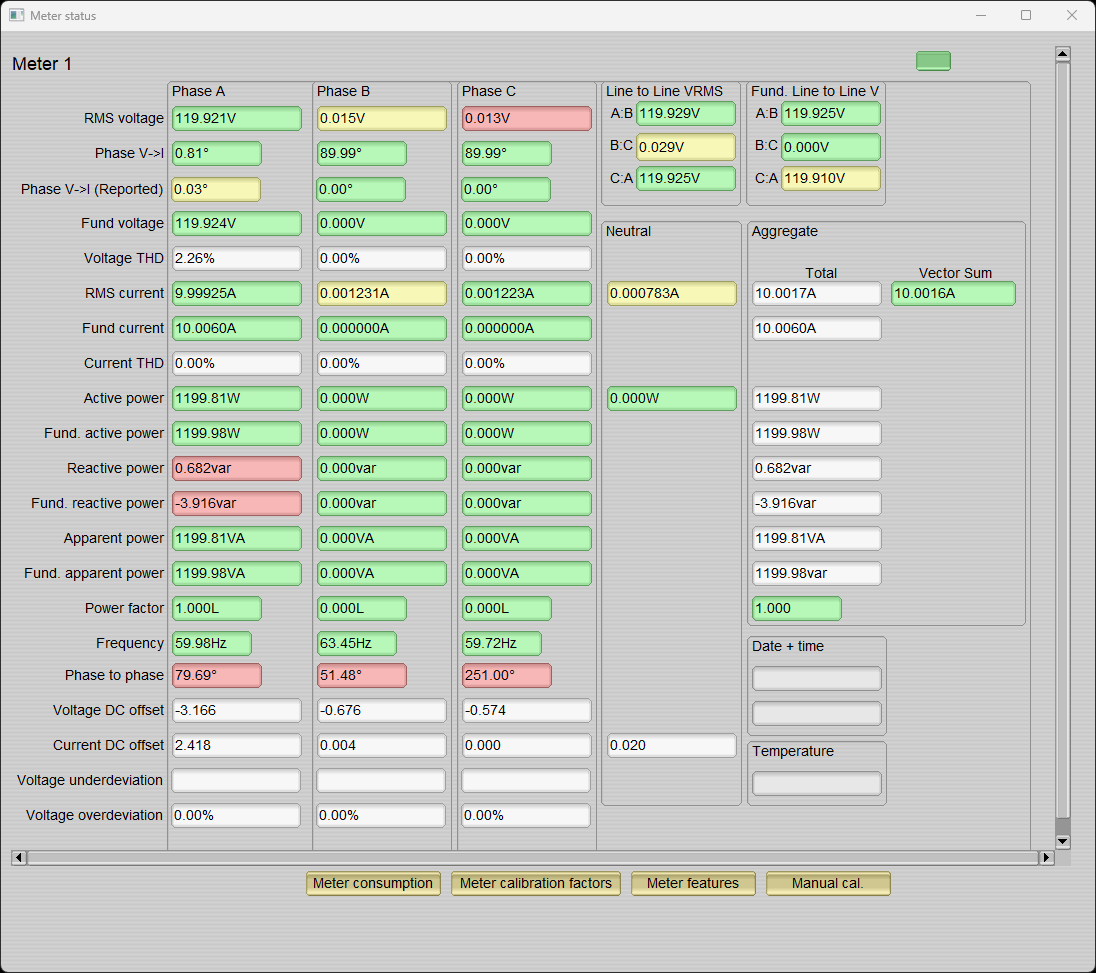 Figure 4-1 Voltage and Current Inputs