TIDUDI9A January   2018  – May 2025 ISOM8610


  1.   1
  2.   Description
  3.   Resources
  4.   Features
  5.   Applications
  6.   6
  7. 1System Description
    1. 1.1 Key System Specifications
  8. 2System Overview
    1. 2.1 Block Diagram
    2. 2.2 Highlighted Products
      1. 2.2.1 ISO121x
      2. 2.2.2 SN74LV165A
      3. 2.2.3 SN74LVC1GU04
      4. 2.2.4 TVS3300
      5. 2.2.5 ISOM8600
    3. 2.3 System Design Theory
      1. 2.3.1 Digital Input Stage
      2. 2.3.2 Broken Wire Detection
        1. 2.3.2.1 Case 1: Wire Intact and Input State '1'
        2. 2.3.2.2 Case 2: Wire Intact and Input State '0'
        3. 2.3.2.3 Case 3: Broken Wire
      3. 2.3.3 Readout of Digital Outputs
  9. 3Hardware, Software, Testing Requirements, and Test Results
    1. 3.1 Required Hardware and Software
      1. 3.1.1 Hardware
      2. 3.1.2 Software
    2. 3.2 Testing and Results
      1. 3.2.1 Test Setup
      2. 3.2.2 Test Results
        1. 3.2.2.1 Group-Channel Configuration
        2. 3.2.2.2 Single-Channel Configuration
      3. 3.2.3 Conclusion
  10. 4Design Files
    1. 4.1 Schematics
    2. 4.2 Bill of Materials
    3. 4.3 PCB Layout Recommendations
      1. 4.3.1 Layout Prints
    4. 4.4 Altium Project
    5. 4.5 Gerber Files
    6. 4.6 Assembly Drawings
  11. 5Software Files
  12. 6Related Documentation
    1. 6.1 Trademarks
  13. 7About the Author
    1. 7.1 Acknowledgments
  14. 8Revision History

Test Setup

The board is plugged onto an MSP430FR5969 LaunchPad, which is connected over USB to a laptop. The laptop is used to program the microcontroller on the LaunchPad. The microcontroller switches the control lines of the optical switches on the board. Furthermore, the MCU reads the output states of the different channels.

The input signal is coming from a mechanical switch. A 100-kΩ pullup resistor is placed in parallel.

The switch is connected to a 24-V supply of the virtual bench. The virtual bench is also connected to the laptop over USB to control the two-channel scope. Figure 3-2 shows a block diagram of the test setup.
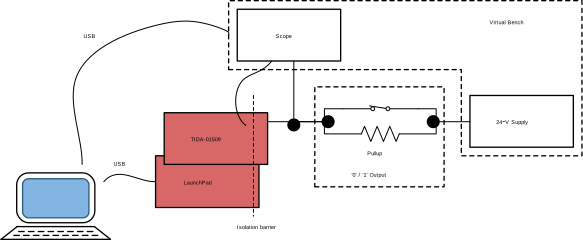
TIDA-01509  TIDA-01509 Test Setup Figure 3-2 TIDA-01509 Test Setup