SLVUD67 September 2025 TPS6521505-Q1
5.10 NVM Re-Programming
Once the register settings are updated, the new values can be saved into the NVM by writing 0x0A to register address 0x34.
- Figure 5-2 shows the button that saves the register settings into the NVM when using the TPS65215-GUI.
- Table 5-22 shows the register field to be written when NOT using the TPS65215-GUI.
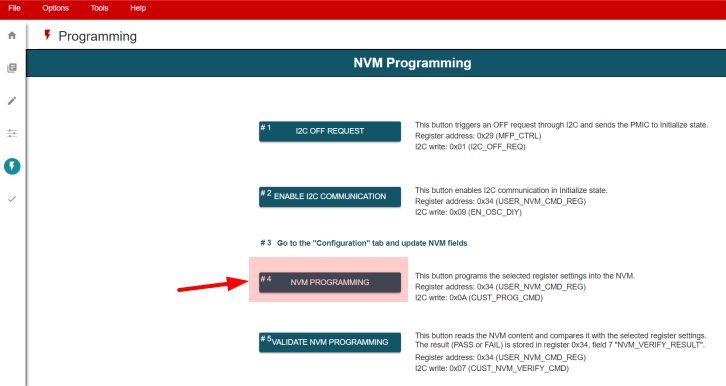 Figure 5-13 NVM Re-programming Using
TPS65215-GUI
Figure 5-13 NVM Re-programming Using
TPS65215-GUITable 5-22 I2C Write to Save Register
Settings into NVM
| Register Address | Bit | Field Name | Data |
|---|---|---|---|
| 0x34 | 3-0 | USER_NVM_CMD | 0x0A |
Note: It is recommended to export the
selected register settings into a CSV and JSON file using the TPS65215-GUI. Figure 5-14 shows how to export the NVM settings. The file format must be selected on
"Register File Format" before using the "Save Registers As".
 Figure 5-14 Export NVM Settings Using
TPS65215-GUI
Figure 5-14 Export NVM Settings Using
TPS65215-GUI