SLVUDA2 July   2025


  1.   1
  2.   Description
  3.   Get Started
  4.   Features
  5.   Applications
  6.   6
  7. 1Evaluation Module Overview
    1. 1.1 Introduction
    2. 1.2 Kit Contents
    3. 1.3 Specification
    4. 1.4 Device Information
  8.   General Texas Instruments High Voltage Evaluation (TI HV EVM) User Safety Guidelines
  9. 2Hardware
    1. 2.1 Power Requirements
    2. 2.2 Test Points
    3. 2.3 Setup
      1. 2.3.1 Reference Voltage
        1. 2.3.1.1 Configuration 1: REFA and REFB = GND
        2. 2.3.1.2 Configuration 2: OPA CH A Bias REFA and REFB
        3. 2.3.1.3 Configuration 3: REFA and REFB Bias Independently
      2. 2.3.2 Current Sensing
      3. 2.3.3 Input Filtering
      4. 2.3.4 Output Load
    4. 2.4 Best Practices
  10. 3Hardware Design Files
    1. 3.1 Schematic
    2. 3.2 PCB Layouts
    3. 3.3 Bill of Materials (BOM)
  11. 4Additional Information
    1. 4.1 Trademarks
    2. 4.2 Related Documentation

Setup

The default configuration of the EVM can test the INA1H94 without any modifications and following the connections shown in Figure 1-1 to test basic device characteristics with standard lab equipment. Modifications that can be made to circuit are shown from Section 2.3.1 to Section 2.3.2.
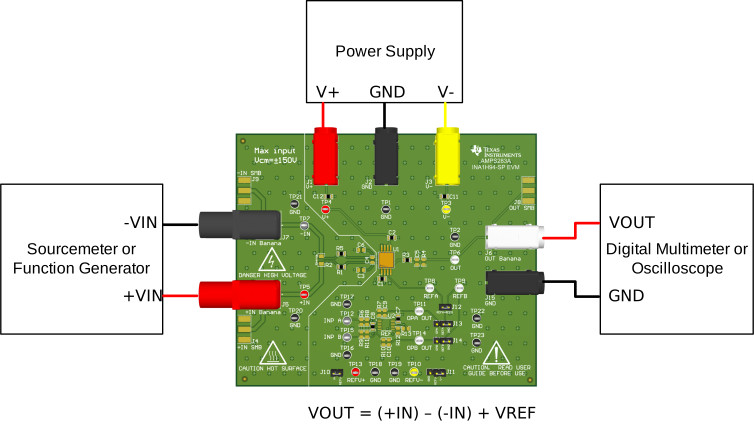
INA1H94EVM Simplified Bench Configuration using Default SetupFigure 2-4 Simplified Bench Configuration using Default Setup
Table 2-2 Default Header Settings
HEADER NAME SETTING
J10 Closed
J11 Closed (REFV- to V-)
J12 Closed
J13 Closed (REFA to GND)
J14 Closed (REFB to GND)