SBAU315B July 2018 – March 2025 ADS9224R , ADS9234R
6.1 EVM GUI Global Settings for ADC Control
Although the EVM GUI does not allow direct access to the levels and timing configuration of the ADC digital interface, the EVM GUI does allow high-level control over virtually all functions of the ADS9224R. The available functions include interface modes, sampling rate, and number of samples to be captured.
Figure 6-3 presents the input parameters and the default values of the GUI, through which the various functions of the ADS9224R are exercised. These settings are global and are applied to all the pages listed in Pages section at the top of the left pane.
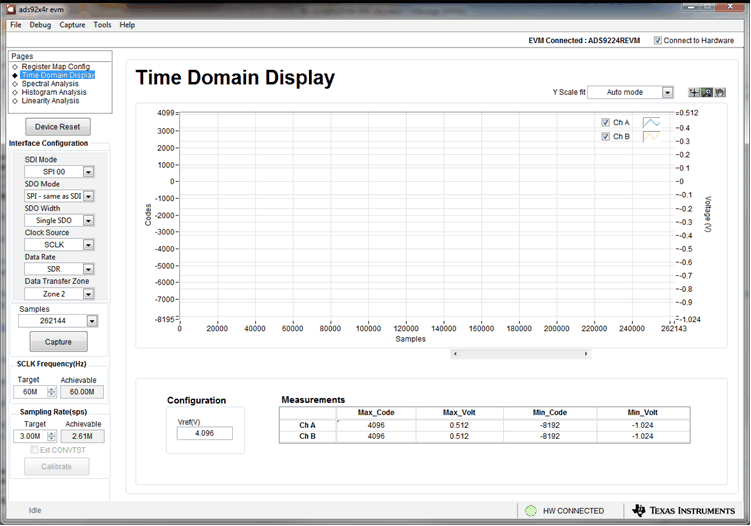 Figure 6-3 EVM GUI Global Input Parameters
The host configuration options in this pane allow the user to choose from various SPI and multiSPI host interface options available on the ADS9224R. The host always communicates with the ADS9224R using the standard SPI protocol over the single SDI lane, irrespective of the mode selected for data capture.
The drop-down boxes under the Interface Configuration submenu allow the user to select the data capture protocol. The SDO Width drop-down menu allows selection between Single-, Dual- and Quad-SDO lanes. The SDO Mode drop-down menu allows selection between standard SPI and multiSPI modes. The ADS9224REVM-PDK software supports maximum throughput of 3-MSPS when using Dual- and Quad-SDO lanes, and a maximum throughput of 2.61-MSPS when using Single-SDO lane. For maximum throughput of 3-MSPS, select the Dual or Quad-SDO lanes.
In SPI mode, the SDI Mode drop-down menu allows selection between the four SPI protocol combinations for CPOL and CPHA.
In multiSPI mode, the Data Rate drop-down menu allows selection between SDR and DDR modes. Detailed descriptions of each of these modes is available in the ADS9224R data sheet. The selected data capture protocol is summarized in the Protocol Selected indicator box.
Select SCLK Frequency and Sampling Rate on this pane. Enter the targeted values for these two parameters, and the GUI computes the best values that can be achieved, considering the timing constraints of the selected device protocol.
Specify a target SCLK frequency (in Hz), and the GUI tries to match this frequency as closely as possible by changing the PHI PLL settings. However, the achievable frequency may differ from the target value entered. Similarly, the sampling rate of the ADC can be adjusted by modifying the Target Sampling Rate argument (also in Hz). The achievable ADC sampling rate can differ from the target value depending on the applied SCLK frequency and selected Device Mode. The closest achievable match is then displayed. Thus, this pane allows the user to test various available settings on the ADS9224R in an iterative fashion until the best settings for the corresponding test scenario are found.
The Device Reset button functions as a master reset to both the ADS9224REVM and the GUI. When the button is pressed, the ADC resets to the reset configuration explained in the ADS9224R data sheet. The GUI also updates the interface configuration settings and the register map to reflect the device reset state.