SBAU394B April   2022  – August 2025


  1.   1
  2.   Description
  3.   Features
  4.   4
  5. 1Evaluation Module Overview
    1. 1.1 Introduction
    2. 1.2 Kit Contents
    3. 1.3 Specification
    4. 1.4 Device Information
    5. 1.5 Quick Start Guide
  6. 2Hardware
    1. 2.1 ADC Analog Input Signal Path
    2. 2.2 ADC Connections and Decoupling
    3. 2.3 Power Supplies
    4. 2.4 ADC Input Clock (CLK) Options
    5. 2.5 Digital-to-Analog Converter (DAC)
    6. 2.6 Digital Interface
    7. 2.7 Connection to the PHI
    8. 2.8 Digital Header
  7. 3Software Installation
  8. 4EVM Configuration and GUI Operation
    1. 4.1 EVM Configuration
    2. 4.2 GUI Operation
      1. 4.2.1 EVM GUI Global Settings for ADC Control
      2. 4.2.2 Register Map Configuration Tool
      3. 4.2.3 Time Domain Display Tool
      4. 4.2.4 Spectral Analysis Tool
      5. 4.2.5 Histogram Tool
      6. 4.2.6 DAC Configuration Tool
  9. 5Hardware Design Files
    1. 5.1 Schematics
    2. 5.2 PCB Layout
    3. 5.3 Bill of Materials
  10. 6Additional Information
    1. 6.1 Trademarks
  11. 7References
  12. 8Revision History

Software Installation

Download the latest version of the EVM GUI installer from the Tools and Software folder of the ADS1285EVM-PDK and run the GUI installer to install the EVM GUI software on your computer.

CAUTION: Manually disable any antivirus software running on the computer before downloading the EVM GUI installer onto the local hard disk. Depending on the antivirus settings, an error message can appear or the installer. The .exe file can be deleted.

Accept the license agreements and follow the on-screen instructions shown in Figure 3-1 to complete the installation.

ADS1285EVM-PDK ADS1285 Software Installation
                    Prompt Figure 3-1 ADS1285 Software Installation Prompt

As part of the ADS1285EVM-PDK GUI installation, a prompt with a device driver installation (as shown in Figure 3-2) appears on the screen. Click Next to proceed.

ADS1285EVM-PDK Device Driver Installation
                    Wizard Prompts Figure 3-2 Device Driver Installation Wizard Prompts
Note: A notice can appear on the screen stating that Windows cannot verify the publisher of this driver software. Select Install this driver software anyway.

The ADS1285EVM-PDK requires the LabVIEW® run-time engine and can prompt for the installation of this software, as shown in Figure 3-3, if not already installed.
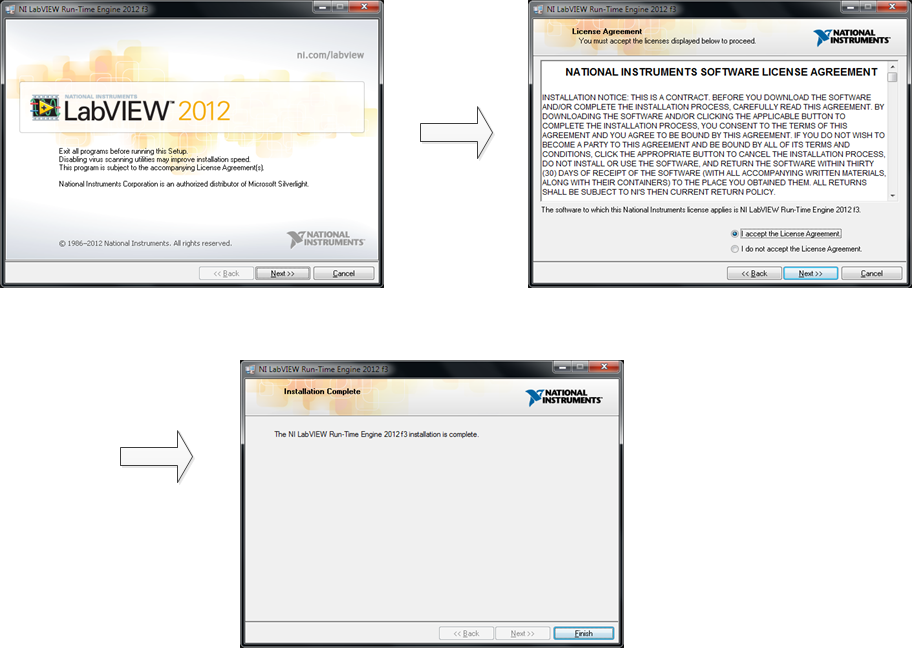
ADS1285EVM-PDK LabVIEW Run-Time Engine
                    Installation Figure 3-3 LabVIEW Run-Time Engine Installation