SWRU455M February 2017 – October 2020 CC3120 , CC3120MOD , CC3130 , CC3135 , CC3135MOD , CC3220MOD , CC3220MODA , CC3220R , CC3220S , CC3220SF , CC3230S , CC3230SF , CC3235MODAS , CC3235MODASF , CC3235MODS , CC3235MODSF , CC3235S , CC3235SF
- 1 Overview
- 1 Introduction
- 2 Networking Application
- 3 Device
-
4 WLAN
- 4.1 Introduction
- 4.2 Key Features
- 4.3 Station (STA)
- 4.4 Access Point
- 4.5 Wi-Fi Direct
- 4.6 WLAN Security
- 4.7 Scan
- 4.8 Antenna Diversity
- 4.9 Calibrations
- 4.10 BLE / 2.4-GHz Radio Coexistence
- 5 Network Addresses
- 6 Socket
-
7 Secure Socket
- 7.1 Introduction
- 7.2 Key Features
- 7.3 Opening a Secure Socket
- 7.4 Trusted Root-Certificate Catalog
- 7.5
Options and Features Use
- 7.5.1 Set TLS Version
- 7.5.2 Set Cipher Suites
- 7.5.3 Set Certificates, Root CA, Private Key, and DH Files
- 7.5.4 Disable the Use of the Trusted Root-Certificate Catalog
- 7.5.5 Set ALPN List
- 7.5.6 Set Domain Name for Verification and SNI
- 7.5.7 Enable OCSP Check
- 7.5.8 Upgrade Nonsecured Socket to Secured
- 7.5.9 Get Connection Parameters
- 7.6 Supported Cryptographic Algorithms
- 7.7 Common Errors and Asynchronous Events
-
8 File System
- 8.1 Introduction
- 8.2 Key Features
- 8.3 File System Characteristics
- 8.4 Write a File
- 8.5 Read a File
- 8.6 Delete a File
- 8.7 Rename a File
- 8.8 File System Helper Functions
- 8.9 Bundle Protection
- 8.10 File Commit Feature
- 8.11 File Rollback Process
- 8.12 Programming
- 8.13 Restore to Factory
- 8.14 Security Alerts
- 8.15 Design Consideration
- 9 HTTP Server
- 10mDNS
- 11Rx Filters
- 12Ping
- 13Transceiver
- 14Real-Time RSSI
- 15Power Management
-
16Provisioning
- 16.1 Introduction
- 16.2 Key Features
- 16.3 Provisioning Process Overview
- 16.4 Host Provisioning Application Flow
- 16.5 Configuration Modes
- 16.6 Starting and Stopping the Provisioning Process
- 16.7 Auto-Provisioning
- 16.8 Delivering Feedback to the User
- 16.9 External Configuration
- 16.10 Common Events and Errors
- 16.11
Usage Examples
- 16.11.1 Successful SmartConfig Provisioning
- 16.11.2 Unsuccessful SmartConfig Provisioning
- 16.11.3 Successful SmartConfig Provisioning With AP Fallback
- 16.11.4 Successful AP Provisioning
- 16.11.5 Successful AP Provisioning With Cloud Confirmation
- 16.11.6 Using External Configuration Method: WAC
- 16.11.7 Successful SmartConfig Provisioning While External Configuration Enabled
- 17Crypto Utilities
- 18Hostless Mode
-
19Porting the Host Driver
- 19.1 Introduction
- 19.2 Create Platform Porting File
- 19.3 Select Capabilities Set
- 19.4 Bind the Device Enable/Disable Line
- 19.5 Implement the Interface Communication Abstract Layer
- 19.6 Choose Memory-Management Model
- 19.7 Implement OS Adaptation Layer
- 19.8 Implement Timestamp Services
- 19.9 Set Asynchronous Event Handler Routines
-
20Debug
- 20.1
Capture NWP Logs
- 20.1.1 Overview
- 20.1.2
Instructions
- 20.1.2.1 Configuring Pin Mux for CC32xx
- 20.1.2.2 Terminal Settings
- 20.1.2.3 Run Your Program
- 20.1.2.4
Send to TI Engineer
-
A Host APIs
-
A.1 Host APIs
-
B Persistency
-
B.1 Persistency
-
C Regulatory
Domain
-
C.1 Regulatory Domain
-
D Supported Host
Interfaces
- D.1 SPI Host Interface
- D.2 UART Host Interface
-
D Supported Host
Interfaces
-
C.1 Regulatory Domain
-
C Regulatory
Domain
-
B.1 Persistency
-
B Persistency
-
A.1 Host APIs
-
A Host APIs
- 20.1
Capture NWP Logs
20.1.2.2 Terminal Settings
Open a serial connection application like TeraTerm or Putty (any other terminal emulator program can be used), and configure the settings:
| Parameter | Value |
|---|---|
| Baud Rate | 921600 |
| Data Bits | 8 |
| Stop Bits | 1 |
| Parity | None |
| Flow Control | None |
If you are using a CC31XXEMUBOOST, connect the fourth port in Device Manager.
Configure the terminal emulation to work in binary mode (and not textual/ASCII mode) and record the log. Here are some examples:
Tera Term
Setup → Serial Port…
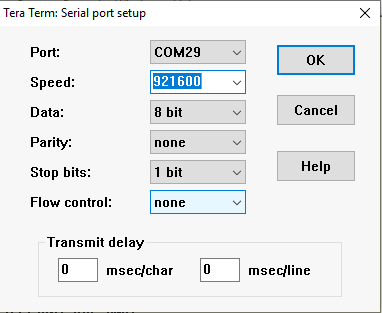 Figure 20-1 Tera Term Port Settings
File → Log...
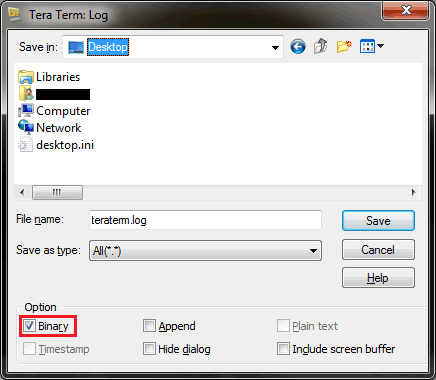 Figure 20-2 Tera Term Log Settings
Putty
On the left side of the screen, select Connection → Serial:
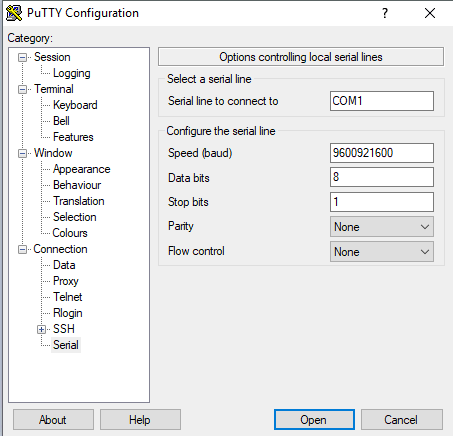 Figure 20-3 Putty Port Settings
In the menu screen before connecting to the port:
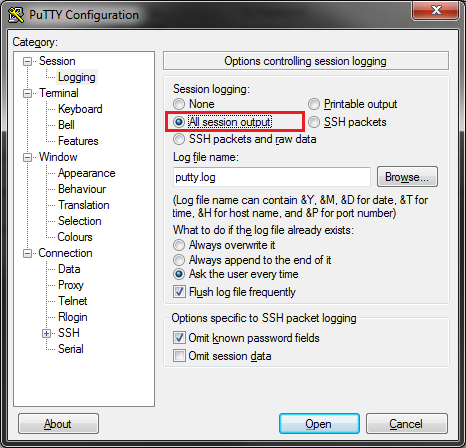 Figure 20-4 Putty Log Settings