SBAU431 July   2024 ADS1282


  1.   1
  2.   Description
  3.   Get Started
  4.   Features
  5.   Applications
  6.   6
  7. 1Evaluation Module Overview
    1. 1.1 Introduction
    2. 1.2 Performance Development Kit Contents
    3. 1.3 Specifications
    4. 1.4 Device Information
  8. 2Hardware
    1. 2.1  EVM Analog Input Options
    2. 2.2  Common-Mode Amplifier
    3. 2.3  Analog Input 1 Circuit
    4. 2.4  Analog Input 2 Amplifier
    5. 2.5  Voltage Reference
    6. 2.6  ADC Connections and Decoupling
    7. 2.7  Power Supplies
    8. 2.8  Low Dropout Regulators (LDO)
    9. 2.9  Flip-Flop/SYNC Circuit
    10. 2.10 Clocking
    11. 2.11 Serial Interface
    12. 2.12 EEPROM
  9. 3Software
    1. 3.1 Software Description
    2. 3.2 ADS1282 EVM Software Installation
  10. 4Implementation Results
    1. 4.1 EVM Operation
      1. 4.1.1 Evaluation Setup
      2. 4.1.2 EVM Register Settings
        1. 4.1.2.1 Channel Configuration
        2. 4.1.2.2 PGA Gain Selection
        3. 4.1.2.3 Data Rate Configuration
      3. 4.1.3 Time Domain Display
      4. 4.1.4 Spectral Analysis Display
      5. 4.1.5 Histogram Analysis Display
  11. 5Hardware Design Files
    1. 5.1 Schematics
    2. 5.2 PCB Layouts
    3. 5.3 Bill of Materials (BOM)
  12. 6Additional Information
    1. 6.1 Trademarks
  13. 7Related Documentation
    1. 7.1 Supplemental Content

PGA Gain Selection

Figure 5-5 shows how the ADS1282 internal PGA gain can be configured within the PGA field of the CONFIG1 register. Gain options available are 1, 2, 4, 8, 16, 32, and 64. This setting is useful for providing dynamic range to small signals relative to the full-scale input range of the ADS1282.
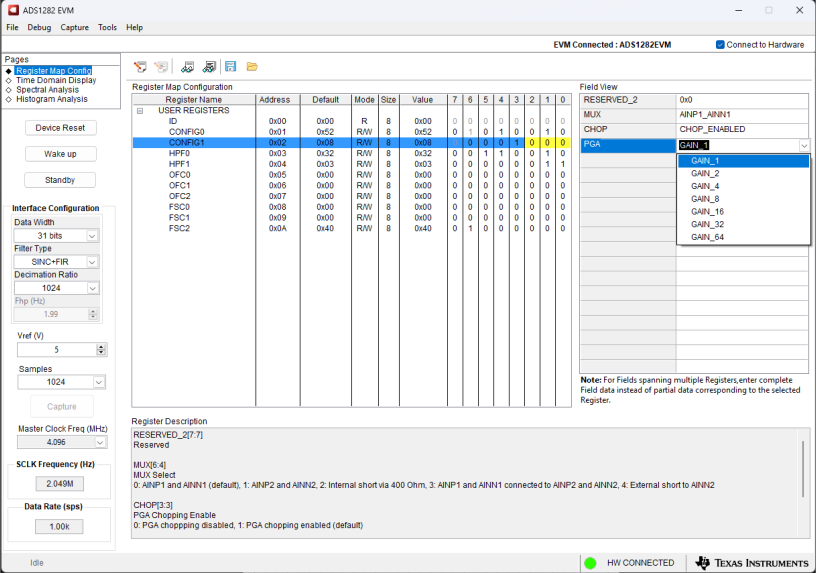
ADS1282V2EVM-PDK PGA Gain Selection Figure 4-5 PGA Gain Selection