SPRADM0 August 2025 F28377D-SEP , F28E120SC , F29H850DM , F29H850TU , F29H859TU-Q1 , F29P329SM-Q1 , F29P589DM-Q1 , F29P589DU-Q1 , TMS320F2800132 , TMS320F2800133 , TMS320F2800135 , TMS320F2800137 , TMS320F2800152-Q1 , TMS320F2800153-Q1 , TMS320F2800154-Q1 , TMS320F2800155 , TMS320F2800155-Q1 , TMS320F2800156-Q1 , TMS320F2800157 , TMS320F2800157-Q1 , TMS320F280021 , TMS320F280021-Q1 , TMS320F280023 , TMS320F280023-Q1 , TMS320F280023C , TMS320F280025 , TMS320F280025-Q1 , TMS320F280025C , TMS320F280025C-Q1 , TMS320F280033 , TMS320F280034 , TMS320F280034-Q1 , TMS320F280036-Q1 , TMS320F280036C-Q1 , TMS320F280037 , TMS320F280037-Q1 , TMS320F280037C , TMS320F280037C-Q1 , TMS320F280038-Q1 , TMS320F280038C-Q1 , TMS320F280039 , TMS320F280039-Q1 , TMS320F280039C , TMS320F280039C-Q1 , TMS320F280040-Q1 , TMS320F280040C-Q1 , TMS320F280041 , TMS320F280041-Q1 , TMS320F280041C , TMS320F280041C-Q1 , TMS320F280045 , TMS320F280048-Q1 , TMS320F280048C-Q1 , TMS320F280049 , TMS320F280049-Q1 , TMS320F280049C , TMS320F280049C-Q1 , TMS320F28075 , TMS320F28075-Q1 , TMS320F28374D , TMS320F28374S , TMS320F28375D , TMS320F28375S , TMS320F28375S-Q1 , TMS320F28376D , TMS320F28376S , TMS320F28377D , TMS320F28377D-EP , TMS320F28377D-Q1 , TMS320F28377S , TMS320F28377S-Q1 , TMS320F28379D , TMS320F28379D-Q1 , TMS320F28379S , TMS320F28384D , TMS320F28384S , TMS320F28386D , TMS320F28386S , TMS320F28388D , TMS320F28388S , TMS320F28P550SG , TMS320F28P550SJ , TMS320F28P559SG-Q1 , TMS320F28P559SJ-Q1 , TMS320F28P650DH , TMS320F28P650DK , TMS320F28P650SH , TMS320F28P650SK , TMS320F28P659DH-Q1 , TMS320F28P659DK-Q1 , TMS320F28P659SH-Q1
6 Transfer Bridge
When data being exported out the primary device is not in a communication protocol supported by the PC (USB), a bridge device (or series of bridge devices) can be used to convert the data packets to the USB protocol. Bridge devices converting a UART protocol to a USB protocol are commonly found on LaunchPADs and controlCARDs, as well as many third party vendors. However, for the setups shown in Section 2.3 or Section 2.4, a different type of bridge firmware is needed; either a FSI-to-USB or a FSI-to-UART bridge firmware. This is where the Transfer Bridge module provided by the MCU Control Center tool can be used to generate code that receives fast communication peripheral packets, buffers the data, then transmits the data through another communication peripheral (UART or USB). The buffering of packets on the bridge device is what allows the data to be quickly exported out of the primary device (without a significant performance hit to the primary application), while still transmitting the data to a PC at a slower speed (either by UART then USB, or through USB).
See Figure 6-1 for a visualization of this concept. Communication Link B represents the communication peripheral used to receive data with the bridge device (often FSI), and Communication Link A represents the communication peripheral used to transmit this data back out of the bridge device to the PC (often UART or USB). The buffer is optionally placed in between the two communication links. Note that in this feature, only the payload of the data packets received by Communication Link B is extracted and forwarded directly to Communication Link A; the Transfer Bridge does not perform any extra data processing.
The below diagram shows the Transfer Bridge feature being used with the setup shown in Section 2.3. If using the setup shown in Section 2.4, then an additional UART-to-USB bridge device is placed between the bridge device and the PC.
This feature can be used with the setup shown in Section 2.2, Section 2.3 or Section 2.4, as well as many other custom hardware setups in a variety of different applications.
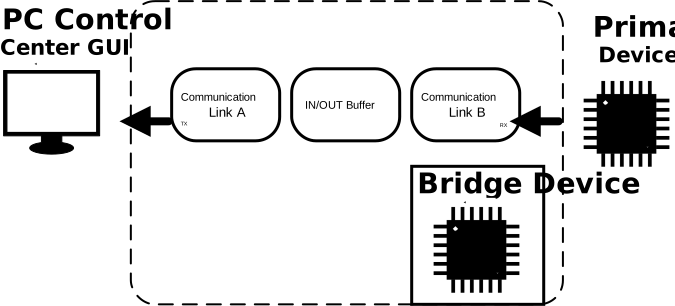 Figure 6-1 Transfer Bridge Diagram
 While the FSI-to-UART bridge is a common use case, the Transfer Bridge feature can be used to generate firmware for other bridge types as well, which can be useful for a variety of applications and hardware setup options. The table below describes all of the different communication link combinations currently supported by the tool. Some are used in the hardware setups highlighted in this document, and others are more application-specific.
| Communication Link B (RX) | Communication Link A (TX) | Corresponding Hardware Setup |
|---|---|---|
| FSI | SCI (UART) | #4 |
| FSI | USB | #3 |
| FSI | SPI | N/A - application specific |
| SCI (UART) | USB | #2 |
| SCI (UART) | SPI | N/A - application specific |
| SPI | SCI (UART) | N/A - application specific |
| SPI | USB | #2 but with SPI messages |