SPRADM0 August 2025 F28377D-SEP , F28E120SC , F29H850DM , F29H850TU , F29H859TU-Q1 , F29P329SM-Q1 , F29P589DM-Q1 , F29P589DU-Q1 , TMS320F2800132 , TMS320F2800133 , TMS320F2800135 , TMS320F2800137 , TMS320F2800152-Q1 , TMS320F2800153-Q1 , TMS320F2800154-Q1 , TMS320F2800155 , TMS320F2800155-Q1 , TMS320F2800156-Q1 , TMS320F2800157 , TMS320F2800157-Q1 , TMS320F280021 , TMS320F280021-Q1 , TMS320F280023 , TMS320F280023-Q1 , TMS320F280023C , TMS320F280025 , TMS320F280025-Q1 , TMS320F280025C , TMS320F280025C-Q1 , TMS320F280033 , TMS320F280034 , TMS320F280034-Q1 , TMS320F280036-Q1 , TMS320F280036C-Q1 , TMS320F280037 , TMS320F280037-Q1 , TMS320F280037C , TMS320F280037C-Q1 , TMS320F280038-Q1 , TMS320F280038C-Q1 , TMS320F280039 , TMS320F280039-Q1 , TMS320F280039C , TMS320F280039C-Q1 , TMS320F280040-Q1 , TMS320F280040C-Q1 , TMS320F280041 , TMS320F280041-Q1 , TMS320F280041C , TMS320F280041C-Q1 , TMS320F280045 , TMS320F280048-Q1 , TMS320F280048C-Q1 , TMS320F280049 , TMS320F280049-Q1 , TMS320F280049C , TMS320F280049C-Q1 , TMS320F28075 , TMS320F28075-Q1 , TMS320F28374D , TMS320F28374S , TMS320F28375D , TMS320F28375S , TMS320F28375S-Q1 , TMS320F28376D , TMS320F28376S , TMS320F28377D , TMS320F28377D-EP , TMS320F28377D-Q1 , TMS320F28377S , TMS320F28377S-Q1 , TMS320F28379D , TMS320F28379D-Q1 , TMS320F28379S , TMS320F28384D , TMS320F28384S , TMS320F28386D , TMS320F28386S , TMS320F28388D , TMS320F28388S , TMS320F28P550SG , TMS320F28P550SJ , TMS320F28P559SG-Q1 , TMS320F28P559SJ-Q1 , TMS320F28P650DH , TMS320F28P650DK , TMS320F28P650SH , TMS320F28P650SK , TMS320F28P659DH-Q1 , TMS320F28P659DK-Q1 , TMS320F28P659SH-Q1
6.1 Transfer Bridge Walk-through
A high-level view of a bridge project and all the layers involved from Table 3-1 is shown below. The Transfer Bridge module allows the user to receive data by one communication peripheral and transmit this data by a different communication peripheral. The intended purpose is for a bridge device to convert the communication protocol of the data sent (for example, convert FSI frames to UART) between two end points. In certain use cases, the bridge device acts as a buffer for devices using a fast serial communication protocol to a slower communication protocol. The steps needed to add this feature are described in the following walk-through.
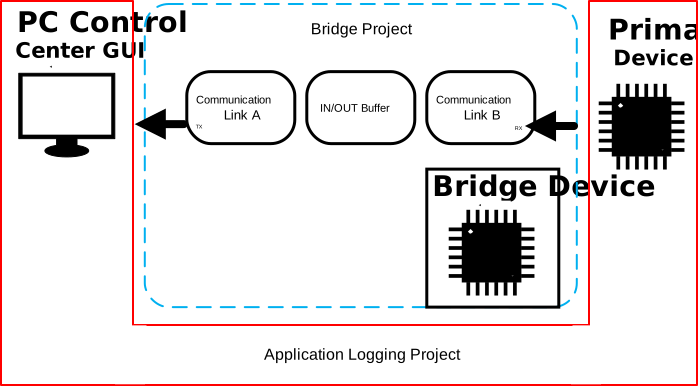
In this figure, the dotted blue line is the Transfer Bridge project, which is used to convert the data from one communication protocol to another. Communication Link B receives data and then transmits the data through Communication Link A. The portion of the diagram outlined in red is the primary device project, which uses the same software implementation as shown in Section 5.1, except for that FSI is selected as the communication link rather than SCI. This walk-through focuses on how to configure just the bridge project portion.
Figure 6-2 High Level Transfer Bridge ProjectSoftware Layer
The following are the software layers required for the bridge project. Note that a buffer layer can optionally be added to the bridge project to increase the memory that is used to store the received data on the device before being exported out.
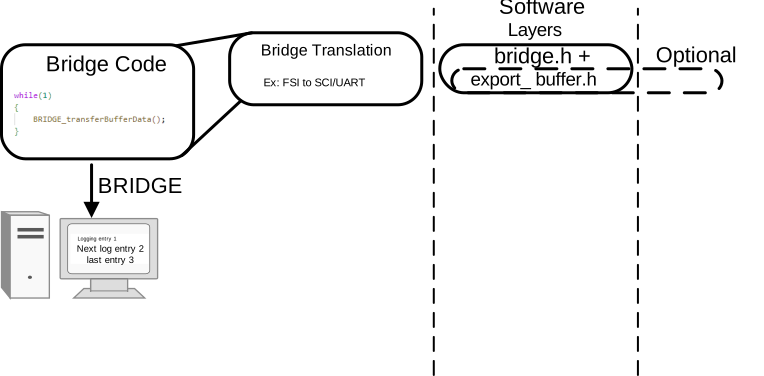 Figure 6-3 Bridge Project Software Layer
SysConfig Configurations
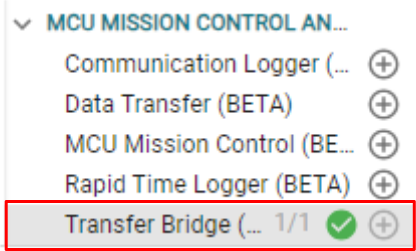 Figure 6-4 Transfer Bridge Module
The figure below shows the Communication Links A and B that are added automatically inside the Transfer Bridge Sysconfig module. Communication Link B receives incoming data using Protocol B and (optionally) stores this data in a buffer. Communication Link A reads the received data (from the Communication Link B or from the buffer) and transmits the data out with Protocol A. For this walk-through, a common use case is shown: the bridge device receives FSI protocol packets and transmits them with the SCI peripheral (UART protocol) packets.
 Figure 6-5 Transfer Bridge Communication
Links
Figure 6-5 Transfer Bridge Communication
LinksThe settings below are optional, and can be used to add a buffer on the bridge device. This option allows the device to accumulate more data before sending the data out when the buffer is full. This feature is useful when the logging device is sending data to the bridge device at a higher speed than the bridge device can process.
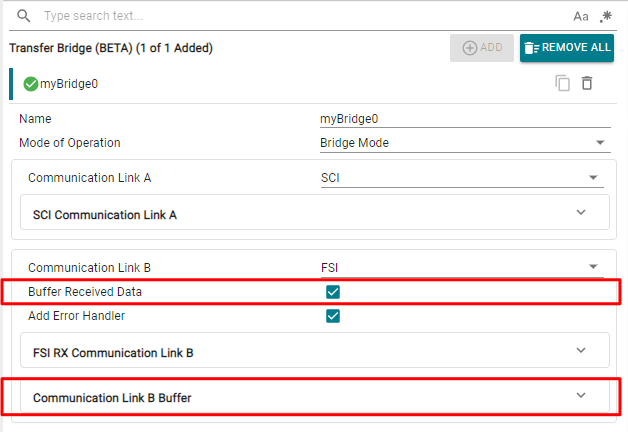 Figure 6-6 Bridge Buffer (Optional)
Include Files
//
// Included Files
//
...
#include "bridge/bridge.h"
Transfer Bridge Initialization
This step is only required if the buffer is enabled. Add this in the main initialization sequence after Board_init().
//
// Logging Inits
//
BRIDGE_init();
Transfer Bridge Application Logging Code
The final step is to add the application code that handles the receiving of the data packets and transfers the converted packets out of the device.
while(1)
{
    BRIDGE_transferBufferData();
}
Testing the Bridge Device
To test if the bridge device is functioning correctly, the following steps can be followed. These steps assume there is a different device logging or transmitting data to the bridge device.
- Flash the bridge device with the Transfer Bridge application program
- Connect the FSITX pins of the primary
device to the bridge device FSIRX pins
- Connect primary device FSITX_CLK to bridge device FSIRX_CLK
- Connect primary device FSITX_D0 to bridge device FSIRX_D0
- Connect primary device FSITX_D1 to bridge device FSIRX_D1 (optional - if dual data lane is configured in Frame Configuration)
- Connect the bridge device to a PC by the USB connector
- Run the Application Logging project code on the primary device
- Open a serial port application and configure the port settings to match the SCI module configurations
The final output appears in the serial terminal port.
 Figure 6-7 Transfer Bridge Final Output