SPRUHZ7K August 2015 – April 2024 AM5706 , AM5708 , AM5716 , AM5718 , AM5718-HIREL
- 1
- Preface
-
1 Introduction
- 1.1 AM571x, AM570x Overview
- 1.2 AM571x, AM570x Environment
- 1.3
AM571x, AM570x Description
- 1.3.1 MPU Subsystem
- 1.3.2 DSP Subsystem
- 1.3.3 PRU-ICSS
- 1.3.4 IPU Subsystems
- 1.3.5 IVA-HD Subsystem
- 1.3.6 Display Subsystem
- 1.3.7 Video Processing Subsystem
- 1.3.8 Video Capture
- 1.3.9 3D GPU Subsystem
- 1.3.10 BB2D Subsystem
- 1.3.11 Camera Interface Subsystem
- 1.3.12 On-Chip Debug Support
- 1.3.13 Power, Reset, and Clock Management
- 1.3.14 On-Chip Memory
- 1.3.15 Memory Management
- 1.3.16 External Memory Interfaces
- 1.3.17 System and Connectivity Peripherals
- 1.4 AM571x, AM570x Family
- 1.5 AM571x, AM570x Device Identification
- 1.6 AM571x, AM570x Package Characteristics Overview
- 2 Memory Mapping
-
3 Power, Reset, and Clock Management
- 3.1
Device Power Management Introduction
- 3.1.1
Device Power-Management Architecture Building Blocks
- 3.1.1.1 Clock Management
- 3.1.1.2 Power Management
- 3.1.1.3 Voltage Management
- 3.1.2 Power-Management Techniques
- 3.1.1
Device Power-Management Architecture Building Blocks
- 3.2 PRCM Subsystem Overview
- 3.3 PRCM Subsystem Environment
- 3.4 PRCM Subsystem Integration
- 3.5
Reset Management Functional Description
- 3.5.1 Overview
- 3.5.2 General Characteristics of Reset Signals
- 3.5.3 Reset Sources
- 3.5.4 Reset Logging
- 3.5.5 Reset Domains
- 3.5.6
Reset Sequences
- 3.5.6.1 MPU Subsystem Power-On Reset Sequence
- 3.5.6.2 MPU Subsystem Warm Reset Sequence
- 3.5.6.3 MPU Subsystem Reset Sequence on Sleep and Wake-Up Transitions From RETENTION State
- 3.5.6.4 IVA Subsystem Power-On Reset Sequence
- 3.5.6.5 IVA Subsystem Software Warm Reset Sequence
- 3.5.6.6 DSP1 Subsystem Power-On Reset Sequence
- 3.5.6.7 DSP1 Subsystem Software Warm Reset Sequence
- 3.5.6.8 IPU1 Subsystem Power-On Reset Sequence
- 3.5.6.9 IPU1 Subsystem Software Warm Reset Sequence
- 3.5.6.10 IPU2 Subsystem Power-On Reset Sequence
- 3.5.6.11 IPU2 Subsystem Software Warm Reset Sequence
- 3.5.6.12 Global Warm Reset Sequence
- 3.6
Clock Management Functional Description
- 3.6.1 Overview
- 3.6.2 External Clock Inputs
- 3.6.3
Internal Clock Sources and Generators
- 3.6.3.1 PRM Clock Source
- 3.6.3.2 CM Clock Source
- 3.6.3.3 Generic DPLL Overview
- 3.6.3.4 DPLL_PER Description
- 3.6.3.5 DPLL_CORE Description
- 3.6.3.6 DPLL_ABE Description
- 3.6.3.7 DPLL_MPU Description
- 3.6.3.8 DPLL_IVA Description
- 3.6.3.9 DPLL_USB Description
- 3.6.3.10 DPLL_DSP Description
- 3.6.3.11 DPLL_GMAC Description
- 3.6.3.12 DPLL_GPU Description
- 3.6.3.13 DPLL_DDR Description
- 3.6.3.14 DPLL_PCIE_REF Description
- 3.6.3.15 APLL_PCIE Description
- 3.6.4
Clock Domains
- 3.6.4.1 CD_WKUPAON Clock Domain
- 3.6.4.2 CD_DSP1 Clock Domain
- 3.6.4.3 CD_CUSTEFUSE Clock Domain
- 3.6.4.4 CD_MPU Clock Domain
- 3.6.4.5 CD_L4PER1 Clock Domain
- 3.6.4.6 CD_L4PER2 Clock Domain
- 3.6.4.7 CD_L4PER3 Clock Domain
- 3.6.4.8 CD_L4SEC Clock Domain
- 3.6.4.9 CD_L3INIT Clock Domain
- 3.6.4.10 CD_IVA Clock Domain
- 3.6.4.11 CD_GPU Description
- 3.6.4.12 CD_EMU Clock Domain
- 3.6.4.13 CD_DSS Clock Domain
- 3.6.4.14 CD_L4_CFG Clock Domain
- 3.6.4.15 CD_L3_INSTR Clock Domain
- 3.6.4.16 CD_L3_MAIN1 Clock Domain
- 3.6.4.17 CD_EMIF Clock Domain
- 3.6.4.18 CD_IPU Clock Domain
- 3.6.4.19 CD_IPU1 Clock Domain
- 3.6.4.20 CD_IPU2 Clock Domain
- 3.6.4.21 CD_DMA Clock Domain
- 3.6.4.22 CD_ATL Clock Domain
- 3.6.4.23 CD_CAM Clock Domain
- 3.6.4.24 CD_GMAC Clock Domain
- 3.6.4.25 CD_VPE Clock Domain
- 3.6.4.26 CD_RTC Clock Domain
- 3.6.4.27 CD_PCIE Clock Domain
- 3.7
Power Management Functional Description
- 3.7.1 PD_WKUPAON Description
- 3.7.2 PD_DSP1 Description
- 3.7.3 PD_CUSTEFUSE Description
- 3.7.4 PD_MPU Description
- 3.7.5 PD_IPU Description
- 3.7.6 PD_L3INIT Description
- 3.7.7 PD_L4PER Description
- 3.7.8 PD_IVA Description
- 3.7.9 PD_GPU Description
- 3.7.10 PD_EMU Description
- 3.7.11 PD_DSS Description
- 3.7.12 PD_CORE Description
- 3.7.13 PD_CAM Description
- 3.7.14 PD_MPUAON Description
- 3.7.15 PD_MMAON Description
- 3.7.16 PD_COREAON Description
- 3.7.17 PD_VPE Description
- 3.7.18 PD_RTC Description
- 3.8 Voltage-Management Functional Description
- 3.9 Device Low-Power States
- 3.10
PRCM Module Programming Guide
- 3.10.1 DPLLs Low-Level Programming Models
- 3.10.2 Clock Management Low-Level Programming Models
- 3.10.3 Power Management Low-Level Programming Models
- 3.11 497
- 3.12 PRCM Software Configuration for OPP_PLUS
- 3.13
PRCM Register Manual
- 3.13.1 Not Supported Functionality (Registers and Bits)
- 3.13.2 PRCM Instance Summary
- 3.13.3 CM_CORE_AON__CKGEN Registers
- 3.13.4 CM_CORE_AON__DSP1 Registers
- 3.13.5 CM_CORE_AON__DSP2 Registers
- 3.13.6 CM_CORE_AON__EVE1 Registers
- 3.13.7 CM_CORE_AON__EVE2 Registers
- 3.13.8 CM_CORE_AON__EVE3 Registers
- 3.13.9 CM_CORE_AON__EVE4 Registers
- 3.13.10 CM_CORE_AON__INSTR Registers
- 3.13.11 CM_CORE_AON__IPU Registers
- 3.13.12 CM_CORE_AON__MPU Registers
- 3.13.13 CM_CORE_AON__OCP_SOCKET Registers
- 3.13.14 CM_CORE_AON__RESTORE Registers
- 3.13.15 CM_CORE_AON__RTC Registers
- 3.13.16 CM_CORE_AON__VPE Registers
- 3.13.17 CM_CORE__CAM Registers
- 3.13.18 CM_CORE__CKGEN Registers
- 3.13.19 CM_CORE__COREAON Registers
- 3.13.20 CM_CORE__CORE Registers
- 3.13.21 CM_CORE__CUSTEFUSE Registers
- 3.13.22 CM_CORE__DSS Registers
- 3.13.23 CM_CORE__GPU Registers
- 3.13.24 CM_CORE__IVA Registers
- 3.13.25 CM_CORE__L3INIT Registers
- 3.13.26 CM_CORE__L4PER Registers
- 3.13.27 CM_CORE__OCP_SOCKET Registers
- 3.13.28 CM_CORE__RESTORE Registers
- 3.13.29 SMARTREFLEX Registers
- 3.13.30 CAM_PRM Registers
- 3.13.31 CKGEN_PRM Registers
- 3.13.32 COREAON_PRM Registers
- 3.13.33 CORE_PRM Registers
- 3.13.34 CUSTEFUSE_PRM Registers
- 3.13.35 DEVICE_PRM Registers
- 3.13.36 DSP1_PRM registers
- 3.13.37 DSP2_PRM Registers
- 3.13.38 DSS_PRM Registers
- 3.13.39 EMU_CM Registers
- 3.13.40 EMU_PRM Registers
- 3.13.41 EVE1_PRM Registers
- 3.13.42 EVE2_PRM Registers
- 3.13.43 EVE3_PRM Registers
- 3.13.44 EVE4_PRM Registers
- 3.13.45 GPU_PRM Registers
- 3.13.46 INSTR_PRM Registers
- 3.13.47 IPU_PRM registers
- 3.13.48 IVA_PRM Registers
- 3.13.49 L3INIT_PRM Registers
- 3.13.50 L4PER_PRM Registers
- 3.13.51 MPU_PRM Registers
- 3.13.52 OCP_SOCKET_PRM Registers
- 3.13.53 RTC_PRM Registers
- 3.13.54 VPE_PRM Registers
- 3.13.55 WKUPAON_CM Registers
- 3.13.56 WKUPAON_PRM registers
- 3.1
Device Power Management Introduction
-
4 Cortex-A15 MPU Subsystem
- 4.1 Cortex-A15 MPU Subsystem Overview
- 4.2 Cortex-A15 MPU Subsystem Integration
- 4.3
Cortex-A15 MPU Subsystem Functional Description
- 4.3.1 MPU Subsystem Block Diagram
- 4.3.2 Cortex-A15 MPCore (MPU_CLUSTER)
- 4.3.3 MPU_AXI2OCP
- 4.3.4 Memory Adapter
- 4.3.5 Realtime Counter (Master Counter)
- 4.3.6 MPU Watchdog Timer
- 4.3.7 MPU Subsystem Power Management
- 4.3.8 MPU Subsystem AMBA Interface Configuration
- 4.4
Cortex-A15 MPU Subsystem Register Manual
- 4.4.1 Cortex-A15 MPU Subsystem Instance Summary
- 4.4.2 MPU_CS_STM Registers
- 4.4.3 MPU_INTC Registers
- 4.4.4 MPU_PRCM_OCP_SOCKET Registers
- 4.4.5 MPU_PRCM_DEVICE Registers
- 4.4.6 MPU_PRCM_PRM_C0 Registers
- 4.4.7 MPU_PRCM_CM_C0 Registers
- 4.4.8 MPU_WUGEN Registers
- 4.4.9 MPU_WD_TIMER Registers
- 4.4.10 MPU_AXI2OCP_MISC Registers
- 4.4.11 MPU_MA_LSM Registers
- 4.4.12 MPU_MA_WP Registers
-
5 DSP Subsystem
- 5.1 DSP Subsystem Overview
- 5.2 DSP Subsystem Integration
- 5.3
DSP Subsystem Functional Description
- 5.3.1 DSP Subsystem Block Diagram
- 5.3.2
DSP Subsystem Components
- 5.3.2.1 C66x DSP Subsystem Introduction
- 5.3.2.2
DSP TMS320C66x CorePac
- 5.3.2.2.1 DSP TMS320C66x CorePac CPU
- 5.3.2.2.2 DSP TMS320C66x CorePac Internal Memory Controllers and Memories
- 5.3.2.2.3
DSP C66x CorePac Internal Peripherals
- 5.3.2.2.3.1 DSP C66x CorePac Interrupt Controller (DSP INTC)
- 5.3.2.2.3.2 DSP C66x CorePac Power-Down Controller (DSP PDC)
- 5.3.2.2.3.3 DSP C66x CorePac Bandwidth Manager (BWM)
- 5.3.2.2.3.4 DSP C66x CorePac Memory Protection Hardware
- 5.3.2.2.3.5 DSP C66x CorePac Internal DMA (IDMA) Controller
- 5.3.2.2.3.6 DSP C66x CorePac External Memory Controller
- 5.3.2.2.3.7 DSP C66x CorePac Extended Memory Controller
- 5.3.2.2.3.8 L1P Memory Error Detection Logic
- 5.3.2.2.3.9 L2 Memory Error Detection and Correction Logic
- 5.3.2.3 DSP Debug and Trace Support
- 5.3.3 DSP System Control Logic
- 5.3.4 DSP Interrupt Requests
- 5.3.5 DSP DMA Requests
- 5.3.6 DSP Intergated Memory Management Units
- 5.3.7 DSP Integrated EDMA Subsystem
- 5.3.8 DSP L2 interconnect Network
- 5.3.9 DSP Boot Configuration
- 5.3.10 DSP Internal and External Memory Views
- 5.4 DSP Subsystem Register Manual
- 6 IVA Subsystem
-
7 Dual Cortex-M4 IPU Subsystem
- 7.1 Dual Cortex-M4 IPU Subsystem Overview
- 7.2 Dual Cortex-M4 IPU Subsystem Integration
- 7.3 Dual Cortex-M4 IPU Subsystem Functional Description
- 7.4 Dual Cortex-M4 IPU Subsystem Register Manual
-
8 Camera Interface Subsystem
- 8.1 CAMSS Overview
- 8.2 CAMSS Environment
- 8.3 CAMSS Integration
- 8.4
CAMSS Functional Description
- 8.4.1 CAMSS Hardware and Software Reset
- 8.4.2 CAMSS Clock Configuration
- 8.4.3 CAMSS Power Management
- 8.4.4 CAMSS Interrupt Events
- 8.4.5 CSI2 PHY Functional Description
- 8.4.6
CAL Functional Description
- 8.4.6.1 CAL Block Diagram
- 8.4.6.2
CSI2 Low Level Protocol
- 8.4.6.2.1 CSI2 Physical Layer
- 8.4.6.2.2 CSI2 Multi-lane Layer and Lane Merger
- 8.4.6.2.3
CSI2 Protocol Layer
- 8.4.6.2.3.1 CSI2 Short Packet
- 8.4.6.2.3.2 CSI2 Long Packet
- 8.4.6.2.3.3 CSI2 ECC and Checksum Generation
- 8.4.6.2.3.4 CSI2 Alignment Constraints
- 8.4.6.2.3.5 CSI2 Data Identifier
- 8.4.6.2.3.6 CSI2 Virtual Channel ID
- 8.4.6.2.3.7 CSI2 Synchronization Codes
- 8.4.6.2.3.8 CSI2 Generic Short Packet Codes
- 8.4.6.2.3.9 CSI2 Frame Structure and Data
- 8.4.6.2.3.10 CSI2 Virtual Channel and Context
- 8.4.6.2.4 CSI2 TAG Generation FSM
- 8.4.6.3 CAL Data Stream Merger
- 8.4.6.4 CAL Pixel Extraction
- 8.4.6.5 CAL DPCM Decoding and Encoding
- 8.4.6.6 CAL Stream Interleaving
- 8.4.6.7 CAL Pixel Packing
- 8.4.6.8 CAL Write DMA
- 8.4.6.9 CAL Video Port
- 8.4.6.10 CAL Registers Shadowing
- 8.5 CAMSS Register Manual
-
9 Video Input Port
- 9.1 VIP Overview
- 9.2 VIP Environment
- 9.3 VIP Integration
- 9.4
VIP Functional Description
- 9.4.1 VIP Block Diagram
- 9.4.2 VIP Software Reset
- 9.4.3 VIP Power and Clocks Management
- 9.4.4
VIP Slice
- 9.4.4.1 VIP Slice Processing Path Overview
- 9.4.4.2 VIP Slice Processing Path Multiplexers
- 9.4.4.3
VIP Slice Processing Path Examples
- 9.4.4.3.1 Input: A=RGB, B=YUV422; Output: A=RGB, B=RGB
- 9.4.4.3.2 Input: A=YUV422 8/16, B=YUV422; Output: A=Scaled YUV420, B=RGB
- 9.4.4.3.3 Input: A=RGB, B=YUV422; Output: A=RGB, B=Scaled YUV420
- 9.4.4.3.4 Input: A=YUV444, B=YUV422; Output: A=YUV422, A=Scaled YUV422, B=YUV422
- 9.4.4.3.5 Input: A=YUV444; Output: A=Scaled YUV420, A=YUV420
- 9.4.4.3.6 Input: A=YUV444; Output: A=Scaled YUV420, A=YUV444
- 9.4.4.3.7 Input: A=YUV422 8/16; Output: A=Scaled YUV420, A=YUV444
- 9.4.4.3.8 Input: A=YUV422 8/16, B=YUV422; Output: A=Scaled YUV420, B=YUV420
- 9.4.4.3.9 Input: A=YUV422 8/16, B=YUV422; Output: A=YUV420, B=YUV420
- 9.4.5
VIP Parser
- 9.4.5.1 Features
- 9.4.5.2 Repacker
- 9.4.5.3 Analog Video
- 9.4.5.4 Digitized Video
- 9.4.5.5 Frame Buffers
- 9.4.5.6
Input Data Interface
- 9.4.5.6.1 8b Interface Mode
- 9.4.5.6.2 16b Interface Mode
- 9.4.5.6.3 24b Interface Mode
- 9.4.5.6.4 Signal Relationships
- 9.4.5.6.5 General 5 Pin Interfaces
- 9.4.5.6.6 Signal Subsets—4 Pin VSYNC, ACTVID, and FID
- 9.4.5.6.7 Signal Subsets—4 Pin VSYNC, HSYNC, and FID
- 9.4.5.6.8 Vertical Sync
- 9.4.5.6.9 Field ID Determination Using Dedicated Signal
- 9.4.5.6.10 Field ID Determination Using VSYNC Skew
- 9.4.5.6.11 Rationale for FID Determination By VSYNC Skew
- 9.4.5.6.12 ACTVID Framing
- 9.4.5.6.13 Ancillary Data Storage in Descrete Sync Mode
- 9.4.5.7 BT.656 Style Embedded Sync
- 9.4.5.8
Source Multiplexing
- 9.4.5.8.1 Multiplexing Scenarios
- 9.4.5.8.2 2-Way Multiplexing
- 9.4.5.8.3 4-Way Multiplexing
- 9.4.5.8.4 Line Multiplexing
- 9.4.5.8.5 Super Frame Concept in Line Multiplexing
- 9.4.5.8.6 8-bit Data Interface in Line Multiplexing
- 9.4.5.8.7 16-bit Data Interface in Line Multiplexing
- 9.4.5.8.8 Split Lines in Line Multiplex Mode
- 9.4.5.8.9 Meta Data
- 9.4.5.8.10 TI Line Mux Mode, Split Lines, and Channel ID Remapping
- 9.4.5.9 Channel ID Extraction for 2x/4x Multiplexed Source
- 9.4.5.10 Embedded Sync Mux Modes and Data Bus Widths
- 9.4.5.11 Ancillary and Active Video Cropping
- 9.4.5.12 Interrupts
- 9.4.5.13 VDET Interrupt
- 9.4.5.14 Source Video Size
- 9.4.5.15 Clipping
- 9.4.5.16 Current and Last FID Value
- 9.4.5.17 Disable Handling
- 9.4.5.18 Picture Size Interrupt
- 9.4.5.19 Discrete Sync Signals
- 9.4.5.20 VIP Overflow Detection and Recovery
- 9.4.6 VIP Color Space Converter (CSC)
- 9.4.7
VIP Scaler (SC)
- 9.4.7.1 SC Features
- 9.4.7.2 SC Functional Description
- 9.4.7.3 SC Code
- 9.4.7.4
SC Coefficient Data Files
- 9.4.7.4.1
HS Polyphase Filter Coefficients
- 9.4.7.4.1.1 ppfcoef_scale_eq_1_32_phases_flip.dat
- 9.4.7.4.1.2 ppfcoef_scale_eq_8div16_32_phases_flip.dat
- 9.4.7.4.1.3 ppfcoef_scale_eq_9div16_32_phases_flip.dat
- 9.4.7.4.1.4 ppfcoef_scale_eq_10div16_32_phases_flip.dat
- 9.4.7.4.1.5 ppfcoef_scale_eq_11div16_32_phases_flip.dat
- 9.4.7.4.1.6 ppfcoef_scale_eq_12div16_32_phases_flip.dat
- 9.4.7.4.1.7 ppfcoef_scale_eq_13div16_32_phases_flip.dat
- 9.4.7.4.1.8 ppfcoef_scale_eq_14div16_32_phases_flip.dat
- 9.4.7.4.1.9 ppfcoef_scale_eq_15div16_32_phases_flip.dat
- 9.4.7.4.2
VS Polyphase Filter Coefficients
- 9.4.7.4.2.1 ppfcoef_scale_eq_1_32_phases_ver_5tap_flip.dat
- 9.4.7.4.2.2 ppfcoef_scale_eq_3_32_phases_flip.dat
- 9.4.7.4.2.3 ppfcoef_scale_eq_4_32_phases_flip.dat
- 9.4.7.4.2.4 ppfcoef_scale_eq_5_32_phases_flip.dat
- 9.4.7.4.2.5 ppfcoef_scale_eq_6_32_phases_flip.dat
- 9.4.7.4.2.6
ppfcoef_scale_eq_7_32_phases_flip.dat
- 9.4.7.4.2.6.1 ppfcoef_scale_eq_8div16_32_phases_ver_5tap_flip.dat
- 9.4.7.4.2.6.2 ppfcoef_scale_eq_9div16_32_phases_ver_5tap_flip.dat
- 9.4.7.4.2.6.3 ppfcoef_scale_eq_10div16_32_phases_ver_5tap_flip.dat
- 9.4.7.4.2.6.4 ppfcoef_scale_eq_11div16_32_phases_ver_5tap_flip.dat
- 9.4.7.4.2.6.5 ppfcoef_scale_eq_12div16_32_phases_ver_5tap_flip.dat
- 9.4.7.4.2.6.6 ppfcoef_scale_eq_13div16_32_phases_ver_5tap_flip.dat
- 9.4.7.4.2.6.7 ppfcoef_scale_eq_14div16_32_phases_ver_5tap_flip.dat
- 9.4.7.4.2.6.8 ppfcoef_scale_eq_15div16_32_phases_ver_5tap_flip.dat
- 9.4.7.4.3 VS (Bilinear Filter Coefficients)
- 9.4.7.4.1
HS Polyphase Filter Coefficients
- 9.4.8
VIP Video Port Direct Memory Access (VPDMA)
- 9.4.8.1 VPDMA Introduction
- 9.4.8.2 VPDMA Basic Definitions
- 9.4.8.3 1107
- 9.4.8.4 VPDMA Client Buffering and Functionality
- 9.4.8.5 VPDMA Channels Assignment
- 9.4.8.6 VPDMA MFLAG Mechanism
- 9.4.8.7 VPDMA Interrupts
- 9.4.8.8
VPDMA Descriptors
- 9.4.8.8.1 Data Transfer Descriptors
- 9.4.8.8.2 Configuration Descriptor
- 9.4.8.8.3 Control Descriptor
- 9.4.8.9 VPDMA Configuration
- 9.4.8.10
VPDMA Data Formats
- 9.4.8.10.1
YUV Data Formats
- 9.4.8.10.1.1 Y 4:4:4 (Data Type 0)
- 9.4.8.10.1.2 Y 4:2:2 (Data Type 1)
- 9.4.8.10.1.3 Y 4:2:0 (Data Type 2)
- 9.4.8.10.1.4 C 4:4:4 (Data Type 4)
- 9.4.8.10.1.5 C 4:2:2 (Data Type 5)
- 9.4.8.10.1.6 C 4:2:0 (Data Type 6)
- 9.4.8.10.1.7 YC 4:2:2 (Data Type 7)
- 9.4.8.10.1.8 YC 4:4:4 (Data Type 8)
- 9.4.8.10.1.9 CY 4:2:2 (Data Type 23)
- 9.4.8.10.2
RGB Data Formats
- 9.4.8.10.2.1 RGB16-565 (Data Type 0)
- 9.4.8.10.2.2 ARGB-1555 (Data Type 1)
- 9.4.8.10.2.3 ARGB-4444 (Data Type 2)
- 9.4.8.10.2.4 RGBA-5551 (Data Type 3)
- 9.4.8.10.2.5 RGBA-4444 (Data Type 4)
- 9.4.8.10.2.6 ARGB24-6666 (Data Type 5)
- 9.4.8.10.2.7 RGB24-888 (Data Type 6)
- 9.4.8.10.2.8 ARGB32-8888 (Data Type 7)
- 9.4.8.10.2.9 RGBA24-6666 (Data Type 8)
- 9.4.8.10.2.10 RGBA32-8888 (Data Type 9)
- 9.4.8.10.3 Miscellaneous Data Type
- 9.4.8.10.1
YUV Data Formats
- 9.5 VIP Register Manual
-
10Video Processing Engine
- 10.1 VPE Overview
- 10.2 VPE Integration
- 10.3
VPE Functional Description
- 10.3.1 VPE Block Diagram
- 10.3.2 VPE VC1 Range Mapping/Range Reduction
- 10.3.3 VPE Deinterlacer (DEI)
- 10.3.4
VPE Scaler (SC)
- 10.3.4.1 SC Features
- 10.3.4.2 SC Functional Description
- 10.3.4.3 SC Code
- 10.3.4.4
SC Coefficient Data Files
- 10.3.4.4.1
HS Polyphase Filter Coefficients
- 10.3.4.4.1.1 ppfcoef_scale_eq_1_32_phases_flip.dat
- 10.3.4.4.1.2 ppfcoef_scale_eq_8div16_32_phases_flip.dat
- 10.3.4.4.1.3 ppfcoef_scale_eq_9div16_32_phases_flip.dat
- 10.3.4.4.1.4 ppfcoef_scale_eq_10div16_32_phases_flip.dat
- 10.3.4.4.1.5 ppfcoef_scale_eq_11div16_32_phases_flip.dat
- 10.3.4.4.1.6 ppfcoef_scale_eq_12div16_32_phases_flip.dat
- 10.3.4.4.1.7 ppfcoef_scale_eq_13div16_32_phases_flip.dat
- 10.3.4.4.1.8 ppfcoef_scale_eq_14div16_32_phases_flip.dat
- 10.3.4.4.1.9 ppfcoef_scale_eq_15div16_32_phases_flip.dat
- 10.3.4.4.2
VS Polyphase Filter Coefficients
- 10.3.4.4.2.1 ppfcoef_scale_eq_1_32_phases_ver_5tap_flip.dat
- 10.3.4.4.2.2 ppfcoef_scale_eq_3_32_phases_flip.dat
- 10.3.4.4.2.3 ppfcoef_scale_eq_4_32_phases_flip.dat
- 10.3.4.4.2.4 ppfcoef_scale_eq_5_32_phases_flip.dat
- 10.3.4.4.2.5 ppfcoef_scale_eq_6_32_phases_flip.dat
- 10.3.4.4.2.6
ppfcoef_scale_eq_7_32_phases_flip.dat
- 10.3.4.4.2.6.1 ppfcoef_scale_eq_8div16_32_phases_ver_5tap_flip.dat
- 10.3.4.4.2.6.2 ppfcoef_scale_eq_9div16_32_phases_ver_5tap_flip.dat
- 10.3.4.4.2.6.3 ppfcoef_scale_eq_10div16_32_phases_ver_5tap_flip.dat
- 10.3.4.4.2.6.4 ppfcoef_scale_eq_11div16_32_phases_ver_5tap_flip.dat
- 10.3.4.4.2.6.5 ppfcoef_scale_eq_12div16_32_phases_ver_5tap_flip.dat
- 10.3.4.4.2.6.6 ppfcoef_scale_eq_13div16_32_phases_ver_5tap_flip.dat
- 10.3.4.4.2.6.7 ppfcoef_scale_eq_14div16_32_phases_ver_5tap_flip.dat
- 10.3.4.4.2.6.8 ppfcoef_scale_eq_15div16_32_phases_ver_5tap_flip.dat
- 10.3.4.4.2.6.9 ppcoef_scale_1x_ver_5tap.dat
- 10.3.4.4.3 VS (Bilinear Filter Coefficients)
- 10.3.4.4.1
HS Polyphase Filter Coefficients
- 10.3.5 VPE Color Space Converter (CSC)
- 10.3.6 VPE Chroma Up-Sampler (CHR_US)
- 10.3.7 VPE Chroma Down-Sampler (CHR_DS)
- 10.3.8 VPE YUV422 to YUV444 Conversion
- 10.3.9
VPE Video Port Direct Memory Access (VPDMA)
- 10.3.9.1 VPDMA Introduction
- 10.3.9.2 VPDMA Basic Definitions
- 10.3.9.3 VPDMA Client Buffering and Functionality
- 10.3.9.4 VPDMA Channels Assignment
- 10.3.9.5 VPDMA Interrupts
- 10.3.9.6
VPDMA Descriptors
- 10.3.9.6.1
Data Transfer Descriptors
- 10.3.9.6.1.1 Data Packet Descriptor Word 0 (Data)
- 10.3.9.6.1.2 Data Packet Descriptor Word 1
- 10.3.9.6.1.3 Data Packet Descriptor Word 2
- 10.3.9.6.1.4 Data Packet Descriptor Word 3
- 10.3.9.6.1.5 Data Packet Descriptor Word 4
- 10.3.9.6.1.6 Data Packet Descriptor Word 5
- 10.3.9.6.1.7 Data Packet Descriptor Word 6/7 (Data)
- 10.3.9.6.2 Configuration Descriptor
- 10.3.9.6.3 Control Descriptor
- 10.3.9.6.1
Data Transfer Descriptors
- 10.3.9.7 VPDMA Configuration
- 10.3.9.8
VPDMA Data Formats
- 10.3.9.8.1
YUV Data Formats
- 10.3.9.8.1.1 Y 4:4:4 (Data Type 0)
- 10.3.9.8.1.2 Y 4:2:2 (Data Type 1)
- 10.3.9.8.1.3 Y 4:2:0 (Data Type 2)
- 10.3.9.8.1.4 C 4:4:4 (Data Type 4)
- 10.3.9.8.1.5 C 4:2:2 (Data Type 5)
- 10.3.9.8.1.6 C 4:2:0 (Data Type 6)
- 10.3.9.8.1.7 YC 4:2:2 (Data Type 7)
- 10.3.9.8.1.8 YC 4:4:4 (Data Type 8)
- 10.3.9.8.1.9 CY 4:2:2 (Data Type 23)
- 10.3.9.8.2
RGB Data Formats
- 10.3.9.8.2.1
Input Data Formats
- 10.3.9.8.2.1.1 RGB16-565 (Data Type 0)
- 10.3.9.8.2.1.2 ARGB-1555 (Data Type 1)
- 10.3.9.8.2.1.3 ARGB-4444 (Data Type 2)
- 10.3.9.8.2.1.4 RGBA-5551 (Data Type 3)
- 10.3.9.8.2.1.5 RGBA-4444 (Data Type 4)
- 10.3.9.8.2.1.6 ARGB24-6666 (Data Type 5)
- 10.3.9.8.2.1.7 RGB24-888 (Data Type 6)
- 10.3.9.8.2.1.8 ARGB32-8888 (Data Type 7)
- 10.3.9.8.2.1.9 RGBA24-6666 (Data Type 8)
- 10.3.9.8.2.1.10 RGBA32-8888 (Data Type 9)
- 10.3.9.8.2.2
Output Data Formats
- 10.3.9.8.2.2.1 RGB16-565 (Data Type 0)
- 10.3.9.8.2.2.2 ARGB-1555 (Data Type 1)
- 10.3.9.8.2.2.3 ARGB-4444 (Data Type 2)
- 10.3.9.8.2.2.4 RGBA-5551 (Data Type 3)
- 10.3.9.8.2.2.5 RGBA-4444 (Data Type 4)
- 10.3.9.8.2.2.6 ARGB24-6666 (Data Type 5)
- 10.3.9.8.2.2.7 RGB24-888 (Data Type 6)
- 10.3.9.8.2.2.8 ARGB32-8888 (Data Type 7)
- 10.3.9.8.2.2.9 RGBA24-6666 (Data Type 8)
- 10.3.9.8.2.2.10 RGBA32-8888 (Data Type 9)
- 10.3.9.8.2.1
Input Data Formats
- 10.3.9.8.3 Miscellaneous Data Type
- 10.3.9.8.1
YUV Data Formats
- 10.3.10 VPE Software Reset
- 10.3.11 VPE Power and Clocks Management
- 10.4 VPE Register Manual
-
11Display Subsystem
- 11.1
Display Subsystem Overview
- 11.1.1 Display Subsystem Environment
- 11.1.2 Display Subsystem Integration
- 11.1.3
Display Subsystem DPLL Controllers Functional Description
- 11.1.3.1 DPLL Controllers Overview
- 11.1.3.2 OCP2SCP2 Functional Description
- 11.1.3.3
DPLL_VIDEO Functional Description
- 11.1.3.3.1 DPLL_VIDEO Controller Architecture
- 11.1.3.3.2 DPLL_VIDEO Operations
- 11.1.3.3.3 DPLL_VIDEO Error Handling
- 11.1.3.3.4 DPLL_VIDEO Software Reset
- 11.1.3.3.5 DPLL_VIDEO Power Management
- 11.1.3.3.6 DPLL_VIDEO HSDIVIDER Loading Operation
- 11.1.3.3.7 DPLL_VIDEO Clock Sequence
- 11.1.3.3.8 DPLL_VIDEO Go Sequence
- 11.1.3.3.9 DPLL_VIDEO Recommended Values
- 11.1.3.4
DPLL_HDMI Functional Description
- 11.1.3.4.1 DPLL_HDMI and PLLCTRL_HDMI Overview
- 11.1.3.4.2 DPLL_HDMI and PLLCTRL_HDMI Architecture
- 11.1.3.4.3 DPLL_HDMI Operations
- 11.1.3.4.4 DPLL_HDMI Register Access
- 11.1.3.4.5 DPLL_HDMI Error Handling
- 11.1.3.4.6 DPLL_HDMI Software Reset
- 11.1.3.4.7 DPLL_HDMI Power Management
- 11.1.3.4.8 DPLL_HDMI Lock Sequence
- 11.1.3.4.9 DPLL_HDMI Go Sequence
- 11.1.3.4.10 DPLL_HDMI Recommended Values
- 11.1.4 Display Subsystem Programming Guide
- 11.1.5 Display Subsystem Register Manual
- 11.2
Display Controller
- 11.2.1 DISPC Overview
- 11.2.2 DISPC Environment
- 11.2.3 DISPC Integration
- 11.2.4
DISPC Functional Description
- 11.2.4.1 DISPC Clock Configuration
- 11.2.4.2 DISPC Software Reset
- 11.2.4.3 DISPC Power Management
- 11.2.4.4 DISPC Interrupt Requests
- 11.2.4.5 DISPC DMA Requests
- 11.2.4.6
DISPC DMA Engine
- 11.2.4.6.1 DISPC Addressing and Bursts
- 11.2.4.6.2 DISPC Immediate Base Address Flip Mechanism
- 11.2.4.6.3 DISPC DMA Buffers
- 11.2.4.6.4 DISPC MFLAG Mechanism and Arbitration
- 11.2.4.6.5 DISPC Predecimation
- 11.2.4.6.6 DISPC Progressive-to-Interlaced Format Conversion
- 11.2.4.6.7 DISPC Arbitration
- 11.2.4.6.8 DISPC DMA Power Modes
- 11.2.4.7 DISPC Rotation and Mirroring
- 11.2.4.8 DISPC Memory Format
- 11.2.4.9 DISPC Graphics Pipeline
- 11.2.4.10 DISPC Video Pipelines
- 11.2.4.11 DISPC Write-Back Pipeline
- 11.2.4.12 DISPC Hardware Cursor
- 11.2.4.13
DISPC LCD Outputs
- 11.2.4.13.1 DISPC Overlay Manager
- 11.2.4.13.2 DISPC Gamma Correction Unit
- 11.2.4.13.3 DISPC Color Phase Rotation Unit
- 11.2.4.13.4 DISPC Color Space Conversion
- 11.2.4.13.5 DISPC BT.656 and BT.1120 Modes
- 11.2.4.13.6 DISPC Active Matrix
- 11.2.4.13.7 DISPC Synchronized Buffer Update
- 11.2.4.13.8 DISPC Timing Generator and Panel Settings
- 11.2.4.14 DISPC TV Output
- 11.2.4.15 DISPC Frame Width Considerations
- 11.2.4.16 DISPC Extended 3D Support
- 11.2.4.17 DISPC Shadow Registers
- 11.2.5
DISPC Programming Guide
- 11.2.5.1
DISPC Low-Level Programming Models
- 11.2.5.1.1 DISPC Global Initialization
- 11.2.5.1.2
DISPC Operational Modes Configuration
- 11.2.5.1.2.1 DISPC DMA Configuration
- 11.2.5.1.2.2 DISPC GFX Pipeline Configuration
- 11.2.5.1.2.3
DISPC Video Pipeline Configuration
- 11.2.5.1.2.3.1 DISPC Main Sequence – Configure the Video Pipeline
- 11.2.5.1.2.3.2 DISPC Subsequence – Configure the Video Window
- 11.2.5.1.2.3.3 DISPC Subsequence – Configure the Video Pipeline Processing
- 11.2.5.1.2.3.4 DISPC Subsequence – Configure the VC-1 Range Mapping
- 11.2.5.1.2.3.5 DISPC Subsequence – Configure the Video Color Space Conversion
- 11.2.5.1.2.3.6 DISPC Subsequence – Configure the Video Scaler Unit
- 11.2.5.1.2.3.7 DISPC Subsequence – Configure the Video Pipeline Layer Output
- 11.2.5.1.2.4 DISPC WB Pipeline Configuration
- 11.2.5.1.2.5
DISPC LCD Output Configuration
- 11.2.5.1.2.5.1 DISPC Main Sequence – Configure the LCD Output
- 11.2.5.1.2.5.2 DISPC Subsequence – Configure the Overlay Manager
- 11.2.5.1.2.5.3 DISPC Subsequence – Configure the Gamma Table for Gamma Correction
- 11.2.5.1.2.5.4 DISPC Subsequence – Configure the Color Phase Rotation
- 11.2.5.1.2.5.5 DISPC Subsequence – Configure the LCD Panel Timings and Parameters
- 11.2.5.1.2.5.6 DISPC Subsequence – Configure BT.656 or BT.1120 Mode
- 11.2.5.1.2.6 DISPC TV Output Configuration
- 11.2.5.1
DISPC Low-Level Programming Models
- 11.2.6 DISPC Register Manual
- 11.3 High-Definition Multimedia Interface
- 11.1
Display Subsystem Overview
- 123D Graphics Accelerator
- 132D Graphics Accelerator
-
14Interconnect
- 14.1 Interconnect Overview
- 14.2
L3_MAIN Interconnect
- 14.2.1 L3_MAIN Interconnect Overview
- 14.2.2 L3_MAIN Interconnect Integration
- 14.2.3
L3_MAIN Interconnect Functional Description
- 14.2.3.1 Module Use in L3_MAIN Interconnect
- 14.2.3.2 Module Distribution
- 14.2.3.3 Bandwidth Regulators
- 14.2.3.4 Bandwidth Limiters
- 14.2.3.5 Flag Muxing
- 14.2.3.6 Statistic Collectors Group
- 14.2.3.7 L3_MAIN Protection and Firewalls
- 14.2.3.8 L3_MAIN Interconnect Error Handling
- 14.2.4
L3_MAIN Interconnect Programming Guide
- 14.2.4.1 L3 _MAIN Interconnect Low-Level Programming Models
- 14.2.4.2
Operational Modes Configuration
- 14.2.4.2.1
L3_MAIN Interconnect Error Analysis Mode
- 14.2.4.2.1.1
Main Sequence: L3_MAIN Interconnect Error Analysis Mode
- 14.2.4.2.1.1.1 Subsequence: L3_MAIN Custom Error Identification
- 14.2.4.2.1.1.2 Subsequence: L3_MAIN Interconnect Protection Violation Error Identification
- 14.2.4.2.1.1.3 Subsequence: L3_MAIN Interconnect Standard Error Identification
- 14.2.4.2.1.1.4 Subsequence: L3_MAIN Interconnect FLAGMUX Configuration
- 14.2.4.2.1.1
Main Sequence: L3_MAIN Interconnect Error Analysis Mode
- 14.2.4.2.1
L3_MAIN Interconnect Error Analysis Mode
- 14.2.5
L3_MAIN Interconnect Register Manual
- 14.2.5.1
L3_MAIN Register Group Summary
- 14.2.5.1.1 L3_MAIN Firewall Registers Summary and Description
- 14.2.5.1.2 L3_MAIN Host Register Summary and Description
- 14.2.5.1.3 L3_MAIN TARG Register Summary and Description
- 14.2.5.1.4 L3_MAIN FLAGMUX Registers Summary and Description
- 14.2.5.1.5 L3_MAIN FLAGMUX CLK1MERGE Registers Summary and Description
- 14.2.5.1.6 L3_MAIN FLAGMUX TIMEOUT Registers Summary and Description
- 14.2.5.1.7 L3_MAIN BW Regulator Register Summary and Description
- 14.2.5.1.8 L3_MAIN Bandwidth Limiter Register Summary and Description
- 14.2.5.1.9 L3_MAIN STATCOLL Register Summary and Description
- 14.2.5.1
L3_MAIN Register Group Summary
- 14.3
L4 Interconnects
- 14.3.1 L4 Interconnect Overview
- 14.3.2 L4 Interconnect Integration
- 14.3.3 L4 Interconnect Functional Description
- 14.3.4
L4 Interconnect Programming Guide
- 14.3.4.1
L4 Interconnect Low-level Programming Models
- 14.3.4.1.1 Global Initialization
- 14.3.4.1.2
Operational Modes Configuration
- 14.3.4.1.2.1
L4 Interconnect Error Analysis Mode
- 14.3.4.1.2.1.1 Main Sequence: L4 Interconnect Error Analysis Mode
- 14.3.4.1.2.1.2 Subsequence: L4 Interconnect Protection Violation Error Identification
- 14.3.4.1.2.1.3 Subsequence: L4 Interconnect Unsupported Command/Address Hole Error Identification
- 14.3.4.1.2.1.4 Subsequence: L4 Interconnect Reset TA and Module
- 14.3.4.1.2.2 L4 Interconnect Time-Out Configuration Mode
- 14.3.4.1.2.3 L4 Interconnect Firewall Configuration Mode
- 14.3.4.1.2.1
L4 Interconnect Error Analysis Mode
- 14.3.4.1
L4 Interconnect Low-level Programming Models
- 14.3.5 L4 Interconnects Register Manual
-
15Memory Subsystem
- 15.1 Memory Subsystem Overview
- 15.2
Dynamic Memory Manager
- 15.2.1 DMM Overview
- 15.2.2 DMM Integration
- 15.2.3
DMM Functional Description
- 15.2.3.1 DMM Block Diagram
- 15.2.3.2 DMM Clock Configuration
- 15.2.3.3 DMM Power Management
- 15.2.3.4 DMM Interrupt Requests
- 15.2.3.5 DMM
- 15.2.3.6
TILER
- 15.2.3.6.1
TILER Concepts
- 15.2.3.6.1.1
TILER Rationale
- 15.2.3.6.1.1.1 The TILER is a 4-GiB Virtual Address Space Composed of Eight Views
- 15.2.3.6.1.1.2 A View is a 512-MiB Virtual Address Space Composed of Four Containers
- 15.2.3.6.1.1.3 A Container is a 128-MiB Virtual Address Space
- 15.2.3.6.1.1.4 A Page is a 4-kiB Virtual Address Space
- 15.2.3.6.1.1.5 A Tile is a 1-kiB Address Space
- 15.2.3.6.1.1.6 1851
- 15.2.3.6.1.1.7 A Subtile is a 128-Bit Address Space
- 15.2.3.6.1.2 TILER Modes
- 15.2.3.6.1.3 Object Container Definition
- 15.2.3.6.1.4 Page Definition
- 15.2.3.6.1.5 Orientation
- 15.2.3.6.1.6 Tile Definition
- 15.2.3.6.1.7 Subtiles
- 15.2.3.6.1.8
TILER Virtual Addressing
- 15.2.3.6.1.8.1 Page Mode Virtual Addressing and Characteristics
- 15.2.3.6.1.8.2 Tiled Mode Virtual Addressing and Characteristics
- 15.2.3.6.1.8.3
Element Ordering in the TILER Container
- 15.2.3.6.1.8.3.1 Natural View or 0-Degree View (Orientation 0)
- 15.2.3.6.1.8.3.2 0-Degree View With Vertical Mirror or 180-Degree View With Horizontal Mirror (Orientation 1)
- 15.2.3.6.1.8.3.3 0-Degree View With Horizontal Mirror or 180-Degree View With Vertical Mirror (Orientation 2)
- 15.2.3.6.1.8.3.4 180-Degree View (Orientation 3)
- 15.2.3.6.1.8.3.5 90-Degree View With Vertical Mirror or 270-Degree View With Horizontal Mirror (Orientation 4)
- 15.2.3.6.1.8.3.6 270-Degree View (Orientation 5)
- 15.2.3.6.1.8.3.7 90-Degree View (Orientation 6)
- 15.2.3.6.1.8.3.8 90-Degree View With Horizontal Mirror or 270-Degree View With Vertical Mirror (Orientation 7)
- 15.2.3.6.1.1
TILER Rationale
- 15.2.3.6.2 TILER Macro-Architecture
- 15.2.3.6.3 TILER Guidelines for Initiators
- 15.2.3.6.1
TILER Concepts
- 15.2.4 DMM Use Cases and Tips
- 15.2.5
DMM Basic Programming Model
- 15.2.5.1 Global Initialization
- 15.2.5.2 DMM Module Global Initialization
- 15.2.5.3 DMM Operational Modes Configuration
- 15.2.5.4 Addressing an Object in Tiled Mode
- 15.2.5.5 Addressing an Object in Page Mode
- 15.2.5.6 Sharing Containers Between Different Modes
- 15.2.6 DMM Register Manual
- 15.3
EMIF Controller
- 15.3.1 EMIF Controller Overview
- 15.3.2 EMIF Module Environment
- 15.3.3 EMIF Module Integration
- 15.3.4
EMIF Functional Description
- 15.3.4.1 Block Diagram
- 15.3.4.2 Clock Management
- 15.3.4.3 Reset
- 15.3.4.4 System Power Management
- 15.3.4.5 Interrupt Requests
- 15.3.4.6 SDRAM Refresh Scheduling
- 15.3.4.7 SDRAM Initialization
- 15.3.4.8 DDR3/DDR3L Read-Write Leveling
- 15.3.4.9 EMIF Access Cycles
- 15.3.4.10 Turnaround Time
- 15.3.4.11 PHY DLL Calibration
- 15.3.4.12
SDRAM Address Mapping
- 15.3.4.12.1 Address Mapping for IBANK_POS = 0 and EBANK_POS = 0
- 15.3.4.12.2 Address Mapping for IBANK_POS = 1 and EBANK_POS = 0
- 15.3.4.12.3 Address Mapping for IBANK_POS = 2 and EBANK_POS = 0
- 15.3.4.12.4 Address Mapping for IBANK_POS = 3 and EBANK_POS = 0
- 15.3.4.12.5 Address Mapping for IBANK_POS = 0 and EBANK_POS = 1
- 15.3.4.12.6 Address Mapping for IBANK_POS = 1 and EBANK_POS = 1
- 15.3.4.12.7 Address Mapping for IBANK_POS = 2 and EBANK_POS = 1
- 15.3.4.12.8 1949
- 15.3.4.12.9 Address Mapping for IBANK_POS = 3 and EBANK_POS = 1
- 15.3.4.12.10 1951
- 15.3.4.13 DDR3/DDR3L Output Impedance Calibration
- 15.3.4.14 Error Correction And Detection Feature
- 15.3.4.15 Class of Service
- 15.3.4.16 Performance Counters
- 15.3.4.17 Forcing CKE to tri-state
- 15.3.5 EMIF Programming Guide
- 15.3.6 EMIF Register Manual
- 15.4
General-Purpose Memory Controller
- 15.4.1 GPMC Overview
- 15.4.2 GPMC Environment
- 15.4.3 GPMC Integration
- 15.4.4
GPMC Functional Description
- 15.4.4.1 GPMC Block Diagram
- 15.4.4.2 GPMC Clock Configuration
- 15.4.4.3 GPMC Software Reset
- 15.4.4.4 GPMC Power Management
- 15.4.4.5 GPMC Interrupt Requests
- 15.4.4.6 L3 Interconnect Interface
- 15.4.4.7 GPMC Address and Data Bus
- 15.4.4.8
Address Decoder and Chip-Select Configuration
- 15.4.4.8.1 Chip-Select Base Address and Region Size
- 15.4.4.8.2 Access Protocol
- 15.4.4.8.3
External Signals
- 15.4.4.8.3.1
Wait Pin Monitoring Control
- 15.4.4.8.3.1.1 Wait Monitoring During Asynchronous Read Access
- 15.4.4.8.3.1.2 Wait Monitoring During Asynchronous Write Access
- 15.4.4.8.3.1.3 Wait Monitoring During Synchronous Read Access
- 15.4.4.8.3.1.4 Wait Monitoring During Synchronous Write Access
- 15.4.4.8.3.1.5 Wait With NAND Device
- 15.4.4.8.3.1.6 Idle Cycle Control Between Successive Accesses
- 15.4.4.8.3.1.7 Slow Device Support (TIMEPARAGRANULARITY Parameter)
- 15.4.4.8.3.2 Reset
- 15.4.4.8.3.3 Byte Enable (nBE1/nBE0)
- 15.4.4.8.3.1
Wait Pin Monitoring Control
- 15.4.4.8.4 Error Handling
- 15.4.4.9
Timing Setting
- 15.4.4.9.1 Read Cycle Time and Write Cycle Time (RDCYCLETIME / WRCYCLETIME)
- 15.4.4.9.2 nCS: Chip-Select Signal Control Assertion/Deassertion Time (CSONTIME / CSRDOFFTIME / CSWROFFTIME / CSEXTRADELAY)
- 15.4.4.9.3 nADV/ALE: Address Valid/Address Latch Enable Signal Control Assertion/Deassertion Time (ADVONTIME / ADVRDOFFTIME / ADVWROFFTIME / ADVEXTRADELAY/ADVAADMUXONTIME/ADVAADMUXRDOFFTIME/ADVAADMUXWROFFTIME)
- 15.4.4.9.4 nOE/nRE: Output Enable/Read Enable Signal Control Assertion/Deassertion Time (OEONTIME / OEOFFTIME / OEEXTRADELAY / OEAADMUXONTIME / OEAADMUXOFFTIME)
- 15.4.4.9.5 nWE: Write Enable Signal Control Assertion/Deassertion Time (WEONTIME / WEOFFTIME / WEEXTRADELAY)
- 15.4.4.9.6 GPMC_CLK
- 15.4.4.9.7 GPMC_CLK and Control Signals Setup and Hold
- 15.4.4.9.8 Access Time (RDACCESSTIME / WRACCESSTIME)
- 15.4.4.9.9 Page Burst Access Time (PAGEBURSTACCESSTIME)
- 15.4.4.9.10 Bus Keeping Support
- 15.4.4.10
NOR Access Description
- 15.4.4.10.1 Asynchronous Access Description
- 15.4.4.10.2 Synchronous Access Description
- 15.4.4.10.3
Asynchronous and Synchronous Accesses in Nonmultiplexed Mode
- 15.4.4.10.3.1 Asynchronous Single-Read Operation on Nonmultiplexed Device
- 15.4.4.10.3.2 Asynchronous Single-Write Operation on Nonmultiplexed Device
- 15.4.4.10.3.3 Asynchronous Multiple (Page Mode) Read Operation on Nonmultiplexed Device
- 15.4.4.10.3.4 Synchronous Operations on a Nonmultiplexed Device
- 15.4.4.10.4 Page and Burst Support
- 15.4.4.10.5 System Burst vs External Device Burst Support
- 15.4.4.11 pSRAM Access Specificities
- 15.4.4.12
NAND Access Description
- 15.4.4.12.1
NAND Memory Device in Byte or 16-bit Word Stream Mode
- 15.4.4.12.1.1 Chip-Select Configuration for NAND Interfacing in Byte or Word Stream Mode
- 15.4.4.12.1.2 NAND Device Command and Address Phase Control
- 15.4.4.12.1.3 Command Latch Cycle
- 15.4.4.12.1.4 Address Latch Cycle
- 15.4.4.12.1.5 NAND Device Data Read and Write Phase Control in Stream Mode
- 15.4.4.12.1.6 NAND Device General Chip-Select Timing Control Requirement
- 15.4.4.12.1.7 Read and Write Access Size Adaptation
- 15.4.4.12.2 NAND Device-Ready Pin
- 15.4.4.12.3
ECC Calculator
- 15.4.4.12.3.1 Hamming Code
- 15.4.4.12.3.2
BCH Code
- 15.4.4.12.3.2.1 Requirements
- 15.4.4.12.3.2.2
Memory Mapping of BCH Codeword
- 15.4.4.12.3.2.2.1 Memory Mapping of Data Message
- 15.4.4.12.3.2.2.2 Memory-Mapping of the ECC
- 15.4.4.12.3.2.2.3
Wrapping Modes
- 4.4.12.3.2.2.3.1 Manual Mode (0x0)
- 4.4.12.3.2.2.3.2 Mode 0x1
- 4.4.12.3.2.2.3.3 Mode 0xA (10)
- 4.4.12.3.2.2.3.4 Mode 0x2
- 4.4.12.3.2.2.3.5 Mode 0x3
- 4.4.12.3.2.2.3.6 Mode 0x7
- 4.4.12.3.2.2.3.7 Mode 0x8
- 4.4.12.3.2.2.3.8 Mode 0x4
- 4.4.12.3.2.2.3.9 Mode 0x9
- 4.4.12.3.2.2.3.10 Mode 0x5
- 4.4.12.3.2.2.3.11 Mode 0xB (11)
- 4.4.12.3.2.2.3.12 Mode 0x6
- 15.4.4.12.3.2.3 Supported NAND Page Mappings and ECC Schemes
- 15.4.4.12.4
Prefetch and Write-Posting Engine
- 15.4.4.12.4.1 General Facts About the Engine Configuration
- 15.4.4.12.4.2 Prefetch Mode
- 15.4.4.12.4.3 FIFO Control in Prefetch Mode
- 15.4.4.12.4.4 Write-Posting Mode
- 15.4.4.12.4.5 FIFO Control in Write-Posting Mode
- 15.4.4.12.4.6 Optimizing NAND Access Using the Prefetch and Write-Posting Engine
- 15.4.4.12.4.7 Interleaved Accesses Between Prefetch and Write-Posting Engine and Other Chip-Selects
- 15.4.4.12.1
NAND Memory Device in Byte or 16-bit Word Stream Mode
- 15.4.5 GPMC Basic Programming Model
- 15.4.6 GPMC Use Cases and Tips
- 15.4.7 GPMC Register Manual
- 15.5 Error Location Module
- 15.6
On-Chip Memory (OCM) Subsystem
- 15.6.1 OCM Subsystem Overview
- 15.6.2 OCM Subsystem Integration
- 15.6.3
OCM Subsystem Functional Desctiption
- 15.6.3.1 Block Diagram
- 15.6.3.2 Resets
- 15.6.3.3 Clock Management
- 15.6.3.4 Interrupt Requests
- 15.6.3.5 OCM Subsystem Memory Regions
- 15.6.3.6 OCM Controller Modes Of Operation
- 15.6.3.7 ECC Associated FIFOs
- 15.6.3.8 ECC Counters And Corrected Bit Distribution Register
- 15.6.3.9 ECC Support
- 15.6.3.10 Circular Buffer (CBUF) Support
- 15.6.3.11 CBUF Mode Error Handling
- 15.6.3.12 Status Reporting
- 15.6.4 OCM Subsystem Register Manual
-
16DMA Controllers
- 16.1
System DMA
- 16.1.1 DMA_SYSTEM Module Overview
- 16.1.2 DMA_SYSTEM Controller Environment
- 16.1.3 DMA_SYSTEM Module Integration
- 16.1.4
DMA_SYSTEM Functional Description
- 16.1.4.1 DMA_SYSTEM Controller Power Management
- 16.1.4.2 DMA_SYSTEM Controller Interrupt Requests
- 16.1.4.3 Logical Channel Transfer Overview
- 16.1.4.4 FIFO Queue Memory Pool
- 16.1.4.5 Addressing Modes
- 16.1.4.6 Packed Accesses
- 16.1.4.7 Burst Transactions
- 16.1.4.8 Endianism Conversion
- 16.1.4.9 Transfer Synchronization
- 16.1.4.10 Thread Budget Allocation
- 16.1.4.11 FIFO Budget Allocation
- 16.1.4.12 Chained Logical Channel Transfers
- 16.1.4.13 Reprogramming an Active Channel
- 16.1.4.14 Packet Synchronization
- 16.1.4.15 Graphics Acceleration Support
- 16.1.4.16 Supervisor Modes
- 16.1.4.17 Posted and Nonposted Writes
- 16.1.4.18 Disabling a Channel During Transfer
- 16.1.4.19 FIFO Draining Mechanism
- 16.1.4.20
Linked List
- 16.1.4.20.1 Overview
- 16.1.4.20.2 Link-List Transfer Profile
- 16.1.4.20.3 Descriptors
- 16.1.4.20.4
Linked-List Control and Monitoring
- 16.1.4.20.4.1 Transfer Mode Setting
- 16.1.4.20.4.2 Starting a Linked List
- 16.1.4.20.4.3 Monitoring a Linked-List Progression
- 16.1.4.20.4.4 Interrupt During Linked-List Execution
- 16.1.4.20.4.5 Pause a Linked List
- 16.1.4.20.4.6 Stop a Linked List (Abort or Drain)
- 16.1.4.20.4.7 Status Bit Behavior
- 16.1.4.20.4.8 Linked-List Channel Linking
- 16.1.5
DMA_SYSTEM Basic Programming Model
- 16.1.5.1 Setup Configuration
- 16.1.5.2 Software-Triggered (Nonsynchronized) Transfer
- 16.1.5.3 Hardware-Synchronized Transfer
- 16.1.5.4 Synchronized Transfer Monitoring Using CDAC
- 16.1.5.5 Concurrent Software and Hardware Synchronization
- 16.1.5.6 Chained Transfer
- 16.1.5.7 90-Degree Clockwise Image Rotation
- 16.1.5.8 Graphic Operations
- 16.1.5.9 Linked-List Programming Guidelines
- 16.1.6 DMA_SYSTEM Register Manual
- 16.2
Enhanced DMA
- 16.2.1 EDMA Module Overview
- 16.2.2 EDMA Controller Environment
- 16.2.3 EDMA Controller Integration
- 16.2.4
EDMA Controller Functional Description
- 16.2.4.1 Block Diagram
- 16.2.4.2 Types of EDMA controller Transfers
- 16.2.4.3
Parameter RAM (PaRAM)
- 16.2.4.3.1 PaRAM
- 16.2.4.3.2
EDMA Channel PaRAM Set Entry Fields
- 16.2.4.3.2.1 Channel Options Parameter (OPT)
- 16.2.4.3.2.2 Channel Source Address (SRC)
- 16.2.4.3.2.3 Channel Destination Address (DST)
- 16.2.4.3.2.4 Count for 1st Dimension (ACNT)
- 16.2.4.3.2.5 Count for 2nd Dimension (BCNT)
- 16.2.4.3.2.6 Count for 3rd Dimension (CCNT)
- 16.2.4.3.2.7 BCNT Reload (BCNTRLD)
- 16.2.4.3.2.8 Source B Index (SBIDX)
- 16.2.4.3.2.9 Destination B Index (DBIDX)
- 16.2.4.3.2.10 Source C Index (SCIDX)
- 16.2.4.3.2.11 Destination C Index (DCIDX)
- 16.2.4.3.2.12 Link Address (LINK)
- 16.2.4.3.3 Null PaRAM Set
- 16.2.4.3.4 Dummy PaRAM Set
- 16.2.4.3.5 Dummy Versus Null Transfer Comparison
- 16.2.4.3.6 Parameter Set Updates
- 16.2.4.3.7 Linking Transfers
- 16.2.4.3.8 Constant Addressing Mode Transfers/Alignment Issues
- 16.2.4.3.9 Element Size
- 16.2.4.4 Initiating a DMA Transfer
- 16.2.4.5 Completion of a DMA Transfer
- 16.2.4.6 Event, Channel, and PaRAM Mapping
- 16.2.4.7 EDMA Channel Controller Regions
- 16.2.4.8 Chaining EDMA Channels
- 16.2.4.9 EDMA Interrupts
- 16.2.4.10 Memory Protection
- 16.2.4.11 Event Queue(s)
- 16.2.4.12 EDMA Transfer Controller (EDMA_TPTC)
- 16.2.4.13 Event Dataflow
- 16.2.4.14 EDMA controller Prioritization
- 16.2.4.15 EDMA Power, Reset and Clock Management
- 16.2.4.16 Emulation Considerations
- 16.2.5
EDMA Transfer Examples
- 16.2.5.1 Block Move Example
- 16.2.5.2 Subframe Extraction Example
- 16.2.5.3 Data Sorting Example
- 16.2.5.4 Peripheral Servicing Example
- 16.2.5.5 Setting Up an EDMA Transfer
- 16.2.6 EDMA Debug Checklist and Programming Tips
- 16.2.7 EDMA Register Manual
- 16.1
System DMA
-
17Interrupt Controllers
- 17.1 Interrupt Controllers Overview
- 17.2 Interrupt Controllers Environment
- 17.3
Interrupt Controllers Integration
- 17.3.1 Interrupt Requests to MPU_INTC
- 17.3.2 Interrupt Requests to DSP1_INTC
- 17.3.3 Interrupt Requests to IPU1_Cx_INTC
- 17.3.4 Interrupt Requests to IPU2_Cx_INTC
- 17.3.5 Interrupt Requests to PRUSS1_INTC
- 17.3.6 Interrupt Requests to PRUSS2_INTC
- 17.3.7 Mapping of Device Interrupts to IRQ_CROSSBAR Inputs
- 17.4 Interrupt Controllers Functional Description
-
18Control Module
- 18.1 Control Module Overview
- 18.2 Control Module Environment
- 18.3 Control Module Integration
- 18.4
Control Module Functional Description
- 18.4.1 Control Module Clock Configuration
- 18.4.2 Control Module Resets
- 18.4.3 Control Module Power Management
- 18.4.4 Hardware Requests
- 18.4.5 Control Module Initialization
- 18.4.6
Functional Description Of The Various Register Types In CTRL_MODULE_CORE Submodule
- 18.4.6.1 Pad Configuration
- 18.4.6.2
Thermal Management Related Registers
- 18.4.6.2.1 Temperature Sensors Control Registers
- 18.4.6.2.2 Registers For The Thermal Alert Comparators
- 18.4.6.2.3 Thermal Shutdown Comparators
- 18.4.6.2.4 Temperature Timestamp Registers
- 18.4.6.2.5 Other Thermal Management Related Registers
- 18.4.6.2.6 Summary Of The Thermal Management Related Registers
- 18.4.6.2.7 ADC Values Versus Temperature
- 18.4.6.3 PBIAS Cell And MMC1 I/O Cells Control Registers
- 18.4.6.4 IRQ_CROSSBAR Module Functional Description
- 18.4.6.5 DMA_CROSSBAR Module Functional Description
- 18.4.6.6 SDRAM Initiator Priority Registers
- 18.4.6.7 L3_MAIN Initiator Priority Registers
- 18.4.6.8 Memory Region Lock Registers
- 18.4.6.9 NMI Mapping To Respective Cores
- 18.4.6.10 Software Controls for the DDR3 I/O Cells
- 18.4.6.11 Reference Voltage for the Device DDR3 Receivers
- 18.4.6.12 AVS Class 0 Associated Registers
- 18.4.6.13 ABB Associated Registers
- 18.4.6.14 Registers For Other Miscellaneous Functions
- 18.4.7 Functional Description Of The Various Register Types In CTRL_MODULE_WKUP Submodule
- 18.5 Control Module Register Manual
- 18.6 IODELAYCONFIG Module Integration
- 18.7 IODELAYCONFIG Module Register Manual
-
19Mailbox
- 19.1 Mailbox Overview
- 19.2 Mailbox Integration
- 19.3 Mailbox Functional Description
- 19.4 Mailbox Programming Guide
- 19.5 Mailbox Register Manual
-
20Memory Management Units
- 20.1 MMU Overview
- 20.2 MMU Integration
- 20.3
MMU Functional Description
- 20.3.1 MMU Block Diagram
- 20.3.2 MMU Software Reset
- 20.3.3 MMU Power Management
- 20.3.4 MMU Interrupt Requests
- 20.3.5 MMU Error Handling
- 20.4 MMU Low-level Programming Models
- 20.5 MMU Register Manual
- 21Spinlock
-
22Timers
- 22.1 Timers Overview
- 22.2
General-Purpose Timers
- 22.2.1 General-Purpose Timers Overview
- 22.2.2 GP Timer Environment
- 22.2.3 GP Timer Integration
- 22.2.4
GP Timer Functional Description
- 22.2.4.1 GP Timer Block Diagram
- 22.2.4.2 TIMER1, TIMER2 and TIMER10 Power Management
- 22.2.4.3 Power Management of Other GP Timers
- 22.2.4.4 Software Reset
- 22.2.4.5 GP Timer Interrupts
- 22.2.4.6 Timer Mode Functionality
- 22.2.4.7 Capture Mode Functionality
- 22.2.4.8 Compare Mode Functionality
- 22.2.4.9 Prescaler Functionality
- 22.2.4.10 Pulse-Width Modulation
- 22.2.4.11 Timer Counting Rate
- 22.2.4.12 Timer Under Emulation
- 22.2.4.13 Accessing GP Timer Registers
- 22.2.4.14 Posted Mode Selection
- 22.2.5 GP Timer Low-Level Programming Models
- 22.2.6 GP Timer Register Manual
- 22.3 32-kHz Synchronized Timer (COUNTER_32K)
- 22.4
Watchdog Timer
- 22.4.1 Watchdog Timer Overview
- 22.4.2 Watchdog Timer Integration
- 22.4.3
Watchdog Timer Functional Description
- 22.4.3.1 Power Management
- 22.4.3.2 Interrupts
- 22.4.3.3 General Watchdog Timer Operation
- 22.4.3.4 Reset Context
- 22.4.3.5 Overflow/Reset Generation
- 22.4.3.6 Prescaler Value/Timer Reset Frequency
- 22.4.3.7 Triggering a Timer Reload
- 22.4.3.8 Start/Stop Sequence for Watchdog Timer (Using the WSPR Register)
- 22.4.3.9 Modifying Timer Count/Load Values and Prescaler Setting
- 22.4.3.10 Watchdog Counter Register Access Restriction (WCRR)
- 22.4.3.11 Watchdog Timer Interrupt Generation
- 22.4.3.12 Watchdog Timer Under Emulation
- 22.4.3.13 Accessing Watchdog Timer Registers
- 22.4.4 Watchdog Timer Low-Level Programming Model
- 22.4.5 Watchdog Timer Register Manual
-
23Real-Time Clock (RTC)
- 23.1 RTC Overview
- 23.2 RTC Environment
- 23.3 RTC Integration
- 23.4 RTC Functional Description
- 23.5 RTC Low-Level Programming Guide
- 23.6 RTC Register Manual
-
24Serial Communication Interfaces
- 24.1
Multimaster High-Speed I2C Controller
- 24.1.1 HS I2C Overview
- 24.1.2
HS I2C Environment
- 24.1.2.1 HS I2C Typical Application
- 24.1.2.2
HS I2C Typical Connection Protocol and Data Format
- 24.1.2.2.1 HS I2C Serial Data Format
- 24.1.2.2.2 HS I2C Data Validity
- 24.1.2.2.3 HS I2C Start and Stop Conditions
- 24.1.2.2.4 HS I2C Addressing
- 24.1.2.2.5 HS I2C Master Transmitter
- 24.1.2.2.6 HS I2C Master Receiver
- 24.1.2.2.7 HS I2C Slave Transmitter
- 24.1.2.2.8 HS I2C Slave Receiver
- 24.1.2.2.9 HS I2C Bus Arbitration
- 24.1.2.2.10 HS I2C Clock Generation and Synchronization
- 24.1.3 HS I2C Integration
- 24.1.4
HS I2C Functional Description
- 24.1.4.1 HS I2C Block Diagram
- 24.1.4.2 HS I2C Clocks
- 24.1.4.3 HS I2C Software Reset
- 24.1.4.4 HS I2C Power Management
- 24.1.4.5 HS I2C Interrupt Requests
- 24.1.4.6 HS I2C DMA Requests
- 24.1.4.7 HS I2C Programmable Multislave Channel Feature
- 24.1.4.8 HS I2C FIFO Management
- 24.1.4.9 HS I2C Noise Filter
- 24.1.4.10 HS I2C System Test Mode
- 24.1.5 HS I2C Programming Guide
- 24.1.6 HS I2C Register Manual
- 24.2
HDQ/1-Wire
- 24.2.1 HDQ1W Overview
- 24.2.2 HDQ1W Environment
- 24.2.3 HDQ1W Integration
- 24.2.4 HDQ1W Functional Description
- 24.2.5 HDQ1W Low-Level Programming Model
- 24.2.6 HDQ1W Register Manual
- 24.3
UART/IrDA/CIR
- 24.3.1 UART/IrDA/CIR Overview
- 24.3.2
UART/IrDA/CIR Environment
- 24.3.2.1 UART Interface
- 24.3.2.2 IrDA Functional Interfaces
- 24.3.2.3 CIR Functional Interfaces
- 24.3.3 UART/IrDA/CIR Integration
- 24.3.4
UART/IrDA/CIR Functional Description
- 24.3.4.1 Block Diagram
- 24.3.4.2 Clock Configuration
- 24.3.4.3 Software Reset
- 24.3.4.4 Power Management
- 24.3.4.5 Interrupt Requests
- 24.3.4.6 FIFO Management
- 24.3.4.7 Mode Selection
- 24.3.4.8
Protocol Formatting
- 24.3.4.8.1
UART Mode
- 24.3.4.8.1.1 UART Clock Generation: Baud Rate Generation
- 24.3.4.8.1.2 Choosing the Appropriate Divisor Value
- 24.3.4.8.1.3 UART Data Formatting
- 24.3.4.8.2
IrDA Mode (UART3 Only)
- 24.3.4.8.2.1 IrDA Clock Generation: Baud Generator
- 24.3.4.8.2.2 Choosing the Appropriate Divisor Value
- 24.3.4.8.2.3
IrDA Data Formatting
- 24.3.4.8.2.3.1 IR RX Polarity Control
- 24.3.4.8.2.3.2 IrDA Reception Control
- 24.3.4.8.2.3.3 IR Address Checking
- 24.3.4.8.2.3.4 Frame Closing
- 24.3.4.8.2.3.5 Store and Controlled Transmission
- 24.3.4.8.2.3.6 Error Detection
- 24.3.4.8.2.3.7 Underrun During Transmission
- 24.3.4.8.2.3.8 Overrun During Receive
- 24.3.4.8.2.3.9 Status FIFO
- 24.3.4.8.2.4 SIR Mode Data Formatting
- 24.3.4.8.2.5 MIR and FIR Mode Data Formatting
- 24.3.4.8.3 CIR Mode (UART3 Only)
- 24.3.4.8.1
UART Mode
- 24.3.5 UART/IrDA/CIR Basic Programming Model
- 24.3.6 UART/IrDA/CIR Register Manual
- 24.4
Multichannel Serial Peripheral Interface
- 24.4.1 McSPI Overview
- 24.4.2 McSPI Environment
- 24.4.3 McSPI Integration
- 24.4.4
McSPI Functional Description
- 24.4.4.1 McSPI Block Diagram
- 24.4.4.2 Reset
- 24.4.4.3
Master Mode
- 24.4.4.3.1 Master Mode Features
- 24.4.4.3.2 Master Transmit-and-Receive Mode (Full Duplex)
- 24.4.4.3.3 Master Transmit-Only Mode (Half Duplex)
- 24.4.4.3.4 Master Receive-Only Mode (Half Duplex)
- 24.4.4.3.5 Single-Channel Master Mode
- 24.4.4.3.6 Start-Bit Mode
- 24.4.4.3.7 Chip-Select Timing Control
- 24.4.4.3.8 Programmable SPI Clock
- 24.4.4.4 Slave Mode
- 24.4.4.5 3-Pin or 4-Pin Mode
- 24.4.4.6 FIFO Buffer Management
- 24.4.4.7 Interrupts
- 24.4.4.8 DMA Requests
- 24.4.4.9 Power Saving Management
- 24.4.5
McSPI Programming Guide
- 24.4.5.1 Global Initialization
- 24.4.5.2
Operational Mode Configuration
- 24.4.5.2.1
McSPI Operational Modes
- 24.4.5.2.1.1 Common Transfer Sequence
- 24.4.5.2.1.2 End of Transfer Sequences
- 24.4.5.2.1.3 Transmit-and-Receive (Master and Slave)
- 24.4.5.2.1.4 Transmit-Only (Master and Slave)
- 24.4.5.2.1.5 Master Normal Receive-Only
- 24.4.5.2.1.6 Master Turbo Receive-Only
- 24.4.5.2.1.7 Slave Receive-Only
- 24.4.5.2.1.8
Transfer Procedures With FIFO
- 24.4.5.2.1.8.1 Common Transfer Sequence in FIFO Mode
- 24.4.5.2.1.8.2 End of Transfer Sequences in FIFO Mode
- 24.4.5.2.1.8.3 Transmit-and-Receive With Word Count
- 24.4.5.2.1.8.4 Transmit-and-Receive Without Word Count
- 24.4.5.2.1.8.5 Transmit-Only
- 24.4.5.2.1.8.6 Receive-Only With Word Count
- 24.4.5.2.1.8.7 Receive-Only Without Word Count
- 24.4.5.2.1
McSPI Operational Modes
- 24.4.5.3 Common Transfer Procedures Without FIFO – Polling Method
- 24.4.6 McSPI Register Manual
- 24.5 Quad Serial Peripheral Interface
- 24.6
Multichannel Audio Serial Port
- 24.6.1 McASP Overview
- 24.6.2 McASP Environment
- 24.6.3 McASP Integration
- 24.6.4
McASP Functional Description
- 24.6.4.1 McASP Block Diagram
- 24.6.4.2 McASP Clock and Frame-Sync Configurations
- 24.6.4.3 Serializers
- 24.6.4.4 Format Units
- 24.6.4.5 State-Machines
- 24.6.4.6 TDM Sequencers
- 24.6.4.7 McASP Software Reset
- 24.6.4.8 McASP Power Management
- 24.6.4.9 Transfer Modes
- 24.6.4.10 Data Transmission and Reception
- 24.6.4.11 McASP Audio FIFO (AFIFO)
- 24.6.4.12 McASP Events and Interrupt Requests
- 24.6.4.13 DMA Requests
- 24.6.4.14 Loopback Modes
- 24.6.4.15 Error Reporting
- 24.6.5
McASP Low-Level Programming Model
- 24.6.5.1
Global Initialization
- 24.6.5.1.1 Surrounding Modules Global Initialization
- 24.6.5.1.2
McASP Global Initialization
- 24.6.5.1.2.1
Main Sequence – McASP Global Initialization for DIT-Transmission
- 24.6.5.1.2.1.1 Subsequence – Transmit Format Unit Configuration for DIT-Transmission
- 24.6.5.1.2.1.2 Subsequence – Transmit Frame Synchronization Generator Configuration for DIT-Transmission
- 24.6.5.1.2.1.3 Subsequence – Transmit Clock Generator Configuration for DIT-Transmission
- 24.6.5.1.2.1.4 Subsequence - McASP Pins Functional Configuration
- 24.6.5.1.2.1.5 Subsequence – DIT-specific Subframe Fields Configuration
- 24.6.5.1.2.2
Main Sequence – McASP Global Initialization for TDM-Reception
- 24.6.5.1.2.2.1 Subsequence – Receive Format Unit Configuration in TDM Mode
- 24.6.5.1.2.2.2 Subsequence – Receive Frame Synchronization Generator Configuration in TDM Mode
- 24.6.5.1.2.2.3 Subsequence – Receive Clock Generator Configuration
- 24.6.5.1.2.2.4 Subsequence—McASP Receiver Pins Functional Configuration
- 24.6.5.1.2.3
Main Sequence – McASP Global Initialization for TDM -Transmission
- 24.6.5.1.2.3.1 Subsequence – Transmit Format Unit Configuration in TDM Mode
- 24.6.5.1.2.3.2 Subsequence – Transmit Frame Synchronization Generator Configuration in TDM Mode
- 24.6.5.1.2.3.3 Subsequence – Transmit Clock Generator Configuration for TDM Cases
- 24.6.5.1.2.3.4 Subsequence—McASP Transmit Pins Functional Configuration
- 24.6.5.1.2.1
Main Sequence – McASP Global Initialization for DIT-Transmission
- 24.6.5.2 Operational Modes Configuration
- 24.6.5.1
Global Initialization
- 24.6.6 McASP Register Manual
- 24.7 SuperSpeed USB DRD
- 24.8
SATA Controller
- 24.8.1 SATA Controller Overview
- 24.8.2 SATA Controller Environment
- 24.8.3 SATA Controller Integration
- 24.8.4
SATA Controller Functional Description
- 24.8.4.1 SATA Controller Block Diagram
- 24.8.4.2 SATA Controller Link Layer Protocol and Data Format
- 24.8.4.3 Resets
- 24.8.4.4 Power Management
- 24.8.4.5
Interrupt Requests
- 24.8.4.5.1 Interrupt Generation
- 24.8.4.5.2 Levels of Interrupt Control
- 24.8.4.5.3
Interrupt Events Description
- 24.8.4.5.3.1 Task File Error Status
- 24.8.4.5.3.2 Host Bus Fatal Error
- 24.8.4.5.3.3 Interface Fatal Error Status
- 24.8.4.5.3.4 Interface Non-Fatal Error Status
- 24.8.4.5.3.5 Overflow Status
- 24.8.4.5.3.6 Incorrect Port Multiplier Status
- 24.8.4.5.3.7 PHYReady Change Status
- 24.8.4.5.3.8 Port Connect Change Status
- 24.8.4.5.3.9 Descriptor Processed
- 24.8.4.5.3.10 Unknown FIS Interrupt
- 24.8.4.5.3.11 Set Device Bits Interrupt
- 24.8.4.5.3.12 DMA Setup FIS Interrupt
- 24.8.4.5.3.13 PIO Setup FIS Interrupt
- 24.8.4.5.3.14 Device to Host Register FIS Interrupt
- 24.8.4.5.4 Interrupt Condition Control
- 24.8.4.5.5 Command Completion Coalescing Interrupts
- 24.8.4.6 System Memory FIS Descriptors
- 24.8.4.7 Transport Layer FIS-Based Interactions
- 24.8.4.8 DMA Port Configuration
- 24.8.4.9 Port Multiplier Operation
- 24.8.4.10 Activity LED Generation Functionality
- 24.8.4.11 Supported Types of SATA Transfers
- 24.8.4.12 SATA Controller AHCI Hardware Register Interface
- 24.8.5 SATA Controller Low Level Programming Model
- 24.8.6 SATA Controller Register Manual
- 24.9
PCIe Controller
- 24.9.1 PCIe Controller Subsystem Overview
- 24.9.2 PCIe Controller Environment
- 24.9.3 PCIe Controllers Integration
- 24.9.4
PCIe SS Controller Functional Description
- 24.9.4.1 PCIe Controller Functional Block Diagram
- 24.9.4.2 PCIe Traffics
- 24.9.4.3 PCIe Controller Ports on L3_MAIN Interconnect
- 24.9.4.4 PCIe Controller Reset Management
- 24.9.4.5 PCIe Controller Power Management
- 24.9.4.6
PCIe Controller Interrupt Requests
- 24.9.4.6.1 PCIe Controller Main Hardware Management
- 24.9.4.6.2 PCIe Controller Legacy and MSI Virtual Interrupts Management
- 24.9.4.6.3 PCIe Controller MSI Hardware Interrupt Events
- 24.9.4.7 PCIe Controller Address Spaces and Address Translation
- 24.9.4.8 PCIe Traffic Requesting and Responding
- 24.9.4.9 PCIe Programming Register Interface
- 24.9.5 PCIe Controller Low Level Programming Model
- 24.9.6 PCIe Standard Registers vs PCIe Subsystem Hardware Registers Mapping
- 24.9.7
PCIe Controller Register Manual
- 24.9.7.1 PCIe Controller Instance Summary
- 24.9.7.2 PCIe_SS_EP_CFG_PCIe Registers
- 24.9.7.3 PCIe_SS_EP_CFG_DBICS Registers
- 24.9.7.4 PCIe_SS_RC_CFG_DBICS Registers
- 24.9.7.5 PCIe_SS_PL_CONF Registers
- 24.9.7.6 PCIe_SS_EP_CFG_DBICS2 Registers
- 24.9.7.7 PCIe_SS_RC_CFG_DBICS2 Registers
- 24.9.7.8 PCIe_SS_TI_CONF Registers
- 24.10
DCAN
- 24.10.1 DCAN Overview
- 24.10.2 DCAN Environment
- 24.10.3 DCAN Integration
- 24.10.4
DCAN Functional Description
- 24.10.4.1 Module Clocking Requirements
- 24.10.4.2 Interrupt Functionality
- 24.10.4.3 DMA Functionality
- 24.10.4.4 Local Power-Down Mode
- 24.10.4.5 Parity Check Mechanism
- 24.10.4.6 Debug/Suspend Mode
- 24.10.4.7
Configuration of Message Objects Description
- 24.10.4.7.1 Configuration of a Transmit Object for Data Frames
- 24.10.4.7.2 Configuration of a Transmit Object for Remote Frames
- 24.10.4.7.3 Configuration of a Single Receive Object for Data Frames
- 24.10.4.7.4 Configuration of a Single Receive Object for Remote Frames
- 24.10.4.7.5 Configuration of a FIFO Buffer
- 24.10.4.8
Message Handling
- 24.10.4.8.1 Message Handler Overview
- 24.10.4.8.2 Receive/Transmit Priority
- 24.10.4.8.3 Transmission of Messages in Event Driven CAN Communication
- 24.10.4.8.4 Updating a Transmit Object
- 24.10.4.8.5 Changing a Transmit Object
- 24.10.4.8.6 Acceptance Filtering of Received Messages
- 24.10.4.8.7 Reception of Data Frames
- 24.10.4.8.8 Reception of Remote Frames
- 24.10.4.8.9 Reading Received Messages
- 24.10.4.8.10 Requesting New Data for a Receive Object
- 24.10.4.8.11 Storing Received Messages in FIFO Buffers
- 24.10.4.8.12 Reading From a FIFO Buffer
- 24.10.4.9 CAN Bit Timing
- 24.10.4.10 Message Interface Register Sets
- 24.10.4.11 Message RAM
- 24.10.4.12 CAN Operation
- 24.10.4.13 GPIO Support
- 24.10.5 DCAN Register Manual
- 24.11
Gigabit Ethernet Switch (GMAC_SW)
- 24.11.1 GMAC_SW Overview
- 24.11.2 GMAC_SW Environment
- 24.11.3 GMAC_SW Integration
- 24.11.4
GMAC_SW Functional Description
- 24.11.4.1 Functional Block Diagram
- 24.11.4.2 GMAC_SW Ports
- 24.11.4.3 Clocking
- 24.11.4.4 Software IDLE
- 24.11.4.5 Interrupt Functionality
- 24.11.4.6 Reset Isolation
- 24.11.4.7 Software Reset
- 24.11.4.8
CPSW_3G
- 24.11.4.8.1 CPDMA RX and TX Interfaces
- 24.11.4.8.2
Address Lookup Engine (ALE)
- 24.11.4.8.2.1
Address Table Entry
- 24.11.4.8.2.1.1 Free Table Entry
- 24.11.4.8.2.1.2 Multicast Address Table Entry
- 24.11.4.8.2.1.3 VLAN/Multicast Address Table Entry
- 24.11.4.8.2.1.4 Unicast Address Table Entry
- 24.11.4.8.2.1.5 OUI Unicast Address Table Entry
- 24.11.4.8.2.1.6 VLAN/Unicast Address Table Entry
- 24.11.4.8.2.1.7 VLAN Table Entry
- 24.11.4.8.2.2 Packet Forwarding Processes
- 24.11.4.8.2.3 Learning Process
- 24.11.4.8.2.4 VLAN Aware Mode
- 24.11.4.8.2.5 VLAN Unaware Mode
- 24.11.4.8.2.1
Address Table Entry
- 24.11.4.8.3 Packet Priority Handling
- 24.11.4.8.4 FIFO Memory Control
- 24.11.4.8.5 FIFO Transmit Queue Control
- 24.11.4.8.6 Audio Video Bridging
- 24.11.4.8.7
Ethernet MAC Sliver (CPGMAC_SL)
- 24.11.4.8.7.1
G/MII Media Independent Interface
- 24.11.4.8.7.1.1 Data Reception
- 24.11.4.8.7.1.2
Data Transmission
- 24.11.4.8.7.1.2.1 Transmit Control
- 24.11.4.8.7.1.2.2 CRC Insertion
- 24.11.4.8.7.1.2.3 MTXER
- 24.11.4.8.7.1.2.4 Adaptive Performance Optimization (APO)
- 24.11.4.8.7.1.2.5 Inter-Packet-Gap Enforcement
- 24.11.4.8.7.1.2.6 Back Off
- 24.11.4.8.7.1.2.7 Programmable Transmit Inter-Packet Gap
- 24.11.4.8.7.1.2.8 Speed, Duplex and Pause Frame Support Negotiation
- 24.11.4.8.7.2 RMII Interface
- 24.11.4.8.7.3 RGMII Interface
- 24.11.4.8.7.4 Frame Classification
- 24.11.4.8.7.1
G/MII Media Independent Interface
- 24.11.4.8.8 Embedded Memories
- 24.11.4.8.9 Flow Control
- 24.11.4.8.10 Short Gap
- 24.11.4.8.11 Switch Latency
- 24.11.4.8.12 Emulation Control
- 24.11.4.8.13 FIFO Loopback
- 24.11.4.8.14 Device Level Ring (DLR) Support
- 24.11.4.8.15 Energy Efficient Ethernet Support (802.3az)
- 24.11.4.8.16 CPSW_3G Network Statistics
- 24.11.4.9
Static Packet Filter (SPF)
- 24.11.4.9.1 SPF Overview
- 24.11.4.9.2 SPF Functional Description
- 24.11.4.9.3 Programming Guide
- 24.11.4.10 Common Platform Time Sync (CPTS)
- 24.11.4.11 CPPI Buffer Descriptors
- 24.11.4.12 MDIO
- 24.11.5 GMAC_SW Programming Guide
- 24.11.6
GMAC_SW Register Manual
- 24.11.6.1 GMAC_SW Instance Summary
- 24.11.6.2 SS Registers
- 24.11.6.3 PORT Registers
- 24.11.6.4 CPDMA registers
- 24.11.6.5 STATS Registers
- 24.11.6.6 STATERAM Registers
- 24.11.6.7 CPTS registers
- 24.11.6.8 ALE registers
- 24.11.6.9 SL registers
- 24.11.6.10 MDIO registers
- 24.11.6.11 WR registers
- 24.11.6.12 SPF Registers
- 24.12 Media Local Bus (MLB)
- 24.1
Multimaster High-Speed I2C Controller
-
25eMMC/SD/SDIO
- 25.1 eMMC/SD/SDIO Overview
- 25.2 eMMC/SD/SDIO Environment
- 25.3 eMMC/SD/SDIO Integration
- 25.4
eMMC/SD/SDIO Functional Description
- 25.4.1 Block Diagram
- 25.4.2 Resets
- 25.4.3 Power Management
- 25.4.4 Interrupt Requests
- 25.4.5 DMA Modes
- 25.4.6 Mode Selection
- 25.4.7 Buffer Management
- 25.4.8 Transfer Process
- 25.4.9 Transfer or Command Status and Errors Reporting
- 25.4.10 Auto Command 12 Timings
- 25.4.11 Transfer Stop
- 25.4.12 Output Signals Generation
- 25.4.13 Sampling Clock Tuning
- 25.4.14 Card Boot Mode Management
- 25.4.15 MMC CE-ATA Command Completion Disable Management
- 25.4.16 Test Registers
- 25.4.17 eMMC/SD/SDIO Hardware Status Features
- 25.5
eMMC/SD/SDIO Programming Guide
- 25.5.1
Low-Level Programming Models
- 25.5.1.1 Global Initialization
- 25.5.1.2
Operational Modes Configuration
- 25.5.1.2.1
Basic Operations for eMMC/SD/SDIO Host Controller
- 25.5.1.2.1.1 Card Detection, Identification, and Selection
- 25.5.1.2.1.2 Read/Write Transfer Flow in DMA Mode With Interrupt
- 25.5.1.2.1.3 Read/Write Transfer Flow in DMA Mode With Polling
- 25.5.1.2.1.4 Read/Write Transfer Flow Without DMA With Polling
- 25.5.1.2.1.5 Read/Write Transfer Flow in CE-ATA Mode
- 25.5.1.2.1.6 Suspend-Resume Flow
- 25.5.1.2.1.7 Basic Operations – Steps Detailed
- 25.5.1.2.2 Bus Voltage Selection
- 25.5.1.2.3 Boot Mode Configuration
- 25.5.1.2.4 SDR104/HS200 DLL Tuning Procedure
- 25.5.1.2.1
Basic Operations for eMMC/SD/SDIO Host Controller
- 25.5.1
Low-Level Programming Models
- 25.6 eMMC/SD/SDIO Register Manual
-
26Shared PHY Component Subsystem
- 26.1
SATA PHY Subsystem
- 26.1.1 SATA PHY Subsystem Overview
- 26.1.2 SATA PHY Subsystem Environment
- 26.1.3 SATA PHY Subsystem Integration
- 26.1.4
SATA PHY Subsystem Functional Description
- 26.1.4.1 SATA PLL Controller L4 Interface Adapter Functional Description
- 26.1.4.2 SATA PHY Serializer and Deserializer Functional Descriptions
- 26.1.4.3
SATA Clock Generator Subsystem Functional Description
- 26.1.4.3.1 SATA DPLL Clock Generator Overview
- 26.1.4.3.2 SATA DPLL Clock Generator Reset
- 26.1.4.3.3 SATA DPLL Low-Power Modes
- 26.1.4.3.4 SATA DPLL Clocks Configuration
- 26.1.4.3.5 SATA DPLL Subsystem Architecture
- 26.1.4.3.6 SATA DPLL Clock Generator Modes and State Transitions
- 26.1.4.3.7 SATA PLL Controller Functions
- 26.1.5 SATA PHY Subsystem Low-Level Programming Model
- 26.2
USB3_PHY Subsystem
- 26.2.1 USB3_PHY Subsystem Overview
- 26.2.2 USB3_PHY Subsystem Environment
- 26.2.3 USB3_PHY Subsystem Integration
- 26.2.4
USB3_PHY Subsystem Functional Description
- 26.2.4.1 Super-Speed USB PLL Controller L4 Interface Adapter Functional Description
- 26.2.4.2 USB3_PHY Serializer and Deserializer Functional Descriptions
- 26.2.4.3
USB3_PHY Clock Generator Subsystem Functional Description
- 26.2.4.3.1 USB3_PHY DPLL Clock Generator Overview
- 26.2.4.3.2 USB3_PHY DPLL Clock Generator Reset
- 26.2.4.3.3 USB3_PHY DPLL Low-Power Modes
- 26.2.4.3.4 USB3_PHY DPLL Clocks Configuration
- 26.2.4.3.5 USB3_PHY DPLL Subsystem Architecture
- 26.2.4.3.6 USB3_PHY DPLL Clock Generator Modes and State Transitions
- 26.2.4.3.7 USB3_PHY PLL Controller Functions
- 26.2.5 USB3_PHY Subsystem Low-Level Programming Model
- 26.3 USB3 PHY and SATA PHY Register Manual
- 26.4
PCIe PHY Subsystem
- 26.4.1 PCIe PHY Subsystem Overview
- 26.4.2 PCIe PHY Subsystem Environment
- 26.4.3 PCIe Shared PHY Subsystem Integration
- 26.4.4
PCIe PHY Subsystem Functional Description
- 26.4.4.1 PCIe PHY Subsystem Block Diagram
- 26.4.4.2 OCP2SCP Functional Description
- 26.4.4.3 PCIe PHY Serializer and Deserializer Functional Descriptions
- 26.4.4.4
PCIe PHY Clock Generator Subsystem Functional Description
- 26.4.4.4.1
PCIe PHY DPLL Clock Generator
- 26.4.4.4.1.1 PCIe PHY DPLL Clock Generator Overview
- 26.4.4.4.1.2 PCIe PHY DPLL Clock Generator Reset
- 26.4.4.4.1.3 PCIe PHY DPLL Low-Power Modes
- 26.4.4.4.1.4 PCIe PHY DPLL Clocks Configuration
- 26.4.4.4.1.5 PCIe PHY DPLL Subsystem Architecture
- 26.4.4.4.1.6
PCIe PHY DPLL Clock Generator Modes and State Transitions
- 26.4.4.4.1.6.1 PCIe PHY Clock Generator Power Up
- 26.4.4.4.1.6.2 PCIe PHY DPLL Sequences
- 26.4.4.4.1.6.3 PCIe PHY DPLL Locked Mode
- 26.4.4.4.1.6.4 PCIe PHY DPLL Idle-Bypass Mode
- 26.4.4.4.1.6.5 PCIe PHY DPLL Low Power Stop Mode
- 26.4.4.4.1.6.6 PCIe PHY DPLL Clock Programming Sequence
- 26.4.4.4.1.6.7 PCIe PHY DPLL Recommended Values
- 26.4.4.4.2
PCIe PHY APLL Clock Generator
- 26.4.4.4.2.1 PCIe PHY APLL Clock Generator Overview
- 26.4.4.4.2.2 PCIe PHY APLL Clock Generator Reset
- 26.4.4.4.2.3 PCIe PHY APLL Low-Power Mode
- 26.4.4.4.2.4 PCIe PHY APLL Clocks Configuration
- 26.4.4.4.2.5 PCIe PHY APLL Subsystem Architecture
- 26.4.4.4.2.6 PCIe PHY APLL Clock Generator Modes and State Transitions
- 26.4.4.4.3 ACSPCIE reference clock buffer
- 26.4.4.4.1
PCIe PHY DPLL Clock Generator
- 26.4.5 PCIePHY Subsystem Low-Level Programming Model
- 26.4.6 PCIe PHY Subsystem Register Manual
- 26.1
SATA PHY Subsystem
-
27General-Purpose Interface
- 27.1 General-Purpose Interface Overview
- 27.2 General-Purpose Interface Environment
- 27.3 General-Purpose Interface Integration
- 27.4
General-Purpose Interface Functional Description
- 27.4.1 General-Purpose Interface Block Diagram
- 27.4.2 General-Purpose Interface Interrupt and Wake-Up Features
- 27.4.3 General-Purpose Interface Clock Configuration
- 27.4.4 General-Purpose Interface Hardware and Software Reset
- 27.4.5 General-Purpose Interface Power Management
- 27.4.6 General-Purpose Interface Interrupt and Wake-Up Requests
- 27.4.7 General-Purpose Interface Channels Description
- 27.4.8 General-Purpose Interface Data Input/Output Capabilities
- 27.4.9 General-Purpose Interface Set-and-Clear Protocol
- 27.5 General-Purpose Interface Programming Guide
- 27.6 General-Purpose Interface Register Manual
-
28Keyboard Controller
- 28.1 Keyboard Controller Overview
- 28.2 Keyboard Controller Environment
- 28.3 Keyboard Controller Integration
- 28.4
Keyboard Controller Functional Description
- 28.4.1 Keyboard Controller Block Diagram
- 28.4.2 Keyboard Controller Software Reset
- 28.4.3 Keyboard Controller Power Management
- 28.4.4 Keyboard Controller Interrupt Requests
- 28.4.5 Keyboard Controller Software Mode
- 28.4.6 Keyboard Controller Hardware Decoding Modes
- 28.4.7 Keyboard Controller Key Coding Registers
- 28.4.8 Keyboard Controller Register Access
- 28.5
Keyboard Controller Programming Guide
- 28.5.1
Keyboard Controller Low-Level Programming Models
- 28.5.1.1 Global Initialization
- 28.5.1.2 Operational Modes Configuration
- 28.5.1.3 Keyboard Controller Events Servicing
- 28.5.1
Keyboard Controller Low-Level Programming Models
- 28.6 Keyboard Controller Register Manual
-
29Pulse-Width Modulation Subsystem
- 29.1 PWM Subsystem Resources
- 29.2 Enhanced PWM (ePWM) Module
- 29.3 Enhanced Capture (eCAP) Module
- 29.4 Enhanced Quadrature Encoder Pulse (eQEP) Module
-
30Programmable Real-Time Unit Subsystem and Industrial Communication Subsystem
- 30.1 PRU-ICSS Overview
- 30.2 PRU-ICSS Environment
- 30.3 PRU-ICSS Integration
- 30.4 PRU-ICSS Level Resources Functional Description
- 30.5 PRU-ICSS PRU Cores
- 30.6
PRU-ICSS Local Interrupt Controller
- 30.6.1 PRU-ICSS Interrupt Controller Overview
- 30.6.2
PRU-ICSS Interrupt Controller Functional Description
- 30.6.2.1 PRU-ICSS Interrupt Controller System Events
- 30.6.2.2 PRU-ICSS Interrupt Controller System Events Flow
- 30.6.2.3 PRU-ICSS Interrupt Disabling
- 30.6.3 PRU-ICSS Interrupt Controller Basic Programming Model
- 30.6.4 PRU-ICSS Interrupt Requests Mapping
- 30.6.5 PRU-ICSS Interrupt Controller Register Manual
- 30.7
PRU-ICSS UART Module
- 30.7.1 PRU-ICSS UART Module Overview
- 30.7.2 PRU-ICSS UART Environment
- 30.7.3
PRU-ICSS UART Module Functional Description
- 30.7.3.1 PRU-ICSS UART Functional Block Diagram
- 30.7.3.2 PRU-ICSS UART Reset Considerations
- 30.7.3.3 PRU-ICSS UART Power Management
- 30.7.3.4 PRU-ICSS UART Interrupt Support
- 30.7.3.5 4061
- 30.7.3.6 PRU-ICSS UART DMA Event Support
- 30.7.3.7 PRU-ICSS UART Operations
- 30.7.3.8 PRU-ICSS UART Initialization
- 30.7.3.9 PRU-ICSS UART Exception Processing
- 30.7.4 PRUSS_UART Register Manual
- 30.8 PRU-ICSS eCAP Module
- 30.9
PRU-ICSS MII RT Module
- 30.9.1 Introduction
- 30.9.2 Functional Description
- 30.9.3 PRU-ICSS MII RT Module Register Manual
- 30.10 PRU-ICSS MII MDIO Module
- 30.11
PRU-ICSS Industrial Ethernet Peripheral (IEP)
- 30.11.1 PRU-ICSS IEP Overview
- 30.11.2 PRU-ICSS IEP Functional Description
- 30.11.3 PRUSS_IEP Register Manual
- 31Viterbi-Decoder Coprocessor
- 32Audio Tracking Logic
-
33Initialization
- 33.1 Initialization Overview
- 33.2 Preinitialization
- 33.3
Device Initialization by ROM Code
- 33.3.1 Booting Overview
- 33.3.2 Memory Maps
- 33.3.3 Overall Booting Sequence
- 33.3.4 Startup and Configuration
- 33.3.5 Peripheral Booting
- 33.3.6 Fast External Booting
- 33.3.7
Memory Booting
- 33.3.7.1 Overview
- 33.3.7.2 Non-XIP Memory
- 33.3.7.3 XIP Memory
- 33.3.7.4 NAND
- 33.3.7.5 SPI/QSPI Flash Devices
- 33.3.7.6
eMMC Memories and SD Cards
- 33.3.7.6.1 eMMC Memories
- 33.3.7.6.2 SD Cards
- 33.3.7.6.3 Initialization and Detection
- 33.3.7.6.4 Read Sector Procedure
- 33.3.7.6.5 File System Handling
- 33.3.7.7 SATA Device Boot Operation
- 33.3.8 Image Format
- 33.3.9 Tracing
- 33.4 Services for HLOS Support
-
34On-Chip Debug Support
- 34.1 Introduction
- 34.2 Debug Interfaces
- 34.3 Debugger Connection
- 34.4 Primary Debug Support
- 34.5 Real-Time Debug
- 34.6 Power, Reset, and Clock Management Debug Support
- 34.7 Performance Monitoring
- 34.8 MPU Memory Adaptor (MPU_MA) Watchpoint
- 34.9 Processor Trace
- 34.10
System Instrumentation
- 34.10.1 MIPI STM (CT_STM)
- 34.10.2 System Trace Export
- 34.10.3 Software Instrumentation
- 34.10.4 OCP Watchpoint
- 34.10.5 IVA Pipeline
- 34.10.6
L3 NOC Statistics Collector
- 34.10.6.1 L3 Target Load Monitoring
- 34.10.6.2
L3 Master Latency Monitoring
- 34.10.6.2.1 SC_LAT0 Configuration
- 34.10.6.2.2 SC_LAT1 Configuration
- 34.10.6.2.3 SC_LAT2 Configuration
- 34.10.6.2.4 SC_LAT3 Configuration
- 34.10.6.2.5 SC_LAT4 Configuration
- 34.10.6.2.6 SC_LAT5 Configuration
- 34.10.6.2.7 SC_LAT6 Configuration
- 34.10.6.2.8 SC_LAT7 Configuration
- 34.10.6.2.9 SC_LAT8 Configuration
- 34.10.6.2.10 Statistics Collector Alarm Mode
- 34.10.6.2.11 Statistics Collector Suspend Mode
- 34.10.7 PM Instrumentation
- 34.10.8 CM Instrumentation
- 34.10.9 Master-ID Encoding
- 34.11 Concurrent Debug Modes
- 34.12 DRM Register Manual
- 35Glossary
- 36Revision History
30.5 PRU-ICSS PRU Cores
This section describes the functionality of the two Programmable Real-time Unit (PRU) processors (PRU0 and PRU1) integrated in each of the device PRUSS.
30.5.1 PRU Cores Overview
The PRU is a processor optimized for performing embedded tasks that require manipulation of packed memory mapped data structures, handling of system events that have tight real-time constraints and interfacing with systems external to the SoC. The PRU is both very small and very efficient at handling such tasks.
The major attributes of the PRU are in Table 30-40.
| Attribute | Value |
|---|---|
| IO Architecture | Load/Store |
| Data Flow Architecture | Register to Register |
| Core Level Bus Architecture | |
| Type | 4-Bus Harvard (1 Instruction, 3 Data) |
| Instruction I/F | 32-Bit |
| Memory I/F 0 | 32-Bit |
| Memory I/F 1 | 32-Bit |
| Execution Model | |
| Issue Type | Scalar |
| Pipelining | None (Purposefully) |
| Ordering | In Order |
| ALU Type | Unsigned Integer |
| Registers | |
| General Purpose (GP) | 30 (R1 – R30) |
| External Status | 1 (R31) |
| GP/Indexing | 1 (R0) |
| Addressability in Instruction | Bit, Byte (8-bit), Half-word (16-bit), Word (32-bit), Pointer |
| Addressing Modes | |
| Load Immediate | 16-bit Immediate |
| Load/Store – Memory | Register Base + Register Offset |
| Register Base + 8-bit Immediate Offset | |
| Register Base with auto increment/decrement | |
| Constant Table Base + Register Offset | |
| Constant Table Base + 8-bit Immediate Offset | |
| Constant Table Base with auto increment/decrement | |
| Data Path Width | 32-bit |
| Instruction Width | 32-bit |
| Accessibility to Internal PRU Structures | Provides 32-bit slave with three regions: |
|
The processor is based on a four-bus architecture which allows instructions to be fetched and executed concurrently with data transfers. In addition, an input is provided in order to allow external status information to be reflected in the internal processor status register. Figure 30-7 shows a block diagram of the processing element and the associated instruction RAM/ROM that contains the code that is to be executed.
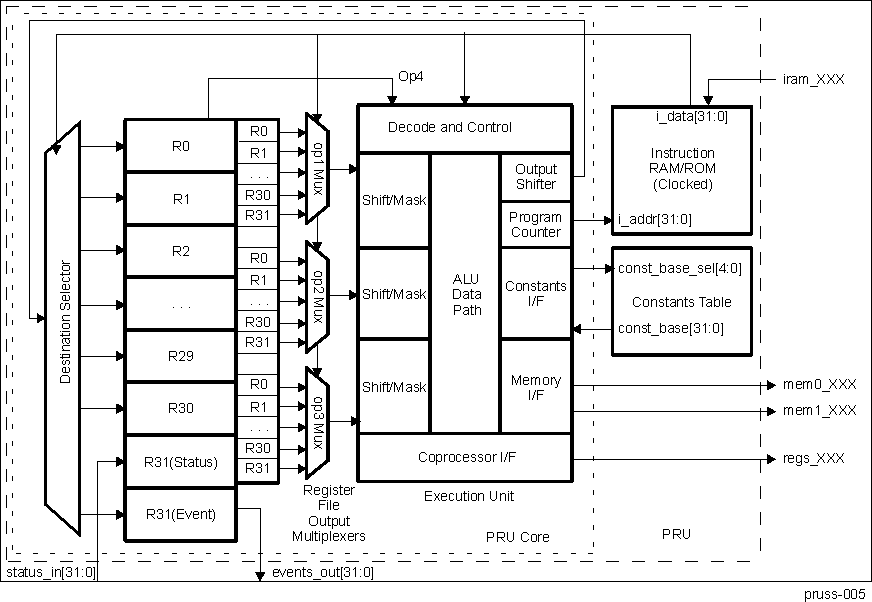 Figure 30-7 PRU Block Diagram
30.5.2 PRU Cores Functional Description
This section describes the PRU cores supported functionality by describing the constant table, module interface and enhanced GPIOs.
30.5.3 PRUs Constant Table
The PRU Constants Table is a structure of hard-coded memory addresses for commonly used peripherals and memories. The constants table exists to more efficiently load/store data to these commonly accessed addresses by:
- Reduce a PRU instruction by not needing to pre-load an address into the internal register file before loading/storing data to memory address.
- Maximizing the usage of the PRU register file for embedded processing applications by moving many of the commonly used constant or deterministically calculated base addresses from the internal register file to an external table.
| Entry No. | Region Pointed To | Value [31:0] |
|---|---|---|
| 0 | PRU-ICSS INTC (local) | 0x0002_0000 |
| 1 | Reserved | 0x4804_0000 |
| 2 | Reserved | 0x4802_A000 |
| 3 | PRU-ICSS eCAP (local) | 0x0003_0000 |
| 4 | PRU-ICSS CFG (local) | 0x0002_6000 |
| 5 | I2C3 | 0x4806_0000 |
| 6 | Reserved | 0x4803_0000 |
| 7 | PRU-ICSS UART0 (local) | 0x0002_8000 |
| 8 | MCASP3_DAT | 0x4600_0000 |
| 9 | Reserved | 0x4A10_0000 |
| 10 | Reserved | 0x4831_8000 |
| 11 | Reserved | 0x4802_2000 |
| 12 | Reserved | 0x4802_4000 |
| 13 | Reserved | 0x4831_0000 |
| 14 | Reserved | 0x481C_C000 |
| 15 | Reserved | 0x481D_0000 |
| 16 | Reserved | 0x481A_0000 |
| 17 | Reserved | 0x4819_C000 |
| 18 | Reserved | 0x4830_0000 |
| 19 | Reserved | 0x4830_2000 |
| 20 | Reserved | 0x4830_4000 |
| 21 | PRU-ICSS MDIO (local) | 0x0003_2400 |
| 22 | Reserved | 0x480C_8000 |
| 23 | Reserved | 0x480C_A000 |
| 24 | PRU-ICSS PRU0/1 Data RAM (local) | 0x0000_0n00, n = c24_blk_index[3:0] |
| 25 | PRU-ICSS PRU1/0 Data RAM (local) | 0x0000_2n00, n = c25_blk_index[3:0] |
| 26 | PRU-ICSS IEP (local) | 0x0002_En00, n = c26_blk_index[3:0] |
| 27 | PRU-ICSS MII_RT (local) | 0x0003_2n00, n = c27_blk_index[3:0] |
| 28 | PRU-ICSS Shared RAM (local) | 0x00nn_nn00, nnnn = c28_pointer[15:0] |
| 29 | OCMC_RAM2_CBUF | 0x49nn_nn00, nnnn = c29_pointer[15:0] |
| 30 | OCMC_RAM | 0x40nn_nn00, nnnn = c30_pointer[15:0] |
| 31 | EMIF1_SDRAM_CS0 | 0x80nn_nn00, nnnn = c31_pointer[15:0] |
PRU-ICSS2 UART and eCAP are not supported on the AM570x family of devices.
PRU-ICSS2 IEP I/Os are not pinned out on AM570x. However, some internal features (such as the IEP timer) are still supported.
The addresses in constants entries 24–31 are partially programmable. Their programmable bit field (for example, c24_blk_index[3:0]) is programmable through the PRU CTRL register space. As a general rule, the PRU should configure this field before using the partially programmable constant entries.
30.5.4 PRU Module Interface
The PRU module interface consists of the PRU internal registers 30 and 31 (R30 and R31). Figure 30-8 shows the PRU module interface and the functionality of R30 and R31. The register R31 serves as an interface with the dedicated PRU general purpose input (GPI) pins and PRUSS_INTC. Reading R31 returns status information from the GPI pins and PRUSS_INTC via the PRU Real Time Status Interface. Writing to R31generates PRU system events via the PRU Event Interface. The register R30 serves as an interface with the dedicated PRU general purpose output (GPO) pins.
The below sections cover different functional modes of the PRUn cores, (where n=0,1), enhanced GPIO (EGPIO) interface. The register bits which control EGPIO functionalities are part of the (PRUSS1_CFG and PRUSS2_CFG) space. For descriptions of these EGPIO register bitfield controls, refer to the Section 30.4.3.
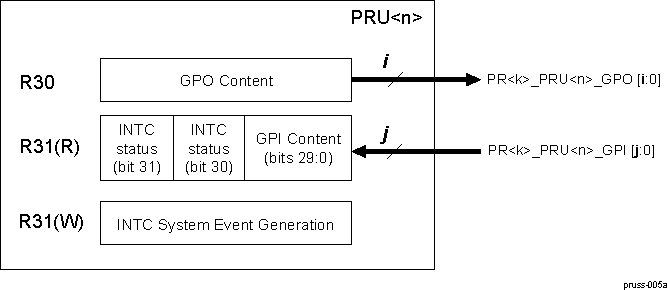 Figure 30-8 PRU Module Interface
30.5.5 Real-Time Status Interface Mapping (R31): Interrupt Events Input
The PRU Real Time Status Interface directly feeds information into register 31 (R31) of the PRU’s internal register file. The firmware on the PRU uses the status information to make decisions during execution. The status interface is comprised of signals from different modules inside of the PRU-ICSS which require some level of interaction with the PRU. More details on the Host interrupts imported into bit 30 and 31 of register R31 of both the PRUs is provided in the Section 30.6, PRU-ICSS Local Interrupt Controller.
| Bit | Field | Description |
|---|---|---|
| 31 | pru_intr_in[1] | PRU Host Interrupt 1 from local PRUSS_INTC |
| 30 | pru_intr_in[0] | PRU Host Interrupt 0 from local PRUSS_INTC |
| 29:0 | prun_r31_status[29:0] | Status inputs from primary input via Enhanced GPI port |
30.5.6 Event Interface Mapping (R31): PRU System Events
This PRU Event Interface directly feeds pulsed event information out of the PRU’s internal ALU. These events are exported out of the PRU-ICSS and need to be connected to the system interrupt controller at the SoC level. The event interface can be used by the firmware to create software interrupts from the PRU to the Host processor.
 Figure 30-9 Event Interface Mapping (R31)
| Bit | Field | Description |
|---|---|---|
| 31:6 | Reserved | |
| 5 | prun_r31_vec_valid | Valid strobe for vector output |
| 4 | Reserved | |
| 3:0 | prun_r31_vec[3:0] | Vector output |
Simultaneously writing a ‘1’ to prun_r31_vec_valid (R31 bit 5) and a channel number from 0 to 15 to prun_r31_vec[3:0] (R31 bits 3:0) creates a pulse on the output of the corresponding prk_pru_mst_intr[x]_intr_req INTC system event. For example, writing ‘100000’ will generate a pulse on prk_pru_mst_intr[0]_intr_req, writing ‘100001’ will generate a pulse on prk_pru_mst_intr[1]_intr_req, and so on to where writing ‘101111’ will generate a pulse on prk_pru_mst_intr[15]_intr_req and writing ‘0xxxxx’ will not generate any system event pulses. The output values from both PRU cores in a subsystem are ORed together.
The output channels 0-15 are connected to the PRUSS_INTC system events 16-31, respectively. This allows the PRU to assert one of the system events 16-31 by writing to its own R31 register. The system event is used to either post a completion event to one of the host CPUs (ARMSS) or to signal the other PRU. The host to be signaled is determined by the system interrupt to interrupt channel mapping (programmable). The 16 events are named as prk_pru_mst_intr<15:0>_intr_req. See the Section 30.6.4, PRU-ICSS Interrupt Requests Mapping , in the section, PRU-ICSS Local Interrupt Controller, for more details.
30.5.7 General-Purpose Inputs (R31): Enhanced PRU GP Module
The PRU-ICSS implements an enhanced General Purpose Input/Output (GPIO) module with SCU that supports the following general-purpose input modes: direct input, 16-bit parallel capture, 28-bit serial shift in. Register R31 serves as an interface with the general-purpose inputs. Table 30-44 describes the input modes in detail.
Each PRU core can only be configured for one GPI mode at a time. Each mode uses the same R31 signals and internal register bits for different purposes. A summary is found in Table 30-45.
The PRUSS_GPCFG0/1 register, bit PR1_PRUn_GP_MUX_SEL in the PRU-ICSS CFG register space needs to be set to 0x0 for GP mode. For a given PRU core, the following IO modes are mutually exclusive: GP mode, Sigma Delta mode, and 3 channel Peripheral I/F mode.
| Mode | Function | Configuration |
|---|---|---|
| Direct input | GPI[20:0] feeds directly into the PRU R31 | Default state |
| 16-bit parallel capture | DATAIN[0:15] is captured by the posedge or negedge of CLOCKIN |
|
| 28-bit shift in | DATAIN is sampled and shifted into a 28-bit shift register. Shift Counter (Cnt_16) feature uses …
|
|
| Pad Names at Device Level(1) | GPI Modes | ||
|---|---|---|---|
| Direct input | Parallel Capture | 28-Bit Shift in | |
| pr<k>_pru<n>_gpi0 | GPI0 | DATAIN0 | DATAIN |
| pr<k>_pru<n>_gpi1 | GPI1 | DATAIN1 | |
| pr<k>_pru<n>_gpi2 | GPI2 | DATAIN2 | |
| pr<k>_pru<n>_gpi3 | GPI3 | DATAIN3 | |
| pr<k>_pru<n>_gpi4 | GPI4 | DATAIN4 | |
| pr<k>_pru<n>_gpi5 | GPI5 | DATAIN5 | |
| pr<k>_pru<n>_gpi6 | GPI6 | DATAIN6 | |
| pr<k>_pru<n>_gpi7 | GPI7 | DATAIN7 | |
| pr<k>_pru<n>_gpi8 | GPI8 | DATAIN8 | |
| pr<k>_pru<n>_gpi9 | GPI9 | DATAIN9 | |
| pr<k>_pru<n>_gpi10 | GPI10 | DATAIN10 | |
| pr<k>_pru<n>_gpi11 | GPI11 | DATAIN11 | |
| pr<k>_pru<n>_gpi12 | GPI12 | DATAIN12 | |
| pr<k>_pru<n>_gpi13 | GPI13 | DATAIN13 | |
| pr<k>_pru<n>_gpi14 | GPI14 | DATAIN14 | |
| pr<k>_pru<n>_gpi15 | GPI15 | DATAIN15 | |
| pr<k>_pru<n>_gpi16 | GPI16 | CLOCKIN | |
| pr<k>_pru<n>_gpi17 | GPI17 | ||
| pr<k>_pru<n>_gpi18 | GPI18 | ||
| pr<k>_pru<n>_gpi19 | GPI19 | ||
| pr<k>_pru<n>_gpi20 | GPI20 | ||
See Section 30.2 for pin limitations on the AM570x family of devices.
30.5.8 PRU EGPIs Direct Input
The prun_r31_status [0:20] bits of the internal PRU register file are mapped to device-level, general purpose input pins (PRUn_GPI [0:20]). In GPI Direct Input mode, PRUn_GPI [0:20] feeds directly to prun_r31_status [0:20]. Each PRU of the PRU-ICSS has a separate mapping to device input signals - pr1_pru0_gpi[20:0] / pr2_pru0_gpi[20:0] for the PRUSS1/ PRUSS2 PRU0 core and pr1_pru1_gpi[20:0] / pr2_pru1_gpi[20:0] for the PRUSS1 / PRUSS2 PRU1 core so that there are 42 total general purpose inputs to the PRUSS1 / PRUSS2. For more details, refer also to the Section 30.2. See the device's system reference guide or datasheet for device specific pin mapping.
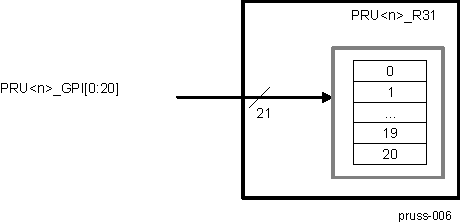 Figure 30-10 PRU R31 (EGPI) Direct Input Mode Block Diagram
30.5.9 PRU EGPIs 16-Bit Parallel Capture
The prun_r31_status [0:15] and prun_r31_status [16] bits of the internal PRU register file mapped to device-level, general purpose input pins (PRUn_DATAIN [0:15] and PRUn_CLOCKIN, respectively). PRUn_CLOCKIN is designated for an external strobe clock, and is used to capture PRUn_DATAIN [0:15].
The PRUn_DATAIN can be captured either by the positive or the negative edge of PRUn_CLOCK, programmable through the PRU-ICSS CFG register space. If the clocking is configured through the PRUICSS CFG register to be positive, then it will equal PRU<n>_CLOCK; however, if the clocking is configured to be negative, then it will equal PRU<n>_CLOCK inverted.
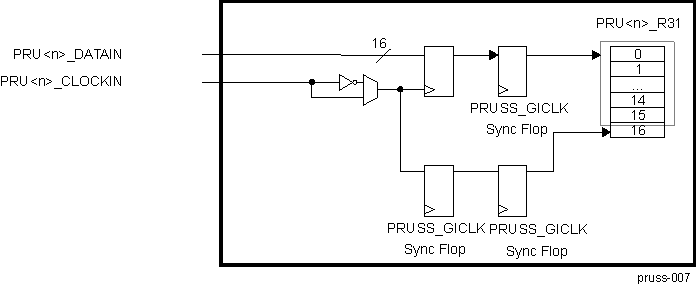 Figure 30-11 PRU R31 (EGPI) 16-Bit Parallel Capture Mode Block Diagram
30.5.10 PRU EGPIs 28-Bit Shift In
In 28-bit shift in mode, the device-level, general-purpose input pin PRUn_DATAIN is sampled and shifted into a 28-bit shift register on an internal clock pulse. The register fills in LSB order (from bit 0 to 27) and then overflows into a bit bucket. The 28-bit register is mapped to prun_r31_status [0:27] and can be cleared in software through the PRU-ICSS CFG register space.
Note, the PRU will continually capture and shift the DATAIN input when the GPI mode has been set to 28- bit shift in.
The shift rate is controlled by the effective divisor of two cascaded dividers applied to the 200-MHz clock. These cascaded dividers can each be configured through the PRU-ICSS CFG register space to a value of {1, 1.5, …, 16}. Table 30-46 shows sample effective clock values and the divisor values that can be used to generate these clocks.
| Generated clock | PRUn_GPI_DIV0 | PRUn_GPI_DIV1 |
|---|---|---|
| 8-MHz | 12.5 (0x17) | 2 (0x02) |
| 10-MHz | 10 (0x12) | 2 (0x02) |
| 16-MHz | 16 (0x1e) | 1 (0x00) |
| 20-MHz | 10 (0x12) | 1 (0x00) |
The 28-bit shift mode also supports the following features:
- SB (Start Bit detection) is mapped to prun_r31_status[29] and is set when the first 1 is captured on PRUn_DATAIN. The SB flag in pru<n>_r31_status[29] is cleared in software through the PRU-ICSS CFG register space.
- Cnt_16 (Shift Counter) is mapped to pru<n>_r31_status[28] and is set on every 16 shift clock samples after the Start Bit has been received. CNT_16 is self clearing and is connected to the PRUSS_INTC. See the PRU-ICSS Interrupt Controller (PRUSS_INTC) section for more details.
 Figure 30-12 PRU R31 (EGPI) 28-Bit Shift Mode
30.5.11 General-Purpose Outputs (R30): Enhanced PRU GP Module
The PRU-ICSS implements an enhanced General Purpose Input/Output (GPIO) module that supports two general-purpose output modes: direct output and shift out.
Table 30-47 describes these modes in detail.
Each PRU core can only be configured for one GPO mode at a time. Each mode uses the same R30 signals and internal register bits for different purposes. A summary is found in Table 30-47.
The PRUSS_GPCFG0/1 register, bit PR1_PRU0_GP_MUX_SEL in the PRU-ICSS CFG register space needs to be set to 0x0 for GP mode. For a given PRU core, the following IO modes are mutually exclusive: GP mode, Sigma Delta mode, and 3 channel Peripheral I/F mode.
| Mode | Function | Configuration |
|---|---|---|
| Direct output | pru<n>_r30[20:0] feeds directly to GPO[20:0] | Default state |
| Shift out |
| Enabled by CFG_GPCFGn register |
| Pad Names at Device Level(1) | GPO Modes | |
|---|---|---|
| Direct output | Shift out | |
| pr<k>_pru<n>_gpo0 | GPO0 | DATAOUT |
| pr<k>_pru<n>_gpo1 | GPO1 | CLOCKOUT |
| pr<k>_pru<n>_gpo2 | GPO2 | |
| pr<k>_pru<n>_gpo3 | GPO3 | |
| pr<k>_pru<n>_gpo4 | GPO4 | |
| pr<k>_pru<n>_gpo5 | GPO5 | |
| pr<k>_pru<n>_gpo6 | GPO6 | |
| pr<k>_pru<n>_gpo7 | GPO7 | |
| pr<k>_pru<n>_gpo8 | GPO8 | |
| pr<k>_pru<n>_gpo9 | GPO9 | |
| pr<k>_pru<n>_gpo10 | GPO10 | |
| pr<k>_pru<n>_gpo11 | GPO11 | |
| pr<k>_pru<n>_gpo12 | GPO12 | |
| pr<k>_pru<n>_gpo13 | GPO13 | |
| pr<k>_pru<n>_gpo14 | GPO14 | |
| pr<k>_pru<n>_gpo15 | GPO15 | |
| pr<k>_pru<n>_gpo16 | GPO16 | |
| pr<k>_pru<n>_gpo17 | GPO17 | |
| pr<k>_pru<n>_gpo18 | GPO18 | |
| pr<k>_pru<n>_gpo19 | GPO19 | |
| pr<k>_pru<n>_gpo20 | GPO20 | |
See Section 30.2 for pin limitations on the AM570x family of devices.
30.5.12 PRU EGPOs Direct Output
The prun_r30 [20:0] bits of the internal PRU register files are mapped to device-level, general-purpose output pins (PRUn_GPO[0:20]). In GPO Direct Output mode, prun_r30[0:20] feed directly to PRUn_GPO[0:20]. Each PRU of the PRU-ICSS has a separate mapping to pins, so that there are 42 total general-purpose outputs from the PRU-ICSS. See Section 30.2, PRU-ICSS Environment, and device Data Manual for device-specific pin mapping.
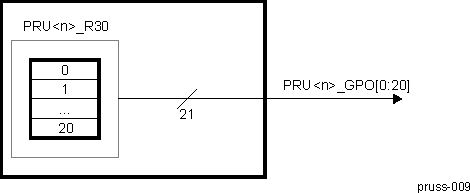 Figure 30-13 PRU R30 (EGPO) Direct Output Mode Block Diagram
R30 is not initialized after reset. To avoid unintended output signals, R30 should be initialized before pinmux configuration of PRU signals.
30.5.13 PRU EGPO Shift Out
In shift out mode, data is shifted out of prun_r30[0] (PRUn_DATAOUT) on every rising edge of prun_r30[1] (PRUn_CLOCK). The shift rate is controlled by the effective divisor of two cascaded dividers applied to the 200-MHz clock. These cascaded dividers can each be configured through the PRU-ICSS CFG register space to a value of {1, 1.5, …, 16}. Table 30-49 shows sample effective clock values and the divisor values that can be used to generate these clocks. Note that PRUn_CLOCKOUT is a free-running clock that starts when the PRU GPO mode is set to shift out mode.
| Generated Clock | PRUn_GPO_DIV0 | PRUn_GPO_DIV1 |
|---|---|---|
| 8 MHz | 12.5 (0x17) | 2 (0x02) |
| 10 MHz | 10 (0x12) | 2 (0x02) |
| 16 MHz | 16 (0x1e) | 1 (0x00) |
| 20 MHz | 10 (0x12) | 1 (0x00) |
Shift out mode uses two 16-bit shadow registers (gpo_sh0 and gpo_sh1) to support ping-pong buffers. Each shadow register has independent load controls programmable through prun_r30[29:30] (PRUn_LOAD_GPO_SH [0:1]). While PRUn_LOAD_GPO_SH [0/1] is set, the contents of prun_r30[0:15] are loaded into gpo_sh0/1.
If any device-level pins mapped to prun_r30[2:15] are configured for the prun_r30 [2:15] pinmux mode, then these pins will reflect the shadow register value written to prun_r30. Any pin configured for a different pinmux setting will not reflect the shadow register value written to prun_r30.
The data shift will start from the LSB of gpo_sh0 when prun_r30[31] (PRUn_ENABLE_SHIFT) is set. Note that if no new data is loaded into gpo_shnn after shift operation, the shift operation will continue looping and shifting out the pre-loaded data. When PRUn_ENABLE_SHIFT is cleared, the shift operation will finish shifting out the current shadow register, stop, and then reset.
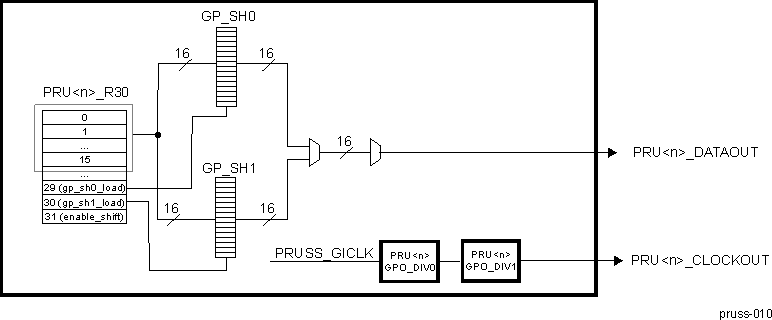 Figure 30-14 PRU R30 (GPO) Shift Out Mode Block Diagram
Follow these steps to use the GPO shift out mode:
Step One: Initialization
- 1. Load 16-bits of data into gpo_sh0:
- (a) Set R30[29] = 1 (PRUn_LOAD_GPO_SH0)
- (b) Load data in R30[15:0]
- (c) Clear R30[29] to turn off load controller
- 2. Load 16-bits of data into gpo_sh1:
- (a) Set R30[30] = 1 (PRUn_LOAD_GPO_SH1)
- (b) Load data in R30[15:0]
- (c) Clear R30[30] to turn off load controller
- 3. Start shift operation:
- (a) Set R30[31] = 1 (PRUn_ENABLE_SHIFT)
Step 2: Shift Loop
- 1. Monitor when a shadow register has finished shifting out data and can be loaded with new data:
- (a) Poll PRUn_GPI_SH_SEL bit of the PRUSS_GPCFG0/1 register
- (b) Load new 16-bits of data into gpo_sh0 if PRUn_GPI_SH_SEL = 1
- (c) Load new 16-bits of data into gpo_sh1 if PRUn_GPI_SH_SEL = 0
- 2. If more data to be shifted out, loop to Shift Loop
- 3. If no more data, exit loop
Step 3: Exit
- 1. End shift operation:
- (a) Clear R30[31] to turn off shift operation
Until the shift operation is disabled, the shift loop will continue looping and shifting out the pre-loaded data if no new data has been loaded into gpo_shn.
30.5.14 EnDat Overview
The EnDat module supports functionality for operations utilizing the EnDat 2.2 protocol. All equipment using EnDat 2.2 is compatible with the EnDat 2.1 protocol as well.
EnDat module supports the following features:
- 3 channels
- EnDat baud range from 100 kHz to 16 MHz
- 192-MHz or 200-MHz master clock is an input to two independent dividers (div16fr) to produce the Tx clock and oversample clock. This enables 16.0-, 12.0-, 8.0-, 6.0-, 4.0-, 2.0- and 1.0-MHz with oversample clock of 8x except for 16-MHz which has 6x
- Configurable shift size/oversampling on RX
- Optional RX frame size shut off
- Programmable hardware wire delay on TX (when to drive 1st clock LOW)
- Programmable hardware test delay on TX (when to drive 1st clock HIGH)
- TX FIFO size of 32 bits
- RX FIFO size of 4 bytes
- Optional programmable end-of-TX based on bit output count from 8 to 32, steps of 1
- TX channel-go (per channel) or global-go (all channels) to trigger TX start
- Flexible hardware assist CLK_OUT generation to allow free-running, stop-high and stop-low operations (after last Rx data), or stop-high after last Tx data.
- Software Direct snoop of Data Input and optional software override of CLK_OUT state.
Not supported features:
- No TX and RX concurrency supported
Assumptions for PRU software:
- PRU software must handle the wire delay compensation for tri-state (turn around) phase
- PRU software must detect propagation delay by doing EnDat sequencing: expected start bit arrival time vs. actual arrival
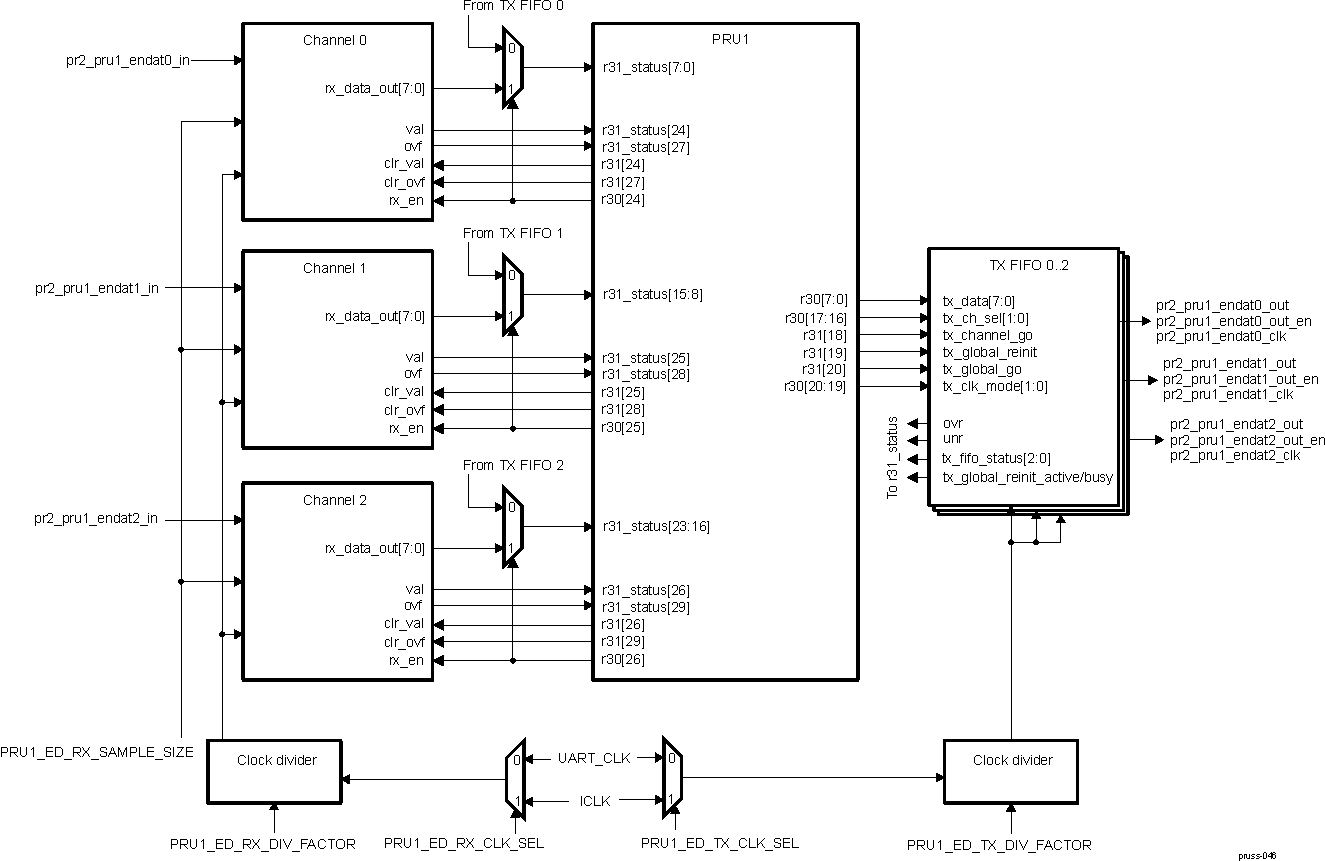 Figure 30-15 EnDat Block Diagram
30.5.15 EnDat I/O Signals
| EnDat Signal | I/O | Description | Reset(1) |
|---|---|---|---|
| pr2_pru1_endat0_clk | O | EnDat clock to differential clock driver 0 | 1 |
| pr2_pru1_endat0_out | O | EnDat data to differential data driver 0 | 0 |
| pr2_pru1_endat0_out_en | O | EnDat data enable to differential data driver 0 | 0 |
| pr2_pru1_endat0_in | I | EnDat data from differential data receiver 0 | HiZ |
| pr2_pru1_endat1_clk | O | EnDat clock to differential clock driver 1 | 1 |
| pr2_pru1_endat1_out | O | EnDat data to differential data driver 1 | 0 |
| pr2_pru1_endat1_out_en | O | EnDat data enable to differential data driver 1 | 0 |
| pr2_pru1_endat1_in | I | EnDat data from differential data receiver 1 | HiZ |
| pr2_pru1_endat2_clk | O | EnDat clock to differential clock driver 2 | 1 |
| pr2_pru1_endat2_out | O | EnDat data to differential data driver 2 | 0 |
| pr2_pru1_endat2_out_en | O | EnDat data enable to differential data driver 2 | 0 |
| pr2_pru1_endat2_in | I | EnDat data from differential data receiver 2 | HiZ |
30.5.16 Signals To PRU Port Mapping
| EnDat Module Signal | I/O | Description | Mapping |
|---|---|---|---|
| rx_en0 | I | RX enable, CH0 0: channel not enabled, all counters/flags will get reset 1: channel is enabled | r30[24] |
| clr_ovf0 | I | Clear Overflow flag, write 1 to clear , CH0 | r31[27] |
| clr_val0 | I | Clear Valid flag, write 1 to clear , CH0 | r31[24] |
| ovf0 | O | Overflow flag, CH0 | r31[27] |
| val0 | O | Valid flag, CH0 | r31[24] |
| rx_data_out0 | O | Oversampled data out , CH0 Note this is shared with TX, when TX_FIFO has stopped transmission, it will select the RX data | r31[7:0] |
| rx_en1 | I | RX enable , CH1 0: channel not enabled, all counters/flags will get reset 1: channel is enabled | r30[25] |
| clr_ovf1 | I | Clear Overflow flag, write 1 to clear , CH1 | r31[28] |
| clr_val1 | I | Clear Valid flag, write 1 to clear , CH1 | r31[25] |
| ovf1 | O | Overflow flag, CH1 | r31[28] |
| val1 | O | Valid flag, CH1 | r31[25] |
| rx_data_out1 | O | Oversampled data out , CH1 Note this is shared with TX, when TX_FIFO has stopped transmission, it will select the RX data | r31[15:8] |
| rx_en2 | I | RX enable , CH2 0: channel not enabled, all counters/flags will get reset 1: channel is enabled | r30[26] |
| clr_ovf2 | I | Clear Overflow flag, write 1 to clear , CH2 | r31[24] |
| clr_val2 | I | Clear Valid flag, write 1 to clear , CH2 | r31[26] |
| ovf2 | O | Overflow flag, CH2 | r31[29] |
| val2 | O | Valid flag, CH2 | r31[26] |
| rx_data_out2 | O | Oversampled data out , CH2 Note this is shared with TX, when TX_FIFO has stopped transmission, it will select the RX data | r31[23:16] |
| EnDat Module Signal | I/O | Description | Mapping |
|---|---|---|---|
| tx_ch_sel group, that is, tx_ch_sel[1:0] defines which channel is effected | |||
| tx_data[7:0] | I | TX data for FIFO Notes: FIFO transmits MSB first FIFO is 32-bits deep. TX_FIFO_SWAP_BITS bit in CFG can be used to flip the load order of bits The FIFO has two modes of operation: Preload-and-Go, this should be done for EnDAT and Frames less than 32-bits. Or continuous mode,when frame is bigger than 32-bits. In continuous mode, software needs to keep up with the line rate, it is also required in this mode not to allow the FIFO to go near empty. When the FIFO is at 2 byte level, software needs to load the next 2 bytes. If software waits till the end of the empty state it is possible to get the TX into a bad state. The FIFO can get recovered via re-init. | r30[7:0] |
| tx_ch_sel[1:0] | I | TX channel select 0x0: CH0 0x1: CH1 0x2: CH2 0x3: reserved | r30[17:16] |
| tx_channel_go | I | TX start the channel transmit (pointed by tx_ch_sel[1:0]) Note: FIFO must not be empty | r31[18] |
| tx_global_go | I | Tx global start of all channels Note: FIFO must not be empty | r31[20] |
| tx_global_reinit | I | Reinit all channels into default mode This clears all flags and state machines for all channels Note: Sequence should be tx_global_reinit then de-assert rx_en. This will insure TX and RX are in reset/default state. User must assert this after the frame has been sent and TX is not busy | r31[19] |
| clk_mode[1:0] | I | CLK_OUT mode 0x0: free-running/stop-low. Clock will remain free-running until the receive module has received the number of bits indicated in rx_frame_counter and then the clock will stop low 0x1: free-running/stop-high. Clock will remain free running until the receive module has received the number of bits indicated in rx_frame_counter and then the clock will stop high. Note this is the default/reset state, it will go into this state upon hardware reset or reinit. Note the initial state of the clock will be high, it will not start until tx-go event 0x2: free_run. In all states/modes, CLK_OUT will continue to run. NOTE: A reinit to get out of this clock mode is done before an update of clk_mode to a different mode. Also if multiple tx-go are done, the 2nd go should have tst_delay and wire_delay zero since the clock is free running after the first go. 0x3: stop high after transmit. Clock will run until the last TX bit is sent and stops high. | r30[20:19] |
| rx_en = 0 mapping | |||
| ovr0 | O | Over Run flag | r31[0] |
| unr0 | O | Under Run flag This flag is only set when the tx_frame_count is non-zero and FIFO is empty at the time to send data | r31[1] |
| tx_fifo_status0[2:0] | O | TX FIFO occupancy status 0x0: Empty 0x1: 1 word 0x2: 2 words 0x3: 3 words 0x4: Full 0x5-0x7: Reserved | r31[4:2] |
| tx_global_reinit_actve/busy0 | O | Tx_global_reinit action has some latency do to clocking. This status determine if action is completed 1: active 0: done For non reinit case, this bit states that last bit is on tx wire, it does not mean the clock is off 1: last bit is not done 0: last bit on tx wire Note that by using rx auto arm feature the observation is lost at rx enable. This can be used to determine when to enable rx during non-auto arm case. | r31[5] |
| ovr1 | O | Over Run flag | r31[8] |
| unr1 | O | Under Run flag This flag is only set when the tx_frame_count is nonzero and FIFO is empty when time to send data | r31[9] |
| tx_fifo_status1[2:0] | O | TX FIFO occupancy status 0x0: Empty 0x1: 1 word 0x2: 2 words 0x3: 3 words 0x4: Full 0x5-0x7: Reserved | r31[12:10] |
| tx_global_reinit_actve/busy1 | O | tx_global_reinit action has some latency do to clocking. This status determine if action is completed 1: active 0: done For non reinit case, this bit states that last bit is on tx wire, it does not mean the clock is off 1: last bit is not done 0: last bit on tx wire Note that by using rx auto arm feature the observation is lost at rx enable. This can be used to determine when to enable rx during non-auto arm case. | r31[13] |
| ovr2 | O | Over Run flag | r31[16] |
| unr2 | O | Under Run flag This flag is only set when the tx_frame_count is nonzero and FIFO is empty when time to send data | r31[17] |
| tx_fifo_status2[2:0] | O | TX FIFO occupancy status 0x0: Empty 0x1: 1 word 0x2: 2 words 0x3: 3 words 0x4: Full 0x5-0x7: Reserved | r31[20:18] |
| tx_global_reinit_actve/busy2 | O | tx_global_reinit action has some latency do to clocking. This status determine if action is completed 1: active 0: done For non reinit case, this bit states that last bit is on tx wire, it does not mean the clock is off 1: last bit is not done 0: last bit on tx wire Note that by using rx auto arm feature the observation is lost at rx enable. This can be used to determine when to enable rx during non-auto arm case. | r31[21] |
30.5.17 Functional Description
30.5.18 Clock Generation
EnDat module features two independent dividers (div16), one for TX and one for RX. Both utilize the 192-MHz clock as root clock source. Table 30-53 shows the division factor and the resultant oversample factor.
| Tx Divisor | Tx Clock | Oversample Divisor | Oversample Clock | Oversample Factor |
|---|---|---|---|---|
| 12 | 16 MHz | 2 | 96 MHz | 6x |
| 16 | 12 MHz | 2 | 96 MHz | 8x |
| 24 | 8 MHz | 3 | 64 MHz | 8x |
| 32 | 6 MHz | 4 | 48 MHz | 8x |
| 48 | 4 MHz | 6 | 32 MHz | 8x |
| 96 | 2 MHz | 12 | 16 MHz | 8x |
| 192 | 1 MHz | 24 | 8 MHz | 8x |
30.5.19 Receive Operation
Each EnDat channel captures its input data at each positive edge of the EnDat clock. This data bit is shifted into the LSB position of an 8-bit shadow register, starting with the first 1 that is received. First 1 is interpreted as the start bit. Data will only be stored while rx_en is asserted. While rx_en is deasserted, the channel is disabled, and the shadow register and all flags are cleared. When n bits of data, determined by the RX_FRAME_SIZE bitfield, have been collected, they are output to the PRU and val is asserted to signal that data is ready to be fetched. This data remains constant for n clock cycles, and the PRU software must clear it during this time, else the data will overflow. If an overflow occurs, an overflow flag, ovf, will be set to signal that val has been continuously asserted for longer than one data frame. ovf will be cleared when clr_ovf is asserted by the PRU. To clear val, the PRU software asserts clr_val for the specified channel.
The RX_SAMPLE_SIZE bitfield determines how large the oversampling rate for the sample clock will be. The larger this value is, the more time in between each new piece of data.
Operation of the EnDat module can be summarized as follows:
- When a channel is enabled, VAL clock cycle count will start after the first 0 to 1 transition.
- VAL set every n (determined by RX_FRAME_SIZE) clock cycles after the start bit (first 1) is detected
- OVF set when an overflow has occurred
- VAL and OVF are cleared by a write of 1 on CLR_VAL and CLR_OVF. The values are cleared immediately. (Note: CLR_OVF clears OVF as well as VAL)
- When RX_EN cleared, then channel is disabled. Buffer and flags are reset.
30.5.20 Transmit Operation
During the transmit cycle, while a channel is compensating for the wire delay propagation, data is stored in a 32-bit deep FIFO. The FIFO contains both a write pointer and a read pointer which are incremented whenever data is written to the FIFO and whenever data is read from the FIFO, respectively. When the pointers reach the last address in the FIFO, they will circle back to the first address.
The input tx_global_reinit resets all the FIFO pointers and causes the CLK_OUT for each channel to be held high and deasserts the TX_OUT_EN_N output. At each FIFO write strobe pulse, data will be pushed into the FIFO. The tx_channel_go bit signals the start of the wire delay compensation counter. Data is read from the FIFO at the Tx clock rate, after the tx wire delay and test delay compensation have been met.
The tx_fifo_status[2:0] indicates the number of bytes remaining in the FIFO (empty means 0 bytes, near empty is 1 or 2 bytes, near full is 3 bytes, full is 4 bytes). Two error flags, overrun (ovr) and underrun (unr), also exist. An overrun occurs whenever data is pushed to an address where data already exists, but has not yet been read. An underrun occurs whenever an address of the FIFO that does not contain data is read. The underrun will not occur if software specifies a TX_FRAME_SIZE. Only if TX_FRAME_SIZE is 0 underrun can occur. It is up to software to keep the FIFO from running empty. Once the FIFO runs empty, the hardware will assume end of the last transmission. Any new writes to FIFO will not be sent until the software initiates another tx_channel_go.
30.5.21 Programming Model
30.5.22 Initialization
- Set CLK_OUT clock to 100 kHz
- Set oversample clock to 192 MHz
- Assert rx_en for all channels
- Start counter
- Send EnDAT mode command to calculate wire propagation delay for each channel
- Poll val for all channels
- IF VALn = 1
THEN store count for this channel // Count value is the wire delay
- IF VALn = 1
30.5.23 Tx Operation
- Setting tx_global_reinit high causes CLK_OUT high and data_out_en_n low
- Min high time determines earliest possible instance of a write strobe (handled by software)
- After tx_global_go is set, wire delay compensation counter for each channel begins
- After wire delay is complete, clock is driven low, and then test counter starts
- After test counter expires, the clock starts running (first low then high)
- Therefore, first rising edge of CLK_OUT (measured from the go bit) = tx wire delay + tst_counter delay + half of tx clk frequency (since clock starts low)
- After data transmitted, TX clk_mode[1:0] will control how the clock will behave
- To restart, software
- can set tx_global_reinit to switch clock to high again
- write to FIFO
- set tx_global_go bit
30.5.24 Rx Operation
Software requirements:
- Asserting channel enable at the correct time to compensate wire delay per channel
- Unpacking data for each channel
No TX and RX concurrency is supported.
30.5.25 Overview
The SD demodulator serves to count the number of 1’s per clock event. Each channel has three cascade counters; they are the accumulators for SINC3 filter. Each counter is 24 bits, giving a maximum count of 16,777,215. They are free running rollover counters. All counters update/count on effective SD_CLK event for that channel. Each also contains a programmable, 8-bit sample size (256), which gives a sample range of 4 samples minimum to 256 samples maximum. Once sample counter is reached, a shadow copy is update and shadow copy flag set.
Sigma delta demodulaor supports the following features:
- Up to 9 channel concurrent counting
- Independent clock source for each channel
- Programmable, 8-bit sample size
- Three 24-bit cascaded counters per channel for accumulation, SINC3 and SINC2 modes
- Common channel enable
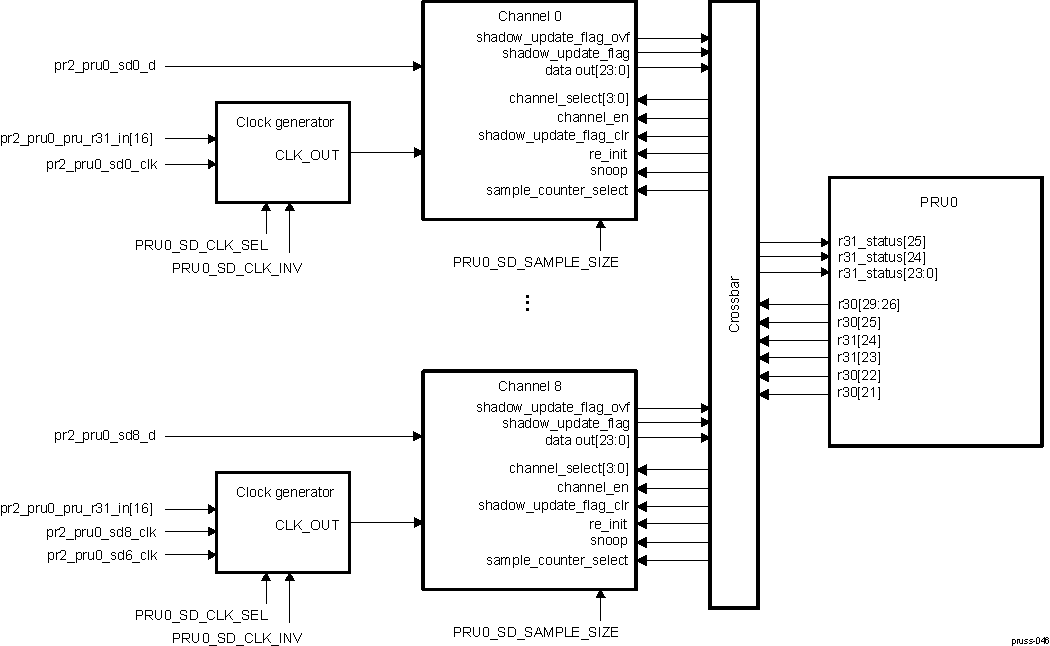 Figure 30-16 SD Demodulator Block Diagram
30.5.26 SD Demodulator I/O Signals
| EnDat Signal | I/O | Description | Reset(1) |
|---|---|---|---|
| pr2_pru0_sd0_clk | I | SD demodulator clock channel 0 | HiZ |
| pr2_pru0_sd0_d | I | SD demodulator data channel 0 | HiZ |
| pr2_pru0_sd1_clk | I | SD demodulator clock channel 1 | HiZ |
| pr2_pru0_sd1_d | I | SD demodulator data channel 1 | HiZ |
| pr2_pru0_sd2_clk | I | SD demodulator clock channel 2 | HiZ |
| pr2_pru0_sd2_d | I | SD demodulator data channel 2 | HiZ |
| pr2_pru0_sd3_clk | I | SD demodulator clock channel 3 | HiZ |
| pr2_pru0_sd3_d | I | SD demodulator data channel 3 | HiZ |
| pr2_pru0_sd4_clk | I | SD demodulator clock channel 4 | HiZ |
| pr2_pru0_sd4_d | I | SD demodulator data channel 4 | HiZ |
| pr2_pru0_sd5_clk | I | SD demodulator clock channel 5 | HiZ |
| pr2_pru0_sd5_d | I | SD demodulator data channel 5 | HiZ |
| pr2_pru0_sd6_clk | I | SD demodulator clock channel 6 | HiZ |
| pr2_pru0_sd6_d | I | SD demodulator data channel 6 | HiZ |
| pr2_pru0_sd7_clk | I | SD demodulator clock channel 7 | HiZ |
| pr2_pru0_sd7_d | I | SD demodulator data channel 7 | HiZ |
| pr2_pru0_sd8_clk | I | SD demodulator clock channel 8 | HiZ |
| pr2_pru0_sd8_d | I | SD demodulator data channel 8 | HiZ |
| pr2_pru0_pru_r31_in[16] | I | SD demodulator common clock | HiZ |
30.5.27 Signal To PRU Port Mapping
| EnDat Module Signal | I/O | Description | Mapping |
|---|---|---|---|
| channel_select[3:0] | I | Channel select 0x0: Channel 0, ... , 0x8: Channel 8, 0x9...0xF: reserved | r30[29:26] |
| sample_counter_select | I | Read sample counter 0: Not selected 1: Sample count selected | r30[21] |
| snoop | I | Enable snoop (i.e. fetch data) on the selected channel 0: acc2/acc3 shadow copy 1: current acc2/acc3 | r30[22] |
| re_init | I | When set resets all counters, flags, and shadow copy. Updates over_sample_size based on the current PRUSS_SD_PRU0_SAMPLE_SIZE_REGISTERi on the selected channel | r31[23] self clear by hardware |
| shadow_update_flag_clr | I | Clears shadow_update_flag and shadow_update_flag_ovf (if set). Clear wins over set on the selected channel | r31[24] self clear by hardware |
| channel_en | I | Global Channel enable, effects all 9 channels 0: all channels disabled, counters/flags are cleared 1: all channels enabled | r30[25] |
| data_out[23:0] | O | Output data of selected channel | r31_status[23:0] |
| shadow_update_flag | O | Shadow update flag, set when over sample count equals over sample size | r31_status[24] |
| shadow_update_flag_ovf | O | Shadow update flag_ovf, set when over sample count equals over sample size and shadow_update_flag is still set | r31_status[25] |
30.5.28 Functional Description
 Figure 30-17 SD Demodulator Functional Diagram (One Channel)
Each channel contains three 24-bit counters which gives a maximum count value of 16,777,215 (16,777,215 = 224 – 1). ACC1 input is 1-bit. ACC2 and ACC3 inputs are 24-bit.
The channel to be viewed is determined by the channel select (channel_select[3:0]). While the channels are not enabled, no operations are performed and all flags and counters are cleared.
When enabled, on each positive edge of the clock (CLK_OUT from clock generator) all three 24-bit counters for each channel get updated including the 8-bit over sample counter.
- acc1 = acc1 + sd_sync
- acc2 = acc2 + acc1
- acc3 = acc3 + acc2
- sample_count = sample_count +1
- over_sample_counter = over_sample_counter +1
When over_sample_counter = over_sample_size:
- ACC2/ACC3 shadow copy gets updated with current value of acc3 (or acc2)
- sample_count shadow copy gets updated with current value of sample_count
- shadow_update_flag will get set
- over_sample_counter gets reset
shadow_update_flag will get clear when shadow_update_flag_clr is asserted by software. shadow_update_flag_clr is a higher priorty than set event, that is, clear wins if both occur at the same time.
Snoop (=1) is an optional method to read ACC2 or ACC3 directly. Active ACC2 or ACC3 is determined by PRU0_SD_ACC2_SEL register bitfield.
sample_counter_select = 1 allows the sample_count to be read at data output.
If a new sample size is to be loaded, the PRU software must assert re_init. At re-init event all stored count values are cleared to 0.
30.5.29 Sigma Delta (SD) Decimation Filtering H/W
Sigma-delta Sinc filtering is achieved by the combination of PRU hardware and firmware. PRU hardware provides hardware integrators that do the accumulation part of Sinc filtering, while the differentiation part is done in firmware.
The integrator serves to count the number of 1’s per clock event. Each channel has three cascaded counters, which are the accumulators for the Sinc3 filter. Each counter is 24 bits, giving a maximum count of 16,777,215. Each channel has a free running rollover clock counter. This sample counter updates the count value on the effective clock event for that channel. Each channel also contains a programmable counter compare block, and the compare register has a size of 8 bits. However, the minimum value is 4 and maximum value is 202 due to the 24-bit accumulator. Once sample counter compare value is reached, the shadow register copy is updated and the shadow register copy flag is set.
Features of the integrators in PRUs SD Demodulator:
- Up to nine channels with concurrent counting
- Flexible clock source configuration for each channel; option of independent clock source for each channel or one clock source for three channels
- Programmable, 8-bit sample counter compare register; used to set the OSR of Sinc filter
- Three 24-bit cascaded counters per channel for accumulation, only Sinc3 and Sinc2 modes supported
- Common channel enable (all channels are active or none are active)
30.5.30 Block Diagram and Signals
The Sigma Delta’s I/Os are multiplexed with the PRU GPI/GPO signals, as shown in Table 30-56. Note the PR<k>_PRU<n>_GP_MUX_SEL bitfield in the PRUSS_GPCFG0/1 register must be set to 0x3 for configure the GPI/GPO signals for SD mode.
| Pad Names at Device Level(1)(2) | Sigma Delta (SD) Mode (PRUSS_GPCFG0/1[PR1_PRUn_GP_MUX_SEL] = 0x3) |
|---|---|
| pr<k>_pru<n>_gpi0 | SD0_CLK |
| pr<k>_pru<n>_gpi1 | SD0_D |
| pr<k>_pru<n>_gpi2 | SD1_CLK |
| pr<k>_pru<n>_gpi3 | SD1_D |
| pr<k>_pru<n>_gpi4 | SD2_CLK |
| pr<k>_pru<n>_gpi5 | SD2_D |
| pr<k>_pru<n>_gpi6 | SD3_CLK |
| pr<k>_pru<n>_gpi7 | SD3_D |
| pr<k>_pru<n>_gpi8 | SD4_CLK |
| pr<k>_pru<n>_gpi9 | SD4_D |
| pr<k>_pru<n>_gpi10 | SD5_CLK |
| pr<k>_pru<n>_gpi11 | SD5_D |
| pr<k>_pru<n>_gpi12 | SD6_CLK |
| pr<k>_pru<n>_gpi13 | SD6_D |
| pr<k>_pru<n>_gpi14 | SD7_CLK |
| pr<k>_pru<n>_gpi15 | SD7_D |
| pr<k>_pru<n>_gpi16 | SD8_CLK |
| pr<k>_pru<n>_gpi17 | SD8_D |
| pr<k>_pru<n>_gpi18 | |
| pr<k>_pru<n>_gpi19 | |
| pr<k>_pru<n>_gpi20 | |
| pr<k>_pru<n>_gpi21 | |
| pr<k>_pru<n>_gpi22 | |
| pr<k>_pru<n>_gpi23 | |
| pr<k>_pru<n>_gpi24 | |
| pr<k>_pru<n>_gpi25 | |
| pr<k>_pru<n>_gpi26 | |
| pr<k>_pru<n>_gpi27 | |
| pr<k>_pru<n>_gpi28 | |
| pr<k>_pru<n>_gpi29 |
The pr<k>_pru0_gpo1 signal (muxed with SD0_D) can be used as SD_CLKOUT when PRU-ICSS generates clock. This is a trade-off as PRU application will lose one SD channel. SD_CLKOUT needs to go through a clock generator chip if driving multiple sigma delta modulators and also be looped back into PRU-ICSS as SD_CLKIN, typically pru_gpi16.
Note to output the SD clock on pr<k>_pru0_gpo1, this device requires that the PRU core be configured for both SD and shift out mode (PRUSS_GPCFG0/1 [PR1_PRU<n>_GP_MUX_SEL] = 0x3 and PRUSS_GPCFG0/1 [PRU<n>_GPO_MODE] = 0x1). Be sure to configure the shift out mode's clock divisors before enabling shift out mode (PRUSS_GPCFG0/1 [PRU<n>_GPO_MODE] = 0x1). Figure 30-18 shows a block diagram of the Sigma Delta implementation. Full description of the PRU R30 and R31 registers are shown in Table 30-58 and Table 30-59.
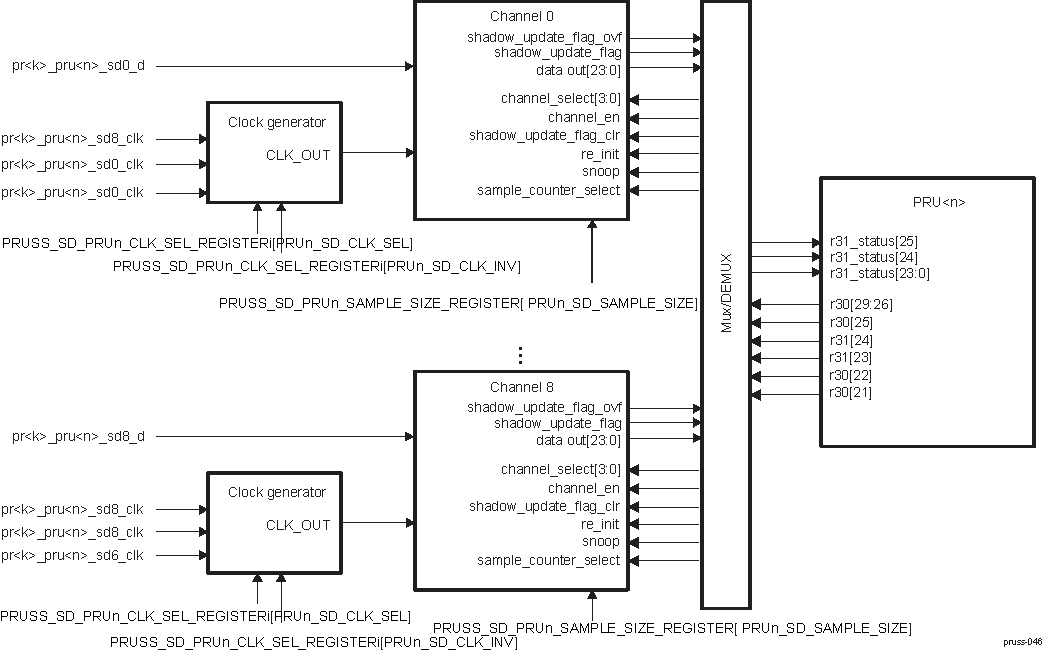 Figure 30-18 Sigma Delta Block Diagram
Note each channel can independently be configured to use one of three external clock sources. Table 30-57 shows the clock source options, selectable through PRUSS_SD_PRUn_CLK_SEL_REGISTERi[PRU<n>_SD_CLK_SEL].
| PRU<n>_SD_CLK_SEL value | Clock Source |
|---|---|
| 0 | pr<k>_pru<n>_gpi[16] |
| 1 | pr<k>_pru<n>_sdi_clk |
| 2 | pr<k>_pru<n>_sd0_clk for sd0, sd1, and sd2; pr<k>_pru<n>_sd3_clk for sd3, sd4, and sd5; pr<k>_pru<n>_sd6_clk for sd6, sd7, and sd8 |
30.5.31 PRU R30 / R31 Interface
The PRU uses the R30 and R31 registers to interface with the Sigma Delta interface. Table 30-58 shows the R31 and R30 interface for the Sigma Delta mode. Note that only the parameters and data for one channel can be viewed at a time. The channel to be viewed is determined by the r30[29-26] (channel_select).
Delta Sigma PRU registers: R31
| Bits | Field Name | Description |
|---|---|---|
| 29-26 | Reserved | |
| 25 | shadow_update_flag_ovf / shadow_update_flag_ovf_clr | Shadow update flag overflow, set when over sample count equals over sample size and shadow_update_flag is still set. Set this bit to clear the flag. |
| 24 | shadow_update_flag / shadow_update_flag_clr | Shadow update flag overflow, set when over sample count equals over sample size and shadow_update_flag is still set. Set this bit to clear the flag. |
| 23 | re_init/data_out[23] | re_init (write): Set to reset all counters, flags, and shadow copy. Updates over_sample_size based on the current PRUSS_SD_PRUn_SAMPLE_SIZE_REGISTERi register on the selected channel. data_out[23](read): most-significant bit of sample data |
| 22-0 | data_out[22:0] | Selected sample data excluding most-significant bit |
Delta Sigma PRU registers: R30
| Bits | Field Name | Description |
|---|---|---|
| 31-30 | Reserved | |
| 29-26 | channel_select[3:0] | Select Channel. 0x0 = Channel 0 ….. 0x8 = Channel 8 0x9-0xF = Unused |
| 25 | channel_en | Global Channel enable (effects all 9 channels). 0x0 = All channels disabled. Counters/flags are cleared. 0x1 = All channels enabled. |
| 24-23 | Reserved | |
| 22 | snoop | Enable snoop (i.e. fetch data) on the selected channel. 0x0 = acc2/acc3 shadow copy 0x1 = current acc2/acc3 |
| 21 | sample_counter_select | Read sample counter. 0x0 = Not selected 0x1 = Sample count selected |
| 20-0 | Reserved |
The PRU_ICSS CFG register space has have additional MMRs for controlling the SD demodulator module:
- PRUSS_SD_PRUn_CLK_SEL_REGISTERi[PRUn_SD_ACC2_SEL] - Selects accumulator 2 as source
- PRUSS_SD_PRUn_CLK_SEL_REGISTERi[PRUn_SD_CLK_INV] - Inverts clock
- PRUSS_SD_PRUn_CLK_SEL_REGISTERi[PRUn_SD_CLK_SEL] - Selects clock source
- PRUSS_SD_PRUn_SAMPLE_SIZE_REGISTERi[PRUn_SD_SAMPLE_SIZE] - Selects number of samples to read before giving output
30.5.32 Sigma Delta Description
Figure 30-19 shows a block diagram of the Sigma Delta hardware integrators and integration with the PRU R30 / R31 interface for a single channel.
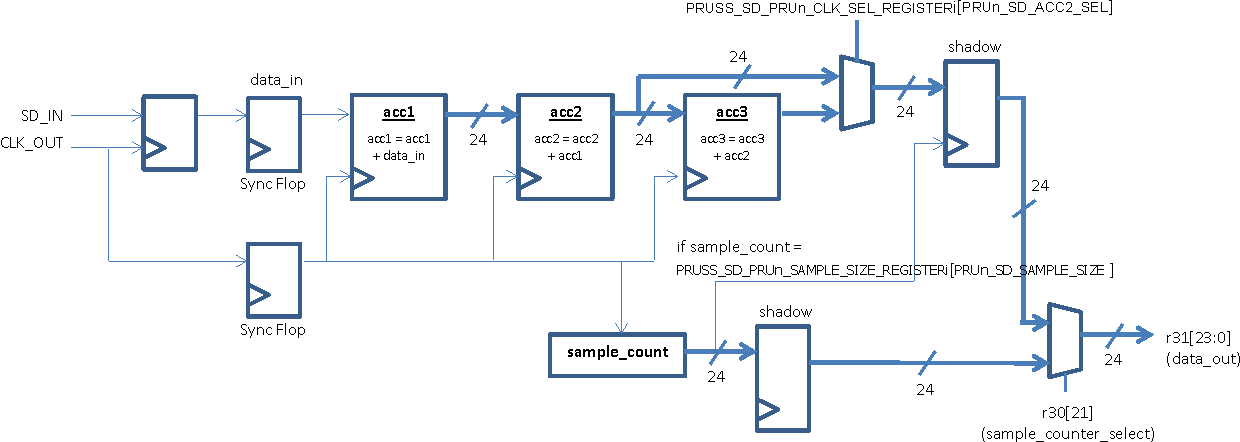 Figure 30-19 Sigma Delta Hardware Integrators Block Diagram (snoop = 0)
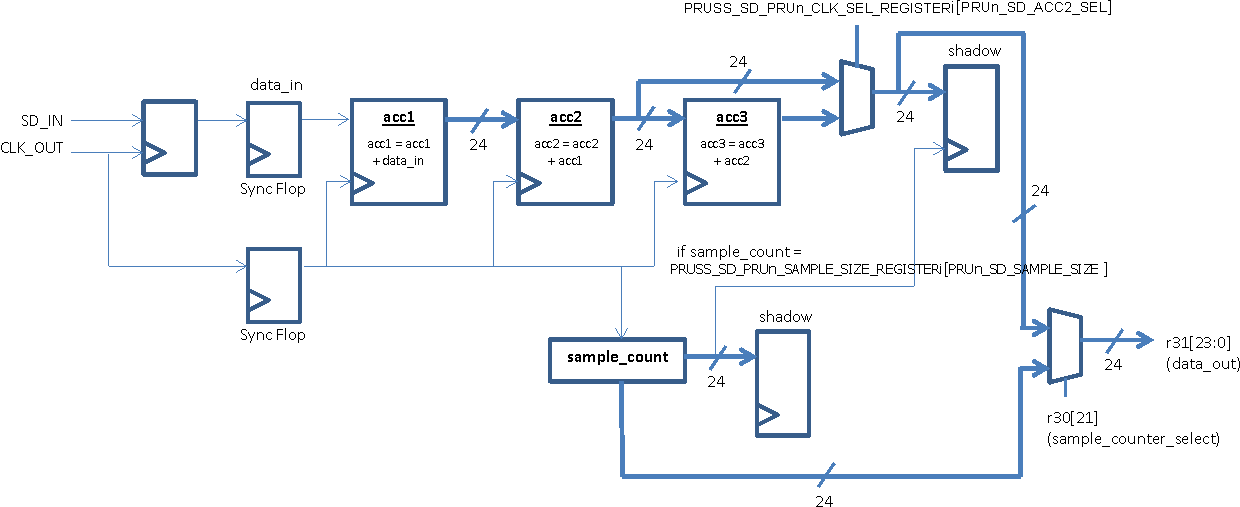 Figure 30-20 Sigma Delta Hardware Integrators Block Diagram (snoop = 1)
The three accumulators (acc1-acc3) for each channel are simple 24 bit adders. The input for acc1 is 1-bit, while the inputs for acc2 and acc3 are 24-bits. On each positive edge of the CLK_OUT, all three 24-bit counters (acc1-acc3) and the sample counter for each channel will get updated as follows:
acc1 = acc1 + data_in
acc2 = acc2 + acc1
acc3 = acc3 + acc2
sample_count = sample_count + 1
Each accumulator will rollover at 0xFF_FFFF. For example if acc2 = 0x10 and acc3 = 0xFF_FFFF, then acc3 will update to 0x00_0000F on the next clock event. Sample_count will rollover when it equals the defined sample size (PRUSS_SD_PRUn_SAMPLE_SIZE_REGISTERi [PRUn_SD_SAMPLE_SIZE]).
Note that while the channels are not enabled , no operations are performed and all flags and counters are cleared. If a new sample size is to be loaded, the PRU firmware should assert re_init (r31[23]), and all stored count values are cleared to 0.
The Sigma Delta interface has two status flags:
- Shadow update flag (r31[24])
- Shadow update flag overflow (r31[25])
When sample_count equals the defined sample size (PRUSS_SD_PRUn_SAMPLE_SIZE_REGISTERi [PRUn_SD_SAMPLE_SIZE]), then the acc2/acc3 shadow register copy will be updated, the shadow_update_flag (r31[24]) will be set, and sample_count will rollover to 0. The PRU firmware can clear this flag by writing ‘1’ to shadow_update_flag_clr (r31[24]). If sample_count equals the defined sample size and the shadow_update_flag is still set, then shadow_update_flag_ovf (r31[25]) will be set. Similarly, the PRU firmware can clear this flag by writing ‘1’ to shadow_update_flag_ovf_clr (r31[25]). Note that the clear operation for both flags has a higher priority than the set event.
The PRU firmware can monitor the acc2/acc3 and sample_count values through data_out[23:0] (r31[23:0]). Table 30-60 shows the configuration options for data_out[23:0].
| snoop (r30[22]) | sample_counter_select (r30[21]) | data_out (r31[23:0]) |
|---|---|---|
| 0 | 0 | Reads acc2/acc3 shadow register copy |
| 1 | 0 | Reads acc2/acc3 directly |
| 0 | 1 | Reads sample_count shadow register copy |
| 1 | 1 | Reads sample_count directly |
30.5.33 Basic Programming Example
The following programming example assumes that the PRU is configured for Sigma Delta Mode (PRUSS_GPCFG0 / 1 [PR1_PRU<n>_GP_MUX_SEL] = 3).
- Configure clock sources, accumulator source, and sample size:
- PRUSS_SD_PRUn_CLK_SEL_REGISTERi[PRUn_SD_CLK_SEL] for clock source
- PRUSS_SD_PRUn_CLK_SEL_REGISTERi[PRUn_SD_CLK_INV] for clock polarity
- PRUSS_SD_PRUn_CLK_SEL_REGISTERi[PRUn_SD_ACC2_SEL] for accumulator source
- PRUSS_SD_PRUn_SAMPLE_SIZE_REGISTERi[PRUn_SD_SAMPLE_SIZE] for sample size
- Reinitialize all channels whose sample size was configured
- Select channel by writing to channel_select (r30[29-26])
- Delay at least 1 PRU cycle before executing re_int in step 2c.
- Reinitialize selected channel by writing to re_init (r31[23])
- Repeat steps 2a & 2b for all configured channels
- Enable all channels by writing ‘1’ to channel_en (r30[25])
- Select channel by writing to channel_select (r30[29-26])
- Poll shadow_update_flag (r31[24]) to detect when acc2/acc3 shadow register copy data is ready to be ready
- Delay at least 1 PRU cycle before polling shadow_update_flag in Step 4c.
- Read data_out[23:0] (r31[23:0])
- Clear shadow_update_flag by writing ‘1’ to r31[24]
- Repeat step 4 for new channel
30.5.34 3 Channel Peripheral Interface
The 3 channel Peripheral Interface supports functionality for operations utilizing the EnDat 2.2 and BiSS protocols.
This module supports the following features:
- 3 channels with baud range from 100 kHz to 16 MHz
- PRUSSn_UART_GFCLK (default) or PRUSSn_GICLK master clock is an input to independent clock dividers to produce a 1X clock (ENDAT<m>_CLK) and oversampling clock
- Half-duplex (TX and RX are not supported concurrently)
- TX FIFO size of 32 bits
- RX FIFO size of 32 bits
- Configurable shift size/oversampling on RX
- Optional RX frame size auto shut off
- Programmable HW delay 1 (wire delay, controlling when the clock signal is first driven low) and delay 2 (test delay, controlling when the clock signal is first driven high) on TX operation
- Optional programmable TX termination
- Individual TX channel start trigger (tx_channel_go) or simultaneous TX start trigger for all channels (tx_global_go)
- Flexible HW assisted clock output generation to allow free running, stop high and stop low (after last RX data), or stop high (after last TX data) operation with optional software clock override feature
- Optional SW direct snoop of data input
30.5.35 Block Diagram and Signal Configuration
The Peripheral Interface’s I/Os are multiplexed with the PRU GPI/GPO signals, as shown in Table 30-61. The PR<k>_PRU<n>_GP_MUX_SEL bitfield in the PRUSS_GPCFG0/1 register must be set to 0x1 for configure the GPI/GPO signals for Peripheral I/F mode.
| Pad Names at Device Level(1)(2)(3) | Peripheral I/F Mode (PRUSS_GPCFG0/1 [PR1_PRUn_GP_MUX_SEL] = 0x1) |
|---|---|
| pr<k>_pru<n>_gpi0 | |
| pr<k>_pru<n>_gpi1 | |
| pr<k>_pru<n>_gpi2 | |
| pr<k>_pru<n>_gpi3 | |
| pr<k>_pru<n>_gpi4 | |
| pr<k>_pru<n>_gpi5 | |
| pr<k>_pru<n>_gpi6 | |
| pr<k>_pru<n>_gpi7 | |
| pr<k>_pru<n>_gpi8 | |
| pr<k>_pru<n>_gpi9 | ENDAT0_IN |
| pr<k>_pru<n>_gpi10 | ENDAT1_IN |
| pr<k>_pru<n>_gpi11 | ENDAT2_IN |
| pr<k>_pru<n>_gpi12 | |
| pr<k>_pru<n>_gpi13 | |
| pr<k>_pru<n>_gpi14 | |
| pr<k>_pru<n>_gpi15 | |
| pr<k>_pru<n>_gpi16 | |
| pr<k>_pru<n>_gpi17 | |
| pr<k>_pru<n>_gpi18 | |
| pr<k>_pru<n>_gpi19 | |
| pr<k>_pru<n>_gpi20 | |
| pr<k>_pru<n>_gpi21 | |
| pr<k>_pru<n>_gpi22 | |
| pr<k>_pru<n>_gpi23 | |
| pr<k>_pru<n>_gpi24 | |
| pr<k>_pru<n>_gpi25 | |
| pr<k>_pru<n>_gpi26 | |
| pr<k>_pru<n>_gpi27 | |
| pr<k>_pru<n>_gpi28 | |
| pr<k>_pru<n>_gpi29 | |
| pr<k>_pru<n>_gpo0 | ENDAT0_CLK |
| pr<k>_pru<n>_gpo1 | ENDAT0_OUT |
| pr<k>_pru<n>_gpo2 | ENDAT0_OUT_EN |
| pr<k>_pru<n>_gpo3 | ENDAT1_CLK |
| pr<k>_pru<n>_gpo4 | ENDAT1_OUT |
| pr<k>_pru<n>_gpo5 | ENDAT1_OUT_EN |
| pr<k>_pru<n>_gpo6 | ENDAT2_CLK |
| pr<k>_pru<n>_gpo7 | ENDAT2_OUT |
| pr<k>_pru<n>_gpo8 | ENDAT2_OUT_EN |
| pr<k>_pru<n>_gpo9 | |
| pr<k>_pru<n>_gpo10 | |
| pr<k>_pru<n>_gpo11 | |
| pr<k>_pru<n>_gpo12 | |
| pr<k>_pru<n>_gpo13 | |
| pr<k>_pru<n>_gpo14 | |
| pr<k>_pru<n>_gpo15 | |
| pr<k>_pru<n>_gpo16 | |
| pr<k>_pru<n>_gpo17 | |
| pr<k>_pru<n>_gpo18 | |
| pr<k>_pru<n>_gpo19 | |
| pr<k>_pru<n>_gpo20 | |
| pr<k>_pru<n>_gpo21 | |
| pr<k>_pru<n>_gpo22 | |
| pr<k>_pru<n>_gpo23 | |
| pr<k>_pru<n>_gpo24 | |
| pr<k>_pru<n>_gpo25 | |
| pr<k>_pru<n>_gpo26 | |
| pr<k>_pru<n>_gpo27 | |
| pr<k>_pru<n>_gpo28 | |
| pr<k>_pru<n>_gpo29 | |
| pr<k>_pru<n>_gpo30 | |
| pr<k>_pru<n>_gpo31 |
A block diagram for the Peripheral I/F is included in Figure 30-21. As shown, each channel is composed of four I/Os:
- ENDAT<m>_IN - RX input data
- ENDAT<m>_CLK - Clock (CLK_OUT) generated by the 1x (or TX) clock. The default value is 1.
- ENDAT<m>_OUT - TX output data. The default value is 0.
- ENDAT<m>_OUT_EN - TX enable output (1 = TX mode, 0 = RX mode). The default value is 0. Note this signal is auto controlled by hardware.
 Figure 30-21 Peripheral I/F Block Diagram
30.5.36 PRU R30 and R31 Interface
The PRU uses the R30 and R31 registers to interface with the Peripheral I/F. Table 30-62 shows the R31 and R30 interface for the Peripheral I/F RX mode, and Table 30-62 shows the comparable interface for the TX mode.
| Register | Bits | Field Name | Description |
|---|---|---|---|
| R31 | 31-30 | Reserved | PRU Host Interrupts 1/0 from local INTC |
| 29 | ovf2 | Overflow Flag for Channel 2. Write 1 to clear. | |
| 28 | ovf1 | Overflow Flag for Channel 1. Write 1 to clear. | |
| 27 | ovf0 | Overflow Flag for Channel 0. Write 1 to clear. | |
| 26 | val2 | Valid Flag for Channel 2. Write 1 to clear. | |
| 25 | val1 | Valid Flag for Channel 1. Write 1 to clear. | |
| 24 | val0 | Valid Flag for Channel 0. Write 1 to clear. | |
| 23-16 | rx_data_out2 | Oversampled Data Output for Channel 2. Note these bits are shared with the TX Interface. When TX_FIFO has stopped transmission, RX data will be selected. | |
| 15-8 | rx_data_out1 | Oversampled Data Output for Channel 1. Note these bits are shared with the TX Interface. When TX_FIFO has stopped transmission, RX data will be selected. | |
| 7-0 | rx_data_out0 | Oversampled Data Output for Channel 0. Note these bits are shared with the TX Interface. When TX_FIFO has stopped transmission, RX data will be selected. | |
| R30 | 31-27 | Reserved | |
| 26 | rx_en2 | RX Enable for Channel 2. 0: Channel not enabled, all counters/flags will get reset 1: Channel is enabled | |
| 25 | rx_en1 | RX Enable for Channel 1. 0: Channel not enabled, all counters/flags will get reset 1: Channel is enabled | |
| 24 | rx_en0 | RX Enable for Channel 0. 0: Channel not enabled, all counters/flags will get reset 1: Channel is enabled | |
| 23-0 | Reserved |
| Register | Bits | Field Name | Description |
|---|---|---|---|
| R31 | 31-30 | Reserved | |
| 29:22 | Reserved | ||
| 21 | tx_global_reinit_active/busy2 | Tx_global_reinit action has some latency do to clocking. This status shows if action is completed. 1 = Active 0 = Done For non reinit case, this bit states that last bit is on tx wire. It does not mean the clock is off. 1 = Last bit is not done 0 = Last bit on tx wire Note that by using rx auto arm feature, the observation is lost at rx enable. This can be used to determine when to enable rx during non-auto arm case. | |
| 20 | tx_global_go | TX global start of all channels. Note: FIFO must not be empty. If empty, transmit will not start. | |
| 19 | tx_global_reinit | Reinit all channels into default mode. This clears all flags and state machines for all channels. Note: Sequence should be assert tx_global_reinit then de-assert rx_en. This will ensure TX and RX are in reset/default state. User must assert this after the frame has been sent and TX is not busy. | |
| 18 | tx_channel_go | TX start the channel transmit (selected by tx_ch_sel). Note: FIFO must not be empty. | |
| 17 | unr2 | Under Run Flag for Channel 2. This flag is only set when the tx_frame_count is nonzero and FIFO is empty at time to send data. | |
| 16 | ovr2 | Over Run Flag for Channel 2 | |
| 15-14 | Reserved | ||
| 13 | tx_global_reinit_active/busy1 | Tx_global_reinit action has some latency do to clocking. This status shows if action is completed. 1 = Active 0 = Done For non reinit case, this bit states that last bit is on tx wire. It does not mean the clock is off. 1 = Last bit is not done 0 = Last bit on tx wire Note that by using rx auto arm feature, the observation is lost at rx enable. This can be used to determine when to enable rx during non-auto arm case. | |
| 12:10 | tx_fifo_sts1 | TX FIFO occupancy status for Channel 1 0 = Empty 1 = 1 word 2 = 2 words 3 = 3 words 4 = Full 5-7 = Reserved | |
| 9 | unr1 | Under Run Flag for Channel 1. This flag is only set when the tx_frame_count is nonzero and FIFO is empty at time to send data. | |
| 8 | ovr1 | Over Run Flag for Channel 1 | |
| 7:6 | Reserved | ||
| R31 | 5 | tx_global_reinit_active/busy0 | Tx_global_reinit action has some latency do to clocking. This status shows if action is completed. 1 = Active 0 = Done For non reinit case, this bit states that last bit is on tx wire. It does not mean the clock is off. 1 = Last bit is not done 0 = Last bit on tx wire Note that by using rx auto arm feature, the observation is lost at rx enable. This can be used to determine when to enable rx during non-auto arm case. |
| 4:2 | tx_fifo_sts0 | TX FIFO occupancy status for Channel 0 0 = Empty 1 = 1 word 2 = 2 words 3 = 3 words 4 = Full 5-7 = Reserved | |
| 1 | unr0 | Under Run Flag. This flag is only set when the tx_frame_count is nonzero and FIFO is empty at time to send data. | |
| 0 | ovr0 | Over Run Flag for Channel 0 | |
| R30 | 31:21 | Reserved | |
| 20:19 | clk_mode | CLK_OUT mode. 0 = Free-running/stop-low. Clock will remain free-running until the receive module has received the number of bits indicated in rx_frame_counter and then the clock will stop low. 1 (default) = Free-running/stop-high. Clock will remain free-running until the receive module has received the number of bits indicated in rx_frame_counter and then the clock will stop high. Note this is the default/reset state, and a hardware reset or reinit will return clk_mode to this state. Note the initial state of the clock will be high, but the clock will not start until TX GO event. 2 = Free-run. Note: NOTE: A reinit to get out of this clock mode is done before an update of clk_mode to a different mode. Also if multiple TX GO are done, the 2nd go should have tst_delay and wire_delay zero since the clock is free running after the first go. 3= Stop high after transmit. Clock will run until the last TX bit is sent and stops high. | |
| 18 | Reserved | ||
| 17:16 | tx_ch_sel | TX channel select. 0 = Channel 0 1 = Channel 1 2 = Channel 2 3 = Reserved | |
| 15:9 | Reserved | ||
| 7:0 | tx_data | TX data for FIFO. Notes: FIFO transmits MSB first and is 32-bits deep. TX_FIFO_SWAP_BITS bit in the PRU-ICSS CFG register space can be used to flip the load order of bits. The FIFO has 2 modes of operation: 1. Preload and Go. This should be done for EnDAT and frames less than 32-bits. 2. Continuous mode. This should be done for frames bigger than 32-bits. In continuous mode, software needs to keep up with the line rate and ensure that the FIFO is never empty. When the FIFO is at 2 byte level, software needs to load the next 2 bytes. If software waits till the end of the empty state, it is possible to get the TX into a bad state. The FIFO state can be recovered via re-init. |
Note the PRU-ICSS CFG register space has additional MMRs for controlling the Peripheral I/F module.
30.5.37 Clock Generation
30.5.38 Configuration
The Peripheral I/F module has two source clock options, PRUSSn_UART_GFCLK (default) and PRUSSn_GICLK. There are two independent clock dividers (div16) for the 1x and oversampling (OS) clocks, and each clock divider is configurable by two cascading dividers:
- PRUn_ED_TX_DIV_FACTOR and PRUn_ED_TX_DIV_FACTOR_FRAC for the 1x clock
- PRUn_ED_RX_DIV_FACTOR and PRUn_ED_RX_DIV_FACTOR_FRAC for the OS clock
The 1x clock is output on the ENDAT<m>_CLK signal. In TX mode, the output data is read from the TX FIFO at this 1x clock rate. The default value of this clock is high and the start and stop conditions for this clock are described in Section 30.5.39 and Section 30.5.42.
In RX mode, the input data is sampled at the OS clock rate. Note the OS clock rate divided by the 1x clock rate must equal PRUn_ED_RX_SAMPLE_SIZE.
Example clock rates and divisor values relative to the 192-MHz PRUSSn_UART_GFCLK source are shown in Table 30-64.
| TX_DIV_FACTOR | 1x Clock | RX_DIV_FACTOR | RX_DIV_FACTOR_FRAC | OS Clock | Oversample Factor |
|---|---|---|---|---|---|
| 12 | 16 MHz | 1 | 1.5 | 128 MHz | 8x |
| 16 | 12 MHz | 2 | 1 | 96 MHz | 8x |
| 24 | 8 MHz | 3 | 1 | 64 MHz | 8x |
| 32 | 6 MHz | 4 | 1 | 48 MHz | 8x |
| 48 | 4 MHz | 6 | 1 | 32 MHz | 8x |
| 96 | 2 MHz | 12 | 1 | 16 MHz | 8x |
| 192 | 1 MHz | 24 | 1 | 8 MHz | 8x |
30.5.39 Clock Output Start Conditions
This section describes the configurable start conditions for the ENDAT<m>_CLK. The software can completely control via PRUSS_ED_PRUn_CHj_CFG0_REGISTER when PRUn_ED_CLK_OUT_OVR_EN = 1. By default however, the PRU hardware will control the clocks as described in the following sections.
30.5.40 TX Mode (RX_EN = 0)
In TX mode, the ENDAT<m>_CLK begins after the firmware loads the TX FIFO and sets either r30[20] (tx_global_go) or r30[17:16] (tx_channel_go) to 1. After the “go” bit is set, the delay1 (wire delay) compensation counter for each channel begins. After delay1 is complete, ENDAT<m>_CLK is driven low and then the delay2 (tst) counter begins. After the delay2 counter expires, the ENDAT<m>>_CLK starts running (first low and then high). Therefore, first rising edge of ENDAT<m>_CLK (measured from the go bit) = delay1 (tx wire delay) + delay2 (tst_counter delay) + half of the 1x clock frequency (since the clock starts low).
Figure 30-22 shows the start condition for TX mode. As shown in the figure, the default value of clock is high. The PRU-ICSS CFG register space has additional MMRs for controlling the TX start timing delay values:
- Delay 1: PRUSS_ED_PRUn_CHj_CFG0_REGISTER [PRUn_ED_TX_WDLY]
- Delay 2: PRUSS_ED_PRUn_CHj_CFG0_REGISTER [PRUn_ED_TST_DELAY_COUNTER]
 Figure 30-22 TX Mode Start Condition
30.5.41 RX Mode (RX_EN = 1)
In RX mode, the ENDAT<m>_CLK will start running whenever the RX_EN is set. Note that the PRU firmware in this mode is responsible for any delay conditions.
The hardware can also auto-enable RX mode at the end of a TX transaction. The PRUSS_ED_PRUn_CHj_CFG1_REGISTER [PRUn_ED_RX_EN_COUNTER] is used to program a delay between the last TX bit sent and when the RX_EN is set.
30.5.42 Stop Conditions
The r30[20:19] (clk_mode[1:0]) value determines the stop condition for ENDAT<m>_CLK. There are 4 options available:
| clk_mode_value | Description |
|---|---|
| 0 | Stop low on last RX frame |
| 1 | Stop high on last RX frame |
| 2 | Run continuously |
| 3 | Stop high on last TX bit |
The last RX frame is configured by PRUSS_ED_PRUn_CHj_CFG0_REGISTER [PRUn_ED_RX_FRAME_SIZE], and the last TX bit is configured by PRUSS_ED_PRUn_CHj_CFG0_REGISTER [PRUn_ED_TX_FRAME_SIZE]. Each stop condition is shown in Figure 30-23 through Figure 30-26.
 Figure 30-23 ENDAT<m>_CLK Stop High on Last RX Frame
 Figure 30-24 ENDAT<m>_CLK Stop Low on Last RX Frame
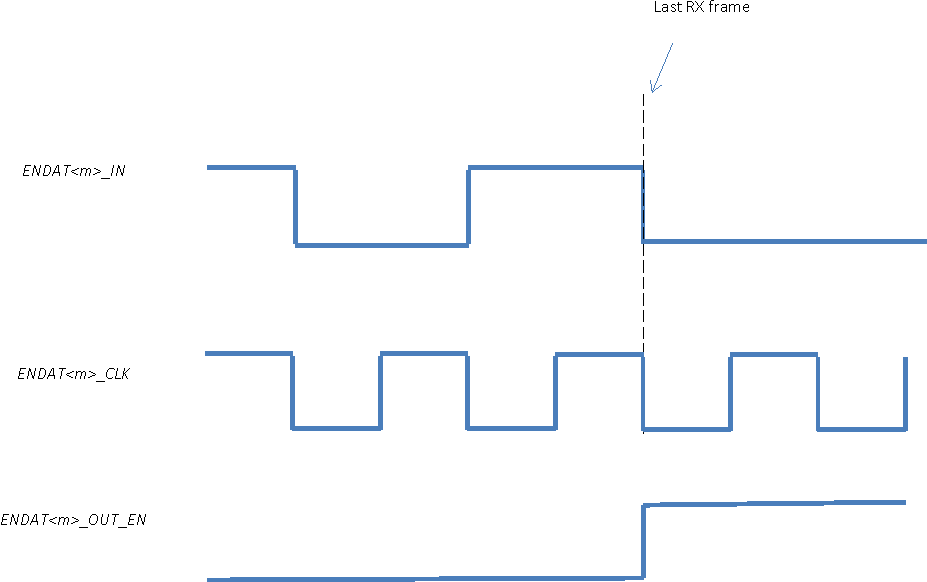 Figure 30-25 ENDAT<m>_CLK Run Continuously
 Figure 30-26 ENDAT<m>_CLK Stop High on Last TX Bit
30.5.43 Basic Programming Model
The following programming models assume that the PRU is configured for 3 Peripheral Mode (PRUSS_GPCFG0/1 [PR1_PRUn_GP_MUX_SEL] = 0x1).
30.5.44 Clock Generation
Follow these steps to configure Peripheral I/F clocks using the HW control of the clock:
- Select TX and RX clock sources:
- PRUSS_ED_PRUn_TX_CFG_REGISTER [PRUn_ED_TX_CLK_SEL] for the TX clock source
- PRUSS_ED_PRUn_RX_CFG_REGISTER [PRUn_ED_RX_CLK_SEL] for the RX clock source
- Configure the 1x (TX) clock frequency:
- Write Division Factor to PRUSS_ED_PRUn_TX_CFG_REGISTER [PRUn_ED_TX_DIV_FACTOR]
- Write Fraction division factor to PRUSS_ED_PRUn_TX_CFG_REGISTER [PRUn_ED_TX_DIV_FACTOR_FRAC]
- Configure the oversampling (RX) frequency and oversample size:
- Write Division Factor to PRUSS_ED_PRUn_RX_CFG_REGISTER [PRUn_ED_RX_DIV_FACTOR]
- Write Fraction division factor to PRUSS_ED_PRUn_RX_CFG_REGISTER [PRUn_ED_RX_DIV_FACTOR_FRAC]
- Write RX oversample size to PRUSS_ED_PRUn_RX_CFG_REGISTER [PRUn_ED_RX__SAMPLE_SIZE]
- Select the clk_mode to configure how the ENDAT<m>_CLK signal ends after TX/RX:
- Write to r30[20:19] (clk_mode). Note the clk_mode setting can also be changed per transaction.
- Configure the wire, tst, and rx_en_counter delay values:
- PRUSS_ED_PRUn_CHj_CFG0_REGISTER [PRUn_ED_TX_WDLY] for wire delay
- PRUSS_ED_PRUn_CHj_CFG1_REGISTER [PRUn_ED_TST_DELAY_COUNTER] for tst delay
- PRUSS_ED_PRUn_CHj_CFG1_REGISTER [PRUn_ED_RX_EN_COUNTER] for auto-delay between TX and RX
30.5.45 TX - Single Shot
Follow these steps to configure the Peripheral I/F channel(s) for a single shot transmission:
- (Optional) Configure TX FIFO for MSB (default) or LSB:
- PRUSS_ED_PRUn_CHj_CFG0_REGISTER [PRUn_ED_TX_FIFO_SWAP_BITS]
- Pre-load TX FIFO:
- Select TX channel by writing the desired channel number to R30[17:16] (tx_ch_sel)
- Write 1-4 bytes of data to r30[7:0] (tx_data). At each r30[7:0] write, data will be pushed into the FIFO.
- Repeat Steps 2a and 2b for all desired channels.
- Configure TX frame size if less than 4 full bytes loaded into FIFO:
- PRUSS_ED_PRUn_CHj_CFG0_REGISTER [PRUn_ED_TX_FRAME_SIZE]
- Push TX FIFO data to ENDAT<m>_OUT (see Section 30.5.39 for the ENDAT<m>_CLK and ENDAT<m>_OUT start time relationship);
- To start TX on all channels, set r31[20] = 1 (tx_global_go).
- To start TX on individual channel:
- Select TX channel by writing the desired channel number to R30[17:16] (tx_ch_sel)
- Set R31[18] = 1 (tx_channel_go)
- If PRUSS_ED_PRUn_CHj_CFG0_REGISTER [PRUn_ED_RX_EN_COUNTER] > 0, then the channel will automatically switch into RX mode. See Section 30.5.47 for an example of how to program and configure RX content.
- If PRUSS_ED_PRUn_CHj_CFG0_REGISTER [PRUn_ED_RX_EN_COUNTER] = 0, poll either r31[21, 13, or 5] (tx_global_reinit_active/busy[2,1,0]) or PRUSS_ED_PRUn_TX_CFG_REGISTER [PRUn_ED_BUSY_i] for when TX is complete
The ENDAT<m>_CLK Peripheral I/F requires that ENDAT<m>_CLK be in a high state at the beginning of a new transaction. If the clock ended the single shot transmission in low state, then the clock needs to be reset before sending more data. The steps to reset ENDAT<m>_CLK are:
- Set R31[19] = 1 (tx_global_reinit) to reset clock high
- Wait until tx_busy<m> is cleared
- Re-configure R30[20:19] (clk_mode), since reinit will reset the clk_mode to "Free-running/stop-high" mode
30.5.46 TX - Continuous FIFO Loading
Follow these steps to configure the Peripheral I/F channel(s) for a continuous loading transmission:
- (Optional) Configure TX FIFO for MSB (default) or LSB:
- PRUSS_ED_PRUn_CHj_CFG0_REGISTER [PRUn_ED_TX_FIFO_SWAP_BITS]
- Pre-load TX FIFO:
- Select TX channel by writing the desired channel number to r30[17:16] (tx_ch_sel)
- Write 1-4 bytes of data to r30[7:0] (tx_data). At each r30[7:0] write, data will be pushed into the FIFO.
- Repeat Steps 2a and 2b for all desired channels.
- Configure TX frame size to continuously transmit the TX FIFO until empty:
- Set PRUSS_ED_PRUn_CHj_CFG0_REGISTER [PRUn_ED_TX_FRAME_SIZE] = 0
- Push TX FIFO data to ENDAT<m>_OUT (see Section 30.5.39 for the ENDAT<m>_CLK and ENDAT<m>_OUT start time relationship):
- To start TX on all channels, set r31[20] = 1 (tx_global_go).
- To start TX on individual channel:
- Select TX channel by writing the desired channel number to r30[17:16] (tx_ch_sel)
- Set r31[18] = 1 (tx_channel_go)
- Monitor line rate and reload FIFO:
- Polling r31[xx, 12:10, 4:2] (tx_fifo_sts<m>)
- When FIFO level is at 2 bytes, load next 2 bytes of data (see Step 2). Do not let the FIFO get close to 0. Once the FIFO runs empty, the hardware will assume the PRU has reached end of the last transmit. Any new writes to the FIFO will not be sent until the software sends another tx_channel_go bit. Note there are also underrun and overrun error flags that can be monitored.
- To end TX operation, do not send any new data to FIFO.
- If PRUSS_ED_PRUn_CHj_CFG1_REGISTER [PRUn_ED_RX_EN_COUNTER] > 0, then the channel will automatically switch into RX mode. See Section 30.5.47 for an example of how to program and configure RX content.
- If PRUSS_ED_PRUn_CHj_CFG1_REGISTER [PRUn_ED_RX_EN_COUNTER] = 0, poll either r31[21, 13, or 5] (tx_global_reinit_active/busy[2,1,0]) or PRUSS_ED_PRUn_TX_CFG_REGISTER [PRUn_ED_BUSY_i] for when TX is complete
The ENDAT<m>_CLK Peripheral I/F requires that ENDAT<m>_CLK be in a high state at the beginning of a new transaction. If the clock ended the continuous loading transmission in low state, then the clock needs to be reset before sending more data. The steps to reset ENDAT<m>_CLK are:
- Set R31[19] = 1 (tx_global_reinit) to reset clock high
- Wait until tx_busy<m> is cleared
- Re-configure R30[20:19] (clk_mode), since reinit will reset the clk_mode to "Free-running/stop-high" mode
30.5.47 RX - Auto Arm or Non-Auto Arm
Follow these steps to configure the Peripheral I/F channel(s) to receive data:
- Configure RX and frame size:
- PRUSS_ED_PRUn_CHj_CFG0_REGISTER [PRUn_ED_RX_FRAME_SIZE]
- To start ENDAT<m>_CLK:
- For the non-auto arm use case, set r30[26, 25, 24] = 1 (rx_en<m>)
- For the auto arm use case, rx_en<m> will be automatically enabled at the end of a TX operation when PRUSS_ED_PRUn_CHj_CFG1_REGISTER [PRUn_ED_RX_EN_COUNTER] > 0
- RX FIFO will start filling on the first start bit (ENDAT<m>_IN = 1). The data will be captured on the positive edge of the ENDAT<m>_CLK and shifted into the LSB position of the 8-bit shadow register.
- Poll for r31[26, 25, 24] (val<m>) assertion. The valid flag will be asserted when n bits of data (determined by PRUSS_ED_PRUn_RX_CFG_REGISTER [PRUn_ED_RX_SAMPLE_SIZE]) have been collected.
- Fetch data by reading r31[23-16, 15-8, 7-0] (rx_data_out<m>). The data will remain constant for one data frame, and PRU must read data and clear valid flag within this time. Otherwise, an overflow will occur – r31[29, 28, 27] (ovf<m>) = 1 - indicating that val<m> has been continuously asserted for longer than one data frame.
- The clock will be stopped based on the r30[20:19] (clk_mode) configured before the start of the RX operation.
- Clear r30[26, 25, 24] (rx_en<m>) to disable RX mode. All counters and flags will be reset.
30.5.48 PRU Multiplier with Optional Accumulation (MPY/MAC)
This section describes the MAC (multiplier with optional accumulation) module integrated to PRU0 and PRU1 cores of PRU-ICSS1/PRU-ICSS2.
30.5.49 PRU MACs Overview
Each of the two PRU cores (PRU0 and PRU1) has a designated unsigned multiplier with optional accumulation (MPY/MAC). The MAC supports two modes of operation: Multiply Only and Multiply and Accumulate.
The MAC is directly connected with the PRU internal registers R25-R29 and uses the broadside load/store PRU interface and XFR instructions to both control and mode of the MAC and import the multiplication results into the PRU.
30.5.50 PRU MAC Key Features
The MPY/MAC instantiated separately to each PRU core (PRU0 and PRU1) features:
- Configurable Multiply Only and Multiply and Accumulate functionality via PRU register R25
- 32-bit operands with direct connection to PRU registers R28 and R29
- 64-bit result (with carry flag) with direct connection to PRU registers R26 and R27
- PRU broadside interface and XFR instructions (XIN, XOUT) allow for importing multiplication results and initiating accumulate function
30.5.51 PRU MAC Operations
30.5.52 PRU versus MAC Interface
The MAC directly connects with the PRU internal registers R25-R29 through use of the PRU broadside interface and XFR instructions. Figure 30-27 shows the functionality of each register.
 Figure 30-27 Integration of the PRU and MPY/MAC
The XFR instructions (XIN and XOUT) are used to load/store register contents between the PRU core and the MAC. These instructions define the start, size, direction of the operation, and device ID. The device ID number corresponding to the MPY/MAC is shown in Table 30-65.
| Device ID | Function |
|---|---|
| 0 | Selects MPY/MAC |
The PRU register R25 is mapped to the MAC_CTRL_STATUS register (Table 30-66). The MAC’s current status (MAC_MODE and ACC_CARRY states) is loaded into R25 using the XIN command on R25. The PRU sets the MAC’s mode and clears the ACC_CARRY using the XOUT command on R25.
| Bit | Field | Description |
|---|---|---|
| 7-2 | RESERVED | Reserved |
| 1 | ACC_CARRY | Write 1 to clear. 0 - 64-bit accumulator carry has not occurred 1 - 64-bit accumulator carry occurred |
| 0 | MAC_MODE | 0 - Accumulation mode disabled and accumulator is cleared 1 - Accumulation mode enabled |
The two 32-bit operands for the multiplication are loaded into R28 and R29. These registers have a direction connection with the MAC. Therefore, XOUT is not required to load the MAC. In multiply mode, the MAC samples these registers every clock cycle. In multiply and accumulate mode, the MAC samples these registers every XOUT R25[7:0] transaction when MAC_MODE = 1.
The product from the MAC is linked to R26 (lower 32 bits) and R27 (upper 32 bits). The product is loaded into register R26 and R27 using XIN.
30.5.53 Multiply only mode(default state), MAC_MODE = 0
The Figure 30-28 summarizes the MAC operation in "Multiply-only" mode, in which the MAC multiplies the contents of R28 and R29 on every clock cycle.
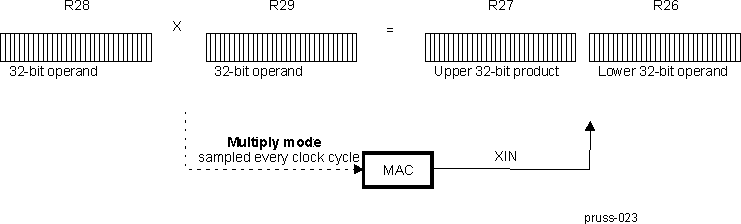 Figure 30-28 MAC Multiply-only Mode- Functional Diagram
30.5.54 Programming PRU MAC in "Multiply-ONLY" mode
The following steps are performed by the PRU firmware for multiply-only mode:
- Enable multiply only MAC_MODE.
- Clear R25[0] for multiply only mode.
- Store MAC_MODE to MAC using XOUT instruction with the following parameters:
- Device ID = 0
- Base register = R25
- Size = 1
- Load operands into R28 and R29.
- Delay at least 1 PRU cycle before executing XIN in step 4.
- Load product into PRU using XIN instruction on R26, R27.
Repeat steps 2-4 for each new operand.
30.5.55 Multiply and Accumulate Mode, MAC_MODE = 1
The Figure 30-29 summarizes the MAC operation in "Multiply and Accumulate" mode. On every XOUT R25_REG[7:0] transaction, the MAC multiplies the contents of R28 and R29, adds the product to its accumulated result, and sets ACC_CARRY if an accumulation overflow occurs.
 Figure 30-29 MAC Multiply and Accumulate Mode Functional Diagram
30.5.56 Programming PRU MAC in "Multiply and Accumulate" mode
The following steps are performed by the PRU firmware for multiply and accumulate mode:
- Enable multiply and accumulate MAC_MODE.
- Set R25[1:0] = 1 for accumulate mode.
- Store MAC_MODE to MAC using XOUT instruction with the following parameters:
- Device ID = 0
- Base register = R25
- Size = 1
- Clear accumulator and carry flag.
- Set R25[1:0] = 3 to clear accumulator (R25[1]=1) and preserve accumulate mode (R25[0]=1).
- Store accumulator to MAC using XOUT instruction on R25.
- Load operands into R28 and R29.
- Multiply and accumulate, XOUT R25[1:0] = 1
Repeat step 4 for each multiply and accumulate using same operands.
Repeat step 3 and 4 for each multiply and accumulate for new operands. - Load the accumulated product into R26, R27, and the ACC_CARRY status into R25 using the XIN instruction.
Steps one and two are required to set the accumulator mode and clear the accumulator and carry flag.
30.5.57 CRC16/32
The PRU0 and PRU1 cores of PRU-ICSS1/PRU-ICSS2 each have a designated CRC16/32 module.
In general, CRC adds error detection capability to communication systems. The CRC encoder appends redundant bits (or CRC bits) to the systematic data message. During reception of the data message, the received data is also encoded with the same CRC encoder. The 2 sets of CRC bits are compared together. If they match, there were no transmission errors; and if they don’t match, a transmission error has been detected.
30.5.58 Features
CRC16/32 supports the following features:
- Supports CRC32:
- x32+x26+x23+x22+x16+x12+x11+x10+x8+x7+x5+x4+x2+x+1
- Supports CRC16:
- x16+x15+x2+1
- PRU broadside interface and XFR instructions (XIN, XOUT) allow for importing CRC results and executing accumulate function
30.5.59 PRU and CRC16/32 Interface
The CRC16/32 module directly connects with the PRU internal registers R25-R29 through use of the PRU broadside interface and XFR instructions. Table 30-67 shows the functionality of each register.
The XFR instructions (XIN and XOUT) are used to load/store register contents between the PRU core and the CRC16/32 module. These instructions define the start, size, direction of the operation, and device ID. The XFR device ID number corresponding to the CRC16/32 module is 1.
| CRC Register | R/W | Description | PRU Mapping |
|---|---|---|---|
| CRC_CFG | W | bit [0] CRC32_ENABLE: 0: CRC16 mode is selected. Hardware will auto-set init state of CRC_SEED to 0x0000_0000. Note CRC16 result value is only 16-bits 1: CRC32 mode is selected . Hardware will auto-set init state of CRC_SEED will be 0xffff_ffff. Always write all 4 bytes. | R25_reg |
| CRC_DATA_8_BFLIP | R | 8-bit flip of CRC_DATA. CRC_DATA_8_BFLIP has the same byte order as CRC_DATA[31:0], but each byte has all bits flipped. CRC_DATA_32_FLIP[7:0] = CRC_DATA[0:7] CRC_DATA_32_FLIP[15:8] = CRC_DATA[8:15] CRC_DATA_32_FLIP[23:16] = CRC_DATA[16:23] CRC_DATA_32_FLIP[31:24] = CRC_DATA[24:31] For CRC16, only CRC_DATA_8_BFLIP[15:0] are valid. No auto reset on CRC_DATA_8_BFLIP read. | R27_reg |
| CRC_SEED | W | CRC SEED value. Hardware will auto-initialize the CRC_SEED value to 0x0000_0000 for CRC16 and 0xFFFF_FFFF for CRC32. Software only needs to initialize CRC_SEED if a different default value is required. Always write 4 bytes. Note when CRC_CFG[CRC32_ENABLE] is enabled, the hardware will switch the CRC_SEED value to 0xFFFF_FFFF. Reading the CRC_DATA register will reset the CRC value to the CRC_SEED state. | R28_reg |
| CRC_DATA_32_BFLIP | R | Full 32-bit flip of CRC_DATA CRC_DATA_32_BFLIP[0] = CRC_DATA[31] … CRC_DATA_32_BFLIP[31] = CRC_DATA[0] For CRC16, only CRC_DATA_32_BFLIP[31:16] are valid. No auto reset on CRC_DATA_32_BFLIP read. | R28_reg |
| CRC_DATA | RW | For Write, must use a fixed width throughout the session. The CRC module supports lower 8-bit, or lower 16-bit, or full 32-bit data widths. For Read, LSB or CRC_DATA[0] is first bit on the wire. Note for CRC16, only CRC_DATA[15:0] is valid. Hardware will delay CRC_DATA read operation up to 1 clock if it occurs back to back with a CRC_DATA write. | R29_reg |
30.5.60 Programming Model
The following steps are performed by the PRU firmware to use the CRC module:
Step1: Configuration (optional)
- Configure CRC type:
For CRC32 operation, set CRC32_ENABLE using XOUT instruction with the following parameters:- Device ID = 1
- Base register = R25
- Size = 1
- Update CRC_SEED, if required using XOUT with the following parameters:
- Device ID = 1
- Base register = R28
- Size = 1 to 4
Step 2:
- Load new CRC data into R29
- Push CRC data to the CRC16/32 module using XOUT with the following parameters:
- Device ID = 1
- Base register = R29
- Size = 1 to 4
- Load the accumulated CRC result into the PRU using the XIN instruction with the following parameters:
- Device ID = 1
- Base register = R29
- Size = 4
Repeat Step 2, numbers 1 and 2 for each new CRC data.
When a session starts, the PRU firmware must use the same write data width throughout the session.
30.5.61 PRU0 and PRU1 Scratch Pad Memory
The PRU-ICSS supports a scratch pad with three independent banks accessible by the PRU cores. The PRU cores interact with the scratch pad through broadside load/store PRU interface and XFR instructions. The scratch pad can be used as a temporary place holder for the register contents of the PRU cores. Direct connection between the PRU cores is also supported for transferring register contents directly between the cores. This section describes the Scratch Pad Memory shared between and directly accessible by the PRU0 and PRU1 cores, as well as the XFR direct method used by the PRU cores of the PRU-ICSS1 /PRU-ICSS2.
30.5.62 PRU0/1 Scratch Pad Overview
The PRU-ICSS scratch pad supports the following features:
- Three scratch pad banks of 30, 32-bit registers (R29:0)
- Flexible load/store options
- User-defined start byte and length of the transfer
- Length of transfer ranges from one byte of a register to the entire register content (R29 to R0)
- Simultaneous transactions supported between PRU0 ↔ Bank<n> and PRU1 ↔ Bank<m>
- Direct connection of PRU0 → PRU1 or PRU1 → PRU0 for all registers R29-R0
- XFR instructions operate in one clock cycle
- Optional XIN/XOUT shift functionality allows remapping of registers (R<n> → R<m>) during load/store operation
Figure 30-30 shows a simplified model of the ScratchPad integration.
 Figure 30-30 ScratchPad and PRU Integration
30.5.63 PRU0 /1 Scratch Pad Operations
XFR instructions are used to load/store register contents between the PRU cores and the scratch pad banks. These instructions define the start, size, direction of the operation, and device ID. The device ID corresponds to the external source or destination (either a scratch pad bank or the other PRU core). The device ID numbers are shown in Table 30-68. Note the direct connect mode (device ID 14) can be used to synchronize the PRU cores. This mode requires the transmitting PRU core to execute XOUT and the receiving PRU core to execute XIN.
| Device ID | Function |
|---|---|
| 10 | Selects Bank0 |
| 11 | Selects Bank1 |
| 12 | Selects Bank2 |
| 13 | Reserved |
| 14 | Selects other PRU core (Direct connect mode) |
A collision occurs when two XOUT commands simultaneously access the same asset or device ID. Table 30-69 shows the priority assigned to each operation when a collision occurs. In direct connect mode (device ID 14), any PRU transaction will be terminated if the stall is greater than 1024 cycles. This will generate the event pr<k>_xfr_timeout that is connected to INTC.
| Operation | Collision and Stall Handling |
|---|---|
| PRU <n> XOUT (→) bank[j] | If both PRU cores access the same bank simultaneously, PRU0 is given priority. PRU1 will temporarily stall until the PRU0 operation completes. |
| PRU <n> XOUT (→) PRU<m> | Direct connect mode requires the transmitting core (PRU<n>) to execute XOUT and the receiving core (PRU<m>) to execute XIN. If PRU<n> executes XOUT before PRU<m> executes XIN, then PRU<n> will stall until either PRU<m> executes XIN or the stall is greater than 1024 cycles. |
| PRU<m> XIN (←) PRU<n> | Direct connect mode requires the transmitting core (PRU<n>) to execute XOUT and the receiving core (PRU<m>) to execute XIN. If PRU<m> executes XIN before PRU<n> executes XOUT, then PRU<m> will stall until either PRU<n> executes XOUT or the stall is greater than 1024 cycles. |
30.5.64 Optional XIN/XOUT Shift
The optional XIN/XOUT shift functionality allows register contents to be remapped or shifted within the destination’s register space. For example, the contents of PRU0 R6-R8 could be remapped to Bank1 R10-12. The XIN/XOUT shift feature is not supported for direct connect mode, only for transfers between a PRU core and scratch pad bank.
The shift feature is enabled or disabled through the PRU subsystem level register PRUSS_SPP[1] XFR_SHIFT_EN bit. When enabled, R0[4:0] (internal to the PRU) defines the number of 32-bit registers in which content is shifted in the scratch pad bank. Note that scratch pad banks do not have registers R30 or R31.
The following PRU firmware examples demonstrate the shift functionality. Note these assume the XFR_SHIFT_EN bit of the PRUSS_SPP register of the PRU-ICSS CFG register space has been set.
XOUT Shift By 4 Registers
Store R4:R7 to R8:R11 in bank0:
- Load 4 into R0.b0
- XOUT using the following parameters:
- Device ID = 10
- Base register = R4
- Size = 16
XOUT Shift By 9 Registers, With Wrap Around
Store R25:R29 to R4:R8 in bank1:
- Load 9 into R0.b0
- XOUT using the following parameters:
- Device ID = 11
- Base register = R25
- Size = 20
XIN Shift By 10 Registers
Load R14:R16 from bank2 to R4:R6:
- Load 10 into R0.b0
- XIN using the following parameters:
- Device ID = 12
- Base register = R4
- Size = 12
30.5.65 PASM_2 — PRU Assembler Overview
PASM_2 is a command-line-driven assembler for the programmable real-time execution unit (PRU). It is designed to build single executable images using a flexible source code syntax and a variety of output options. PRU_ASM is available for Windows and Linux.
The PASM_2 (version 2) command-line driven assembler supports version 3 of the PRU core instructions set.
30.5.66 PRU Calling Syntax
The command line syntax to PASM_2 is:
pasm_2 -PRUv2[bcmldz] SourceFile [OutFileBasename] [-Dname=value] [-CArrayName]Note that only the source file SourceFile is required on the command line. The assembler will default to output option "-c" which generates a C array containing the binary opcode data. The majority of the option flags select a variety of output formats.
The output file OutFileBasename is a base name only. It defaults to the same name as the source file (for example "myprog.p" would have a default base name of "myprog"). Standard filename extensions are applied to the base name to create the final output filename(s), depending on the output option(s) selected.
When specifying PASM_2 options, options can be specified individually or as a group. For example, either of the two invocations below is valid:
pasm_2 -PRUv2 -cdl myprog.p
pasm_2 -PRUv2 -c -d -l myprog.p
Filenames and options can also be mixed, for example:
pasm_2 -PRUv2 myprog.p -cdl
pasm_2 -PRUv2 -cd myprog.p -DMYVAL=1 -l
30.5.67 PRU Output Formats
All program images start at Programmable Real-Time Unit (PRU) address 0. For example, if a program has an internal origin of 8, the first eight 32 bit words of the program image output will be zero.
The following output options are supported. The output file name shown in the table is generated assuming a base name of “myprog”:
| Command Line Option | Output Format | Output Filename |
|---|---|---|
| -b | Little endian binary file | myprog.bin |
| -c | C include file containing unsigned long array called PRUcode[](1) | myprog_bin.h |
| -m | Image file containing one 32 bit hex opcode per line | myprog.img |
| -L | Listing file containing original source code and generated opcodes. | myprog.txt |
| -l | Listing file containing post-processed code and generated opcodes | myprog.lst |
| -d | Debugger output file (opcodes with source and label info) | myprog.dbg |
30.5.68 PRU Additional Options
PASM_2 supports some additional command line options that are not associated with output file format:
| Command Line Option | Function |
|---|---|
| -PRUv2 | Version number. PRUv2 for PRUSSv2. |
| -C | Rename the code array declared when using the -c option |
| -D | Constant definition |
| -z | Enable PASM_2 assembler debug output |
30.5.69 Rename the Code Array for the -c Option
By default, the –c option will create an output file with a name ending in “_bin.h”. Inside this created include file, the output code is defined as a C array of 32 bit values. The default name of the array is “PRUcode[]”. The –C option allows the user to redefine this name to something more appropriate. For example the following command line will create an output file named “myprog_bin.h”, and the C array inside the created file will be called “MyProg_Release_003a[]”.
pasm_2 -PRUv2 -c myprog.p -CMyProg_Release_003a30.5.70 Constant Definitions
When the “-D” option is specified, the remaining command line argument is interpreted as a constant assignment. For example, to add an assignment “1” to the constant “MYVAL”, any of the following is valid:
pasm_2 -PRUv2 -cdl myprog.p -DMYVAL=1
pasm_2 -PRUv2 -c -d -l -DMYVAL=1 myprog.p
pasm_2 -PRUv2 myprog.p -cdlDMYVAL=1
Since the default value assigned to a constant is “1”, the following is also equivalent:
pasm_2 -PRUv2 -c -d -l -DMYVAL myprog.pNote that constants defined on the command line do not override constants defined in the source code.
30.5.71 PRU Assembler Source File Syntax
PASM_2 is a non-linking two pass assembler. It assembles programs as a single monolithic image and directly generates executable code. As there is no linking stage in a PASM_2 build, there are no section or segment directives, nor memory maps or command files.
In PASM_2, there are four basic assembly operators. These include dot “.” commands, hash “#” commands, labels, and instructions (mnemonics). The user may supply comments that are invisible to the assembler.
30.5.72 Dot Commands
Dot commands are used to control the assembler, for example “.origin” and “.proc”. They can also be used to declare complex data types as in the “.struct” directive.
30.5.73 Syntax
The rules for a dot command are as follows:
- Must be the only assembly type on the line
- Can be followed by a comment
- Does not need to start in column 0
30.5.74 Origin (.origin) Command
The origin command is used to specify a code offset in the PRU source file. Typically a single origin statement is specified before any instructions, but multiple origin commands can be specified in order to insert space into the code map.
Example:
.origin 8 // Start the next instruction at code offset 830.5.75 Entry Point (.entrypoint) Command
The entry point command is used to specify the code entry point to the debugger, and stores the information in the debug output file (*.dbg). It has no affect on any other output file type.
By default PASM_2 will set the entry point to the first instruction generated by the assembly.
Examples:
.entrypoint 0	      // Set code entrypoint to address 0
.entrypoint Start	// Set code entrypoint to the code label "Start"
30.5.76 Set Call/Return Register (.setcallreg) Command
This command sets the call/return register that is used in the CALL and RET pseudo op instructions. If this command is not specified, a default register of R30.w0 is used. This command must appear in the source code prior to any program instructions, and it must specify a 16-bit register field.
Example:
.setcallreg r15.w2 // Use R15.W2 in the CALL/RET pseudo ops30.5.77 Start Macro Definition (.macro)
The .macro command is used to begin the definition of a macro. In the assembler, a macro can only be used in place of an opcode. There is always a single parameter to the command, being the name of the macro. Each macro section must start with a “.macro” and end with an “.endm”.
See Section 30.5.109 for more details on using macros.
Example:
.macro mov32 // Define macro "mov32"30.5.78 Specific Macro Parameter(s) (.mparam)
The .mparam command is used to add one or more parameters to a macro. The form of the command is:
.mparam param1 [= default_value] [, param2 [= default_value] ]When a parameter is given a default value, it is considered an optional parameter. Any optional parameters must be the last parameters specified in the parameter list. It is acceptable to supply both required and optional parameters on the same .mparam line.
See Section 30.5.109 for more details on using macros.
Example:
.mparam    dst, src    // Define 2 required parameters, "dst" and "src"
.mparam    temp = r0   // Define an optional parameter "temp" that
                          // defaults to the value 'r0'.
30.5.79 End Macro Definition (.endm)
The .endm command is used to complete the definition of a macro. It is required at the end of any macro specification. There are no parameters.
See Section 30.5.109 for more details on using macros.
Example:
.endm // Completed defining macro30.5.80 Structure (.struct) Command
The structure command is used to open a declaration to a new structure in PASM_2. PASM_2 uses structures to generate standard equates, and allow the user to perform register allocation to private structure instances.
See Section 30.5.115 for more details on using scope and structures.
Example:
.struct myStruct // Declare a structure template called "myStruct"30.5.81 End Structure (.ends) Command
The end structure command is used to close a structure declaration. PASM_2 uses structures to generate standard equates, and allow the user to perform register allocation to private structure instances.
See Section 30.5.115 for more details on using scope and structures.
Example:
.ends30.5.82 Field Directives (.u8, .u16, .u32)
Field directives are used within an open structure declaration to define fields within the structure.
See Section 30.5.115 for more details on using scope and structures.
Example:
.struct MyStruct
	.u32	MyInt					// 32-bit field
	.u16	MyShort					// 16-bit field
	.u8	MyByte1					// 8-bit field
	.u8	MyByte2					// 8-bit field
.ends
30.5.83 Assignment Directive (.assign)
The assignment directive is used to map a defined structure onto the PRU register file. An assign statement can begin on any register boundary.
The programmer may declare the full assignment span manually (both starting and ending register), or leave the ending register blank. When the programmer declares a full register span, PASM_2 will generate an error when the specified span is incorrect. This allows the programmer to formally map structures to specific register spans, reducing the chance that register assignments will accidentally overlap.
Some structures will also require specific alignments due to how their fields are arranged within the structure. PASM_2 will generate an error if the structure alignment requirements can not be met with the specified starting register.
See Section 30.5.115 for more details on using scope and structures.
Example:
.assign MyStruct, R4, R5, MyName1  // Make sure this uses R4 thru R5
.assign MyStruct, R6,  *, MyName2  // Don’t need to validate the range
30.5.84 Enter New Variable Scope (.enter)
The .enter command is used to create and enter a new variable scope. There is a single parameter to the command that specifies the name of the scope. Any structures that are assigned inside a named scope can only be accessed when the scope is open. Use of variable scopes is optional.
See Section 30.5.115 for more details on using scope and structures.
Example:
.enter Scope1 // Create and enter scope named "Scope1"30.5.85 Leave a Variable Scope (.leave)
The .leave command is used to leave a specific variable scope. There is a single parameter to the command that specifies the name of the scope to leave. Scopes do not need to be entered or left in any particular order, but a natural ordering can be enforced by the programmer.
See Section 30.5.115 for more details on using scope and structures.
Example:
.enter Scope1					// Create and enter scope named "Scope1"
	.enter Scope2					// Create and enter scope named "Scope2"
	.leave Scope2					// Leave scope named "Scope2"
.leave Scope1					// Leave scope named "Scope1"
30.5.86 Referencing an Existing Variable Scope (.using)
The .using command is used to enter a specific variable scope that has been previously created and left. There is a single parameter to the command that specifies the name of the scope to enter. The .leave command is then used to leave the scope after being entered with .using.
See Section 30.5.115 for more details on using scope and structures.
Example:
.using Scope1					// Enter existing scope named "Scope1"
	.using Scope2					// Enter existing scope named "Scope2"
	.leave Scope2					// Leave scope named "Scope2"
.leave Scope1					// Leave scope named "Scope1"
30.5.87 PRU Hash Commands
Hash commands are used to control the assembler pre-processor. They are quite similar to their C counterparts.
30.5.88 Syntax
The rules for a hash command are as follows:
- Must be the only assembly type on the line
- Can be followed by a comment
- Does not need to start in column 0
30.5.89 Include (#include) Command
The #include command is used to include additional source files in the assembly process. When a “#include” is specified, the included file is immediately opened, parsed, and processed.
The calling syntax for #include can use quotes ‘” “’ or brackets “< >". Specifying quotes is functionally equivalent to specifying brackets. For example:
#include "localInclude.h"
#include "c:\include\myInclude.h"
#include <inc\myInclude.h>
As PASM_2 uses a monolithic single source approach, the #include statement can be used to specify external source files. This allows a developer to break up a complicated application into several smaller source files.
For example, an application may consist of a master source file “myApp.p” which itself contains nothing but include commands for including sub source files. The contents of “myApp.p” may appear as follows:
#include "myInitialization.p"
#include "myMainLoop.p"
#include "mySubroutines.p"
The above lines would include each source file in turn, concatenating one after the other in the final code image. Each of these included source files may have additional include files of their own.
Including the same include file multiple times will not result in an error, however including files recursively will result in an error.
30.5.90 Define (#define) Command
The “#define” command is used to specify a simple text substitution. Any text defined in a #define is substituted for the defined name within the code.
For example, if the programmer writes:
#define BUFFER_ADDRESS	0x08001000
	ldi     r1.w0, BUFFER_ADDRESS & 0xFFFF
	ldi     r1.w2, BUFFER_ADDRESS >> 16
This would load 0x1000 into register r1.w0 and then 0x0800 into register r1.w2.
Equates are expanded recursively, so the value of the define does not need to be resolved until it is used. For example:
#define B A
#define A 1
        ldi     r1, B
The above will load “1” in register r1.
30.5.91 Undefine (#undef) Command
The “#undef” command is used to undefined a constant that was previously assigned via #define.
For example:
// Redefine our buffer address without generating an assmbler warning
#undef BUFFER_ADDRESS
#define BUFFER_ADDRESS	0x08001000
30.5.92 Error (#error) Command
The “#error” command is used to specify an error during assembly. For example, if the programmer wishes to verify the constant value MYMODE is defined, they can write:
#ifndef MYMODE
#error Mode not specified
#endif
The above will produce an error if the program is assembled and MYMODE is not defined.
30.5.93 Warning (#warn) Command
The “#warn” command is used to specify a warning during pass 1 of the assembly. For example, if the programmer wishes to verify the constant value MYMODE is defined, but still allow a default mode, they can write:
#ifndef MYMODE
#warn   Mode not specified - setting default
#define MYMODE DEFAULT_MODE
#endif
The above will produce an assembler warning if the program is assembled and MYMODE is not defined.
30.5.94 Notation (#note) Command
The “#note” command is used to specify a notation during pass 1 of the assembly. For example, if the programmer wishes to allow a default setting of the constant value MYMODE, but still notify the programmer what is happening, they can write:
#ifndef MYMODE
#note   Using default MYMODE
#define MYMODE DEFAULT_MODE
#endif
The above will produce an assembler notation if the program is assembled and MYMODE is not defined, but it is not counted as an error or a warning.
30.5.95 If Defined (#ifdef) Command
The “#ifdef” command is used to specify a block of conditional code based on whether the supplied constant is defined. Here, the code inside the #ifdef block will be assembled only if the constant is defined, regardless of its defined value. Every #ifdef must be followed by a #endif. For example:
#define MYVAL 1
#ifdef MYVAL
    // This code in this block will be assembled
#endif
#undef MYVAL
#ifdef MYVAL
    // This code in this block will not be assembled
#endif
30.5.96 If Not Defined (#ifndef) Command
The “#ifndef” command is used to specify a block of conditional code based on whether the supplied constant is defined. Here, the code inside the #ifndef block will be assembled only if the constant is not defined. Every #ifndef must be followed by a #endif. For example:
#define MYVAL 1
#ifndef MYVAL
    // This code in this block will not be assembled
#endif
#undef MYVAL
#ifndef MYVAL
    // This code in this block will be assembled
#endif
30.5.97 End If (#endif) Command
The “#endif” command is used to close a previously open #ifdef or #ifndef, thus closing the conditional assembly block.
30.5.98 Else (#else) Command
The “#else” command is used to specify a block of conditional code based on a previous #ifdef or #ifndef, allowing for the opposite case. For example:
#define MYVAL 1
#ifdef MYVAL
    // This code in this block will be assembled
#else
    // This code in this block will not be assembled
#endif
30.5.99 Labels
Labels are used denote program addresses. When placed at the beginning of a source line and immediately followed by a colon ‘:’, they mark a program address location. When referenced by an instruction, the corresponding marked address is substituted for the label.
The syntax rules for labels are as follows:
- A label definition must be immediately followed by a colon.
- Only instructions and/or comments can occupy the same source line as a label.
- Labels can use characters ‘A’-‘Z’, ‘a’-‘z’, ‘0’-‘9’ plus underscores ‘_’ and dots ‘.’.
- A label can not begin with a number (‘0’-‘9’).
The following illustrates defining and using the label named “loop_label”:
        ldi     r0, 100
loop_label:
        sub     r0, r0, 1
        qbne    loop_label, r0, 0
        ret
30.5.100 Comments
In PASM_2 comments are transparent to all other operations, thus they can appear anywhere on any source line. However, since comments are terminated by the end of line, they are by definition, the last field on a line.
The syntax rules for comments are as follows:
- Comments must be preceded by '//'.
- Comments are always the last field to appear on a line.
The following illustrates defining a comment:
       //-------------------------
       // This is a comment
       //-------------------------
       ldi     r0, 100     // This is a comment
30.5.101 PRU Assembly Instructions
Instruction lines include a PRU mnemonic, followed by a list of parameters appropriate for the mnemonic. See Section 30.5.129, PRU Instruction Set, for supported instructions. Note that some of these are pseudo ops, which do not affect their use, but may affect how they are displayed when disassembled by a debugger.
30.5.102 Syntax
An instruction line consists of a mnemonic is followed by a specific number of parameters appropriate for the instruction. Parameters are always separated by commas. For example:
mnemonic parameter1, parameter2, parameter3, parameter4Each instruction accepts either a fixed or varying number of parameters. Those that use a varying number of parameters do so for either flexibility in formatting, or to adjust to different use cases. In most cases, at least one of the parameters can be one of a couple different types. For example, on many instructions the third parameter can be either a register or an immediate value.
All parameters take the form a register, label, or immediate value. There exists both a formal and informal syntax for instruction lines. The formal syntax was inherited from an earlier assembler. Modern applications typically use the informal syntax. These are discussed in more detail later in section dealing with parameter type, but here are some examples of both formal and informal syntax.
Formal Syntax:
        LDI     R2, #5
        LDI     R3, #3
        ADD     R1, R2, R3
        QBNE    (LABEL), R1, #8
        JMP     (LABEL)
Informal Syntax:
        ldi     r2, 5
        ldi     r3, 3
        add     r1, r2, r3
        qbne    label, r1, 8
        jmp     label
30.5.103 PRU Registers Access
The PASM_2 assembler treats PRU registers as bit fields within the register file. All registers start with a base register (R0 through R31). A base register defines an unsigned 32 bit quantity. This 32 bit base field can be modified by appending different register modifier suffixes. The modifier suffix selects which portion of the register on which to operate. The suffixes are as follows:
| Suffix | Range of n | Meaning |
|---|---|---|
| .wn | 0 to 2 | 16 bit field with a byte offset of n within the parent field |
| .bn | 0 to 3 | 8 bit field with a byte offset of n within the parent field |
| .tn | 0 to 31 | 1 bit field with a bit offset of n within the parent field |
Multiple suffixes may appear on a base register to further modify the desired field. For example:
| Register | Meaning |
|---|---|
| R5 | 32 bit value, bits 0 to 32 of register R5 |
| R5.w0 | 16 bit value, bits 0 to 15 of register R5 |
| R5.w1 | 16 bit value, bits 8 to 23 of register R5 |
| R5.b1 | 8 bit value, bits 8 to 15 of register R5 |
| R5.t7 | 1 bit value, bit 7 of register R5 |
| R5.w1.b1 | 8 bit value, bits 8 to 15 of “R5.w1” (this corresponds to bits 16 to 23 of register R5) |
| R5.w1.b1.t7 | 1 bit value, bit 7 of R5.w1.b1 (since R5.w1.b1 is bits 16 to 23 of R5, this is bit 23 of register R5) |
Note that some suffix combinations are illegal. A combination is illegal when a modifier attempts to extract a field that is not contained in the parent field. For example:
| Illegal Register | Reason for Illegality |
|---|---|
| R5.t0.b0 | A byte field can be extracted from a single bit field |
| R5.w2.b2 | Bits 16 to 23 can not be extracted out of a 16 bit field |
| R5.b0.t8 | Bit 8 can not be extracted out of an 8 bit field |
| R5.w0.w1 | Bits 8 to 23 can not be extracted out of a 16 bit field. Note that R5.w1.w0 would be legal, but not of much use as R5.w1.w0 == R5.w1 |
30.5.104 Loop/Byte Count Registers
Register R0 is used in some instructions to specify a loop count or byte count value. A count of this type is always the last parameter in the parameter list. A loop/byte count is always an 8 bit sub-field of R0. For legacy reasons, the register is expressed only by its modifier suffix. For example: “b0” is taken to mean “R0.b0” and “b2” is taken to mean “R0.b2”.
Register loop/byte counts are allowed only in very specific circumstances which are detailed in the appropriate instruction description.
30.5.105 Labels
Labels are used to reference code locations in a program. In PASM_2, labels are used to specify targets of jump instructions, but can also be used in an instruction that calls for an immediate value (so long as the label’s value fits in the immediate field’s specified bit width). When specifying a label, the user has the option of enclosing it in parenthesis “( )” for legacy concerns, but it is not required or recommended. For example:
        QBNE    (MyLabel), R1, #8
        JMP     (MyLabel)
        LDI     R1.W0, #MyLabel
        qbne    MyLabel, r1, 8
        jmp     MyLabel
        ldi     r1.w0, MyLabel
30.5.106 Immediate Values
Immediate values are simple numbers or expressions that compute to constant values. Immediate values or expressions can be preceded by a hash character ‘#’ for legacy concerns, but this is not required or recommended. For example:
        LDI     R1, #0x25
        and     r2, r1, 0b1001011
        ldi     r1.w0, 0x12345678 & 0xFFFF
        ldi     r1.w2, 0x12345678 >> 16
        add     r2, r3, (6*(5-3)/2) << 2
Note that if an immediate value is lead by a ‘0’ without a format notation of ‘x’ or ‘b’, then the base is assumed to be in octal format.
30.5.107 Syntax Terms and Definitions
The following terms are definitions are used to specify parameters in a formal instruction definition.
| Field Name | Meaning | Examples |
|---|---|---|
| REG, REG1, REG2, … | Any register field from 8 to 32 bits | r0 r1.w0 r3.b2 |
| Rn, Rn1, Rn2, … | Any 32 bit register field (r0 through r31) | r0 r1 |
| Rn.tx | Any 1 bit register field (x denotes the bit position) | r0.t23 r1.b1.t4 |
| Cn, Cn1, Cn2, … | Any 32 bit constant register entry (c0 through c31) | c0 c1 |
| bn | Specifies a field that must be b0, b1, b2, or b3 – denoting r0.b0, r0.b1, r0.b2, and r0.b3 respectively. | b0 |
| LABEL | Any valid label, specified with or without parenthesis. An immediate value denoting an instruction address is also acceptable. | loop1 (loop1) 0 |
| IM(n) | An immediate value from 0 to n. Immediate values can be specified with or without a leading hash “#” character. Immediate values, labels, and register addresses are all acceptable. | #23 0b0110 2+2 &r3.w2 |
| OP(n) | This is a combination (or the union) of REG and IM(n). It specifies a register field from 8 to 32 bits, or an immediate value from 0 to n. A label or register address that resolves to a value within the denoted range is also acceptable. | r0 r1.w0 #0x7F 1<<3 loop1 &r1.w0 |
For example the following is the definition for the ADD instruction:
ADD REG1, REG2, OP(255)This means that the first and second parameters can be any register field from 8 to 32 bits. The third parameter can be any register field from 8 to 32 bits or an immediate value from 0 to 255. Thus the following are all legal ADD instructions:
        ADD     R1, R1, #0x25        // r1 += 37
        ADD     r1, r1, 0x25         // r1 += 37
        ADD     r3, r1, r2           // r3 = r1 + r2
        ADD     r1.b0, r1.b0, 0b100  // r1.b0 += 4
        ADD     r2, r1.w0, 1<<3      // r2 = r1.w0 + 8
30.5.108 PRU Advanced Topics
30.5.109 PRU Using Macros
Macros are used to define custom instructions for the CPU. They are similar to in-line subroutines in C.
30.5.110 Defining a Macro
A macro is defined by first declaring the start of a macro block and specifying the macro name, then specifying the assembly code to implement the intended function, and finally closing the macro block.
    .macro  macro name
    .mparam macro parameters
       	 < lines of assembly code >
       	 < lines of assembly code >
       	 < lines of assembly code >
    .endm
The assembly code within a macro block is identical to that used outside a macro block with minor variances:
- Macros cannot be nested
- No dot commands may appear within a macro block other than “.mparam”.
- Pre-processor definitions and conditional assembly are processed when the macro is defined.
- Structure references are expanded when the macro is used.
- Labels defined within a macro are considered local and can only be referenced from within the macro.
- References to external labels from within a macro are allowed.
30.5.111 Macro Parameters
The macro parameters can be specified on one “.mparam” line or multiple. They are processed in the order that they are encountered. There are two types of parameters, mandatory and optional. Optional parameters are assigned a default value that is used in the event that they are not specified when the macro is used. Since parameters are always processed in order, any optional parameters must come last, and once an optional parameter is used, none of the remaining parameters may be specified.
For example:
    .macro  mv1             // Define macro "mv1"
    .mparam dst=r0, src=5   // Two optional parameters
        mov dst, src
    .endm
For the above macro, the following expansions are possible:
| Macro Invocation | Result |
|---|---|
| mv1 r1, 7 | mov r1, 7 |
| mv1 r2 | mov r2, 5 |
| mv1 | mov r0, 5 |
Note that optional parameters can not be passed by using “empty” delimiters. For example, the following invocation of “mv1” is illegal:
mv1 , 7 // Illegal attempt to do ‘mov r0, 7’ 30.5.112 Example Macros
30.5.113 Example 1: Move 32-bit Value (mov32)
The mov32 macro is a good example of a simple macro that saves some typing and makes a source code look a little cleaner.
Note: The latest assembler supports 32-bit immediate values natively, making this MACRO undesirable for general use (but it makes a good macro example).
Specification:
//
// mov32 : Move a 32bit value to a register
//
// Usage:
//     mov32   dst, src
//
// Sets dst = src. Src must be a 32 bit immediate value.
//
.macro  mov32
.mparam dst, src
        mov     dst.w0, (src) & 0xFFFF
        mov     dst.w2, (src) >> 16
.endm
Example Invocation:
The invocation for this macro is the same as the standard mov pseudo op:
mov32 r0, 0x12345678Example Expansion:
The expansion of the above invocation uses to immediate value moves to accomplish the 32-bit load.
        mov     r0.w0, (0x12345678) & 0xFFFF
        mov     r0.w2, (0x12345678) >> 16
30.5.114 Example 2: Quick Branch If in Range (qbir)
Any label defined within a macro is altered upon expansion to be unique. Thus internal labels are local to the macro and code defined outside of a macro cannot make direct use of a label that is defined inside a macro. However code contained within a macro can make free use of externally defined labels.
The qbir macro is a simple example that uses a local label. The macro instruction will jump to the supplied label if the test value is within the specified range.
Specification:
//
// qbir : Quick branch in range
//
// Usage:
//     qbir    label, test, low, high
//
// Jumps to label if (low <= test <= high).
// Test must be a register. Low and high can be
// a register or a 8 bit immediate value.
//
.macro  qbir
.mparam label, test, low, high
        qbgt    out_of_range, test, low
        qbge    label, test, high
out_of_range:
.endm
Example Invocation:
The example below checks the value in R5 for membership of two different ranges. Note that the range “low” and “high” values could also come from registers. They do not need to be immediate values:
        qbir    range1, r5,  1,  9   // Jump if (1 <= r5 <= 9)
        qbir    range2, r5, 25, 50   // Jump if (25 <= r5 <= 50)
Example Expansion:
The expansion of the above invocation illustrates how external labels are used unmodified while internal labels are altered on expansion to make them unique.
        qbgt     _out_of_range_1_, R5, 1
        qbge     range1, r5, 9
_out_of_range_1_:
        qbgt     _out_of_range_2_, R5, 25
        qbge     range2, r5, 50
_out_of_range_2_:
30.5.115 Using Structures and Scope
30.5.116 Basic Structures
Structures are used in PASM_2 to eliminate the tedious process of defining structure offset fields for using in LBBO/SBBO, and the even more painful process of mapping structures to registers.
30.5.117 Declaring Structure Types
Structures are declared in PASM_2 using the “.struct” dot command. This is similar to using a “typedef” in C. PASM_2 automatically processes each declared structure template and creates an internal structure type. The named structure type is not yet associated with any registers or storage. For example, say the application programmer has the following structure in C:
typedef struct _PktDesc {
    struct _PktDesc *pNext;
    char            *pBuffer;
    unsigned short  Offset;
    unsigned short  BufLength;
    unsigned short  Flags;
    unsigned short  PktLength;
} PKTDESC;
The equivalent PASM_2 structure type is created using the following syntax:
.struct PktDesc
    .u32    pNext
    .u32    pBuffer
    .u16    Offset
    .u16    BufLength
    .u16    Flags
    .u16    PktLength
.ends
30.5.118 Assigning Structure Interfaces to Registers
The second function of the PASM_2 structure is to allow the application developer to map structures onto the PRU register file without the need to manually allocate registers to each field. This is done through the “.assign” dot command. For example, say the application programmer performs the following assignment:
.assign PktDesc, R4, R7, RxDesc // Make sure this uses R4 thru R7When PASM_2 sees this assignment, it will perform three tasks for the application developer:
- PASM_2 will verify that the structure perfectly spans the declared range (in this case R4 through R7). The application developer can avoid the formal range declaration by substituting ‘*’ for ‘R7’ above.
- PASM_2 will verify that all structure fields are able to be mapped onto the declared range without any alignment issues. If an alignment issue is found, it is reported as an error along with the field in question. Note that assignments can begin on any register boundary.
- PASM_2 will create an internal data type named “RxDesc”, which is of type “PktDesc”.
For the above assignment, PASM_2 will use the following variable equivalencies. Note that PASM_2 will automatically adjust for endian mode.
| Variable | Little Endian |
|---|---|
| RxDesc | R4 |
| RxDesc.pNext | R4 |
| RxDesc.pBuffer | R5 |
| RxDesc.Offset | R6.w0 |
| RxDesc.BufLength | R6.w2 |
| RxDesc.Flags | R7.w0 |
| RxDesc.PktLength | R7.w2 |
For example the source line below will be converted to the output shown:
        // Input Source Line
        ADD     r20, RxDesc.pBuffer, RxDesc.Offset
        // Output Source Line
        ADD     r20, R5, R6.w0
30.5.119 SIZE and OFFSET Operators
SIZE and OFFSET are two useful operators that can be applied to either structure types or structure assignments. The SIZE operator returns the byte size of the supplied structure or structure field. The OFFSET operator returns the byte offset of the supplied field from the start of the structure.
30.5.120 SIZE Operator Example
Using the assignment example from the previous section, the following SIZE equivalencies would apply:
| Variable Operation | Results |
|---|---|
| SIZE(PktDesc) | 16 |
| SIZE(PktDesc.pNext) | 4 |
| SIZE(PktDesc.pBuffer) | 4 |
| SIZE(PktDesc.Offset) | 2 |
| SIZE(PktDesc.BufLength) | 2 |
| SIZE(PktDesc.Flags) | 2 |
| SIZE(PktDesc.PktLength) | 2 |
| SIZE(RxDesc) | 16 |
| SIZE(RxDesc.pNext) | 4 |
| SIZE(RxDesc.pBuffer) | 4 |
| SIZE(RxDesc.Offset) | 2 |
| SIZE(RxDesc.BufLength) | 2 |
| SIZE(RxDesc.Flags) | 2 |
| SIZE(RxDesc.PktLength) | 2 |
30.5.121 OFFSET Operator Example
Using the assignment example from the previous section, the following OFFSET equivalencies would apply:
| Variable Operation | Results |
|---|---|
| OFFSET(PktDesc) | 0 |
| OFFSET(PktDesc.pNext) | 0 |
| OFFSET(PktDesc.pBuffer) | 4 |
| OFFSET(PktDesc.Offset) | 8 |
| OFFSET(PktDesc.BufLength) | 10 |
| OFFSET(PktDesc.Flags) | 12 |
| OFFSET(PktDesc.PktLength) | 14 |
| OFFSET(RxDesc) | 0 |
| OFFSET(RxDesc.pNext) | 0 |
| OFFSET(RxDesc.pBuffer) | 4 |
| OFFSET(RxDesc.Offset) | 8 |
| OFFSET(RxDesc.BufLength) | 10 |
| OFFSET(RxDesc.Flags) | 12 |
| OFFSET(RxDesc.PktLength) | 14 |
30.5.122 Using Variable Scopes
On larger PASM_2 applications, it is common for different structures to be applied to the same register range for use at different times in the code. For example, assume the programmer uses three structures, one called “global”, one called “init” and one called “work”. Assume that the global structure is always valid, but that the init and work structures do not need to be used at the same time.
The programmer could assign the structures as follows:
.assign struct_global,   R2, R8,  myGlobal
.assign struct_init      R9, R12, init      // Registers shared with "work"
.assign struct_work      R9, R13, work      // Registers shared with "init"
The program code may look something like the following:
| |
| |
| Using R9 to R12 for "init" structure |
| |
| |
| |
| |
| Using R9 to R13 for "work" structure |
| |
| ... | |
| |
| |
| Using R9 to R12 for "init" structure |
|
The code has been shaded to emphasize when the shared registers are being used for the “init” structure and when they are been used for the “work” structure. The above is quite legal, but in this example, PASM_2 does not provide any enforcement for the register sharing. For example, assume the work section of the code contained a reference to the “init” structure:
| |
| |
| |
| The reference to "init" would not cause an assembly error. |
| |
| ... |
The above example would not result in an assembly error even though using the same registers for two different purposes at the same time would result in a functional error.
To solve this potential problem, named variable scopes can be defined in which the register assignments are to be made. For example, the above shared assignments can be revised to as shown below to include the creation of variable scopes:
.assign struct_global,   R2, R8,  myGlobal // Available in all scopes
.enter Init_Scope                          // Create new scope Init_Scope
    .assign struct_init  R9, R12, init     // Only available in Init_Scope
.leave Init_Scope                          // Leave scope Init_Scope
.enter Work_Scope                          // Create new scope Work_Scope
    .assign struct_work  R9, R13, work     // Only available in Work_Scope
.leave Work_Scope                          // Leave scope Work_Scope
Once the scopes have been defined, the structures assigned within can only be accessed while the scope is open. Previously defined scopes can be reopened via the “.using” command.
| |
| |
| |
| Using "Init_Scope" |
| |
| |
| |
| |
| |
| |
| Using "Work_Scope" |
| |
| ... | |
| |
| |
| |
| |
| Using "Init_Scope" |
| |
|
When using scopes as in the above example, any attempted reference to a structure assignment made outside a currently open scope will result in an assembly error.
30.5.123 PRU Register Addressing and Spanning
Certain PRU instructions act upon or affect more than a single register field. These include MVIx, ZERO, SCAN, LBxO, and SBxO. It is important to understand how register fields are packed into registers, and how these fields are addressed when using one of these PRU functions.
30.5.124 PRU Little Endian Register Mapping
The registers of the PRU are memory mapped with the little endian byte ordering scheme. For example, say we have the following registers set to the given values:
R0 = 0x80818283
R1 = 0x84858687
The following table is the register mapping to byte offset in little endian:
| Byte Offset | 0 | 1 | 2 | 3 | 4 | 5 | 6 | 7 |
|---|---|---|---|---|---|---|---|---|
| Register Field | R0.b0 | R0.b1 | R0.b2 | R0.b3 | R1.b0 | R1.b1 | R1.b2 | R1.b3 |
| Example Value | 0x83 | 0x82 | 0x81 | 0x80 | 0x87 | 0x86 | 0x85 | 0x84 |
There are three factors affected by register mapping and little endian mapping. There are register spans, the first byte affected in a register field, and register addressing. In addition, there are some alterations in PRU opcode encoding.
30.5.125 PRU Register Spans
The concept of how the register file is spanned can be best viewed using the tables created in the example from section 3.3.1. Registers are spanned by incrementing the byte offset from the start of the register file for each subsequent byte.
For example assume we have the following registers set to their indicated values:
R0 = 0x80818283
R1 = 0x84858687
R2 = 0x00001000
If the instruction “SBBO R0.b2, R2, 0, 5” is executed, it will result in a memory write to memory address 0x1000 as shown in little endian:
| Byte Address | 0x1000 | 0x1001 | 0x1002 | 0x1003 | 0x1004 |
|---|---|---|---|---|---|
| Value | 0x81 | 0x80 | 0x87 | 0x86 | 0x85 |
30.5.126 PRU First Byte Affected
The first affected byte in a register field is literally the first byte to be altered when executing a PRU instruction. For example, in the instruction “LBBO R0, R1, 0, 4”, the first byte to be affected by the LBBO is R0.b0 in little endian. The width of a field in a register span operation is almost irrelevant in little endian, since the first byte affected is independent of field width. For example, consider the following table:
| Register Expression | First Byte Affected |
|---|---|
| R0 | R0.b0 |
| R0.w0 | R0.b0 |
| R0.w1 | R0.b1 |
| R0.w2 | R0.b2 |
| R0.b0 | R0.b0 |
| R0.b1 | R0.b1 |
| R0.b2 | R0.b2 |
| R0.b3 | R0.b3 |
As can be seen in the table above, for any expression the first byte affected is always the byte offset of the field within the register. Thus in little endian, the expressions listed below all result in identical behavior.
- LBBO R0, R1, 0, 4
- LBBO R0.w0, R1, 0, 4
- LBBO R0.b0, R1, 0, 4
30.5.127 PRU Register Address
The MVIx, ZERO, SCAN, LBxO, and SBxO instructions may use or require a register address instead of the direct register field in the instruction. In the assembler a leading ‘&’ character is used to specify that a register address is to be used. The address of a register is defined to be the byte offset within the register file of the first affected byte in the supplied field.
Given the information already presented in this chapter, it should be straight forward to verify the following register address mappings:
| Register Address Expression | Little Endian | |
| First Byte Affected | Register Address | |
| &Rn | Rn.b0 | (n*4) |
| &Rn.w0 | Rn.b0 | (n*4) |
| &Rn.w1 | Rn.b1 | (n*4) + 1 |
| &Rn.w2 | Rn.b2 | (n*4) + 2 |
| &Rn.b0 | Rn.b0 | (n*4) |
| &Rn.b1 | Rn.b1 | (n*4) + 1 |
| &Rn.b2 | Rn.b2 | (n*4) + 2 |
| &Rn.b3 | Rn.b3 | (n*4) + 3 |
Register addresses are very useful for writing endian agnostic code, or for overriding the declared field widths in a structure element.
30.5.128 PRU Opcode Generation
The PRU binary opcode formats for LBBO, SBBO, LBCO, and SBCO use a byte offset for the source/destination register in the PRU register file. For example, only the following destination fields can actually be encoded into a PRU opcode for register R1:
- LBBO R1.b0, R0, 0, 4
- LBBO R1.b1, R0, 0, 4
- LBBO R1.b2, R0, 0, 4
- LBBO R1.b3, R0, 0, 4
30.5.129 PRU Instruction Set
This section gives the Instruction set of the PRU cores integrated in the device PRU Subsystem.
30.5.130 Arithmetic and Logical
All operations are 32 bits wide (with a 33-bit result in the case of arithmetic). The source values are zero extended prior to the operation. If the destination is too small to accept the result, the result is truncated.
On arithmetic operations, the first bit to the right of the destination width becomes the carry value. Thus if the destination register is an 8 bit field, bit 8 of the result becomes the carry. For 16 and 32 bit destinations, bit 16 and bit 32 are used as the carry bit respectively.
30.5.131 Unsigned Integer Add (ADD)
Performs 32-bit add on two 32 bit zero extended source values.
Definition:
ADD REG1, REG2, OP(255)Operation:
REG1 = REG2 + OP(255)
carry   = (( REG2 + OP(255) ) >> bitwidth(REG1)) & 1
Example:
add     r3, r1, r2
add     r3, r1.b0, r2.w2
add     r3, r3, 10
30.5.132 Unsigned Integer Add with Carry (ADC)
Performs 32-bit add on two 32 bit zero extended source values, plus a stored carry bit.
Definition:
ADC REG1, REG2, OP(255)Operation:
REG1 = REG2 + OP(255) + carry
carry   = (( REG2 + OP(255) + carry ) >> bitwidth(REG1)) & 1
Example:
adc     r3, r1, r2
adc     r3, r1.b0, r2.w2
adc     r3, r3, 10
30.5.133 Unsigned Integer Subtract (SUB)
Performs 32-bit subtract on two 32 bit zero extended source values.
Definition:
SUB REG1, REG2, OP(255)Operation:
REG1 = REG2 - OP(255)
carry   = (( REG2 - OP(255) ) >> bitwidth(REG1)) & 1
Example:
sub     r3, r1, r2
sub     r3, r1.b0, r2.w2
sub     r3, r3, 10
30.5.134 Unsigned Integer Subtract with Carry (SUC)
Performs 32-bit subtract on two 32 bit zero extended source values with carry (borrow).
Definition:
SUC REG1, REG2, OP(255)Operation:
REG1 = REG2 - OP(255) - carry
carry   = (( REG2 - OP(255) - carry ) >> bitwidth(REG1)) & 1
Example:
suc     r3, r1, r2
suc     r3, r1.b0, r2.w2
suc     r3, r3, 10
30.5.135 Reverse Unsigned Integer Subtract (RSB)
Performs 32-bit subtract on two 32 bit zero extended source values. Source values reversed.
Definition:
RSB REG1, REG2, OP(255)Operation:
REG1 = OP(255) - REG2
carry   = (( OP(255) - REG2 ) >> bitwidth(REG1)) & 1
Example:
rsb     r3, r1, r2
rsb     r3, r1.b0, r2.w2
rsb     r3, r3, 10
30.5.136 Reverse Unsigned Integer Subtract with Carry (RSC)
Performs 32-bit subtract on two 32 bit zero extended source values with carry (borrow). Source values reversed.
Definition:
RSC REG1, REG2, OP(255)Operation:
REG1 = OP(255) - REG2 - carry
carry   = (( OP(255) - REG2 - carry ) >> bitwidth(REG1)) & 1
Example:
rsc     r3, r1, r2
rsc     r3, r1.b0, r2.w2
rsc     r3, r3, 10
30.5.137 Logical Shift Left (LSL)
Performs 32-bit shift left of the zero extended source value.
Definition:
LSL REG1, REG2, OP(31)Operation:
REG1 = REG2 << ( OP(31) & 0x1f )Example:
lsl     r3, r3, 2
lsl     r3, r3, r1.b0
lsl     r3, r3.b0, 10
30.5.138 Logical Shift Right (LSR)
Performs 32-bit shift right of the zero extended source value.
Definition:
LSR REG1, REG2, OP(31)Operation:
REG1 = REG2 >> ( OP(31) & 0x1f )Example:
lsr     r3, r3, 2
lsr     r3, r3, r1.b0
lsr     r3, r3.b0, 10
30.5.139 Bitwise AND (AND)
Performs 32-bit logical AND on two 32 bit zero extended source values.
Definition:
AND REG1, REG2, OP(255)Operation:
REG1 = REG2 & OP(255)Example:
and     r3, r1, r2
and     r3, r1.b0, r2.w2
and     r3.b0, r3.b0, ~(1<<3)    // Clear bit 3
30.5.140 Bitwise OR (OR)
Performs 32-bit logical OR on two 32 bit zero extended source values.
Definition:
OR REG1, REG2, OP(255)Operation:
REG1 = REG2 | OP(255)Example:
or      r3, r1, r2
or      r3, r1.b0, r2.w2
or      r3.b0, r3.b0, 1<<3     // Set bit 3
30.5.141 Bitwise Exclusive OR (XOR)
Performs 32-bit logical XOR on two 32 bit zero extended source values.
Definition:
XOR REG1, REG2, OP(255)Operation:
REG1 = REG2 ^ OP(255)Example:
xor      r3, r1, r2
xor      r3, r1.b0, r2.w2
xor      r3.b0, r3.b0, 1<<3   // Toggle bit 3
30.5.142 Bitwise not (not)
Performs 32-bit logical not on the 32 bit zero extended source value.
Definition:
not REG1, REG2Operation:
REG1 = ~REG2Example:
not      r3, r3
not      r1.w0, r1.b0
30.5.143 Copy Minimum (MIN)
Compares two 32 bit zero extended source values and copies the minimum value to the destination register.
Definition:
MIN REG1, REG2, OP(255)Operation:
if( OP(255) > REG2 )
        REG1 = REG2;
else
        REG1 = OP(255);
Example:
min      r3, r1, r2
min      r1.w2, r1.b0, 127
30.5.144 Copy Maximum (MAX)
Compares two 32 bit zero extended source values and copies the maximum value to the destination register.
Definition:
MAX REG1, REG2, OP(255)Operation:
if( OP(255) > REG2 )
        REG1 = REG2;
else
        REG1 = OP(255);
Example:
max      r3, r1, r2
max      r1.w2, r1.b0, 127
30.5.145 Clear Bit (CLR)
Clears the specified bit in the source and copies the result to the destination. Various calling formats are supported:
Format 1:
Definition:
CLR REG1, REG2, OP(255)Operation:
REG1 = REG2 & ~( 1 << (OP(31) & 0x1f) )Example:
clr      r3, r1, r2          // r3 = r1 & ~(1<<r2)
clr      r1.b1, r1.b0, 5     // r1.b1 = r1.b0 & ~(1<<5)
Format 2 (same source and destination):
Definition:
CLR REG1, OP(255)Operation:
REG1 = REG1 & ~( 1 << (OP(31) & 0x1f) )Example:
clr      r3, r1             // r3 = r3 & ~(1<<r1)
clr      r1.b1, 5           // r1.b1 = r1.b1 & ~(1<<5)
Format 3 (source abbreviated):
Definition:
CLR REG1, Rn.txOperation:
REG1 = Rn & ~Rn.txExample:
clr      r3, r1.t2         // r3 = r1 & ~(1<<2)
clr      r1.b1, r1.b0.t5   // r1.b1 = r1.b0 & ~(1<<5)
Format 4 (same source and destination – abbreviated):
Definition:
CLR Rn.txOperation:
Rn = Rn & ~Rn.txExample:
clr r3.t2 // r3 = r3 & ~(1<<2)30.5.146 Set Bit
Sets the specified bit in the source and copies the result to the destination. Various calling formats are supported.
Note: Whenever R31 is selected as the source operand to a SET, the resulting source bits will be NULL, and not reflect the current input event flags that are normally obtained by reading R31.
Format 1:
Definition:
SET REG1, REG2, OP(255)Operation:
REG1 = REG2 | ( 1 << (OP(31) & 0x1f) )Example:
set      r3, r1, r2          // r3 = r1 | (1<<r2)
set      r1.b1, r1.b0, 5     // r1.b1 = r1.b0 | (1<<5)
Format 2 (same source and destination):
Definition:
SET REG1, OP(255)Operation:
REG1 = REG1 | ( 1 << (OP(31) & 0x1f) )Example:
set      r3, r1             // r3 = r3 | (1<<r1)
set      r1.b1, 5           // r1.b1 = r1.b1 | 1<<5)
Format 3 (source abbreviated):
Definition:
SET REG1, Rn.txOperation:
REG1 = Rn | Rn.txExample:
set      r3, r1.t2         // r3 = r1 | (1<<2)
set      r1.b1, r1.b0.t5   // r1.b1 = r1.b0 | (1<<5)
Format 4 (same source and destination – abbreviated):
Definition:
SET Rn.txOperation:
Rn = Rn | Rn.txExample:
set r3.t2 // r3 = r3 | (1<<2)30.5.147 Left-Most Bit Detect (LMBD)
Scans REG2 from its left-most bit for a bit value matching bit 0 of OP(255), and writes the bit number in REG1 (writes 32 to REG1 if the bit is not found).
Definition:
LMBD REG1, REG2, OP(255)Operation:
for( i=(bitwidth(REG2)-1); i>=0; i-- )
if( !((( REG2>>i) ^ OP(255))&1) )
    break;
if( i<0 )
    REG1 = 32;
else
    REG1 = i;
Example:
lmbd     r3, r1, r2
lmbd     r3, r1, 1
lmbd     r3.b3, r3.w0, 0
30.5.148 NULL Operation (NOPn)
This instruction performs no standard operation. The instruction may or may not provide custom functionality that will vary from platform to platform.
There are 16 forms of the instruction including NOP0 through NOP9, and NOPA through NOPF.
Definition:
NOPn REG1, REG2, OP(255)Operation:
NULL operation or Platform dependentExample:
nop0     r3, r1, r2
nop9     r3, r1.b0, r2.w2
nopf     r3, r3, 10
30.5.149 PRU Register Load and Store
30.5.150 Copy Value (MOV)
The MOV instruction moves the value from OP(0xFFFFFFFF), zero extends it, and stores it into REG1. The instruction is a pseudo op, and is coded with different PRU instructions, depending on how it is used. When used with a constant, it is similar to the LDI instruction except that it allows for moving values up to 32-bits by automatically inserting two LDI instructions. It will always select the optimal coding method to perform the desired operation.
Definition:
MOV REG1, OP(0xFFFFFFFF)Operation:
REG1 = OP(0xFFFFFFFF)Example:
mov     r3, r1
mov     r3, r1.b0        // Zero extend r1.b0 into r3
mov     r1, 10           // Move 10 into r1
mov     r1, #10          // Move 10 into r1
mov     r1, 0b10 + 020/2 // Move 10 into r1
mov     r1, 0x12345678   // Move 0x12345678 into r1
mov     r30.b0, &r2      // Move the offset of r2 into r30.b0
30.5.151 Load Immediate (LDI)
The LDI instruction moves the value from IM(65535), zero extends it, and stores it into REG1. This instruction is one form of MOV (the MOV pseudo op uses LDI when the source data is an immediate value).
Definition:
LDI REG1, IM(65535)Operation:
REG1 = IM(65535)Example:
ldi     r1, 10           // Load 10 into r1
ldi     r1, #10          // Load 10 into r1
ldi     r1, 0b10 + 020/2 // Load 10 into r1
ldi     r30.b0, &r2      // Load the offset of r2 into r30.b0
30.5.152 Move Register File Indirect (MVIx)
The MVIx instruction family moves an 8-, 16-, or 32-bit value from the source to the destination. The size of the value is determined by the exact instruction used; MVIB, MVIW, and MVID, for 8-, 16-, and 32-bit values respectively. The source, destination, or both can be register pointers. There is an option for auto-increment and auto-decrement on register pointers.
Definition:
MVIB	[*][&][--]REG1[++], [*][&][--]REG2[++]
MVIW	[*][&][--]REG1[++], [*][&][--]REG2[++]
MVID	[*][&][--]REG1[++], [*][&][--]REG2[++]
Operation:
- Register pointers are byte offsets into the register file
- Auto increment and decrement operations are done by the byte width of the operation
- Increments are post-increment; incremented after the register offset is used
- Decrements are pre-decrement; decremented before the register offset is used
- When the destination register is not expressed as register pointer, the size of the data written is determined by the field width of the destination register. If the data transfer size is less than the width of the destination, the data is zero extended. Size conversion occurs after indirect reads, and before indirect writes.
- When the source register is not expressed as a register pointer, the size of the data read is the lesser of register source width and the instruction width. For example, a MVIB from R0 will read only 8 bits from R0.b3, and a MVID from R0.b3 will read 8 bits from R0.b3 (and then zero extend it to a 32-bit value).
Note that register pointer registers are restricted to r1.b0, r1.b1, r1.b2, and r1.b3.
30.5.153 Notes on Endian Mode and Size Conversion
On an indirect read operation, the data is first read indirectly using the source pointer. The resulting data size is the size specified by the MVIx opcode. It is then converted to the destination register size using truncation or zero extend.
Say we have the following registers set:
R1.b0 = 8 (this is &R2)
R2 = 0x01020304
R3 = 0
The following are some indirect read examples:
| Operation | Result |
| Little Endian | |
| mvib r3, *r1.b0 | R3 = 0x00000004 |
| mviw r3, *r1.b0 | R3 = 0x00000304 |
| mvid r3, *r1.b0 | R3 = 0x01020304 |
| mvid r3.w0, *r1.b0 | R3 = 0x00000304 |
| mvid r3.b0, *r1.b0 | R3 = 0x00000004 |
On an indirect write operation, the data is first converted to the size as specified by the MVIx opcode using zero extend or truncation. It is then written indirectly using the destination pointer.
Say we have the following registers set:
R1.b0 = 8 (this is &R2)
R2 = 0
R3 = 0x01020304
The following are some indirect write examples:
| Operation | Result |
| Little Endian | |
| mvib *r1.b0, r3 | R2 = 0x00000004 |
| mviw *r1.b0, r3 | R2 = 0x00000304 |
| mvid *r1.b0, r3 | R2 = 0x01020304 |
| mvid *r1.b0, r3.w0 | R2 = 0x00000304 |
| mvid *r1.b0, r3.b0 | R2 = 0x00000004 |
30.5.154 Load Byte Burst (LBBO)
The LBBO instruction is used to read a block of data from memory into the register file. The memory address to read from is specified by a 32 bit register (Rn2), using an optional offset. The destination in the register file can be specified as a direct register, or indirectly through a register pointer.
Note: Either the traditional direct register syntax or the more recent register address offset syntax can be used for the first parameter.
Format 1 (immediate count):
Definition:
LBBO REG1, Rn2, OP(255), IM(124) Operation:
memcpy( offset(REG1), Rn2+OP(255), IM(124) );Example:
lbbo     r2, r1, 5, 8      // Copy 8 bytes into r2/r3 from the
                           // memory address r1+5
lbbo     &r2, r1, 5, 8     // Copy 8 bytes into r2/r3 from the
                           // memory address r1+5
Format 2 (register count):
Definition:
LBBO REG1, Rn2, OP(255), bnOperation:
memcpy( offset(REG1), Rn2+OP(255), bn );Example:
lbbo     r3, r1, r2.w0, b0 // Copy "r0.b0" bytes into r3 from the
                           // memory address r1+r2.w0
lbbo     &r3, r1, r2.w0, b0 // Copy "r0.b0" bytes into r3 from the
                            // memory address r1+r2.w0
30.5.155 Store Byte Burst (SBBO)
The SBBO instruction is used to write a block of data from the register file into memory. The memory address to write to is specified by a 32 bit register (Rn2), using an optional offset. The source in the register file can be specified as a direct register, or indirectly through a register pointer.
Note: Either the traditional direct register syntax or the more recent register address offset syntax can be used for the first parameter.
Format 1 (immediate count):
Definition:
SBBO REG1, Rn2, OP(255), IM(124)Operation:
memcpy( Rn2+OP(255), offset(REG1), IM(124) );Example:
sbbo     r2, r1, 5, 8      // Copy 8 bytes from r2/r3 to the
                           // memory address r1+5
sbbo     &r2, r1, 5, 8     // Copy 8 bytes from r2/r3 to the
                           // memory address r1+5
Format 2 (register count):
Definition:
SBBO REG1, Rn2, OP(255), bnOperation:
memcpy( Rn2+OP(255), offset(REG1), bn );Example:
sbbo     r3, r1, r2.w0, b0 // Copy "r0.b0" bytes from r3 to the
                           // memory address r1+r2.w0
sbbo     &r3, r1, r2.w0, b0 // Copy "r0.b0" bytes from r3 to the
                            // memory address r1+r2.w0
30.5.156 Load Byte Burst with Constant Table Offset (LBCO)
The LBCO instruction is used to read a block of data from memory into the register file. The memory address to read from is specified by a 32 bit constant register (Cn2), using an optional offset from an immediate or register value. The destination in the register file is specified as a direct register.
Note: Either the traditional direct register syntax or the more recent register address offset syntax can be used for the first parameter.
Format 1 (immediate count):
Definition:
LBCO REG1, Cn2, OP(255), IM(124)Operation:
memcpy( offset(REG1), Cn2+OP(255), IM(124) );Example:
lbco     r2, c1, 5, 8      // Copy 8 bytes into r2/r3 from the
                           // memory address c1+5
lbco     &r2, c1, 5, 8     // Copy 8 bytes into r2/r3 from the
                           // memory address c1+5
Format 2 (register count):
Definition:
LBCO REG1, Cn2, OP(255), bnOperation:
memcpy( offset(REG1), Cn2+OP(255), bn );Example:
lbco     r3, c1, r2.w0, b0 // Copy "r0.b0" bytes into r3 from the
                           // memory address c1+r2.w0
lbco     &r3, c1, r2.w0, b0 // Copy "r0.b0" bytes into r3 from the
                            // memory address c1+r2.w0
30.5.157 Store Byte Burst with Constant Table Offset (SBCO)
The SBCO instruction is used to write a block of data from the register file into memory. The memory address to write to is specified by a 32 bit constant register (Cn2), using an optional offset from an immediate or register value. The source in the register file is specified as a direct register.
Note: Either the traditional direct register syntax or the more recent register address offset syntax can be used for the first parameter.
Format 1 (immediate count):
Definition:
SBCO REG1, Cn2, OP(255), IM(124)Operation:
memcpy( Cn2+OP(255), offset(REG1), IM(124) );Example:
sbco     r2, c1, 5, 8      // Copy 8 bytes from r2/r3 to the
                           // memory address c1+5
sbco     &r2, c1, 5, 8     // Copy 8 bytes from r2/r3 to the
                           // memory address c1+5
Format 2 (register count):
Definition:
SBCO REG1, Cn2, OP(255), bnOperation:
SBCO REG1, Cn2, OP(255), bnExample:
sbco     r3, c1, r2.w0, b0 // Copy "r0.b0" bytes from r3 to the
                           // memory address c1+r2.w0
sbco     &r3, c1, r2.w0, b0 // Copy "r0.b0" bytes from r3 to the
                            // memory address c1+r2.w0
30.5.158 Clear Register Space (ZERO)
Clear space in the register file (set to zero).
Definition:
ZERO IM(123), IM(124)
ZERO ®1, IM(124)
Operation: The register file data starting at offset IM(123) (or ®1) with a length of IM(124) is cleared to zero.
Example:
zero    0, 8     // Set R0 and R1 to zero
zero    &r0, 8   // Set R0 and R1 to zero
// Set all elements in myStruct zero
zero    &myStruct, SIZE(myStruct)
This pseudo-op is implemented using a form of the XFR instruction, and always completes in a single clock cycle.
30.5.159 Fill Register Space (FILL)
Set all bits in a register file range.
Definition:
FILL IM(123), IM(124)
FILL ®1, IM(124)
Operation: The register file data starting at offset IM(123) (or ®1) with a length of IM(124) is set to one.
Example:
fill    0, 8     // Set R0 and R1 to 0xFFFFFFFF
fill    &r0, 8   // Set R0 and R1 to 0xFFFFFFFF
// Set all elements in myStruct 0xFF
fill    &myStruct, SIZE(myStruct)
This pseudo-op will generate the necessary XFR instruction and will always complete in a single clock cycle.
30.5.160 PRU Register Transfer In, Out, and Exchange (XIN, XOUT, XCHG)
These XFR pseudo-ops use the XFR wide transfer bus to read in a range of bytes into the register file, write out a range of bytes from the register file, or exchange the range of bytes to/from the register file.
Definition:
XIN	IM(253), REG, IM(124)
XIN	IM(253), REG, bn
XOUT	IM(253), REG, IM(124)
XOUT	IM(253), REG, bn
XCHG	IM(253), REG, IM(124)
XCHG	IM(253), REG, bn
Operation:
On XIN, the register file data starting at the register REG with a length of IM(124) is read in from the parallel XFR interface from the hardware device with the device id specified in IM(253).
On XOUT, the register file data starting at the register REG with a length of IM(124) is written out to the parallel XFR interface to the hardware device with the device id specified in IM(253).
On XCHG, the register file data starting at the register REG with a length of IM(124) is exchanged on the parallel XFR interface between the register file and the hardware device with the device id specified in IM(253).
Example:
XIN   XID_SCRATCH, R2, 8   // Read 8 bytes from scratch to R2:R3
XOUT  XID_SCRATCH, R2, b2  // Write ‘b2’ byte to scratch starting at R2
XCHG  XID_SCRATCH, R2, 8   // Exchange the values of R2:R3 with 8 bytes
                           // from scratch
XIN   XID_PKTFIFO, R6, 24  // Read 24 bytes from the "Packet FIFO"
                           // info R6:R7:R8:R9
30.5.161 PRU Register and Status Transfer In, Out, and Exchange (SXIN, SXOUT, SXCHG)
These XFR pseudo-ops use the XFR wide transfer bus to read in a range of bytes into the register file, write out a range of bytes from the register file, or exchange the range of bytes to/from the register file. This version also transfers status along with any specified registers.
Definition:
SXIN	IM(253), REG, IM(124)
SXIN	IM(253), REG, bn
SXOUT	IM(253), REG, IM(124)
SXOUT	IM(253), REG, bn
SXCHG	IM(253), REG, IM(124)
SXCHG	IM(253), REG, bn
Operation: Operation of their instructions is identical to their non-status counterparts, except that core status is transferred along with any specified registers. Status includes things such as instruction pointer and the carry/borrow bit.
30.5.162 Notes on the PRU Register Transfer Bus
All register transfers use the same fixed alignment. For example, the contents of R0.b3 may only be transferred to the exact byte location that is mapped to R0.b3 on the destination device. Although transfers ideally complete in one cycle, peripherals have the ability to stall the PRU when a transfer can not be completed.
A transfer can start and end on a register byte boundary, but must be contiguous. For example, a transfer of 9 bytes starting at R0.b1 will transfer the following bytes:
| Endian Mode | Bytes Transferred (9 bytes starting with R0.b1) |
|---|---|
| Little Endian | R0.b1, R0.b2, R0.b3, R1.b0, R1.b1, R1.b2, R1.b3, R2.b0, R2.b1 |
Some peripherals may limit transfers to multiples of 4 bytes on word boundaries.
30.5.163 PRU Transfer Bus Hardware Connection
The transfer bus coming out of the PRU consists of 124 bytes of data and a sufficient number of control lines to control the transfer. Any given transfer will consist of a direction (in or out of the PRU), a peripheral ID, a starting byte offset, and a length. These can be represented in hardware as register and byte enable signals as needed for a proper implementation (which is beyond the scope of this description).
How the bus transfer is used is entirely up to the peripherals that connect to it. The number of registers that are implemented on the peripheral and how they align to the PRU register file is determined by the peripheral connection. For example, the system below connects PRU registers R1::R3 to “peripheral A” registers A0::A2, and connects PRU registers R2::R4 to “peripheral B” registers B0::B2.
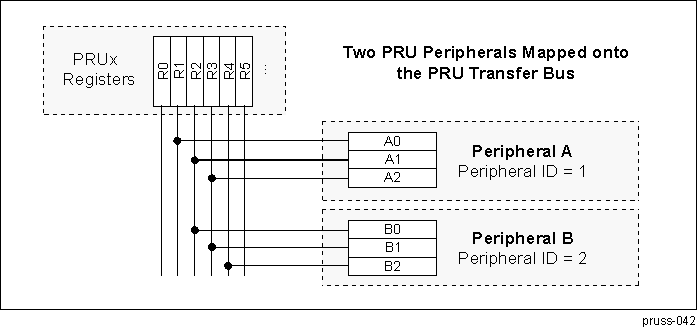 Figure 30-31 PRU Peripherals Mapped to PRU Transfer Bus
30.5.164 External Peripherals vs PRU Register Mappings
Using the XFR command, the PRU can transfer register contents between its register file and externally connected peripherals. The transfer id used for the source and destination allows for up to 253 additional peripherals to be connected to the PRU with register transfer capability.
Not all peripherals will implement the entire 32 PRU register space, and any transfer from space that is not implemented on the peripheral will return undefined results. Peripherals that do not implement the full space can define which register range to implement, and can even replicated a smaller set of registers across the PRU register space.
The example below shows two possible implementations of a peripheral that only contains a 32 byte data window (8 registers). The first example has a straight register mapping. The second example maps three PRU register spans onto the same local peripheral space. This allows the PRU to transfer peripheral data to or from any one of the three possible spans, allowing for much greater flexibility in using the peripheral.
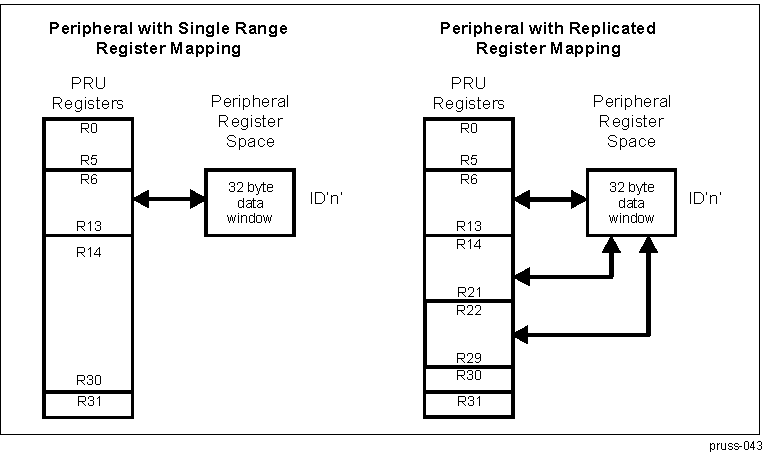 Figure 30-32 Possible Implementations of a 32-Byte Data Window Peripheral
It is also possible for a peripheral to map the same PRU registers into multiple internal device registers by using more that one peripheral ID. For example, below are two possible implementations of a peripheral with a 64 byte register space. The first uses a standard transfer, while the second makes use of 2 transfer ID values to allow the same PRU register span to be mapped to both of its internal register sets. Mapping the same PRU register space into multiple peripheral registers can benefit the PRU when the entire space need not be valid at any particular time. For example, a network packet search engine may map the Layer 2 fields to the same PRU register space at the Layer 3 fields, knowing that they both do not need to be valid at the same time and thus freeing up addition PRU registers for other use.
 Figure 30-33 PRU Registers Mapped into Multiple Internal Device Registers
30.5.165 PRU Flow Control
30.5.166 Unconditional Jump (JMP)
Unconditional jump to a 16 bit instruction address, specified by register or immediate value.
Definition:
JMP OP(65535)Operation:
PRU Instruction Pointer = OP(65535)Example:
jmp     r2.w0    // Jump to the address stored in r2.w0
jmp     myLabel  // Jump to the supplied code label
30.5.167 Unconditional Jump and Link (JAL)
Unconditional jump to a 16 bit instruction address, specified by register or immediate value. The address following the JAL instruction is stored into REG1, so that REG1 can later be used as a “return” address.
Definition:
JAL REG1, OP(65535)Operation:
REG1 = Current PRU Instruction Pointer + 1
PRU Instruction Pointer = OP(65535)
Example:
jal     r2.w2, r2.w0      // Jump to the address stored in r2.w0
                          // put return location in r2.w2
jal     r30.w0, myLabel   // Jump to the supplied code label and
                          // put the return location in r30.w0
30.5.168 Call Procedure (CALL)
The CALL instruction is a pseudo op designed to emulate a subroutine call on a stack based processor. Here, the JAL instruction is used with a specific call/ret register being the location to save the return pointer. The default register is R30.w0, but this can be changed by using the .setcallreg dot command. This instruction works in conjunction with the “.ret” dot command (deprecated) or the RET pseudo op instruction.
Definition:
CALL OP(65535)Operation:
JAL call register, OP(65535) (where call register defaults to r30.w0)Example:
call    r2.w0    // Call to the address stored in r2.w0
call    myLabel  // Call to the supplied code label
30.5.169 Return from Procedure (RET)
The RET instruction is a pseudo op designed to emulate a subroutine return on a stack based processor. Here, the JMP instruction is used with a specific call/ret register being the location of the return pointer. The default register is R30.w0, but this can be changed by using the .setcallreg dot command. This instruction works in conjunction with the CALL pseudo op instruction.
Definition:
RETOperation:
JMP call register (where call register defaults to r30.w0)Example:
ret // Return address stored in our call register
30.5.170 Quick Branch if Greater Than (QBGT)
Jumps if the value of OP(255) is greater than REG1.
Definition:
QBGT LABEL, REG1, OP(255)Operation: Branch to LABEL if OP(255) > REG1
Example:
qbgt    myLabel, r2.w0, 5  // Branch if 5 > r2.w0
qbgt    myLabel, r3, r4    // Branch if r4 > r3
30.5.171 Quick Branch if Greater Than or Equal (QBGE)
Jumps if the value of OP(255) is greater than or equal to REG1.
Definition:
QBGE LABEL, REG1, OP(255)Operation:
Branch to LABEL if OP(255) >= REG1Example:
qbge    myLabel, r2.w0, 5  // Branch if 5 >= r2.w0
qbge    myLabel, r3, r4    // Branch if r4 >= r3
30.5.172 Quick Branch if Less Than (QBLT)
Jumps if the value of OP(255) is less than REG1.
Definition:
QBLT LABEL, REG1, OP(255)Operation:
Branch to LABEL if OP(255) < REG1Example:
qblt    myLabel, r2.w0, 5  // Branch if 5 < r2.w0
qblt    myLabel, r3, r4    // Branch if r4 < r3
30.5.173 Quick Branch if Less Than or Equal (QBLE)
Jumps if the value of OP(255) is less than or equal to REG1.
Definition:
QBLE LABEL, REG1, OP(255)Operation:
Branch to LABEL if OP(255) <= REG1Example:
qble    myLabel, r2.w0, 5  // Branch if 5 <= r2.w0
qble    myLabel, r3, r4    // Branch if r4 <= r3
30.5.174 Quick Branch if Equal (QBEQ)
Jumps if the value of OP(255) is equal to REG1.
Definition:
QBGT LABEL, REG1, OP(255)Operation:
Branch to LABEL if OP(255) == REG1Example:
qbeq    myLabel, r2.w0, 5  // Branch if r2.w0==5
qbeq    myLabel, r3, r4    // Branch if r4==r3
30.5.175 Quick Branch if Not Equal (QBNE)
Jumps if the value of OP(255) is not equal to REG1.
Definition:
QBNE LABEL, REG1, OP(255)Operation:
Branch to LABEL if OP(255) != REG1Example:
qbne    myLabel, r2.w0, 5  // Branch if r2.w0==5
qbne    myLabel, r3, r4    // Branch if r4!=r3
30.5.176 Quick Branch Always (QBA)'
Jump always. This is similar to the JMP instruction, only QBA uses an address offset and thus can be relocated in memory.
Definition:
QBA LABELOperation:
Branch to LABELExample:
qba myLabel // Branch
30.5.177 Quick Branch if Bit is Set (QBBS)
Jumps if the bit OP(31) is set in REG1.
Format 1:
Definition:
QBBS LABEL, REG1, OP(255)Operation:
Branch to LABEL if( REG1 & ( 1 << (OP(31) & 0x1f) ) )Example:
qbbs     myLabel r3, r1     // Branch if( r3&(1<<r1) )
qbbs     myLabel, r1.b1, 5  // Branch if( r1.b1 & 1<<5 )
Format 2:
Definition:
QBBS LABEL, Rn.txOperation:
Branch to LABEL if( Rn & Rn.tx )Example:
qbbs     myLabel, r1.b1.t5	// Branch if( r1.b1 & 1<<5 )
qbbs     myLabel, r0.t0    // Brach if bit 0 in R0 is set
30.5.178 Quick Branch if Bit is Clear (QBBC)
Jumps if the bit OP(31) is clear in REG1.
Format 1:
Definition:
QBBC LABEL, REG1, OP(255)Operation:
Branch to LABEL if( !(REG1 & ( 1 << (OP(31) & 0x1f) )) )Example:
qbbc     myLabel r3, r1     // Branch if( !(r3&(1<<r1)) )
qbbc     myLabel, r1.b1, 5  // Branch if( !(r1.b1 & 1<<5) )
Format 2:
Definition:
QBBC LABEL, Rn.txOperation:
Branch to LABEL if( !(Rn & Rn.tx) )Example:
qbbc     myLabel, r1.b1.t5	// Branch if( !(r1.b1 & 1<<5) )
qbbc     myLabel, r0.t0    // Brach if bit 0 in R0 is clear
30.5.179 Wait Until Bit Set (WBS)
The WBS instruction is a pseudo op that uses the QBBC instruction. It is used to poll on a status bit, spinning until the bit is set. In this case, REG1 is almost certainly R31, else this instruction could lead to an infinite loop.
Format 1:
Definition:
WBS REG1, OP(255)Operation:
QBBC $, REG1, OP(255)Example:
wbs     r31, r1     	// Spin here while ( !(r31&(1<<r1)) )
wbs     r31.b1, 5  	// Spin here while ( !(r31.b1 & 1<<5) )
Format 2:
Definition:
WBS Rn.txOperation:
QBBC $, Rn.txExample:
wbs     r31.b1.t5     // Spin here while ( !(r31.b1 & 1<<5) )
wbs     r31.t0        // Spin here while bit 0 in R31 is clear
30.5.180 Wait Until Bit Clear (WBC)
The WBC instruction is a pseudo op that uses the QBBS instruction. It is used to poll on a status bit, spinning until the bit is clear. In this case, REG1 is almost certainly R31, else this instruction could lead to an infinite loop.
Format 1:
Definition:
WBC REG1, OP(255)Operation:
QBBS $, REG1, OP(255)Example:
wbc     r31, r1     	// Spin here while ( r31&(1<<r1) )
wbc     r31.b1, 5  	// Spin here while ( r31.b1 & 1<<5 )
Format 2:
Definition:
WBC Rn.txOperation:
QBBS $, Rn.txExample:
wbc     r31.b1.t5    // Spin here while ( r31.b1 & 1<<5 )
wbc     r31.t0       // Spin here while bit 0 in R31 is set
30.5.181 Halt Operation (HALT)
The HALT instruction disables the PRU. This instruction is used to implement software breakpoints in a debugger. The PRU program counter remains at its current location (the location of the HALT). When the PRU is re-enabled, the instruction is re-fetched from instruction memory.
Definition: HALT
Operation: Disable PRU
Example: halt
30.5.182 Sleep Operation (SLP)
The SLP instruction will sleep the PRU, causing it to disable its clock. This instruction can specify either a permanent sleep (requiring a PRU reset to recover) or a “wake on event”. When the wake on event option is set to “1”, the PRU will wake on any event that is enabled in the PRU Wakeup Enable register.
Definition: SLP IM(1)
Operation: Sleep the PRU with operational "wake on event" flag.
Example:
SLP	0	// Sleep without wake events
SLP	1	// Sleep until wake event set
30.5.183 Hardware Loop Assist (LOOP, ILOOP)
Defines a hardware-assisted loop operation. The loop can be non-interruptible (LOOP), or can be interruptible based on an external break signal (ILOOP). The loop operation works by detecting when the instruction pointer would normal hit the instruction at the designated target label, and instead decrementing a loop counter and jumping back to the instruction immediately following the loop instruction.
Definition:
LOOP LABEL, OP(256)
	ILOOP LABEL, OP(256)
Operation:
LoopCounter = OP(256)
                    LoopTop       = $+1
                    While (LoopCounter>0)
	{
                        If (InstructionPointer==LABEL)
	    {
	        LoopCounter--;
	        InstructionPointer = LoopTop;
	    }
                   }
Example 1:
loop    EndLoop, 5        // Peform the loop 5 times
	    mvi     r2, *r1.b0        // Get value
	    xor     r2, r2, r3        // Change value
	    mvi     *r1.b0++, r1      // Save value
	EndLoop:
Example 2:
mvi     r2, *r1.b0++      // Get the number of elements
	    loop    EndLoop, r2       // Peform the loop for each element
	    mvi     r2, *r1.b0        // Get value
	    call    ProcessValue      // It is legal to jump outside the loop
	    mvi     *r1.b0++, r1      // Save value
	EndLoop:
When the loop count is set from a register, only the 16 LS bits are used (regardless of the field size). If this 16-bit value is zero, the instruction jumps directly to the end of loop.
30.5.184 PRUSS_PRU_CTRL Register Manual
This section describes the PRUSS PRU0 and PRU1 cores memory mapped registers.
30.5.185 PRUSS_PRU_CTRL Instance Summary
| Module Name | Base Address | Size |
|---|---|---|
| PRUSS1_PRU0_CTRL | 0x4B22 2000 | 48 Bytes |
| PRUSS1_PRU1_CTRL | 0x4B22 4000 | 48 Bytes |
| PRUSS2_PRU0_CTRL | 0x4B2A 2000 | 48 Bytes |
| PRUSS2_PRU1_CTRL | 0x4B2A 4000 | 48 Bytes |
30.5.186 PRUSS_PRU_CTRL Registers
30.5.187 PRUSS_PRU_CTRL Register Summary
| Register Name | Type | Register Width (Bits) | Address Offset | PRUSS1_PRU0_CTRL Physical Address | PRUSS1_PRU1_CTRL Physical Address |
|---|---|---|---|---|---|
| PRU_CONTROL | RW | 32 | 0x0000 0000 | 0x4B22 2000 | 0x4B22 4000 |
| PRU_STATUS | R | 32 | 0x0000 0004 | 0x4B22 2004 | 0x4B22 4004 |
| PRU_WAKEUP_EN | RW | 32 | 0x0000 0008 | 0x4B22 2008 | 0x4B22 4008 |
| PRU_CYCLE | RW | 32 | 0x0000 000C | 0x4B22 200C | 0x4B22 400C |
| PRU_STALL | RW | 32 | 0x0000 0010 | 0x4B22 2010 | 0x4B22 4010 |
| PRU_CTBIR0 | RW | 32 | 0x0000 0020 | 0x4B22 2020 | 0x4B22 4020 |
| PRU_CTBIR1 | RW | 32 | 0x0000 0024 | 0x4B22 2024 | 0x4B22 4024 |
| PRU_CTPPR0 | RW | 32 | 0x0000 0028 | 0x4B22 2028 | 0x4B22 4028 |
| PRU_CTPPR1 | RW | 32 | 0x0000 002C | 0x4B22 202C | 0x4B22 402C |
| Register Name | Type | Register Width (Bits) | Address Offset | PRUSS2_PRU0_CTRL Physical Address | PRUSS2_PRU1_CTRL Physical Address |
|---|---|---|---|---|---|
| PRU_CONTROL | RW | 32 | 0x0000 0000 | 0x4B2A 2000 | 0x4B2A 4000 |
| PRU_STATUS | R | 32 | 0x0000 0004 | 0x4B2A 2004 | 0x4B2A 4004 |
| PRU_WAKEUP_EN | RW | 32 | 0x0000 0008 | 0x4B2A 2008 | 0x4B2A 4008 |
| PRU_CYCLE | RW | 32 | 0x0000 000C | 0x4B2A 200C | 0x4B2A 400C |
| PRU_STALL | RW | 32 | 0x0000 0010 | 0x4B2A 2010 | 0x4B2A 4010 |
| PRU_CTBIR0 | RW | 32 | 0x0000 0020 | 0x4B2A 2020 | 0x4B2A 4020 |
| PRU_CTBIR1 | RW | 32 | 0x0000 0024 | 0x4B2A 2024 | 0x4B2A 4024 |
| PRU_CTPPR0 | RW | 32 | 0x0000 0028 | 0x4B2A 2028 | 0x4B2A 4028 |
| PRU_CTPPR1 | RW | 32 | 0x0000 002C | 0x4B2A 202C | 0x4B2A 402C |
30.5.188 PRUSS_PRU_CTRL Register Description
| Address Offset | 0x0000 0000 | ||
| Physical Address | 0x4B22 2000 0x4B22 4000 0x4B2A 2000 0x4B2A 4000 | Instance | PRUSS1_PRU0_CTRL PRUSS1_PRU1_CTRL PRUSS2_PRU0_CTRL PRUSS2_PRU1_CTRL |
| Description | CONTROL REGISTER | ||
| Type | RW | ||
| 31 | 30 | 29 | 28 | 27 | 26 | 25 | 24 | 23 | 22 | 21 | 20 | 19 | 18 | 17 | 16 | 15 | 14 | 13 | 12 | 11 | 10 | 9 | 8 | 7 | 6 | 5 | 4 | 3 | 2 | 1 | 0 |
| PCOUNTER_RST_VAL | RUNSTATE | BIG_ENDIAN | RESERVED | SINGLE_STEP | RESERVED | COUNTER_ENABLE | SLEEPING | ENABLE | SOFT_RST_N | ||||||||||||||||||||||
| Bits | Field Name | Description | Type | Reset |
|---|---|---|---|---|
| 31:16 | PCOUNTER_RST_VAL | Program Counter Reset Value: This field controls the address where the PRU will start executing code from after it is taken out of reset. | RW | 0x0 |
| 15 | RUNSTATE | Run State: This bit indicates whether the PRU is currently executing an instruction or is halted. 0 = PRU is halted and host has access to the instruction RAM and debug registers regions. 1 = PRU is currently running and the host is locked out of the instruction RAM and debug registers regions. This bit is used by an external debug agent to know when the PRU has actually halted when waiting for a HALT instruction to execute, a single step to finish, or any other time when the pru_enable has been cleared. | R | 0x0 |
| 14 | BIG_ENDIAN | R | 0x0 | |
| 13:9 | RESERVED | R | 0x0 | |
| 8 | SINGLE_STEP | Single Step Enable: This bit controls whether or not the PRU will only execute a single instruction when enabled. 0 = PRU will free run when enabled. 1 = PRU will execute a single instruction and then the pru_enable bit will be cleared. Note that this bit does not actually enable the PRU, it only sets the policy for how much code will be run after the PRU is enabled. The pru_enable bit must be explicitly asserted. It is legal to initialize both the single_step and pru_enable bits simultaneously. (Two independent writes are not required to cause the stated functionality.) | RW | 0x0 |
| 7:4 | RESERVED | R | 0x0 | |
| 3 | COUNTER_ENABLE | PRU Cycle Counter Enable: Enables PRU cycle counters. 0 = Counters not enabled 1 = Counters enabled | RW | 0x0 |
| 2 | SLEEPING | PRU Sleep Indicator: This bit indicates whether or not the PRU is currently asleep. 0 = PRU is not asleep 1 = PRU is asleep If this bit is written to a 0, the PRU will be forced to power up from sleep mode. | RW | 0x0 |
| 1 | ENABLE | Processor Enable: This bit controls whether or not the PRU is allowed to fetch new instructions. 0 = PRU is disabled. 1 = PRU is enabled. If this bit is de-asserted while the PRU is currently running and has completed the initial cycle of a multi-cycle instruction (LBxO,SBxO,SCAN, etc.), the current instruction will be allowed to complete before the PRU pauses execution. Otherwise, the PRU will halt immediately. Because of the unpredictability timing sensitivity of the instruction execution loop, this bit is not a reliable indication of whether or not the PRU is currently running. The pru_state bit should be consulted for an absolute indication of the run state of the core. When the PRU is halted, its internal state remains coherent therefore this bit can be reasserted without issuing a software reset and the PRU will resume processing exactly where it left off in the instruction stream. | RW | 0x0 |
| 0 | SOFT_RST_N | Soft Reset: When this bit is cleared, the PRU will be reset. This bit is set back to 1 on the next cycle after it has been cleared. | RW | 0x1 |
| Address Offset | 0x0000 0004 | ||
| Physical Address | 0x4B22 2004 0x4B22 4004 0x4B2A 2004 0x4B2A 4004 | Instance | PRUSS1_PRU0_CTRL PRUSS1_PRU1_CTRL PRUSS2_PRU0_CTRL PRUSS2_PRU1_CTRL |
| Description | STATUS REGISTER | ||
| Type | R | ||
| 31 | 30 | 29 | 28 | 27 | 26 | 25 | 24 | 23 | 22 | 21 | 20 | 19 | 18 | 17 | 16 | 15 | 14 | 13 | 12 | 11 | 10 | 9 | 8 | 7 | 6 | 5 | 4 | 3 | 2 | 1 | 0 |
| RESERVED | PCOUNTER | ||||||||||||||||||||||||||||||
| Bits | Field Name | Description | Type | Reset |
|---|---|---|---|---|
| 31:16 | RESERVED | R | 0x0000 | |
| 15:0 | PCOUNTER | Program Counter: This field is a registered (1 cycle delayed) reflection of the PRU program counter. Note that the PC is an instruction address where each instruction is a 32 bit word. This is not a byte address and to compute the byte address just multiply the PC by 4 (PC of 2 = byte address of 0x8, or PC of 8 = byte address of 0x20). | R | 0x0 |
| Address Offset | 0x0000 0008 | ||
| Physical Address | 0x4B22 2008 0x4B22 4008 0x4B2A 2008 0x4B2A 4008 | Instance | PRUSS1_PRU0_CTRL PRUSS1_PRU1_CTRL PRUSS2_PRU0_CTRL PRUSS2_PRU1_CTRL |
| Description | WAKEUP ENABLE REGISTER | ||
| Type | RW | ||
| 31 | 30 | 29 | 28 | 27 | 26 | 25 | 24 | 23 | 22 | 21 | 20 | 19 | 18 | 17 | 16 | 15 | 14 | 13 | 12 | 11 | 10 | 9 | 8 | 7 | 6 | 5 | 4 | 3 | 2 | 1 | 0 |
| BITWISE_ENABLES | |||||||||||||||||||||||||||||||
| Bits | Field Name | Description | Type | Reset |
|---|---|---|---|---|
| 31:0 | BITWISE_ENABLES | Wakeup Enables: This field is ANDed with the incoming R31 status inputs (whose bit positions were specified in the stmap parameter) to produce a vector which is unary ORed to produce the status_wakeup source for the core. Setting any bit in this vector will allow the corresponding status input to wake up the core when it is asserted high. The PRU should set this enable vector prior to executing a SLP (sleep) instruction to ensure that the desired sources can wake up the core. | RW | 0x0 |
| Address Offset | 0x0000 000C | ||
| Physical Address | 0x4B22 200C 0x4B22 400C 0x4B2A 200C 0x4B2A 400C | Instance | PRUSS1_PRU0_CTRL PRUSS1_PRU1_CTRL PRUSS2_PRU0_CTRL PRUSS2_PRU1_CTRL |
| Description | CYCLE COUNT. This register counts the number of cycles for which the PRU has been enabled. | ||
| Type | RW | ||
| 31 | 30 | 29 | 28 | 27 | 26 | 25 | 24 | 23 | 22 | 21 | 20 | 19 | 18 | 17 | 16 | 15 | 14 | 13 | 12 | 11 | 10 | 9 | 8 | 7 | 6 | 5 | 4 | 3 | 2 | 1 | 0 |
| CYCLECOUNT | |||||||||||||||||||||||||||||||
| Bits | Field Name | Description | Type | Reset |
|---|---|---|---|---|
| 31:0 | CYCLECOUNT | This value is incremented by 1 for every cycle during which the PRU is enabled and the counter is enabled (both bits ENABLE and COUNTENABLE set in the PRU control register). Counting halts while the PRU is disabled or counter is disabled, and resumes when re-eneabled. Counter clears the COUNTENABLE bit in the PRU control register when the count reaches 0xFFFFFFFF. (Count does does not wrap). The register can be read at any time. The register can be cleared when the counter or PRU is disabled. Clearing this register also clears the PRU Stall Count Register. | RW | 0x0 |
| Address Offset | 0x0000 0010 | ||
| Physical Address | 0x4B22 2010 0x4B22 4010 0x4B2A 2010 0x4B2A 4010 | Instance | PRUSS1_PRU0_CTRL PRUSS1_PRU1_CTRL PRUSS2_PRU0_CTRL PRUSS2_PRU1_CTRL |
| Description | STALL COUNT. This register counts the number of cycles for which the PRU has been enabled, but unable to fetch a new instruction. It is linked to the Cycle Count Register (0x0C) such that this register reflects the stall cycles measured over the same cycles as counted by the cycle count register. Thus the value of this register is always less than or equal to cycle count. | ||
| Type | RW | ||
| 31 | 30 | 29 | 28 | 27 | 26 | 25 | 24 | 23 | 22 | 21 | 20 | 19 | 18 | 17 | 16 | 15 | 14 | 13 | 12 | 11 | 10 | 9 | 8 | 7 | 6 | 5 | 4 | 3 | 2 | 1 | 0 |
| STALLCOUNT | |||||||||||||||||||||||||||||||
| Bits | Field Name | Description | Type | Reset |
|---|---|---|---|---|
| 31:0 | STALLCOUNT | This value is incremented by 1 for every cycle during which the PRU is enabled and the counter is enabled (both bits ENABLE and COUNTENABLE set in the PRU control register), and the PRU was unable to fetch a new instruction for any reason. | RW | 0x0 |
| Address Offset | 0x0000 0020 | ||
| Physical Address | 0x4B22 2020 0x4B22 4020 0x4B2A 2020 0x4B2A 4020 | Instance | PRUSS1_PRU0_CTRL PRUSS1_PRU1_CTRL PRUSS2_PRU0_CTRL PRUSS2_PRU1_CTRL |
| Description | CONSTANT TABLE BLOCK INDEX REGISTER 0. This register is used to set the block indices which are used to modify entries 24 and 25 in the PRU Constant Table. This register can be written by the PRU whenever it needs to change to a new base pointer for a block in the State Scratchpad RAM. This function is useful since the PRU is often processing multiple processing threads which require it to change contexts. The PRU can use this register to avoid requiring excessive amounts of code for repetitive context switching. | ||
| Type | RW | ||
| 31 | 30 | 29 | 28 | 27 | 26 | 25 | 24 | 23 | 22 | 21 | 20 | 19 | 18 | 17 | 16 | 15 | 14 | 13 | 12 | 11 | 10 | 9 | 8 | 7 | 6 | 5 | 4 | 3 | 2 | 1 | 0 |
| RESERVED | C25_BLK_INDEX | RESERVED | C24_BLK_INDEX | ||||||||||||||||||||||||||||
| Bits | Field Name | Description | Type | Reset |
|---|---|---|---|---|
| 31:24 | RESERVED | R | 0x00 | |
| 23:16 | C25_BLK_INDEX | PRU Constant Entry 25 Block Index: This field sets the value that will appear in bits 11:8 of entry 25 in the PRU Constant Table. | RW | 0x0 |
| 15:8 | RESERVED | R | 0x00 | |
| 7:0 | C24_BLK_INDEX | PRU Constant Entry 24 Block Index: This field sets the value that will appear in bits 11:8 of entry 24 in the PRU Constant Table. | RW | 0x0 |
| Address Offset | 0x0000 0024 | ||
| Physical Address | 0x4B22 2024 0x4B22 4024 0x4B2A 2024 0x4B2A 4024 | Instance | PRUSS1_PRU0_CTRL PRUSS1_PRU1_CTRL PRUSS2_PRU0_CTRL PRUSS2_PRU1_CTRL |
| Description | CONSTANT TABLE BLOCK INDEX REGISTER 1. This register is used to set the block indices which are used to modify entries 26 and 27 in the PRU Constant Table. This register can be written by the PRU whenever it needs to change to a new base pointer for a block in the State Scratchpad RAM. This function is useful since the PRU is often processing multiple processing threads which require it to change contexts. The PRU can use this register to avoid requiring excessive amounts of code for repetitive context switching. | ||
| Type | RW | ||
| 31 | 30 | 29 | 28 | 27 | 26 | 25 | 24 | 23 | 22 | 21 | 20 | 19 | 18 | 17 | 16 | 15 | 14 | 13 | 12 | 11 | 10 | 9 | 8 | 7 | 6 | 5 | 4 | 3 | 2 | 1 | 0 |
| RESERVED | C27_BLK_INDEX | RESERVED | C26_BLK_INDEX | ||||||||||||||||||||||||||||
| Bits | Field Name | Description | Type | Reset |
|---|---|---|---|---|
| 31:24 | RESERVED | R | 0x00 | |
| 23:16 | C27_BLK_INDEX | PRU Constant Entry 27 Block Index: This field sets the value that will appear in bits 11:8 of entry 27 in the PRU Constant Table. | RW | 0x0 |
| 15:8 | RESERVED | R | 0x00 | |
| 7:0 | C26_BLK_INDEX | PRU Constant Entry 26 Block Index: This field sets the value that will appear in bits 11:8 of entry 26 in the PRU Constant Table. | RW | 0x0 |
| Address Offset | 0x0000 0028 | ||
| Physical Address | 0x4B22 2028 0x4B22 4028 0x4B2A 2028 0x4B2A 4028 | Instance | PRUSS1_PRU0_CTRL PRUSS1_PRU1_CTRL PRUSS2_PRU0_CTRL PRUSS2_PRU1_CTRL |
| Description | CONSTANT TABLE PROGRAMMABLE POINTER REGISTER 0. This register allows the PRU to set up the 256-byte page index for entries 28 and 29 in the PRU Constant Table which serve as general purpose pointers which can be configured to point to any locations inside the session router address map. This register is useful when the PRU needs to frequently access certain structures inside the session router address space whose locations are not hard coded such as tables in scratchpad memory. | ||
| Type | RW | ||
| 31 | 30 | 29 | 28 | 27 | 26 | 25 | 24 | 23 | 22 | 21 | 20 | 19 | 18 | 17 | 16 | 15 | 14 | 13 | 12 | 11 | 10 | 9 | 8 | 7 | 6 | 5 | 4 | 3 | 2 | 1 | 0 |
| C29_POINTER | C28_POINTER | ||||||||||||||||||||||||||||||
| Bits | Field Name | Description | Type | Reset |
|---|---|---|---|---|
| 31:16 | C29_POINTER | PRU Constant Entry 29 Pointer: This field sets the value that will appear in bits 23:8 of entry 29 in the PRU Constant Table. | RW | 0x0 |
| 15:0 | C28_POINTER | PRU Constant Entry 28 Pointer: This field sets the value that will appear in bits 23:8 of entry 28 in the PRU Constant Table. | RW | 0x0 |
| Address Offset | 0x0000 002C | ||
| Physical Address | 0x4B22 202C 0x4B22 402C 0x4B2A 202C 0x4B2A 402C | Instance | PRUSS1_PRU0_CTRL PRUSS1_PRU1_CTRL PRUSS2_PRU0_CTRL PRUSS2_PRU1_CTRL |
| Description | CONSTANT TABLE PROGRAMMABLE POINTER REGISTER 1. This register functions the same as the PRU Constant Table Programmable Pointer Register 0 but allows the PRU to control entries 30 and 31 in the PRU Constant Table. | ||
| Type | RW | ||
| 31 | 30 | 29 | 28 | 27 | 26 | 25 | 24 | 23 | 22 | 21 | 20 | 19 | 18 | 17 | 16 | 15 | 14 | 13 | 12 | 11 | 10 | 9 | 8 | 7 | 6 | 5 | 4 | 3 | 2 | 1 | 0 |
| C31_POINTER | C30_POINTER | ||||||||||||||||||||||||||||||
| Bits | Field Name | Description | Type | Reset |
|---|---|---|---|---|
| 31:16 | C31_POINTER | PRU Constant Entry 31 Pointer: This field sets the value that will appear in bits 23:8 of entry 31 in the PRU Constant Table. | RW | 0x0 |
| 15:0 | C30_POINTER | PRU Constant Entry 30 Pointer: This field sets the value that will appear in bits 23:8 of entry 30 in the PRU Constant Table. | RW | 0x0 |
30.5.189 PRUSS_PRU_DEBUG Register Manual
30.5.190 PRUSS_PRU_DEBUG Instance Summary
| Module Name | Base Address | Size |
|---|---|---|
| PRUSS1_PRU0_DEBUG | 0x20AA 2400 | 144 Bytes |
| PRUSS1_PRU1_DEBUG | 0x20AA 4400 | 144 Bytes |
| PRUSS2_PRU0_DEBUG | 0x20AE 2400 | 144 Bytes |
| PRUSS2_PRU1_DEBUG | 0x20AE 4400 | 144 Bytes |
30.5.191 PRUSS_PRU_DEBUG Registers
30.5.192 PRUSS_PRU_DEBUG Register Summary
| Acronym | Type | Register Width (Bits) | Address Offset | PRUSS1_PRU0_DEBUG Physical Address | PRUSS1_PRU1_DEBUG Physical Address |
|---|---|---|---|---|---|
| PRUSS_DBG_GPREG0 | RW | 32 | 0x0000 0000 | 0x20AA 2400 | 0x20AA 4400 |
| PRUSS_DBG_GPREG1 | RW | 32 | 0x0000 0004 | 0x20AA 2404 | 0x20AA 4404 |
| PRUSS_DBG_GPREG2 | RW | 32 | 0x0000 0008 | 0x20AA 2408 | 0x20AA 4408 |
| PRUSS_DBG_GPREG3 | RW | 32 | 0x0000 000C | 0x20AA 240C | 0x20AA 440C |
| PRUSS_DBG_GPREG4 | RW | 32 | 0x0000 0010 | 0x20AA 2410 | 0x20AA 4410 |
| PRUSS_DBG_GPREG5 | RW | 32 | 0x0000 0014 | 0x20AA 2414 | 0x20AA 4414 |
| PRUSS_DBG_GPREG6 | RW | 32 | 0x0000 0018 | 0x20AA 2418 | 0x20AA 4418 |
| PRUSS_DBG_GPREG7 | RW | 32 | 0x0000 001C | 0x20AA 241C | 0x20AA 441C |
| PRUSS_DBG_GPREG8 | RW | 32 | 0x0000 0020 | 0x20AA 2420 | 0x20AA 4420 |
| PRUSS_DBG_GPREG9 | RW | 32 | 0x0000 0024 | 0x20AA 2424 | 0x20AA 4424 |
| PRUSS_DBG_GPREG10 | RW | 32 | 0x0000 0028 | 0x20AA 2428 | 0x20AA 4428 |
| PRUSS_DBG_GPREG11 | RW | 32 | 0x0000 002C | 0x20AA 242C | 0x20AA 442C |
| PRUSS_DBG_GPREG12 | RW | 32 | 0x0000 0030 | 0x20AA 2430 | 0x20AA 4430 |
| PRUSS_DBG_GPREG13 | RW | 32 | 0x0000 0034 | 0x20AA 2434 | 0x20AA 4434 |
| PRUSS_DBG_GPREG14 | RW | 32 | 0x0000 0038 | 0x20AA 2438 | 0x20AA 4438 |
| PRUSS_DBG_GPREG15 | RW | 32 | 0x0000 003C | 0x20AA 243C | 0x20AA 443C |
| PRUSS_DBG_GPREG16 | RW | 32 | 0x0000 0040 | 0x20AA 2440 | 0x20AA 4440 |
| PRUSS_DBG_GPREG17 | RW | 32 | 0x0000 0044 | 0x20AA 2444 | 0x20AA 4444 |
| PRUSS_DBG_GPREG18 | RW | 32 | 0x0000 0048 | 0x20AA 2448 | 0x20AA 4448 |
| PRUSS_DBG_GPREG19 | RW | 32 | 0x0000 004C | 0x20AA 244C | 0x20AA 444C |
| PRUSS_DBG_GPREG20 | RW | 32 | 0x0000 0050 | 0x20AA 2450 | 0x20AA 4450 |
| PRUSS_DBG_GPREG21 | RW | 32 | 0x0000 0054 | 0x20AA 2454 | 0x20AA 4454 |
| PRUSS_DBG_GPREG22 | RW | 32 | 0x0000 0058 | 0x20AA 2458 | 0x20AA 4458 |
| PRUSS_DBG_GPREG23 | RW | 32 | 0x0000 005C | 0x20AA 245C | 0x20AA 445C |
| PRUSS_DBG_GPREG24 | RW | 32 | 0x0000 0060 | 0x20AA 2460 | 0x20AA 4460 |
| PRUSS_DBG_GPREG25 | RW | 32 | 0x0000 0064 | 0x20AA 2464 | 0x20AA 4464 |
| PRUSS_DBG_GPREG26 | RW | 32 | 0x0000 0068 | 0x20AA 2468 | 0x20AA 4468 |
| PRUSS_DBG_GPREG27 | RW | 32 | 0x0000 006C | 0x20AA 246C | 0x20AA 446C |
| PRUSS_DBG_GPREG28 | RW | 32 | 0x0000 0070 | 0x20AA 2470 | 0x20AA 4470 |
| PRUSS_DBG_GPREG29 | RW | 32 | 0x0000 0074 | 0x20AA 2474 | 0x20AA 4474 |
| PRUSS_DBG_GPREG30 | RW | 32 | 0x0000 0078 | 0x20AA 2478 | 0x20AA 4478 |
| PRUSS_DBG_GPREG31 | RW | 32 | 0x0000 007C | 0x20AA 247C | 0x20AA 447C |
| PRUSS_DBG_CT_REG0 | R | 32 | 0x0000 0080 | 0x20AA 2480 | 0x20AA 4480 |
| PRUSS_DBG_CT_REG1 | R | 32 | 0x0000 0084 | 0x20AA 2484 | 0x20AA 4484 |
| PRUSS_DBG_CT_REG2 | R | 32 | 0x0000 0088 | 0x20AA 2488 | 0x20AA 4488 |
| PRUSS_DBG_CT_REG3 | R | 32 | 0x0000 008C | 0x20AA 248C | 0x20AA 448C |
| PRUSS_DBG_CT_REG4 | R | 32 | 0x0000 0090 | 0x20AA 2490 | 0x20AA 4490 |
| PRUSS_DBG_CT_REG5 | R | 32 | 0x0000 0094 | 0x20AA 2494 | 0x20AA 4494 |
| PRUSS_DBG_CT_REG6 | R | 32 | 0x0000 0098 | 0x20AA 2498 | 0x20AA 4498 |
| PRUSS_DBG_CT_REG7 | R | 32 | 0x0000 009C | 0x20AA 249C | 0x20AA 449C |
| PRUSS_DBG_CT_REG8 | R | 32 | 0x0000 00A0 | 0x20AA 24A0 | 0x20AA 44A0 |
| PRUSS_DBG_CT_REG9 | R | 32 | 0x0000 00A4 | 0x20AA 24A4 | 0x20AA 44A4 |
| PRUSS_DBG_CT_REG10 | R | 32 | 0x0000 00A8 | 0x20AA 24A8 | 0x20AA 44A8 |
| PRUSS_DBG_CT_REG11 | R | 32 | 0x0000 00AC | 0x20AA 24AC | 0x20AA 44AC |
| PRUSS_DBG_CT_REG12 | R | 32 | 0x0000 00B0 | 0x20AA 24B0 | 0x20AA 44B0 |
| PRUSS_DBG_CT_REG13 | R | 32 | 0x0000 00B4 | 0x20AA 24B4 | 0x20AA 44B4 |
| PRUSS_DBG_CT_REG14 | R | 32 | 0x0000 00B8 | 0x20AA 24B8 | 0x20AA 44B8 |
| PRUSS_DBG_CT_REG15 | R | 32 | 0x0000 00BC | 0x20AA 24BC | 0x20AA 44BC |
| PRUSS_DBG_CT_REG16 | R | 32 | 0x0000 00C0 | 0x20AA 24C0 | 0x20AA 44C0 |
| PRUSS_DBG_CT_REG17 | R | 32 | 0x0000 00C4 | 0x20AA 24C4 | 0x20AA 44C4 |
| PRUSS_DBG_CT_REG18 | R | 32 | 0x0000 00C8 | 0x20AA 24C8 | 0x20AA 44C8 |
| PRUSS_DBG_CT_REG19 | R | 32 | 0x0000 00CC | 0x20AA 24CC | 0x20AA 44CC |
| PRUSS_DBG_CT_REG20 | R | 32 | 0x0000 00D0 | 0x20AA 24D0 | 0x20AA 44D0 |
| PRUSS_DBG_CT_REG21 | R | 32 | 0x0000 00D4 | 0x20AA 24D4 | 0x20AA 44D4 |
| PRUSS_DBG_CT_REG22 | R | 32 | 0x0000 00D8 | 0x20AA 24D8 | 0x20AA 44D8 |
| PRUSS_DBG_CT_REG23 | R | 32 | 0x0000 00DC | 0x20AA 24DC | 0x20AA 44DC |
| PRUSS_DBG_CT_REG24 | R | 32 | 0x0000 00E0 | 0x20AA 24E0 | 0x20AA 44E0 |
| PRUSS_DBG_CT_REG25 | R | 32 | 0x0000 00E4 | 0x20AA 24E4 | 0x20AA 44E4 |
| PRUSS_DBG_CT_REG26 | R | 32 | 0x0000 00E8 | 0x20AA 24E8 | 0x20AA 44E8 |
| PRUSS_DBG_CT_REG27 | R | 32 | 0x0000 00EC | 0x20AA 24EC | 0x20AA 44EC |
| PRUSS_DBG_CT_REG28 | R | 32 | 0x0000 00F0 | 0x20AA 24F0 | 0x20AA 44F0 |
| PRUSS_DBG_CT_REG29 | R | 32 | 0x0000 00F4 | 0x20AA 24F4 | 0x20AA 44F4 |
| PRUSS_DBG_CT_REG30 | R | 32 | 0x0000 00F8 | 0x20AA 24F8 | 0x20AA 44F8 |
| PRUSS_DBG_CT_REG31 | R | 32 | 0x0000 00FC | 0x20AA 24FC | 0x20AA 44FC |
| Acronym | Type | Register Width (Bits) | Address Offset | PRUSS2_PRU0_DEBUG Physical Address | PRUSS2_PRU1_DEBUG Physical Address |
|---|---|---|---|---|---|
| PRUSS_DBG_GPREG0 | RW | 32 | 0x0000 0000 | 0x20AE 2400 | 0x20AE 4400 |
| PRUSS_DBG_GPREG1 | RW | 32 | 0x0000 0004 | 0x20AE 2404 | 0x20AE 4404 |
| PRUSS_DBG_GPREG2 | RW | 32 | 0x0000 0008 | 0x20AE 2408 | 0x20AE 4408 |
| PRUSS_DBG_GPREG3 | RW | 32 | 0x0000 000C | 0x20AE 240C | 0x20AE 440C |
| PRUSS_DBG_GPREG4 | RW | 32 | 0x0000 0010 | 0x20AE 2410 | 0x20AE 4410 |
| PRUSS_DBG_GPREG5 | RW | 32 | 0x0000 0014 | 0x20AE 2414 | 0x20AE 4414 |
| PRUSS_DBG_GPREG6 | RW | 32 | 0x0000 0018 | 0x20AE 2418 | 0x20AE 4418 |
| PRUSS_DBG_GPREG7 | RW | 32 | 0x0000 001C | 0x20AE 241C | 0x20AE 441C |
| PRUSS_DBG_GPREG8 | RW | 32 | 0x0000 0020 | 0x20AE 2420 | 0x20AE 4420 |
| PRUSS_DBG_GPREG9 | RW | 32 | 0x0000 0024 | 0x20AE 2424 | 0x20AE 4424 |
| PRUSS_DBG_GPREG10 | RW | 32 | 0x0000 0028 | 0x20AE 2428 | 0x20AE 4428 |
| PRUSS_DBG_GPREG11 | RW | 32 | 0x0000 002C | 0x20AE 242C | 0x20AE 442C |
| PRUSS_DBG_GPREG12 | RW | 32 | 0x0000 0030 | 0x20AE 2430 | 0x20AE 4430 |
| PRUSS_DBG_GPREG13 | RW | 32 | 0x0000 0034 | 0x20AE 2434 | 0x20AE 4434 |
| PRUSS_DBG_GPREG14 | RW | 32 | 0x0000 0038 | 0x20AE 2438 | 0x20AE 4438 |
| PRUSS_DBG_GPREG15 | RW | 32 | 0x0000 003C | 0x20AE 243C | 0x20AE 443C |
| PRUSS_DBG_GPREG16 | RW | 32 | 0x0000 0040 | 0x20AE 2440 | 0x20AE 4440 |
| PRUSS_DBG_GPREG17 | RW | 32 | 0x0000 0044 | 0x20AE 2444 | 0x20AE 4444 |
| PRUSS_DBG_GPREG18 | RW | 32 | 0x0000 0048 | 0x20AE 2448 | 0x20AE 4448 |
| PRUSS_DBG_GPREG19 | RW | 32 | 0x0000 004C | 0x20AE 244C | 0x20AE 444C |
| PRUSS_DBG_GPREG20 | RW | 32 | 0x0000 0050 | 0x20AE 2450 | 0x20AE 4450 |
| PRUSS_DBG_GPREG21 | RW | 32 | 0x0000 0054 | 0x20AE 2454 | 0x20AE 4454 |
| PRUSS_DBG_GPREG22 | RW | 32 | 0x0000 0058 | 0x20AE 2458 | 0x20AE 4458 |
| PRUSS_DBG_GPREG23 | RW | 32 | 0x0000 005C | 0x20AE 245C | 0x20AE 445C |
| PRUSS_DBG_GPREG24 | RW | 32 | 0x0000 0060 | 0x20AE 2460 | 0x20AE 4460 |
| PRUSS_DBG_GPREG25 | RW | 32 | 0x0000 0064 | 0x20AE 2464 | 0x20AE 4464 |
| PRUSS_DBG_GPREG26 | RW | 32 | 0x0000 0068 | 0x20AE 2468 | 0x20AE 4468 |
| PRUSS_DBG_GPREG27 | RW | 32 | 0x0000 006C | 0x20AE 246C | 0x20AE 446C |
| PRUSS_DBG_GPREG28 | RW | 32 | 0x0000 0070 | 0x20AE 2470 | 0x20AE 4470 |
| PRUSS_DBG_GPREG29 | RW | 32 | 0x0000 0074 | 0x20AE 2474 | 0x20AE 4474 |
| PRUSS_DBG_GPREG30 | RW | 32 | 0x0000 0078 | 0x20AE 2478 | 0x20AE 4478 |
| PRUSS_DBG_GPREG31 | RW | 32 | 0x0000 007C | 0x20AE 247C | 0x20AE 447C |
| PRUSS_DBG_CT_REG0 | R | 32 | 0x0000 0080 | 0x20AE 2480 | 0x20AE 4480 |
| PRUSS_DBG_CT_REG1 | R | 32 | 0x0000 0084 | 0x20AE 2484 | 0x20AE 4484 |
| PRUSS_DBG_CT_REG2 | R | 32 | 0x0000 0088 | 0x20AE 2488 | 0x20AE 4488 |
| PRUSS_DBG_CT_REG3 | R | 32 | 0x0000 008C | 0x20AE 248C | 0x20AE 448C |
| PRUSS_DBG_CT_REG4 | R | 32 | 0x0000 0090 | 0x20AE 2490 | 0x20AE 4490 |
| PRUSS_DBG_CT_REG5 | R | 32 | 0x0000 0094 | 0x20AE 2494 | 0x20AE 4494 |
| PRUSS_DBG_CT_REG6 | R | 32 | 0x0000 0098 | 0x20AE 2498 | 0x20AE 4498 |
| PRUSS_DBG_CT_REG7 | R | 32 | 0x0000 009C | 0x20AE 249C | 0x20AE 449C |
| PRUSS_DBG_CT_REG8 | R | 32 | 0x0000 00A0 | 0x20AE 24A0 | 0x20AE 44A0 |
| PRUSS_DBG_CT_REG9 | R | 32 | 0x0000 00A4 | 0x20AE 24A4 | 0x20AE 44A4 |
| PRUSS_DBG_CT_REG10 | R | 32 | 0x0000 00A8 | 0x20AE 24A8 | 0x20AE 44A8 |
| PRUSS_DBG_CT_REG11 | R | 32 | 0x0000 00AC | 0x20AE 24AC | 0x20AE 44AC |
| PRUSS_DBG_CT_REG12 | R | 32 | 0x0000 00B0 | 0x20AE 24B0 | 0x20AE 44B0 |
| PRUSS_DBG_CT_REG13 | R | 32 | 0x0000 00B4 | 0x20AE 24B4 | 0x20AE 44B4 |
| PRUSS_DBG_CT_REG14 | R | 32 | 0x0000 00B8 | 0x20AE 24B8 | 0x20AE 44B8 |
| PRUSS_DBG_CT_REG15 | R | 32 | 0x0000 00BC | 0x20AE 24BC | 0x20AE 44BC |
| PRUSS_DBG_CT_REG16 | R | 32 | 0x0000 00C0 | 0x20AE 24C0 | 0x20AE 44C0 |
| PRUSS_DBG_CT_REG17 | R | 32 | 0x0000 00C4 | 0x20AE 24C4 | 0x20AE 44C4 |
| PRUSS_DBG_CT_REG18 | R | 32 | 0x0000 00C8 | 0x20AE 24C8 | 0x20AE 44C8 |
| PRUSS_DBG_CT_REG19 | R | 32 | 0x0000 00CC | 0x20AE 24CC | 0x20AE 44CC |
| PRUSS_DBG_CT_REG20 | R | 32 | 0x0000 00D0 | 0x20AE 24D0 | 0x20AE 44D0 |
| PRUSS_DBG_CT_REG21 | R | 32 | 0x0000 00D4 | 0x20AE 24D4 | 0x20AE 44D4 |
| PRUSS_DBG_CT_REG22 | R | 32 | 0x0000 00D8 | 0x20AE 24D8 | 0x20AE 44D8 |
| PRUSS_DBG_CT_REG23 | R | 32 | 0x0000 00DC | 0x20AE 24DC | 0x20AE 44DC |
| PRUSS_DBG_CT_REG24 | R | 32 | 0x0000 00E0 | 0x20AE 24E0 | 0x20AE 44E0 |
| PRUSS_DBG_CT_REG25 | R | 32 | 0x0000 00E4 | 0x20AE 24E4 | 0x20AE 44E4 |
| PRUSS_DBG_CT_REG26 | R | 32 | 0x0000 00E8 | 0x20AE 24E8 | 0x20AE 44E8 |
| PRUSS_DBG_CT_REG27 | R | 32 | 0x0000 00EC | 0x20AE 24EC | 0x20AE 44EC |
| PRUSS_DBG_CT_REG28 | R | 32 | 0x0000 00F0 | 0x20AE 24F0 | 0x20AE 44F0 |
| PRUSS_DBG_CT_REG29 | R | 32 | 0x0000 00F4 | 0x20AE 24F4 | 0x20AE 44F4 |
| PRUSS_DBG_CT_REG30 | R | 32 | 0x0000 00F8 | 0x20AE 24F8 | 0x20AE 44F8 |
| PRUSS_DBG_CT_REG31 | R | 32 | 0x0000 00FC | 0x20AE 24FC | 0x20AE 44FC |
30.5.193 PRUSS_PRU_DEBUG Register Description
| Address Offset | 0x0000 0000 | ||
| Physical Address | 0x20AA 2400 0x20AA 4400 0x20AE 2400 0x20AE 4400 | Instance | PRUSS1_PRU0_DEBUG PRUSS1_PRU1_DEBUG PRUSS2_PRU0_DEBUG PRUSS2_PRU1_DEBUG |
| Description | DEBUG PRU GENERAL PURPOSE REGISTER 0. This register allows an external agent to debug the PRU while it is disabled. Reading or writing to these registers will have the same effect as a read or write to these registers from an internal instruction in the PRU. For R30, this includes generation of the pulse outputs whenever the register is written. | ||
| Type | RW | ||
| 31 | 30 | 29 | 28 | 27 | 26 | 25 | 24 | 23 | 22 | 21 | 20 | 19 | 18 | 17 | 16 | 15 | 14 | 13 | 12 | 11 | 10 | 9 | 8 | 7 | 6 | 5 | 4 | 3 | 2 | 1 | 0 |
| GP_REG0 | |||||||||||||||||||||||||||||||
| Bits | Field Name | Description | Type | Reset |
|---|---|---|---|---|
| 31:0 | GP_REG0 | PRU Internal GP Register n: Reading / writing this field directly inspects/modifies the corresponding internal register in the PRU internal regfile | RW | 0x0 |
| Address Offset | 0x0000 0004 | ||
| Physical Address | 0x20AA 2404 0x20AA 4404 0x20AE 2404 0x20AE 4404 | Instance | PRUSS1_PRU0_DEBUG PRUSS1_PRU1_DEBUG PRUSS2_PRU0_DEBUG PRUSS2_PRU1_DEBUG |
| Description | DEBUG PRU GENERAL PURPOSE REGISTER 1. This register allows an external agent to debug the PRU while it is disabled. Reading or writing to these registers will have the same effect as a read or write to these registers from an internal instruction in the PRU. For R30, this includes generation of the pulse outputs whenever the register is written. | ||
| Type | RW | ||
| 31 | 30 | 29 | 28 | 27 | 26 | 25 | 24 | 23 | 22 | 21 | 20 | 19 | 18 | 17 | 16 | 15 | 14 | 13 | 12 | 11 | 10 | 9 | 8 | 7 | 6 | 5 | 4 | 3 | 2 | 1 | 0 |
| GP_REG1 | |||||||||||||||||||||||||||||||
| Bits | Field Name | Description | Type | Reset |
|---|---|---|---|---|
| 31:0 | GP_REG1 | PRU Internal GP Register n: Reading / writing this field directly inspects/modifies the corresponding internal register in the PRU internal regfile | RW | 0x0 |
| Address Offset | 0x0000 0008 | ||
| Physical Address | 0x20AA 2408 0x20AA 4408 0x20AE 2408 0x20AE 4408 | Instance | PRUSS1_PRU0_DEBUG PRUSS1_PRU1_DEBUG PRUSS2_PRU0_DEBUG PRUSS2_PRU1_DEBUG |
| Description | DEBUG PRU GENERAL PURPOSE REGISTER 2. This register allows an external agent to debug the PRU while it is disabled. Reading or writing to these registers will have the same effect as a read or write to these registers from an internal instruction in the PRU. For R30, this includes generation of the pulse outputs whenever the register is written. | ||
| Type | RW | ||
| 31 | 30 | 29 | 28 | 27 | 26 | 25 | 24 | 23 | 22 | 21 | 20 | 19 | 18 | 17 | 16 | 15 | 14 | 13 | 12 | 11 | 10 | 9 | 8 | 7 | 6 | 5 | 4 | 3 | 2 | 1 | 0 |
| GP_REG2 | |||||||||||||||||||||||||||||||
| Bits | Field Name | Description | Type | Reset |
|---|---|---|---|---|
| 31:0 | GP_REG2 | PRU Internal GP Register n: Reading / writing this field directly inspects/modifies the corresponding internal register in the PRU internal regfile | RW | 0x0 |
| Address Offset | 0x0000 000C | ||
| Physical Address | 0x20AA 240C 0x20AA 440C 0x20AE 240C 0x20AE 440C | Instance | PRUSS1_PRU0_DEBUG PRUSS1_PRU1_DEBUG PRUSS2_PRU0_DEBUG PRUSS2_PRU1_DEBUG |
| Description | DEBUG PRU GENERAL PURPOSE REGISTER 3. This register allows an external agent to debug the PRU while it is disabled. Reading or writing to these registers will have the same effect as a read or write to these registers from an internal instruction in the PRU. For R30, this includes generation of the pulse outputs whenever the register is written. | ||
| Type | RW | ||
| 31 | 30 | 29 | 28 | 27 | 26 | 25 | 24 | 23 | 22 | 21 | 20 | 19 | 18 | 17 | 16 | 15 | 14 | 13 | 12 | 11 | 10 | 9 | 8 | 7 | 6 | 5 | 4 | 3 | 2 | 1 | 0 |
| GP_REG3 | |||||||||||||||||||||||||||||||
| Bits | Field Name | Description | Type | Reset |
|---|---|---|---|---|
| 31:0 | GP_REG3 | PRU Internal GP Register n: Reading / writing this field directly inspects/modifies the corresponding internal register in the PRU internal regfile | RW | 0x0 |
| Address Offset | 0x0000 0010 | ||
| Physical Address | 0x20AA 2410 0x20AA 4410 0x20AE 2410 0x20AE 4410 | Instance | PRUSS1_PRU0_DEBUG PRUSS1_PRU1_DEBUG PRUSS2_PRU0_DEBUG PRUSS2_PRU1_DEBUG |
| Description | DEBUG PRU GENERAL PURPOSE REGISTER 4. This register allows an external agent to debug the PRU while it is disabled. Reading or writing to these registers will have the same effect as a read or write to these registers from an internal instruction in the PRU. For R30, this includes generation of the pulse outputs whenever the register is written. | ||
| Type | RW | ||
| 31 | 30 | 29 | 28 | 27 | 26 | 25 | 24 | 23 | 22 | 21 | 20 | 19 | 18 | 17 | 16 | 15 | 14 | 13 | 12 | 11 | 10 | 9 | 8 | 7 | 6 | 5 | 4 | 3 | 2 | 1 | 0 |
| GP_REG4 | |||||||||||||||||||||||||||||||
| Bits | Field Name | Description | Type | Reset |
|---|---|---|---|---|
| 31:0 | GP_REG4 | PRU Internal GP Register n: Reading / writing this field directly inspects/modifies the corresponding internal register in the PRU internal regfile | RW | 0x0 |
| Address Offset | 0x0000 0014 | ||
| Physical Address | 0x20AA 2414 0x20AA 4414 0x20AE 2414 0x20AE 4414 | Instance | PRUSS1_PRU0_DEBUG PRUSS1_PRU1_DEBUG PRUSS2_PRU0_DEBUG PRUSS2_PRU1_DEBUG |
| Description | DEBUG PRU GENERAL PURPOSE REGISTER 5. This register allows an external agent to debug the PRU while it is disabled. Reading or writing to these registers will have the same effect as a read or write to these registers from an internal instruction in the PRU. For R30, this includes generation of the pulse outputs whenever the register is written. | ||
| Type | RW | ||
| 31 | 30 | 29 | 28 | 27 | 26 | 25 | 24 | 23 | 22 | 21 | 20 | 19 | 18 | 17 | 16 | 15 | 14 | 13 | 12 | 11 | 10 | 9 | 8 | 7 | 6 | 5 | 4 | 3 | 2 | 1 | 0 |
| GP_REG5 | |||||||||||||||||||||||||||||||
| Bits | Field Name | Description | Type | Reset |
|---|---|---|---|---|
| 31:0 | GP_REG5 | PRU Internal GP Register n: Reading / writing this field directly inspects/modifies the corresponding internal register in the PRU internal regfile | RW | 0x0 |
| Address Offset | 0x0000 0018 | ||
| Physical Address | 0x20AA 2418 0x20AA 4418 0x20AE 2418 0x20AE 4418 | Instance | PRUSS1_PRU0_DEBUG PRUSS1_PRU1_DEBUG PRUSS2_PRU0_DEBUG PRUSS2_PRU1_DEBUG |
| Description | DEBUG PRU GENERAL PURPOSE REGISTER 6. This register allows an external agent to debug the PRU while it is disabled. Reading or writing to these registers will have the same effect as a read or write to these registers from an internal instruction in the PRU. For R30, this includes generation of the pulse outputs whenever the register is written. | ||
| Type | RW | ||
| 31 | 30 | 29 | 28 | 27 | 26 | 25 | 24 | 23 | 22 | 21 | 20 | 19 | 18 | 17 | 16 | 15 | 14 | 13 | 12 | 11 | 10 | 9 | 8 | 7 | 6 | 5 | 4 | 3 | 2 | 1 | 0 |
| GP_REG6 | |||||||||||||||||||||||||||||||
| Bits | Field Name | Description | Type | Reset |
|---|---|---|---|---|
| 31:0 | GP_REG6 | PRU Internal GP Register n: Reading / writing this field directly inspects/modifies the corresponding internal register in the PRU internal regfile | RW | 0x0 |
| Address Offset | 0x0000 001C | ||
| Physical Address | 0x20AA 241C 0x20AA 441C 0x20AE 241C 0x20AE 441C | Instance | PRUSS1_PRU0_DEBUG PRUSS1_PRU1_DEBUG PRUSS2_PRU0_DEBUG PRUSS2_PRU1_DEBUG |
| Description | DEBUG PRU GENERAL PURPOSE REGISTER 7. This register allows an external agent to debug the PRU while it is disabled. Reading or writing to these registers will have the same effect as a read or write to these registers from an internal instruction in the PRU. For R30, this includes generation of the pulse outputs whenever the register is written. | ||
| Type | RW | ||
| 31 | 30 | 29 | 28 | 27 | 26 | 25 | 24 | 23 | 22 | 21 | 20 | 19 | 18 | 17 | 16 | 15 | 14 | 13 | 12 | 11 | 10 | 9 | 8 | 7 | 6 | 5 | 4 | 3 | 2 | 1 | 0 |
| GP_REG7 | |||||||||||||||||||||||||||||||
| Bits | Field Name | Description | Type | Reset |
|---|---|---|---|---|
| 31:0 | GP_REG7 | PRU Internal GP Register n: Reading / writing this field directly inspects/modifies the corresponding internal register in the PRU internal regfile | RW | 0x0 |
| Address Offset | 0x0000 0020 | ||
| Physical Address | 0x20AA 2420 0x20AA 4420 0x20AE 2420 0x20AE 4420 | Instance | PRUSS1_PRU0_DEBUG PRUSS1_PRU1_DEBUG PRUSS2_PRU0_DEBUG PRUSS2_PRU1_DEBUG |
| Description | DEBUG PRU GENERAL PURPOSE REGISTER 8. This register allows an external agent to debug the PRU while it is disabled. Reading or writing to these registers will have the same effect as a read or write to these registers from an internal instruction in the PRU. For R30, this includes generation of the pulse outputs whenever the register is written. | ||
| Type | RW | ||
| 31 | 30 | 29 | 28 | 27 | 26 | 25 | 24 | 23 | 22 | 21 | 20 | 19 | 18 | 17 | 16 | 15 | 14 | 13 | 12 | 11 | 10 | 9 | 8 | 7 | 6 | 5 | 4 | 3 | 2 | 1 | 0 |
| GP_REG8 | |||||||||||||||||||||||||||||||
| Bits | Field Name | Description | Type | Reset |
|---|---|---|---|---|
| 31:0 | GP_REG8 | PRU Internal GP Register n: Reading / writing this field directly inspects/modifies the corresponding internal register in the PRU internal regfile | RW | 0x0 |
| Address Offset | 0x0000 0024 | ||
| Physical Address | 0x20AA 2424 0x20AA 4424 0x20AE 2424 0x20AE 4424 | Instance | PRUSS1_PRU0_DEBUG PRUSS1_PRU1_DEBUG PRUSS2_PRU0_DEBUG PRUSS2_PRU1_DEBUG |
| Description | DEBUG PRU GENERAL PURPOSE REGISTER 9. This register allows an external agent to debug the PRU while it is disabled. Reading or writing to these registers will have the same effect as a read or write to these registers from an internal instruction in the PRU. For R30, this includes generation of the pulse outputs whenever the register is written. | ||
| Type | RW | ||
| 31 | 30 | 29 | 28 | 27 | 26 | 25 | 24 | 23 | 22 | 21 | 20 | 19 | 18 | 17 | 16 | 15 | 14 | 13 | 12 | 11 | 10 | 9 | 8 | 7 | 6 | 5 | 4 | 3 | 2 | 1 | 0 |
| GP_REG9 | |||||||||||||||||||||||||||||||
| Bits | Field Name | Description | Type | Reset |
|---|---|---|---|---|
| 31:0 | GP_REG9 | PRU Internal GP Register n: Reading / writing this field directly inspects/modifies the corresponding internal register in the PRU internal regfile | RW | 0x0 |
| Address Offset | 0x0000 0028 | ||
| Physical Address | 0x20AA 2428 0x20AA 4428 0x20AE 2428 0x20AE 4428 | Instance | PRUSS1_PRU0_DEBUG PRUSS1_PRU1_DEBUG PRUSS2_PRU0_DEBUG PRUSS2_PRU1_DEBUG |
| Description | DEBUG PRU GENERAL PURPOSE REGISTER 10. This register allows an external agent to debug the PRU while it is disabled. Reading or writing to these registers will have the same effect as a read or write to these registers from an internal instruction in the PRU. For R30, this includes generation of the pulse outputs whenever the register is written. | ||
| Type | RW | ||
| 31 | 30 | 29 | 28 | 27 | 26 | 25 | 24 | 23 | 22 | 21 | 20 | 19 | 18 | 17 | 16 | 15 | 14 | 13 | 12 | 11 | 10 | 9 | 8 | 7 | 6 | 5 | 4 | 3 | 2 | 1 | 0 |
| GP_REG10 | |||||||||||||||||||||||||||||||
| Bits | Field Name | Description | Type | Reset |
|---|---|---|---|---|
| 31:0 | GP_REG10 | PRU Internal GP Register n: Reading / writing this field directly inspects/modifies the corresponding internal register in the PRU internal regfile | RW | 0x0 |
| Address Offset | 0x0000 002C | ||
| Physical Address | 0x20AA 242C 0x20AA 442C 0x20AE 242C 0x20AE 442C | Instance | PRUSS1_PRU0_DEBUG PRUSS1_PRU1_DEBUG PRUSS2_PRU0_DEBUG PRUSS2_PRU1_DEBUG |
| Description | DEBUG PRU GENERAL PURPOSE REGISTER 11. This register allows an external agent to debug the PRU while it is disabled. Reading or writing to these registers will have the same effect as a read or write to these registers from an internal instruction in the PRU. For R30, this includes generation of the pulse outputs whenever the register is written. | ||
| Type | RW | ||
| 31 | 30 | 29 | 28 | 27 | 26 | 25 | 24 | 23 | 22 | 21 | 20 | 19 | 18 | 17 | 16 | 15 | 14 | 13 | 12 | 11 | 10 | 9 | 8 | 7 | 6 | 5 | 4 | 3 | 2 | 1 | 0 |
| GP_REG11 | |||||||||||||||||||||||||||||||
| Bits | Field Name | Description | Type | Reset |
|---|---|---|---|---|
| 31:0 | GP_REG11 | PRU Internal GP Register n: Reading / writing this field directly inspects/modifies the corresponding internal register in the PRU internal regfile | RW | 0x0 |
| Address Offset | 0x0000 0030 | ||
| Physical Address | 0x20AA 2430 0x20AA 4430 0x20AE 2430 0x20AE 4430 | Instance | PRUSS1_PRU0_DEBUG PRUSS1_PRU1_DEBUG PRUSS2_PRU0_DEBUG PRUSS2_PRU1_DEBUG |
| Description | DEBUG PRU GENERAL PURPOSE REGISTER 12. This register allows an external agent to debug the PRU while it is disabled. Reading or writing to these registers will have the same effect as a read or write to these registers from an internal instruction in the PRU. For R30, this includes generation of the pulse outputs whenever the register is written. | ||
| Type | RW | ||
| 31 | 30 | 29 | 28 | 27 | 26 | 25 | 24 | 23 | 22 | 21 | 20 | 19 | 18 | 17 | 16 | 15 | 14 | 13 | 12 | 11 | 10 | 9 | 8 | 7 | 6 | 5 | 4 | 3 | 2 | 1 | 0 |
| GP_REG12 | |||||||||||||||||||||||||||||||
| Bits | Field Name | Description | Type | Reset |
|---|---|---|---|---|
| 31:0 | GP_REG12 | PRU Internal GP Register n: Reading / writing this field directly inspects/modifies the corresponding internal register in the PRU internal regfile | RW | 0x0 |
| Address Offset | 0x0000 0034 | ||
| Physical Address | 0x20AA 2434 0x20AA 4434 0x20AE 2434 0x20AE 4434 | Instance | PRUSS1_PRU0_DEBUG PRUSS1_PRU1_DEBUG PRUSS2_PRU0_DEBUG PRUSS2_PRU1_DEBUG |
| Description | DEBUG PRU GENERAL PURPOSE REGISTER 13. This register allows an external agent to debug the PRU while it is disabled. Reading or writing to these registers will have the same effect as a read or write to these registers from an internal instruction in the PRU. For R30, this includes generation of the pulse outputs whenever the register is written. | ||
| Type | RW | ||
| 31 | 30 | 29 | 28 | 27 | 26 | 25 | 24 | 23 | 22 | 21 | 20 | 19 | 18 | 17 | 16 | 15 | 14 | 13 | 12 | 11 | 10 | 9 | 8 | 7 | 6 | 5 | 4 | 3 | 2 | 1 | 0 |
| GP_REG13 | |||||||||||||||||||||||||||||||
| Bits | Field Name | Description | Type | Reset |
|---|---|---|---|---|
| 31:0 | GP_REG13 | PRU Internal GP Register n: Reading / writing this field directly inspects/modifies the corresponding internal register in the PRU internal regfile | RW | 0x0 |
| Address Offset | 0x0000 0038 | ||
| Physical Address | 0x20AA 2438 0x20AA 4438 0x20AE 2438 0x20AE 4438 | Instance | PRUSS1_PRU0_DEBUG PRUSS1_PRU1_DEBUG PRUSS2_PRU0_DEBUG PRUSS2_PRU1_DEBUG |
| Description | DEBUG PRU GENERAL PURPOSE REGISTER 14. This register allows an external agent to debug the PRU while it is disabled. Reading or writing to these registers will have the same effect as a read or write to these registers from an internal instruction in the PRU. For R30, this includes generation of the pulse outputs whenever the register is written. | ||
| Type | RW | ||
| 31 | 30 | 29 | 28 | 27 | 26 | 25 | 24 | 23 | 22 | 21 | 20 | 19 | 18 | 17 | 16 | 15 | 14 | 13 | 12 | 11 | 10 | 9 | 8 | 7 | 6 | 5 | 4 | 3 | 2 | 1 | 0 |
| GP_REG14 | |||||||||||||||||||||||||||||||
| Bits | Field Name | Description | Type | Reset |
|---|---|---|---|---|
| 31:0 | GP_REG14 | PRU Internal GP Register n: Reading / writing this field directly inspects/modifies the corresponding internal register in the PRU internal regfile | RW | 0x0 |
| Address Offset | 0x0000 003C | ||
| Physical Address | 0x20AA 243C 0x20AA 443C 0x20AE 243C 0x20AE 443C | Instance | PRUSS1_PRU0_DEBUG PRUSS1_PRU1_DEBUG PRUSS2_PRU0_DEBUG PRUSS2_PRU1_DEBUG |
| Description | DEBUG PRU GENERAL PURPOSE REGISTER 15. This register allows an external agent to debug the PRU while it is disabled. Reading or writing to these registers will have the same effect as a read or write to these registers from an internal instruction in the PRU. For R30, this includes generation of the pulse outputs whenever the register is written. | ||
| Type | RW | ||
| 31 | 30 | 29 | 28 | 27 | 26 | 25 | 24 | 23 | 22 | 21 | 20 | 19 | 18 | 17 | 16 | 15 | 14 | 13 | 12 | 11 | 10 | 9 | 8 | 7 | 6 | 5 | 4 | 3 | 2 | 1 | 0 |
| GP_REG15 | |||||||||||||||||||||||||||||||
| Bits | Field Name | Description | Type | Reset |
|---|---|---|---|---|
| 31:0 | GP_REG15 | PRU Internal GP Register n: Reading / writing this field directly inspects/modifies the corresponding internal register in the PRU internal regfile | RW | 0x0 |
| Address Offset | 0x0000 0040 | ||
| Physical Address | 0x20AA 2440 0x20AA 4440 0x20AE 2440 0x20AE 4440 | Instance | PRUSS1_PRU0_DEBUG PRUSS1_PRU1_DEBUG PRUSS2_PRU0_DEBUG PRUSS2_PRU1_DEBUG |
| Description | DEBUG PRU GENERAL PURPOSE REGISTER 16. This register allows an external agent to debug the PRU while it is disabled. Reading or writing to these registers will have the same effect as a read or write to these registers from an internal instruction in the PRU. For R30, this includes generation of the pulse outputs whenever the register is written. | ||
| Type | RW | ||
| 31 | 30 | 29 | 28 | 27 | 26 | 25 | 24 | 23 | 22 | 21 | 20 | 19 | 18 | 17 | 16 | 15 | 14 | 13 | 12 | 11 | 10 | 9 | 8 | 7 | 6 | 5 | 4 | 3 | 2 | 1 | 0 |
| GP_REG16 | |||||||||||||||||||||||||||||||
| Bits | Field Name | Description | Type | Reset |
|---|---|---|---|---|
| 31:0 | GP_REG16 | PRU Internal GP Register n: Reading / writing this field directly inspects/modifies the corresponding internal register in the PRU internal regfile | RW | 0x0 |
| Address Offset | 0x0000 0044 | ||
| Physical Address | 0x20AA 2444 0x20AA 4444 0x20AE 2444 0x20AE 4444 | Instance | PRUSS1_PRU0_DEBUG PRUSS1_PRU1_DEBUG PRUSS2_PRU0_DEBUG PRUSS2_PRU1_DEBUG |
| Description | DEBUG PRU GENERAL PURPOSE REGISTER 17. This register allows an external agent to debug the PRU while it is disabled. Reading or writing to these registers will have the same effect as a read or write to these registers from an internal instruction in the PRU. For R30, this includes generation of the pulse outputs whenever the register is written. | ||
| Type | RW | ||
| 31 | 30 | 29 | 28 | 27 | 26 | 25 | 24 | 23 | 22 | 21 | 20 | 19 | 18 | 17 | 16 | 15 | 14 | 13 | 12 | 11 | 10 | 9 | 8 | 7 | 6 | 5 | 4 | 3 | 2 | 1 | 0 |
| GP_REG17 | |||||||||||||||||||||||||||||||
| Bits | Field Name | Description | Type | Reset |
|---|---|---|---|---|
| 31:0 | GP_REG17 | PRU Internal GP Register n: Reading / writing this field directly inspects/modifies the corresponding internal register in the PRU internal regfile | RW | 0x0 |
| Address Offset | 0x0000 0048 | ||
| Physical Address | 0x20AA 2448 0x20AA 4448 0x20AE 2448 0x20AE 4448 | Instance | PRUSS1_PRU0_DEBUG PRUSS1_PRU1_DEBUG PRUSS2_PRU0_DEBUG PRUSS2_PRU1_DEBUG |
| Description | DEBUG PRU GENERAL PURPOSE REGISTER 18. This register allows an external agent to debug the PRU while it is disabled. Reading or writing to these registers will have the same effect as a read or write to these registers from an internal instruction in the PRU. For R30, this includes generation of the pulse outputs whenever the register is written. | ||
| Type | RW | ||
| 31 | 30 | 29 | 28 | 27 | 26 | 25 | 24 | 23 | 22 | 21 | 20 | 19 | 18 | 17 | 16 | 15 | 14 | 13 | 12 | 11 | 10 | 9 | 8 | 7 | 6 | 5 | 4 | 3 | 2 | 1 | 0 |
| GP_REG18 | |||||||||||||||||||||||||||||||
| Bits | Field Name | Description | Type | Reset |
|---|---|---|---|---|
| 31:0 | GP_REG18 | PRU Internal GP Register n: Reading / writing this field directly inspects/modifies the corresponding internal register in the PRU internal regfile | RW | 0x0 |
| Address Offset | 0x0000 004C | ||
| Physical Address | 0x20AA 244C 0x20AA 444C 0x20AE 244C 0x20AE 444C | Instance | PRUSS1_PRU0_DEBUG PRUSS1_PRU1_DEBUG PRUSS2_PRU0_DEBUG PRUSS2_PRU1_DEBUG |
| Description | DEBUG PRU GENERAL PURPOSE REGISTER 19. This register allows an external agent to debug the PRU while it is disabled. Reading or writing to these registers will have the same effect as a read or write to these registers from an internal instruction in the PRU. For R30, this includes generation of the pulse outputs whenever the register is written. | ||
| Type | RW | ||
| 31 | 30 | 29 | 28 | 27 | 26 | 25 | 24 | 23 | 22 | 21 | 20 | 19 | 18 | 17 | 16 | 15 | 14 | 13 | 12 | 11 | 10 | 9 | 8 | 7 | 6 | 5 | 4 | 3 | 2 | 1 | 0 |
| GP_REG19 | |||||||||||||||||||||||||||||||
| Bits | Field Name | Description | Type | Reset |
|---|---|---|---|---|
| 31:0 | GP_REG19 | PRU Internal GP Register n: Reading / writing this field directly inspects/modifies the corresponding internal register in the PRU internal regfile | RW | 0x0 |
| Address Offset | 0x0000 0050 | ||
| Physical Address | 0x20AA 2450 0x20AA 4450 0x20AE 2450 0x20AE 4450 | Instance | PRUSS1_PRU0_DEBUG PRUSS1_PRU1_DEBUG PRUSS2_PRU0_DEBUG PRUSS2_PRU1_DEBUG |
| Description | DEBUG PRU GENERAL PURPOSE REGISTER 20. This register allows an external agent to debug the PRU while it is disabled. Reading or writing to these registers will have the same effect as a read or write to these registers from an internal instruction in the PRU. For R30, this includes generation of the pulse outputs whenever the register is written. | ||
| Type | RW | ||
| 31 | 30 | 29 | 28 | 27 | 26 | 25 | 24 | 23 | 22 | 21 | 20 | 19 | 18 | 17 | 16 | 15 | 14 | 13 | 12 | 11 | 10 | 9 | 8 | 7 | 6 | 5 | 4 | 3 | 2 | 1 | 0 |
| GP_REG20 | |||||||||||||||||||||||||||||||
| Bits | Field Name | Description | Type | Reset |
|---|---|---|---|---|
| 31:0 | GP_REG20 | PRU Internal GP Register n: Reading / writing this field directly inspects/modifies the corresponding internal register in the PRU internal regfile | RW | 0x0 |
| Address Offset | 0x0000 0054 | ||
| Physical Address | 0x20AA 2454 0x20AA 4454 0x20AE 2454 0x20AE 4454 | Instance | PRUSS1_PRU0_DEBUG PRUSS1_PRU1_DEBUG PRUSS2_PRU0_DEBUG PRUSS2_PRU1_DEBUG |
| Description | DEBUG PRU GENERAL PURPOSE REGISTER 21. This register allows an external agent to debug the PRU while it is disabled. Reading or writing to these registers will have the same effect as a read or write to these registers from an internal instruction in the PRU. For R30, this includes generation of the pulse outputs whenever the register is written. | ||
| Type | RW | ||
| 31 | 30 | 29 | 28 | 27 | 26 | 25 | 24 | 23 | 22 | 21 | 20 | 19 | 18 | 17 | 16 | 15 | 14 | 13 | 12 | 11 | 10 | 9 | 8 | 7 | 6 | 5 | 4 | 3 | 2 | 1 | 0 |
| GP_REG21 | |||||||||||||||||||||||||||||||
| Bits | Field Name | Description | Type | Reset |
|---|---|---|---|---|
| 31:0 | GP_REG21 | PRU Internal GP Register n: Reading / writing this field directly inspects/modifies the corresponding internal register in the PRU internal regfile | RW | 0x0 |
| Address Offset | 0x0000 0058 | ||
| Physical Address | 0x20AA 2458 0x20AA 4458 0x20AE 2458 0x20AE 4458 | Instance | PRUSS1_PRU0_DEBUG PRUSS1_PRU1_DEBUG PRUSS2_PRU0_DEBUG PRUSS2_PRU1_DEBUG |
| Description | DEBUG PRU GENERAL PURPOSE REGISTER 22. This register allows an external agent to debug the PRU while it is disabled. Reading or writing to these registers will have the same effect as a read or write to these registers from an internal instruction in the PRU. For R30, this includes generation of the pulse outputs whenever the register is written. | ||
| Type | RW | ||
| 31 | 30 | 29 | 28 | 27 | 26 | 25 | 24 | 23 | 22 | 21 | 20 | 19 | 18 | 17 | 16 | 15 | 14 | 13 | 12 | 11 | 10 | 9 | 8 | 7 | 6 | 5 | 4 | 3 | 2 | 1 | 0 |
| GP_REG22 | |||||||||||||||||||||||||||||||
| Bits | Field Name | Description | Type | Reset |
|---|---|---|---|---|
| 31:0 | GP_REG22 | PRU Internal GP Register n: Reading / writing this field directly inspects/modifies the corresponding internal register in the PRU internal regfile | RW | 0x0 |
| Address Offset | 0x0000 005C | ||
| Physical Address | 0x20AA 245C 0x20AA 445C 0x20AE 245C 0x20AE 445C | Instance | PRUSS1_PRU0_DEBUG PRUSS1_PRU1_DEBUG PRUSS2_PRU0_DEBUG PRUSS2_PRU1_DEBUG |
| Description | DEBUG PRU GENERAL PURPOSE REGISTER 23. This register allows an external agent to debug the PRU while it is disabled. Reading or writing to these registers will have the same effect as a read or write to these registers from an internal instruction in the PRU. For R30, this includes generation of the pulse outputs whenever the register is written. | ||
| Type | RW | ||
| 31 | 30 | 29 | 28 | 27 | 26 | 25 | 24 | 23 | 22 | 21 | 20 | 19 | 18 | 17 | 16 | 15 | 14 | 13 | 12 | 11 | 10 | 9 | 8 | 7 | 6 | 5 | 4 | 3 | 2 | 1 | 0 |
| GP_REG23 | |||||||||||||||||||||||||||||||
| Bits | Field Name | Description | Type | Reset |
|---|---|---|---|---|
| 31:0 | GP_REG23 | PRU Internal GP Register n: Reading / writing this field directly inspects/modifies the corresponding internal register in the PRU internal regfile | RW | 0x0 |
| Address Offset | 0x0000 0060 | ||
| Physical Address | 0x20AA 2460 0x20AA 4460 0x20AE 2460 0x20AE 4460 | Instance | PRUSS1_PRU0_DEBUG PRUSS1_PRU1_DEBUG PRUSS2_PRU0_DEBUG PRUSS2_PRU1_DEBUG |
| Description | DEBUG PRU GENERAL PURPOSE REGISTER 24. This register allows an external agent to debug the PRU while it is disabled. Reading or writing to these registers will have the same effect as a read or write to these registers from an internal instruction in the PRU. For R30, this includes generation of the pulse outputs whenever the register is written. | ||
| Type | RW | ||
| 31 | 30 | 29 | 28 | 27 | 26 | 25 | 24 | 23 | 22 | 21 | 20 | 19 | 18 | 17 | 16 | 15 | 14 | 13 | 12 | 11 | 10 | 9 | 8 | 7 | 6 | 5 | 4 | 3 | 2 | 1 | 0 |
| GP_REG24 | |||||||||||||||||||||||||||||||
| Bits | Field Name | Description | Type | Reset |
|---|---|---|---|---|
| 31:0 | GP_REG24 | PRU Internal GP Register n: Reading / writing this field directly inspects/modifies the corresponding internal register in the PRU internal regfile | RW | 0x0 |
| Address Offset | 0x0000 0064 | ||
| Physical Address | 0x20AA 2464 0x20AA 4464 0x20AE 2464 0x20AE 4464 | Instance | PRUSS1_PRU0_DEBUG PRUSS1_PRU1_DEBUG PRUSS2_PRU0_DEBUG PRUSS2_PRU1_DEBUG |
| Description | DEBUG PRU GENERAL PURPOSE REGISTER 25. This register allows an external agent to debug the PRU while it is disabled. Reading or writing to these registers will have the same effect as a read or write to these registers from an internal instruction in the PRU. For R30, this includes generation of the pulse outputs whenever the register is written. | ||
| Type | RW | ||
| 31 | 30 | 29 | 28 | 27 | 26 | 25 | 24 | 23 | 22 | 21 | 20 | 19 | 18 | 17 | 16 | 15 | 14 | 13 | 12 | 11 | 10 | 9 | 8 | 7 | 6 | 5 | 4 | 3 | 2 | 1 | 0 |
| GP_REG25 | |||||||||||||||||||||||||||||||
| Bits | Field Name | Description | Type | Reset |
|---|---|---|---|---|
| 31:0 | GP_REG25 | PRU Internal GP Register n: Reading / writing this field directly inspects/modifies the corresponding internal register in the PRU internal regfile | RW | 0x0 |
| Address Offset | 0x0000 0068 | ||
| Physical Address | 0x20AA 2468 0x20AA 4468 0x20AE 2468 0x20AE 4468 | Instance | PRUSS1_PRU0_DEBUG PRUSS1_PRU1_DEBUG PRUSS2_PRU0_DEBUG PRUSS2_PRU1_DEBUG |
| Description | DEBUG PRU GENERAL PURPOSE REGISTER 26. This register allows an external agent to debug the PRU while it is disabled. Reading or writing to these registers will have the same effect as a read or write to these registers from an internal instruction in the PRU. For R30, this includes generation of the pulse outputs whenever the register is written. | ||
| Type | RW | ||
| 31 | 30 | 29 | 28 | 27 | 26 | 25 | 24 | 23 | 22 | 21 | 20 | 19 | 18 | 17 | 16 | 15 | 14 | 13 | 12 | 11 | 10 | 9 | 8 | 7 | 6 | 5 | 4 | 3 | 2 | 1 | 0 |
| GP_REG26 | |||||||||||||||||||||||||||||||
| Bits | Field Name | Description | Type | Reset |
|---|---|---|---|---|
| 31:0 | GP_REG26 | PRU Internal GP Register n: Reading / writing this field directly inspects/modifies the corresponding internal register in the PRU internal regfile | RW | 0x0 |
| Address Offset | 0x0000 006C | ||
| Physical Address | 0x20AA 246C 0x20AA 446C 0x20AE 246C 0x20AE 446C | Instance | PRUSS1_PRU0_DEBUG PRUSS1_PRU1_DEBUG PRUSS2_PRU0_DEBUG PRUSS2_PRU1_DEBUG |
| Description | DEBUG PRU GENERAL PURPOSE REGISTER 27. This register allows an external agent to debug the PRU while it is disabled. Reading or writing to these registers will have the same effect as a read or write to these registers from an internal instruction in the PRU. For R30, this includes generation of the pulse outputs whenever the register is written. | ||
| Type | RW | ||
| 31 | 30 | 29 | 28 | 27 | 26 | 25 | 24 | 23 | 22 | 21 | 20 | 19 | 18 | 17 | 16 | 15 | 14 | 13 | 12 | 11 | 10 | 9 | 8 | 7 | 6 | 5 | 4 | 3 | 2 | 1 | 0 |
| GP_REG27 | |||||||||||||||||||||||||||||||
| Bits | Field Name | Description | Type | Reset |
|---|---|---|---|---|
| 31:0 | GP_REG27 | PRU Internal GP Register n: Reading / writing this field directly inspects/modifies the corresponding internal register in the PRU internal regfile | RW | 0x0 |
| Address Offset | 0x0000 0070 | ||
| Physical Address | 0x20AA 2470 0x20AA 4470 0x20AE 2470 0x20AE 4470 | Instance | PRUSS1_PRU0_DEBUG PRUSS1_PRU1_DEBUG PRUSS2_PRU0_DEBUG PRUSS2_PRU1_DEBUG |
| Description | DEBUG PRU GENERAL PURPOSE REGISTER 28. This register allows an external agent to debug the PRU while it is disabled. Reading or writing to these registers will have the same effect as a read or write to these registers from an internal instruction in the PRU. For R30, this includes generation of the pulse outputs whenever the register is written. | ||
| Type | RW | ||
| 31 | 30 | 29 | 28 | 27 | 26 | 25 | 24 | 23 | 22 | 21 | 20 | 19 | 18 | 17 | 16 | 15 | 14 | 13 | 12 | 11 | 10 | 9 | 8 | 7 | 6 | 5 | 4 | 3 | 2 | 1 | 0 |
| GP_REG28 | |||||||||||||||||||||||||||||||
| Bits | Field Name | Description | Type | Reset |
|---|---|---|---|---|
| 31:0 | GP_REG28 | PRU Internal GP Register n: Reading / writing this field directly inspects/modifies the corresponding internal register in the PRU internal regfile | RW | 0x0 |
| Address Offset | 0x0000 0074 | ||
| Physical Address | 0x20AA 2474 0x20AA 4474 0x20AE 2474 0x20AE 4474 | Instance | PRUSS1_PRU0_DEBUG PRUSS1_PRU1_DEBUG PRUSS2_PRU0_DEBUG PRUSS2_PRU1_DEBUG |
| Description | DEBUG PRU GENERAL PURPOSE REGISTER 29. This register allows an external agent to debug the PRU while it is disabled. Reading or writing to these registers will have the same effect as a read or write to these registers from an internal instruction in the PRU. For R30, this includes generation of the pulse outputs whenever the register is written. | ||
| Type | RW | ||
| 31 | 30 | 29 | 28 | 27 | 26 | 25 | 24 | 23 | 22 | 21 | 20 | 19 | 18 | 17 | 16 | 15 | 14 | 13 | 12 | 11 | 10 | 9 | 8 | 7 | 6 | 5 | 4 | 3 | 2 | 1 | 0 |
| GP_REG29 | |||||||||||||||||||||||||||||||
| Bits | Field Name | Description | Type | Reset |
|---|---|---|---|---|
| 31:0 | GP_REG29 | PRU Internal GP Register n: Reading / writing this field directly inspects/modifies the corresponding internal register in the PRU internal regfile | RW | 0x0 |
| Address Offset | 0x0000 0078 | ||
| Physical Address | 0x20AA 2478 0x20AA 4478 0x20AE 2478 0x20AE 4478 | Instance | PRUSS1_PRU0_DEBUG PRUSS1_PRU1_DEBUG PRUSS2_PRU0_DEBUG PRUSS2_PRU1_DEBUG |
| Description | DEBUG PRU GENERAL PURPOSE REGISTER 30. This register allows an external agent to debug the PRU while it is disabled. Reading or writing to these registers will have the same effect as a read or write to these registers from an internal instruction in the PRU. For R30, this includes generation of the pulse outputs whenever the register is written. | ||
| Type | RW | ||
| 31 | 30 | 29 | 28 | 27 | 26 | 25 | 24 | 23 | 22 | 21 | 20 | 19 | 18 | 17 | 16 | 15 | 14 | 13 | 12 | 11 | 10 | 9 | 8 | 7 | 6 | 5 | 4 | 3 | 2 | 1 | 0 |
| GP_REG30 | |||||||||||||||||||||||||||||||
| Bits | Field Name | Description | Type | Reset |
|---|---|---|---|---|
| 31:0 | GP_REG30 | PRU Internal GP Register n: Reading / writing this field directly inspects/modifies the corresponding internal register in the PRU internal regfile | RW | 0x0 |
| Address Offset | 0x0000 007C | ||
| Physical Address | 0x20AA 247C 0x20AA 447C 0x20AE 247C 0x20AE 447C | Instance | PRUSS1_PRU0_DEBUG PRUSS1_PRU1_DEBUG PRUSS2_PRU0_DEBUG PRUSS2_PRU1_DEBUG |
| Description | DEBUG PRU GENERAL PURPOSE REGISTER 31. This register allows an external agent to debug the PRU while it is disabled. Reading or writing to these registers will have the same effect as a read or write to these registers from an internal instruction in the PRU. For R30, this includes generation of the pulse outputs whenever the register is written. | ||
| Type | RW | ||
| 31 | 30 | 29 | 28 | 27 | 26 | 25 | 24 | 23 | 22 | 21 | 20 | 19 | 18 | 17 | 16 | 15 | 14 | 13 | 12 | 11 | 10 | 9 | 8 | 7 | 6 | 5 | 4 | 3 | 2 | 1 | 0 |
| GP_REG31 | |||||||||||||||||||||||||||||||
| Bits | Field Name | Description | Type | Reset |
|---|---|---|---|---|
| 31:0 | GP_REG31 | PRU Internal GP Register n: Reading / writing this field directly inspects/modifies the corresponding internal register in the PRU internal regfile | RW | 0x0 |
| Address Offset | 0x0000 0080 | ||
| Physical Address | 0x20AA 2480 0x20AA 4480 0x20AE 2480 0x20AE 4480 | Instance | PRUSS1_PRU0_DEBUG PRUSS1_PRU1_DEBUG PRUSS2_PRU0_DEBUG PRUSS2_PRU1_DEBUG |
| Description | DEBUG PRU CONSTANTS TABLE ENTRY 0. This register allows an external agent to debug the PRU while it is disabled. Since some of the constants table entries may actually depend on system inputs / and or the internal state of the PRU, these registers are provided to allow an external agent to easily determine the state of the constants table. | ||
| Type | R | ||
| 31 | 30 | 29 | 28 | 27 | 26 | 25 | 24 | 23 | 22 | 21 | 20 | 19 | 18 | 17 | 16 | 15 | 14 | 13 | 12 | 11 | 10 | 9 | 8 | 7 | 6 | 5 | 4 | 3 | 2 | 1 | 0 |
| CT_REG0 | |||||||||||||||||||||||||||||||
| Bits | Field Name | Description | Type | Reset |
|---|---|---|---|---|
| 31:0 | CT_REG0 | PRU Internal Constants Table Entry n: Reading this field directly inspects the corresponding entry in the PRU internal constants table. | R | 0x02 0000 |
| Address Offset | 0x0000 0084 | ||
| Physical Address | 0x20AA 2484 0x20AA 4484 0x20AE 2484 0x20AE 4484 | Instance | PRUSS1_PRU0_DEBUG PRUSS1_PRU1_DEBUG PRUSS2_PRU0_DEBUG PRUSS2_PRU1_DEBUG |
| Description | DEBUG PRU CONSTANTS TABLE ENTRY 1. This register allows an external agent to debug the PRU while it is disabled. Since some of the constants table entries may actually depend on system inputs / and or the internal state of the PRU, these registers are provided to allow an external agent to easily determine the state of the constants table. | ||
| Type | R | ||
| 31 | 30 | 29 | 28 | 27 | 26 | 25 | 24 | 23 | 22 | 21 | 20 | 19 | 18 | 17 | 16 | 15 | 14 | 13 | 12 | 11 | 10 | 9 | 8 | 7 | 6 | 5 | 4 | 3 | 2 | 1 | 0 |
| CT_REG1 | |||||||||||||||||||||||||||||||
| Bits | Field Name | Description | Type | Reset |
|---|---|---|---|---|
| 31:0 | CT_REG1 | PRU Internal Constants Table Entry n: Reading this field directly inspects the corresponding entry in the PRU internal constants table. | R | 0x4804 0000 |
| Address Offset | 0x0000 0088 | ||
| Physical Address | 0x20AA 2488 0x20AA 4488 0x20AE 2488 0x20AE 4488 | Instance | PRUSS1_PRU0_DEBUG PRUSS1_PRU1_DEBUG PRUSS2_PRU0_DEBUG PRUSS2_PRU1_DEBUG |
| Description | DEBUG PRU CONSTANTS TABLE ENTRY 2. This register allows an external agent to debug the PRU while it is disabled. Since some of the constants table entries may actually depend on system inputs / and or the internal state of the PRU, these registers are provided to allow an external agent to easily determine the state of the constants table. | ||
| Type | R | ||
| 31 | 30 | 29 | 28 | 27 | 26 | 25 | 24 | 23 | 22 | 21 | 20 | 19 | 18 | 17 | 16 | 15 | 14 | 13 | 12 | 11 | 10 | 9 | 8 | 7 | 6 | 5 | 4 | 3 | 2 | 1 | 0 |
| CT_REG2 | |||||||||||||||||||||||||||||||
| Bits | Field Name | Description | Type | Reset |
|---|---|---|---|---|
| 31:0 | CT_REG2 | PRU Internal Constants Table Entry n: Reading this field directly inspects the corresponding entry in the PRU internal constants table. | R | 0x4802 A000 |
| Address Offset | 0x0000 008C | ||
| Physical Address | 0x20AA 248C 0x20AA 448C 0x20AE 248C 0x20AE 448C | Instance | PRUSS1_PRU0_DEBUG PRUSS1_PRU1_DEBUG PRUSS2_PRU0_DEBUG PRUSS2_PRU1_DEBUG |
| Description | DEBUG PRU CONSTANTS TABLE ENTRY 3. This register allows an external agent to debug the PRU while it is disabled. Since some of the constants table entries may actually depend on system inputs / and or the internal state of the PRU, these registers are provided to allow an external agent to easily determine the state of the constants table. | ||
| Type | R | ||
| 31 | 30 | 29 | 28 | 27 | 26 | 25 | 24 | 23 | 22 | 21 | 20 | 19 | 18 | 17 | 16 | 15 | 14 | 13 | 12 | 11 | 10 | 9 | 8 | 7 | 6 | 5 | 4 | 3 | 2 | 1 | 0 |
| CT_REG3 | |||||||||||||||||||||||||||||||
| Bits | Field Name | Description | Type | Reset |
|---|---|---|---|---|
| 31:0 | CT_REG3 | PRU Internal Constants Table Entry n: Reading this field directly inspects the corresponding entry in the PRU internal constants table. | R | 0x03 0000 |
| Address Offset | 0x0000 0090 | ||
| Physical Address | 0x20AA 2490 0x20AA 4490 0x20AE 2490 0x20AE 4490 | Instance | PRUSS1_PRU0_DEBUG PRUSS1_PRU1_DEBUG PRUSS2_PRU0_DEBUG PRUSS2_PRU1_DEBUG |
| Description | DEBUG PRU CONSTANTS TABLE ENTRY 4. This register allows an external agent to debug the PRU while it is disabled. Since some of the constants table entries may actually depend on system inputs / and or the internal state of the PRU, these registers are provided to allow an external agent to easily determine the state of the constants table. | ||
| Type | R | ||
| 31 | 30 | 29 | 28 | 27 | 26 | 25 | 24 | 23 | 22 | 21 | 20 | 19 | 18 | 17 | 16 | 15 | 14 | 13 | 12 | 11 | 10 | 9 | 8 | 7 | 6 | 5 | 4 | 3 | 2 | 1 | 0 |
| CT_REG4 | |||||||||||||||||||||||||||||||
| Bits | Field Name | Description | Type | Reset |
|---|---|---|---|---|
| 31:0 | CT_REG4 | PRU Internal Constants Table Entry n: Reading this field directly inspects the corresponding entry in the PRU internal constants table. | R | 0x02 6000 |
| Address Offset | 0x0000 0094 | ||
| Physical Address | 0x20AA 2494 0x20AA 4494 0x20AE 2494 0x20AE 4494 | Instance | PRUSS1_PRU0_DEBUG PRUSS1_PRU1_DEBUG PRUSS2_PRU0_DEBUG PRUSS2_PRU1_DEBUG |
| Description | DEBUG PRU CONSTANTS TABLE ENTRY 5. This register allows an external agent to debug the PRU while it is disabled. Since some of the constants table entries may actually depend on system inputs / and or the internal state of the PRU, these registers are provided to allow an external agent to easily determine the state of the constants table. | ||
| Type | R | ||
| 31 | 30 | 29 | 28 | 27 | 26 | 25 | 24 | 23 | 22 | 21 | 20 | 19 | 18 | 17 | 16 | 15 | 14 | 13 | 12 | 11 | 10 | 9 | 8 | 7 | 6 | 5 | 4 | 3 | 2 | 1 | 0 |
| CT_REG5 | |||||||||||||||||||||||||||||||
| Bits | Field Name | Description | Type | Reset |
|---|---|---|---|---|
| 31:0 | CT_REG5 | PRU Internal Constants Table Entry n: Reading this field directly inspects the corresponding entry in the PRU internal constants table. | R | 0x4806 0000 |
| Address Offset | 0x0000 0098 | ||
| Physical Address | 0x20AA 2498 0x20AA 4498 0x20AE 2498 0x20AE 4498 | Instance | PRUSS1_PRU0_DEBUG PRUSS1_PRU1_DEBUG PRUSS2_PRU0_DEBUG PRUSS2_PRU1_DEBUG |
| Description | DEBUG PRU CONSTANTS TABLE ENTRY 6. This register allows an external agent to debug the PRU while it is disabled. Since some of the constants table entries may actually depend on system inputs / and or the internal state of the PRU, these registers are provided to allow an external agent to easily determine the state of the constants table. | ||
| Type | R | ||
| 31 | 30 | 29 | 28 | 27 | 26 | 25 | 24 | 23 | 22 | 21 | 20 | 19 | 18 | 17 | 16 | 15 | 14 | 13 | 12 | 11 | 10 | 9 | 8 | 7 | 6 | 5 | 4 | 3 | 2 | 1 | 0 |
| CT_REG6 | |||||||||||||||||||||||||||||||
| Bits | Field Name | Description | Type | Reset |
|---|---|---|---|---|
| 31:0 | CT_REG6 | PRU Internal Constants Table Entry n: Reading this field directly inspects the corresponding entry in the PRU internal constants table. | R | 0x4803 0000 |
| Address Offset | 0x0000 009C | ||
| Physical Address | 0x20AA 249C 0x20AA 449C 0x20AE 249C 0x20AE 449C | Instance | PRUSS1_PRU0_DEBUG PRUSS1_PRU1_DEBUG PRUSS2_PRU0_DEBUG PRUSS2_PRU1_DEBUG |
| Description | DEBUG PRU CONSTANTS TABLE ENTRY 7. This register allows an external agent to debug the PRU while it is disabled. Since some of the constants table entries may actually depend on system inputs / and or the internal state of the PRU, these registers are provided to allow an external agent to easily determine the state of the constants table. | ||
| Type | R | ||
| 31 | 30 | 29 | 28 | 27 | 26 | 25 | 24 | 23 | 22 | 21 | 20 | 19 | 18 | 17 | 16 | 15 | 14 | 13 | 12 | 11 | 10 | 9 | 8 | 7 | 6 | 5 | 4 | 3 | 2 | 1 | 0 |
| CT_REG7 | |||||||||||||||||||||||||||||||
| Bits | Field Name | Description | Type | Reset |
|---|---|---|---|---|
| 31:0 | CT_REG7 | PRU Internal Constants Table Entry n: Reading this field directly inspects the corresponding entry in the PRU internal constants table. | R | 0x02 8000 |
| Address Offset | 0x0000 00A0 | ||
| Physical Address | 0x20AA 24A0 0x20AA 44A0 0x20AE 24A0 0x20AE 44A0 | Instance | PRUSS1_PRU0_DEBUG PRUSS1_PRU1_DEBUG PRUSS2_PRU0_DEBUG PRUSS2_PRU1_DEBUG |
| Description | DEBUG PRU CONSTANTS TABLE ENTRY 8. This register allows an external agent to debug the PRU while it is disabled. Since some of the constants table entries may actually depend on system inputs / and or the internal state of the PRU, these registers are provided to allow an external agent to easily determine the state of the constants table. | ||
| Type | R | ||
| 31 | 30 | 29 | 28 | 27 | 26 | 25 | 24 | 23 | 22 | 21 | 20 | 19 | 18 | 17 | 16 | 15 | 14 | 13 | 12 | 11 | 10 | 9 | 8 | 7 | 6 | 5 | 4 | 3 | 2 | 1 | 0 |
| CT_REG8 | |||||||||||||||||||||||||||||||
| Bits | Field Name | Description | Type | Reset |
|---|---|---|---|---|
| 31:0 | CT_REG8 | PRU Internal Constants Table Entry n: Reading this field directly inspects the corresponding entry in the PRU internal constants table. | R | 0x4600 0000 |
| Address Offset | 0x0000 00A4 | ||
| Physical Address | 0x20AA 24A4 0x20AA 44A4 0x20AE 24A4 0x20AE 44A4 | Instance | PRUSS1_PRU0_DEBUG PRUSS1_PRU1_DEBUG PRUSS2_PRU0_DEBUG PRUSS2_PRU1_DEBUG |
| Description | DEBUG PRU CONSTANTS TABLE ENTRY 9. This register allows an external agent to debug the PRU while it is disabled. Since some of the constants table entries may actually depend on system inputs / and or the internal state of the PRU, these registers are provided to allow an external agent to easily determine the state of the constants table. | ||
| Type | R | ||
| 31 | 30 | 29 | 28 | 27 | 26 | 25 | 24 | 23 | 22 | 21 | 20 | 19 | 18 | 17 | 16 | 15 | 14 | 13 | 12 | 11 | 10 | 9 | 8 | 7 | 6 | 5 | 4 | 3 | 2 | 1 | 0 |
| CT_REG9 | |||||||||||||||||||||||||||||||
| Bits | Field Name | Description | Type | Reset |
|---|---|---|---|---|
| 31:0 | CT_REG9 | PRU Internal Constants Table Entry n: Reading this field directly inspects the corresponding entry in the PRU internal constants table. | R | 0x4A10 0000 |
| Address Offset | 0x0000 00A8 | ||
| Physical Address | 0x20AA 24A8 0x20AA 44A8 0x20AE 24A8 0x20AE 44A8 | Instance | PRUSS1_PRU0_DEBUG PRUSS1_PRU1_DEBUG PRUSS2_PRU0_DEBUG PRUSS2_PRU1_DEBUG |
| Description | DEBUG PRU CONSTANTS TABLE ENTRY 10. This register allows an external agent to debug the PRU while it is disabled. Since some of the constants table entries may actually depend on system inputs / and or the internal state of the PRU, these registers are provided to allow an external agent to easily determine the state of the constants table. | ||
| Type | R | ||
| 31 | 30 | 29 | 28 | 27 | 26 | 25 | 24 | 23 | 22 | 21 | 20 | 19 | 18 | 17 | 16 | 15 | 14 | 13 | 12 | 11 | 10 | 9 | 8 | 7 | 6 | 5 | 4 | 3 | 2 | 1 | 0 |
| CT_REG10 | |||||||||||||||||||||||||||||||
| Bits | Field Name | Description | Type | Reset |
|---|---|---|---|---|
| 31:0 | CT_REG10 | PRU Internal Constants Table Entry n: Reading this field directly inspects the corresponding entry in the PRU internal constants table. | R | 0x4831 8000 |
| Address Offset | 0x0000 00AC | ||
| Physical Address | 0x20AA 24AC 0x20AA 44AC 0x20AE 24AC 0x20AE 44AC | Instance | PRUSS1_PRU0_DEBUG PRUSS1_PRU1_DEBUG PRUSS2_PRU0_DEBUG PRUSS2_PRU1_DEBUG |
| Description | DEBUG PRU CONSTANTS TABLE ENTRY 11. This register allows an external agent to debug the PRU while it is disabled. Since some of the constants table entries may actually depend on system inputs / and or the internal state of the PRU, these registers are provided to allow an external agent to easily determine the state of the constants table. | ||
| Type | R | ||
| 31 | 30 | 29 | 28 | 27 | 26 | 25 | 24 | 23 | 22 | 21 | 20 | 19 | 18 | 17 | 16 | 15 | 14 | 13 | 12 | 11 | 10 | 9 | 8 | 7 | 6 | 5 | 4 | 3 | 2 | 1 | 0 |
| CT_REG11 | |||||||||||||||||||||||||||||||
| Bits | Field Name | Description | Type | Reset |
|---|---|---|---|---|
| 31:0 | CT_REG11 | PRU Internal Constants Table Entry n: Reading this field directly inspects the corresponding entry in the PRU internal constants table. | R | 0x4802 2000 |
| Address Offset | 0x0000 00B0 | ||
| Physical Address | 0x20AA 24B0 0x20AA 44B0 0x20AE 24B0 0x20AE 44B0 | Instance | PRUSS1_PRU0_DEBUG PRUSS1_PRU1_DEBUG PRUSS2_PRU0_DEBUG PRUSS2_PRU1_DEBUG |
| Description | DEBUG PRU CONSTANTS TABLE ENTRY 12. This register allows an external agent to debug the PRU while it is disabled. Since some of the constants table entries may actually depend on system inputs / and or the internal state of the PRU, these registers are provided to allow an external agent to easily determine the state of the constants table. | ||
| Type | R | ||
| 31 | 30 | 29 | 28 | 27 | 26 | 25 | 24 | 23 | 22 | 21 | 20 | 19 | 18 | 17 | 16 | 15 | 14 | 13 | 12 | 11 | 10 | 9 | 8 | 7 | 6 | 5 | 4 | 3 | 2 | 1 | 0 |
| CT_REG12 | |||||||||||||||||||||||||||||||
| Bits | Field Name | Description | Type | Reset |
|---|---|---|---|---|
| 31:0 | CT_REG12 | PRU Internal Constants Table Entry n: Reading this field directly inspects the corresponding entry in the PRU internal constants table. | R | 0x4802 4000 |
| Address Offset | 0x0000 00B4 | ||
| Physical Address | 0x20AA 24B4 0x20AA 44B4 0x20AE 24B4 0x20AE 44B4 | Instance | PRUSS1_PRU0_DEBUG PRUSS1_PRU1_DEBUG PRUSS2_PRU0_DEBUG PRUSS2_PRU1_DEBUG |
| Description | DEBUG PRU CONSTANTS TABLE ENTRY 13. This register allows an external agent to debug the PRU while it is disabled. Since some of the constants table entries may actually depend on system inputs / and or the internal state of the PRU, these registers are provided to allow an external agent to easily determine the state of the constants table. | ||
| Type | R | ||
| 31 | 30 | 29 | 28 | 27 | 26 | 25 | 24 | 23 | 22 | 21 | 20 | 19 | 18 | 17 | 16 | 15 | 14 | 13 | 12 | 11 | 10 | 9 | 8 | 7 | 6 | 5 | 4 | 3 | 2 | 1 | 0 |
| CT_REG13 | |||||||||||||||||||||||||||||||
| Bits | Field Name | Description | Type | Reset |
|---|---|---|---|---|
| 31:0 | CT_REG13 | PRU Internal Constants Table Entry n: Reading this field directly inspects the corresponding entry in the PRU internal constants table. | R | 0x4831 0000 |
| Address Offset | 0x0000 00B8 | ||
| Physical Address | 0x20AA 24B8 0x20AA 44B8 0x20AE 24B8 0x20AE 44B8 | Instance | PRUSS1_PRU0_DEBUG PRUSS1_PRU1_DEBUG PRUSS2_PRU0_DEBUG PRUSS2_PRU1_DEBUG |
| Description | DEBUG PRU CONSTANTS TABLE ENTRY 14. This register allows an external agent to debug the PRU while it is disabled. Since some of the constants table entries may actually depend on system inputs / and or the internal state of the PRU, these registers are provided to allow an external agent to easily determine the state of the constants table. | ||
| Type | R | ||
| 31 | 30 | 29 | 28 | 27 | 26 | 25 | 24 | 23 | 22 | 21 | 20 | 19 | 18 | 17 | 16 | 15 | 14 | 13 | 12 | 11 | 10 | 9 | 8 | 7 | 6 | 5 | 4 | 3 | 2 | 1 | 0 |
| CT_REG14 | |||||||||||||||||||||||||||||||
| Bits | Field Name | Description | Type | Reset |
|---|---|---|---|---|
| 31:0 | CT_REG14 | PRU Internal Constants Table Entry n: Reading this field directly inspects the corresponding entry in the PRU internal constants table. | R | 0x481C C000 |
| Address Offset | 0x0000 00BC | ||
| Physical Address | 0x20AA 24BC 0x20AA 44BC 0x20AE 24BC 0x20AE 44BC | Instance | PRUSS1_PRU0_DEBUG PRUSS1_PRU1_DEBUG PRUSS2_PRU0_DEBUG PRUSS2_PRU1_DEBUG |
| Description | DEBUG PRU CONSTANTS TABLE ENTRY 15. This register allows an external agent to debug the PRU while it is disabled. Since some of the constants table entries may actually depend on system inputs / and or the internal state of the PRU, these registers are provided to allow an external agent to easily determine the state of the constants table. | ||
| Type | R | ||
| 31 | 30 | 29 | 28 | 27 | 26 | 25 | 24 | 23 | 22 | 21 | 20 | 19 | 18 | 17 | 16 | 15 | 14 | 13 | 12 | 11 | 10 | 9 | 8 | 7 | 6 | 5 | 4 | 3 | 2 | 1 | 0 |
| CT_REG15 | |||||||||||||||||||||||||||||||
| Bits | Field Name | Description | Type | Reset |
|---|---|---|---|---|
| 31:0 | CT_REG15 | PRU Internal Constants Table Entry n: Reading this field directly inspects the corresponding entry in the PRU internal constants table. | R | 0x481D 0000 |
| Address Offset | 0x0000 00C0 | ||
| Physical Address | 0x20AA 24C0 0x20AA 44C0 0x20AE 24C0 0x20AE 44C0 | Instance | PRUSS1_PRU0_DEBUG PRUSS1_PRU1_DEBUG PRUSS2_PRU0_DEBUG PRUSS2_PRU1_DEBUG |
| Description | DEBUG PRU CONSTANTS TABLE ENTRY 16. This register allows an external agent to debug the PRU while it is disabled. Since some of the constants table entries may actually depend on system inputs / and or the internal state of the PRU, these registers are provided to allow an external agent to easily determine the state of the constants table. | ||
| Type | R | ||
| 31 | 30 | 29 | 28 | 27 | 26 | 25 | 24 | 23 | 22 | 21 | 20 | 19 | 18 | 17 | 16 | 15 | 14 | 13 | 12 | 11 | 10 | 9 | 8 | 7 | 6 | 5 | 4 | 3 | 2 | 1 | 0 |
| CT_REG16 | |||||||||||||||||||||||||||||||
| Bits | Field Name | Description | Type | Reset |
|---|---|---|---|---|
| 31:0 | CT_REG16 | PRU Internal Constants Table Entry n: Reading this field directly inspects the corresponding entry in the PRU internal constants table. | R | 0x481A 0000 |
| Address Offset | 0x0000 00C4 | ||
| Physical Address | 0x20AA 24C4 0x20AA 44C4 0x20AE 24C4 0x20AE 44C4 | Instance | PRUSS1_PRU0_DEBUG PRUSS1_PRU1_DEBUG PRUSS2_PRU0_DEBUG PRUSS2_PRU1_DEBUG |
| Description | DEBUG PRU CONSTANTS TABLE ENTRY 17. This register allows an external agent to debug the PRU while it is disabled. Since some of the constants table entries may actually depend on system inputs / and or the internal state of the PRU, these registers are provided to allow an external agent to easily determine the state of the constants table. | ||
| Type | R | ||
| 31 | 30 | 29 | 28 | 27 | 26 | 25 | 24 | 23 | 22 | 21 | 20 | 19 | 18 | 17 | 16 | 15 | 14 | 13 | 12 | 11 | 10 | 9 | 8 | 7 | 6 | 5 | 4 | 3 | 2 | 1 | 0 |
| CT_REG17 | |||||||||||||||||||||||||||||||
| Bits | Field Name | Description | Type | Reset |
|---|---|---|---|---|
| 31:0 | CT_REG17 | PRU Internal Constants Table Entry n: Reading this field directly inspects the corresponding entry in the PRU internal constants table. | R | 0x4819 C000 |
| Address Offset | 0x0000 00C8 | ||
| Physical Address | 0x20AA 24C8 0x20AA 44C8 0x20AE 24C8 0x20AE 44C8 | Instance | PRUSS1_PRU0_DEBUG PRUSS1_PRU1_DEBUG PRUSS2_PRU0_DEBUG PRUSS2_PRU1_DEBUG |
| Description | DEBUG PRU CONSTANTS TABLE ENTRY 18. This register allows an external agent to debug the PRU while it is disabled. Since some of the constants table entries may actually depend on system inputs / and or the internal state of the PRU, these registers are provided to allow an external agent to easily determine the state of the constants table. | ||
| Type | R | ||
| 31 | 30 | 29 | 28 | 27 | 26 | 25 | 24 | 23 | 22 | 21 | 20 | 19 | 18 | 17 | 16 | 15 | 14 | 13 | 12 | 11 | 10 | 9 | 8 | 7 | 6 | 5 | 4 | 3 | 2 | 1 | 0 |
| CT_REG18 | |||||||||||||||||||||||||||||||
| Bits | Field Name | Description | Type | Reset |
|---|---|---|---|---|
| 31:0 | CT_REG18 | PRU Internal Constants Table Entry n: Reading this field directly inspects the corresponding entry in the PRU internal constants table. | R | 0x4830 0000 |
| Address Offset | 0x0000 00CC | ||
| Physical Address | 0x20AA 24CC 0x20AA 44CC 0x20AE 24CC 0x20AE 44CC | Instance | PRUSS1_PRU0_DEBUG PRUSS1_PRU1_DEBUG PRUSS2_PRU0_DEBUG PRUSS2_PRU1_DEBUG |
| Description | DEBUG PRU CONSTANTS TABLE ENTRY 19. This register allows an external agent to debug the PRU while it is disabled. Since some of the constants table entries may actually depend on system inputs / and or the internal state of the PRU, these registers are provided to allow an external agent to easily determine the state of the constants table. | ||
| Type | R | ||
| 31 | 30 | 29 | 28 | 27 | 26 | 25 | 24 | 23 | 22 | 21 | 20 | 19 | 18 | 17 | 16 | 15 | 14 | 13 | 12 | 11 | 10 | 9 | 8 | 7 | 6 | 5 | 4 | 3 | 2 | 1 | 0 |
| CT_REG19 | |||||||||||||||||||||||||||||||
| Bits | Field Name | Description | Type | Reset |
|---|---|---|---|---|
| 31:0 | CT_REG19 | PRU Internal Constants Table Entry n: Reading this field directly inspects the corresponding entry in the PRU internal constants table. | R | 0x4830 2000 |
| Address Offset | 0x0000 00D0 | ||
| Physical Address | 0x20AA 24D0 0x20AA 44D0 0x20AE 24D0 0x20AE 44D0 | Instance | PRUSS1_PRU0_DEBUG PRUSS1_PRU1_DEBUG PRUSS2_PRU0_DEBUG PRUSS2_PRU1_DEBUG |
| Description | DEBUG PRU CONSTANTS TABLE ENTRY 20. This register allows an external agent to debug the PRU while it is disabled. Since some of the constants table entries may actually depend on system inputs / and or the internal state of the PRU, these registers are provided to allow an external agent to easily determine the state of the constants table. | ||
| Type | R | ||
| 31 | 30 | 29 | 28 | 27 | 26 | 25 | 24 | 23 | 22 | 21 | 20 | 19 | 18 | 17 | 16 | 15 | 14 | 13 | 12 | 11 | 10 | 9 | 8 | 7 | 6 | 5 | 4 | 3 | 2 | 1 | 0 |
| CT_REG20 | |||||||||||||||||||||||||||||||
| Bits | Field Name | Description | Type | Reset |
|---|---|---|---|---|
| 31:0 | CT_REG20 | PRU Internal Constants Table Entry n: Reading this field directly inspects the corresponding entry in the PRU internal constants table. | R | 0x4830 4000 |
| Address Offset | 0x0000 00D4 | ||
| Physical Address | 0x20AA 24D4 0x20AA 44D4 0x20AE 24D4 0x20AE 44D4 | Instance | PRUSS1_PRU0_DEBUG PRUSS1_PRU1_DEBUG PRUSS2_PRU0_DEBUG PRUSS2_PRU1_DEBUG |
| Description | DEBUG PRU CONSTANTS TABLE ENTRY 21. This register allows an external agent to debug the PRU while it is disabled. Since some of the constants table entries may actually depend on system inputs / and or the internal state of the PRU, these registers are provided to allow an external agent to easily determine the state of the constants table. | ||
| Type | R | ||
| 31 | 30 | 29 | 28 | 27 | 26 | 25 | 24 | 23 | 22 | 21 | 20 | 19 | 18 | 17 | 16 | 15 | 14 | 13 | 12 | 11 | 10 | 9 | 8 | 7 | 6 | 5 | 4 | 3 | 2 | 1 | 0 |
| CT_REG21 | |||||||||||||||||||||||||||||||
| Bits | Field Name | Description | Type | Reset |
|---|---|---|---|---|
| 31:0 | CT_REG21 | PRU Internal Constants Table Entry n: Reading this field directly inspects the corresponding entry in the PRU internal constants table. | R | 0x03 2400 |
| Address Offset | 0x0000 00D8 | ||
| Physical Address | 0x20AA 24D8 0x20AA 44D8 0x20AE 24D8 0x20AE 44D8 | Instance | PRUSS1_PRU0_DEBUG PRUSS1_PRU1_DEBUG PRUSS2_PRU0_DEBUG PRUSS2_PRU1_DEBUG |
| Description | DEBUG PRU CONSTANTS TABLE ENTRY 22. This register allows an external agent to debug the PRU while it is disabled. Since some of the constants table entries may actually depend on system inputs / and or the internal state of the PRU, these registers are provided to allow an external agent to easily determine the state of the constants table. | ||
| Type | R | ||
| 31 | 30 | 29 | 28 | 27 | 26 | 25 | 24 | 23 | 22 | 21 | 20 | 19 | 18 | 17 | 16 | 15 | 14 | 13 | 12 | 11 | 10 | 9 | 8 | 7 | 6 | 5 | 4 | 3 | 2 | 1 | 0 |
| CT_REG22 | |||||||||||||||||||||||||||||||
| Bits | Field Name | Description | Type | Reset |
|---|---|---|---|---|
| 31:0 | CT_REG22 | PRU Internal Constants Table Entry n: Reading this field directly inspects the corresponding entry in the PRU internal constants table. | R | 0x480C 8000 |
| Address Offset | 0x0000 00DC | ||
| Physical Address | 0x20AA 24DC 0x20AA 44DC 0x20AE 24DC 0x20AE 44DC | Instance | PRUSS1_PRU0_DEBUG PRUSS1_PRU1_DEBUG PRUSS2_PRU0_DEBUG PRUSS2_PRU1_DEBUG |
| Description | DEBUG PRU CONSTANTS TABLE ENTRY 23. This register allows an external agent to debug the PRU while it is disabled. Since some of the constants table entries may actually depend on system inputs / and or the internal state of the PRU, these registers are provided to allow an external agent to easily determine the state of the constants table. | ||
| Type | R | ||
| 31 | 30 | 29 | 28 | 27 | 26 | 25 | 24 | 23 | 22 | 21 | 20 | 19 | 18 | 17 | 16 | 15 | 14 | 13 | 12 | 11 | 10 | 9 | 8 | 7 | 6 | 5 | 4 | 3 | 2 | 1 | 0 |
| CT_REG23 | |||||||||||||||||||||||||||||||
| Bits | Field Name | Description | Type | Reset |
|---|---|---|---|---|
| 31:0 | CT_REG23 | PRU Internal Constants Table Entry n: Reading this field directly inspects the corresponding entry in the PRU internal constants table. | R | 0x480C A000 |
| Address Offset | 0x0000 00E0 | ||
| Physical Address | 0x20AA 24E0 0x20AA 44E0 0x20AE 24E0 0x20AE 44E0 | Instance | PRUSS1_PRU0_DEBUG PRUSS1_PRU1_DEBUG PRUSS2_PRU0_DEBUG PRUSS2_PRU1_DEBUG |
| Description | DEBUG PRU CONSTANTS TABLE ENTRY 24. This register allows an external agent to debug the PRU while it is disabled. Since some of the constants table entries may actually depend on system inputs / and or the internal state of the PRU, these registers are provided to allow an external agent to easily determine the state of the constants table. | ||
| Type | R | ||
| 31 | 30 | 29 | 28 | 27 | 26 | 25 | 24 | 23 | 22 | 21 | 20 | 19 | 18 | 17 | 16 | 15 | 14 | 13 | 12 | 11 | 10 | 9 | 8 | 7 | 6 | 5 | 4 | 3 | 2 | 1 | 0 |
| CT_REG24 | |||||||||||||||||||||||||||||||
| Bits | Field Name | Description | Type | Reset |
|---|---|---|---|---|
| 31:0 | CT_REG24 | PRU Internal Constants Table Entry n: Reading this field directly inspects the corresponding entry in the PRU internal constants table. This entry is partially programmable through the c24_blk_index in the PRU Control register. The reset value for this Constant Table Entry is 0x00000n00, n=c24_blk_index[3:0]. | R | 0x0 |
| Address Offset | 0x0000 00E4 | ||
| Physical Address | 0x20AA 24E4 0x20AA 44E4 0x20AE 24E4 0x20AE 44E4 | Instance | PRUSS1_PRU0_DEBUG PRUSS1_PRU1_DEBUG PRUSS2_PRU0_DEBUG PRUSS2_PRU1_DEBUG |
| Description | DEBUG PRU CONSTANTS TABLE ENTRY 25. This register allows an external agent to debug the PRU while it is disabled. Since some of the constants table entries may actually depend on system inputs / and or the internal state of the PRU, these registers are provided to allow an external agent to easily determine the state of the constants table. | ||
| Type | R | ||
| 31 | 30 | 29 | 28 | 27 | 26 | 25 | 24 | 23 | 22 | 21 | 20 | 19 | 18 | 17 | 16 | 15 | 14 | 13 | 12 | 11 | 10 | 9 | 8 | 7 | 6 | 5 | 4 | 3 | 2 | 1 | 0 |
| CT_REG25 | |||||||||||||||||||||||||||||||
| Bits | Field Name | Description | Type | Reset |
|---|---|---|---|---|
| 31:0 | CT_REG25 | PRU Internal Constants Table Entry n: Reading this field directly inspects the corresponding entry in the PRU internal constants table. This entry is partially programmable through the c25_blk_index in the PRU Control register. The reset value for this Constant Table Entry is 0x00002n00, n=c25_blk_index[3:0]. | R | 0x0 |
| Address Offset | 0x0000 00E8 | ||
| Physical Address | 0x20AA 24E8 0x20AA 44E8 0x20AE 24E8 0x20AE 44E8 | Instance | PRUSS1_PRU0_DEBUG PRUSS1_PRU1_DEBUG PRUSS2_PRU0_DEBUG PRUSS2_PRU1_DEBUG |
| Description | DEBUG PRU CONSTANTS TABLE ENTRY 26. This register allows an external agent to debug the PRU while it is disabled. Since some of the constants table entries may actually depend on system inputs / and or the internal state of the PRU, these registers are provided to allow an external agent to easily determine the state of the constants table. | ||
| Type | R | ||
| 31 | 30 | 29 | 28 | 27 | 26 | 25 | 24 | 23 | 22 | 21 | 20 | 19 | 18 | 17 | 16 | 15 | 14 | 13 | 12 | 11 | 10 | 9 | 8 | 7 | 6 | 5 | 4 | 3 | 2 | 1 | 0 |
| CT_REG26 | |||||||||||||||||||||||||||||||
| Bits | Field Name | Description | Type | Reset |
|---|---|---|---|---|
| 31:0 | CT_REG26 | PRU Internal Constants Table Entry n: Reading this field directly inspects the corresponding entry in the PRU internal constants table. This entry is partially programmable through the c26_blk_index in the PRU Control register. The reset value for this Constant Table Entry is 0x0002En00, n=c26_blk_index[3:0]. | R | 0x0 |
| Address Offset | 0x0000 00EC | ||
| Physical Address | 0x20AA 24EC 0x20AA 44EC 0x20AE 24EC 0x20AE 44EC | Instance | PRUSS1_PRU0_DEBUG PRUSS1_PRU1_DEBUG PRUSS2_PRU0_DEBUG PRUSS2_PRU1_DEBUG |
| Description | DEBUG PRU CONSTANTS TABLE ENTRY 27. This register allows an external agent to debug the PRU while it is disabled. Since some of the constants table entries may actually depend on system inputs / and or the internal state of the PRU, these registers are provided to allow an external agent to easily determine the state of the constants table. | ||
| Type | R | ||
| 31 | 30 | 29 | 28 | 27 | 26 | 25 | 24 | 23 | 22 | 21 | 20 | 19 | 18 | 17 | 16 | 15 | 14 | 13 | 12 | 11 | 10 | 9 | 8 | 7 | 6 | 5 | 4 | 3 | 2 | 1 | 0 |
| CT_REG27 | |||||||||||||||||||||||||||||||
| Bits | Field Name | Description | Type | Reset |
|---|---|---|---|---|
| 31:0 | CT_REG27 | PRU Internal Constants Table Entry n: Reading this field directly inspects the corresponding entry in the PRU internal constants table. This entry is partially programmable through the c27_blk_index in the PRU Control register. The reset value for this Constant Table Entry is 0x00032n00, n=c27_blk_index[3:0]. | R | 0x0 |
| Address Offset | 0x0000 00F0 | ||
| Physical Address | 0x20AA 24F0 0x20AA 44F0 0x20AE 24F0 0x20AE 44F0 | Instance | PRUSS1_PRU0_DEBUG PRUSS1_PRU1_DEBUG PRUSS2_PRU0_DEBUG PRUSS2_PRU1_DEBUG |
| Description | DEBUG PRU CONSTANTS TABLE ENTRY 28. This register allows an external agent to debug the PRU while it is disabled. Since some of the constants table entries may actually depend on system inputs / and or the internal state of the PRU, these registers are provided to allow an external agent to easily determine the state of the constants table. | ||
| Type | R | ||
| 31 | 30 | 29 | 28 | 27 | 26 | 25 | 24 | 23 | 22 | 21 | 20 | 19 | 18 | 17 | 16 | 15 | 14 | 13 | 12 | 11 | 10 | 9 | 8 | 7 | 6 | 5 | 4 | 3 | 2 | 1 | 0 |
| CT_REG28 | |||||||||||||||||||||||||||||||
| Bits | Field Name | Description | Type | Reset |
|---|---|---|---|---|
| 31:0 | CT_REG28 | PRU Internal Constants Table Entry n: Reading this field directly inspects the corresponding entry in the PRU internal constants table. This entry is partially programmable through the c28_pointer in the PRU Control register. The reset value for this Constant Table Entry is 0x00nnnn00, nnnn=c28_pointer[15:0]. | R | 0x0 |
| Address Offset | 0x0000 00F4 | ||
| Physical Address | 0x20AA 24F4 0x20AA 44F4 0x20AE 24F4 0x20AE 44F4 | Instance | PRUSS1_PRU0_DEBUG PRUSS1_PRU1_DEBUG PRUSS2_PRU0_DEBUG PRUSS2_PRU1_DEBUG |
| Description | DEBUG PRU CONSTANTS TABLE ENTRY 29. This register allows an external agent to debug the PRU while it is disabled. Since some of the constants table entries may actually depend on system inputs / and or the internal state of the PRU, these registers are provided to allow an external agent to easily determine the state of the constants table. | ||
| Type | R | ||
| 31 | 30 | 29 | 28 | 27 | 26 | 25 | 24 | 23 | 22 | 21 | 20 | 19 | 18 | 17 | 16 | 15 | 14 | 13 | 12 | 11 | 10 | 9 | 8 | 7 | 6 | 5 | 4 | 3 | 2 | 1 | 0 |
| CT_REG29 | |||||||||||||||||||||||||||||||
| Bits | Field Name | Description | Type | Reset |
|---|---|---|---|---|
| 31:0 | CT_REG29 | PRU Internal Constants Table Entry n: Reading this field directly inspects the corresponding entry in the PRU internal constants table. This entry is partially programmable through the c29_pointer in the PRU Control register. The reset value for this Constant Table Entry is 0x49nnnn00, nnnn=c29_pointer[15:0]. | R | 0x0 |
| Address Offset | 0x0000 00F8 | ||
| Physical Address | 0x20AA 24F8 0x20AA 44F8 0x20AE 24F8 0x20AE 44F8 | Instance | PRUSS1_PRU0_DEBUG PRUSS1_PRU1_DEBUG PRUSS2_PRU0_DEBUG PRUSS2_PRU1_DEBUG |
| Description | DEBUG PRU CONSTANTS TABLE ENTRY 30. This register allows an external agent to debug the PRU while it is disabled. Since some of the constants table entries may actually depend on system inputs / and or the internal state of the PRU, these registers are provided to allow an external agent to easily determine the state of the constants table. | ||
| Type | R | ||
| 31 | 30 | 29 | 28 | 27 | 26 | 25 | 24 | 23 | 22 | 21 | 20 | 19 | 18 | 17 | 16 | 15 | 14 | 13 | 12 | 11 | 10 | 9 | 8 | 7 | 6 | 5 | 4 | 3 | 2 | 1 | 0 |
| CT_REG30 | |||||||||||||||||||||||||||||||
| Bits | Field Name | Description | Type | Reset |
|---|---|---|---|---|
| 31:0 | CT_REG30 | PRU Internal Constants Table Entry n: Reading this field directly inspects the corresponding entry in the PRU internal constants table. This entry is partially programmable through the c30_pointer in the PRU Control register. The reset value for this Constant Table Entry is 0x40nnnn00, nnnn=c30_pointer[15:0]. | R | 0x0 |
| Address Offset | 0x0000 00FC | ||
| Physical Address | 0x20AA 24FC 0x20AA 44FC 0x20AE 24FC 0x20AE 44FC | Instance | PRUSS1_PRU0_DEBUG PRUSS1_PRU1_DEBUG PRUSS2_PRU0_DEBUG PRUSS2_PRU1_DEBUG |
| Description | DEBUG PRU CONSTANTS TABLE ENTRY 31. This register allows an external agent to debug the PRU while it is disabled. Since some of the constants table entries may actually depend on system inputs / and or the internal state of the PRU, these registers are provided to allow an external agent to easily determine the state of the constants table. | ||
| Type | R | ||
| 31 | 30 | 29 | 28 | 27 | 26 | 25 | 24 | 23 | 22 | 21 | 20 | 19 | 18 | 17 | 16 | 15 | 14 | 13 | 12 | 11 | 10 | 9 | 8 | 7 | 6 | 5 | 4 | 3 | 2 | 1 | 0 |
| CT_REG31 | |||||||||||||||||||||||||||||||
| Bits | Field Name | Description | Type | Reset |
|---|---|---|---|---|
| 31:0 | CT_REG31 | PRU Internal Constants Table Entry n: Reading this field directly inspects the corresponding entry in the PRU internal constants table. This entry is partially programmable through the c31_pointer in the PRU Control register. The reset value for this Constant Table Entry is 0x80nnnn00, nnnn=c31_pointer[15:0]. | R | 0x0 |